
Create:Parachute (1.1.4+)
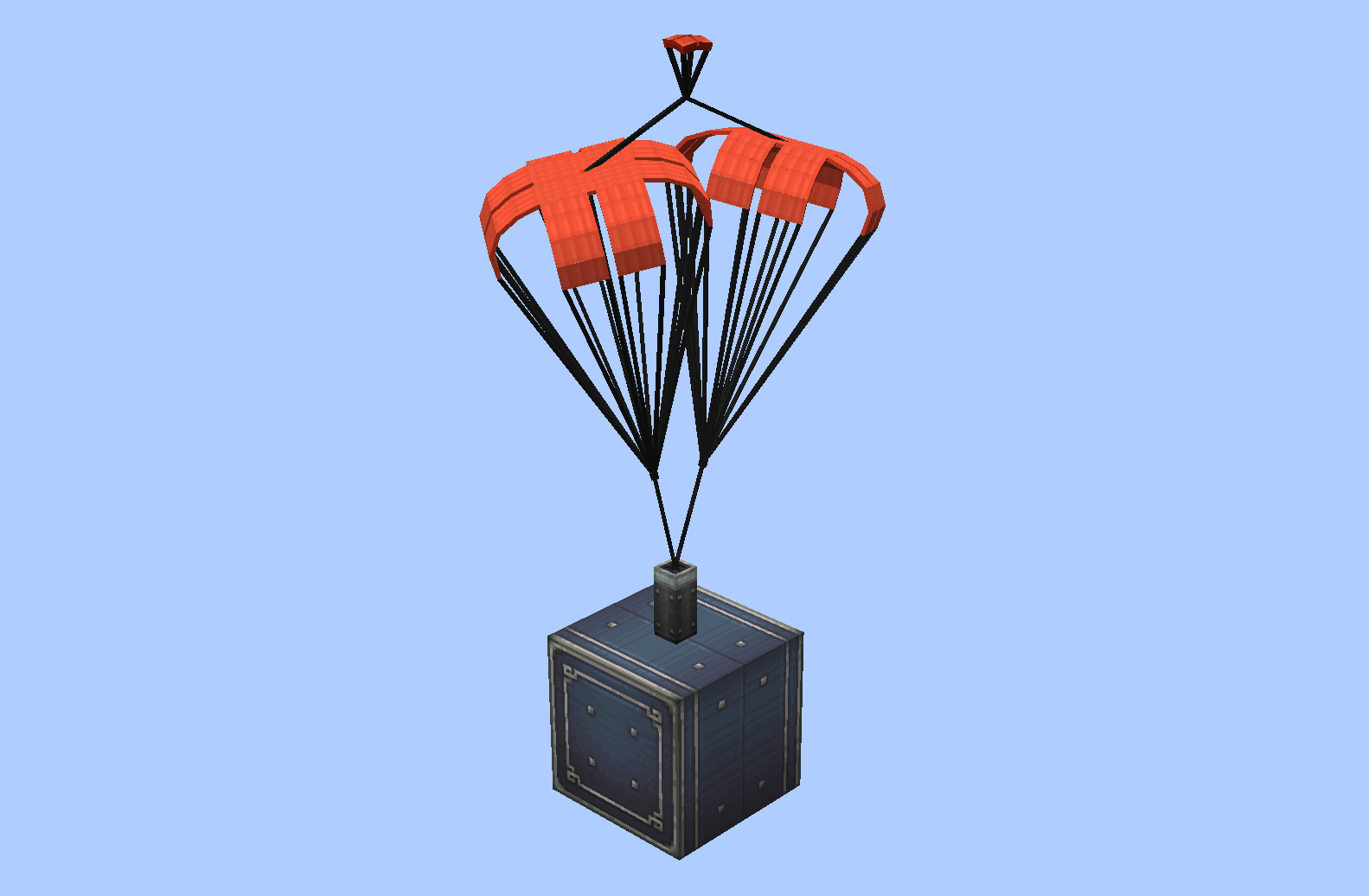
适用于 Create 和 Sable 物理系统的降落伞模组 为你的载具安装降落伞,通过红石脉冲部署,安全滑翔而下。
它做了什么?
将文件夹放入 <game root>/parachute/local/,它就会立即出现在选择 GUI 中:
-
Blockbench 项目 —
.bbmodel+.png。降落伞必须是 Blockbench 项目中的 Java 实体模型 (或基岩版模型)。 -
OBJ 模型 —
.obj+.mtl+ 纹理文件夹,直接从 Blender 导出parachute/local/<name>/<name>.obj<name>.mtltextures/*.png -
两者在
parachute/server/中也能正常工作。 -
内置的降落伞会在模组加载成功后放置在
parachute/文件夹中。 -
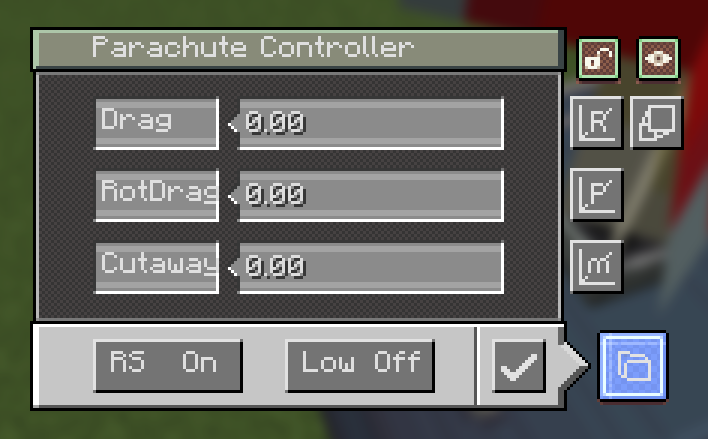
控制器 GUI — 右键点击方块以打开它:
- Drag(阻力系数) — 伞面的阻力系数(数值越高 = 减速越快)
- RotDrag(旋转阻尼) — 旋转阻尼(数值越高 = 旋转停止得越快)
- Cutaway(分离阈值) — 低速分离阈值,单位为 m/s;低于此速度时,若启用自动分离,降落伞会自动收回
- Low(低速模式) — 切换低速自动分离功能的开启/关闭
- RS(红石行为) — 脉冲部署降落伞;当 RS 开启时,另一个脉冲将其收回
- Save(保存) — 应用设置
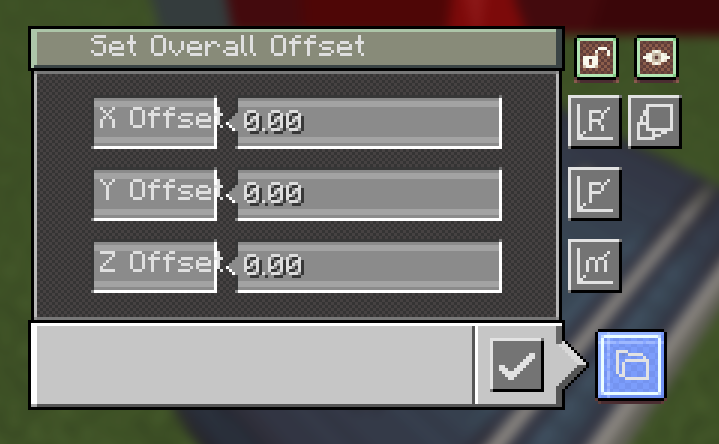
- M — 设置模型偏移量
- P — 设置枢轴偏移量(此设置调整相对于模型的枢轴位置,但实际上枢轴本身并不移动)
- R — 设置旋转(以枢轴为旋转点)
- Scale(缩放) — 打开渲染缩放界面:一个字段(0.05 – 20),用于围绕枢轴缩放整个模型和伞面
- lock(锁定) — 固定伞面的旋转,使其停止空闲时的晃动/摇摆
- pack(背包) — 红色按键隐藏/显示背包方块的自身模型
-
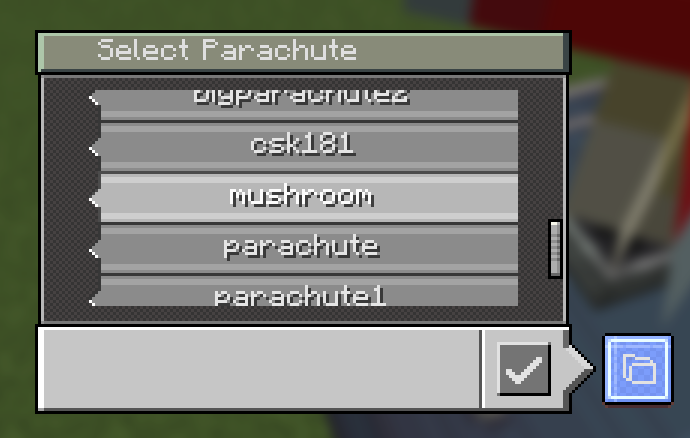
降落伞选择 GUI — 从控制器的文件夹按钮打开。 每个降落伞对应一个显示框,带有滑块的可滚动列表;点击一个框 进行选择并按确认。 Open Folder(打开文件夹) 按钮会打开游戏的
<game root>/parachute/local/。(该列表还会标记那些仅作为本地备用项存在的降落伞。)
座椅垫 & Synaxis 控制椅
使用 Create 扳手 右键点击降落伞方块,可将其转变为 座椅垫。坐在上面的效果类似于 Create 座椅,并保留 所有降落伞功能 —— 模型、伞面、染色以及控制器 GUI。
-
坐下 — 空手右键点击坐垫。
-
控制器 GUI — 按住 Shift + 空手右键点击。
-
Synaxis 控制椅 — 安装了 Synaxis 后,坐垫同时充当 Synaxis 控制椅:椅子 UI、其设置以及电路板外设均可通过坐垫进行操作。
-
** blaze rod(烈焰棒)+ 右键** — 打开控制椅设置 UI。
-
未安装 Synaxis 时,坐垫仅为普通座椅;其他一切功能照常运行。
-
染色支持 — 右键点击已放置的降落伞并使用任意染料可重新着色; 右键点击使用斧头可恢复其原始纹理。
服务器上的降落伞
- 你自己的降落伞和你下载的降落伞是分开的: 你的降落伞位于
parachute/local/,而每个服务器都有其自己的文件夹,parachute/server/<save uuid>/。 - 每个世界存档都有唯一的 UUID(写入到
create_parachute/server-id.txt),并在你登录时发送给你,因此 更改服务器的地址或端口永远不会导致文件夹分裂或混合。 在服务器端,库仍然是普通的parachute/<name>/。 - 当你处于他人的服务器上时,同名降落伞优先使用该服务器的版本;在单人游戏中,或者当你托管世界时,使用你的
local/文件夹。同名情况下,服务器的副本会覆盖你的副本。 当服务器地址发生变化时,其库仍保存在同一世界存档的 UUID 文件夹中,旧地址保留在server-info.txt中。 - 如果其他玩家使用了你完全没有的降落伞,它将回退到默认的蘑菇模型。
每位玩家的下载,分批发送
/parachute list和/parachute download不再需要 OP 权限 —— 任何玩家都可以 浏览服务器库并拉取降落伞。upload、distribute和delete仍然需要 OP 权限。- 下载是分批次流式传输的(每刻限制传输一定字节数,一次一个文件),而不是打包成一个大的 zip 文件,因此即使库很大,也能通过慢速连接接收,完成后你会收到一条聊天消息。无需解压:文件直接落入正确的
parachute/server/<save uuid>/文件夹中。 - 服务器所有者可以在
config/create_parachute-common.toml中关闭或调整此功能:[download] allowPlayerDownload— 默认为true[download] bytesPerTick— 每刻发送给每位玩家的字节数, 默认为65536(64 KiB);在配置较低的服务器或大型库的情况下可降低此值[download] maxPendingFiles— 队列限制,默认为512
使用方法
- 放置降落伞方块——或手持降落伞背包并右键点击,以选择要放置的降落伞类型。
- 手持空手右键点击该方块以打开控制器,并调整参数(阻力 / 旋转阻力 / 分离速度 / 低速模式 / 红石信号)。
- 发送一个红石脉冲来部署它;在你落地或收回之前,它会减缓你的下落速度(或你乘坐的载具)的速度。
- 用扳手敲击该方块将其转换为座椅垫并坐下;安装了 Synaxis 模组后,手持烈焰棒并右键点击座椅垫即可打开控制椅用户界面。
- 使用任意染料改变其颜色,或使用斧头恢复原状。
- 微调其外观:使用 Scale 调整大小,按住 lock 键停止伞盖摆动,以及使用 pack 键隐藏背包方块本身。
- 在服务器上,使用
/parachute list查看服务器有哪些内容,并使用/parachute download将其拉取到你自己的游戏中。
命令
| 命令 | 功能 |
|---|---|
/parachute list [page] |
列出服务器库中的降落伞(所有玩家) |
/parachute download [name] |
下载一个或多个降落伞到 parachute/server/<save uuid>/ 目录中(如果服务器允许,所有玩家均可使用) |
/parachute upload [name] |
将你本地文件夹 (local/) 中的一个或多个降落伞发送到服务器(OP) |
/parachute distribute [player] |
将服务器库发送给所有玩家,或发送给单个玩家(OP) |
/parachute delete [name] |
从服务器删除一个或多个降落伞,支持点击确认(OP) |
GUI 术语
| 术语 | 含义 |
|---|---|
| Drag | 阻力系数 —— 数值越高 = 减速越快 |
| RotDrag | 旋转阻尼 —— 数值越高 = 旋转停止越快 |
| Cutaway | 低速自动分离的速度阈值(米/秒) |
| Low | 切换低速自动分离功能 |
| RS | 红石脉冲行为(部署 / 收回) |
| On/Off | 切换状态 |
| Confirm | 应用所选降落伞 |
| Scale | 整个降落伞的渲染比例(0.05 – 20) |
| lock | 固定伞盖位置 —— 停止其闲置摆动 |
| pack | 显示 / 隐藏背包方块模型(伞盖保持可见) |
Create:Parachute (1.1.4+)
A parachute mod for Create and Sable physics Build a parachute onto your vehicle, deploy it with a redstone pulse, and glide down safely.
What did it do?
Drop a folder into <game root>/parachute/local/ and it shows up in the selection GUI instantly:
-
Blockbench project —
.bbmodel+.png. The parachute has to be a Java entity model (or a Bedrock edition model) in the Blockbench project. -
OBJ model —
.obj+.mtl+ the texture folder, straight out of Blenderparachute/local/<name>/<name>.obj<name>.mtltextures/*.png -
Both work in
parachute/server/as well. -
The built-in parachutes are placed in the
parachute/folder when the mod loads successfully. -
Controller GUI — right-click the block to open it:
- Drag — drag coefficient of the canopy (higher = slows you down faster)
- RotDrag — rotational damping (higher = spins stop faster)
- Cutaway — low-speed detach threshold in m/s; below this speed the chute auto-retracts when enabled
- Low — toggle low-speed auto-detach on/off
- RS — redstone behaviour: a pulse deploys the chute; with RS on, another pulse retracts it
- Save — apply the settings
- M — Set model offset
- P — Set pivot offset (this setting adjusts the pivot relative to the model, but in fact the pivot itself doesn't move)
- R — Set rotation (rotation point at the pivot)
- Scale — opens the Render Scale screen: one field (0.05 – 20) that scales the whole model and canopy around the pivot
- lock — freeze the canopy's rotation, so it stops its idle sway/wobble
- pack — the red key hides/shows the pack block's own model
-
Parachute selection GUI — opened from the controller's folder button. One display box per parachute, scrollable list with a slider; click a box to select it and press confirm. The Open Folder button opens the game's
<game root>/parachute/local/. (The list also tags parachutes that only exist as your local fallback.)
Seat cushion & Synaxis Control Chair
Use the Create wrench on a parachute block to turn it into a seat cushion. Sitting on it works like a Create seat, and it keeps every parachute feature — model, canopy, dye and the controller GUI.
-
Sit — right-click the cushion with an empty hand.
-
Controller GUI — Shift + right-click with an empty hand.
-
Synaxis Control Chair — with Synaxis installed, the cushion doubles as a Synaxis Control Chair: the chair UI and its settings and the circuit-board peripherals all work from the cushion.
-
Blaze Rod + right-click — open the Control Chair settings UI.
-
Without Synaxis the cushion is simply a seat; everything else keeps working.
-
Dye support — right-click a placed parachute with any dye to recolor it; right-click with an axe to restore its original texture.
Parachutes on servers
- Your own parachutes and the ones you download are kept apart: yours live
in
parachute/local/, and every server gets its own folder,parachute/server/<save uuid>/. - Each world save has its own UUID (written into the save at
create_parachute/server-id.txt) and sends it to you when you log in, so changing a server's address or port never splits or mixes its folder. On the server side the library is still a plainparachute/<name>/. - While you are on someone else's server, that server's parachutes win over
same-named local ones; in single player, or while you host the world, your
local/folder is used. Same name = the server's copy overwrites yours. When a server's address changes, its library keeps living in the same world save's UUID folder, and the old address is kept inserver-info.txt. - If another player uses a parachute you don't have at all, it falls back to the default mushroom.
Downloads for every player, sent in batches
/parachute listand/parachute downloadno longer need OP — any player can browse the server library and pull parachutes.upload,distributeanddeletestill require OP.- Downloads are streamed a little at a time (a limited number of bytes per
tick, one file at a time) instead of being packed into one big zip, so a large
library still arrives over a slow connection, and you get a chat message when
it finishes. There is nothing to unzip: the files land directly in the right
parachute/server/<save uuid>/folder. - Server owners can turn it off or tune it in
config/create_parachute-common.toml:[download] allowPlayerDownload—trueby default[download] bytesPerTick— how much is sent to each player per tick,65536(64 KiB) by default; lower it on a weak server or a big library[download] maxPendingFiles— queue limit,512by default
How to use
- Place the parachute block — or hold the parachute pack and right-click first to pick which parachute it will place.
- Right-click it with an empty hand to open the controller and tune the parameters (Drag / RotDrag / Cutaway / Low / RS).
- Send a redstone pulse to deploy it; it will slow your fall (or your contraption) until you land or retract it.
- Wrench the block to turn it into a seat cushion and sit on it; with Synaxis installed, hold a Blaze Rod and right-click the cushion for the Control Chair UI.
- Recolor it with any dye, or revert it with an axe.
- Fine-tune how it looks: Scale for size, the lock key to stop the canopy swaying, and the pack key to hide the pack block itself.
- On a server, use
/parachute listto see what the server has and/parachute downloadto pull it into your own game.
Commands
| Command | What it does |
|---|---|
/parachute list [page] |
List the parachutes in the server library (everyone) |
/parachute download [name] |
Download one parachute, or all of them, into parachute/server/<save uuid>/ (everyone, if the server allows it) |
/parachute upload [name] |
Send one, or all, of your local/ parachutes to the server (OP) |
/parachute distribute [player] |
Send the whole server library to everyone, or to one player (OP) |
/parachute delete [name] |
Delete one, or all, parachutes from the server, with click-to-confirm (OP) |
GUI terms
| Term | Meaning |
|---|---|
| Drag | Drag coefficient — higher = faster deceleration |
| RotDrag | Rotational damping — higher = spins stop faster |
| Cutaway | Speed threshold (m/s) for low-speed auto-detach |
| Low | Toggle low-speed auto-detach |
| RS | Redstone pulse behaviour (deploy / retract) |
| On/Off | Toggle state |
| Confirm | Apply the selected parachute |
| Scale | Render scale of the whole parachute (0.05 – 20) |
| lock | Hold the canopy still — stops its idle sway |
| pack | Show / hide the pack block model (canopy stays) |

下载 Create:Parachute
下载 Create:Parachute
下载 Create:Parachute
下载 Create:Parachute
下载 Create:Parachute
下载 Create:Parachute
下载 Create:Parachute
下载 Create:Parachute
下载 Create:Parachute
下载 Create:Parachute
降落伞回归,服务器修复
关于这个资源的讨论、问题反馈与使用心得
还没有讨论,来发第一帖吧
你是这个资源的作者?登录后可认领此资源。
相似资源
 模组

显示你正在注视的方块的信息。(适用于 Minecraft 1.16+ 的 Hwyla/Waila 分支)
 模组
使用 JavaScript 编辑配方、添加自定义物品、编写世界事件!
 模组

查看物品与配方
 模组
在游戏画面角落显示附近世界地形、玩家、生物和实体的地图。可创建路径点,帮助你找到标记过的位置。
 模组
AE2:一款流行的自动化与存储模组
 模组
添加区块认领和玩家组队功能,并与 Xaero's Minimap 和 World Map 集成
评论 0
登录后参与评分
还没有评论,来抢沙发吧