CrossNotes
一款适用于 Minecraft Fabric 的客户端模组,用于在游戏中轻松记录和管理工作笔记。支持跨服务器和跨世界同步,具备 Markdown 渲染、HUD 显示、交互式控制以及快速命令记笔记等功能。
功能特性
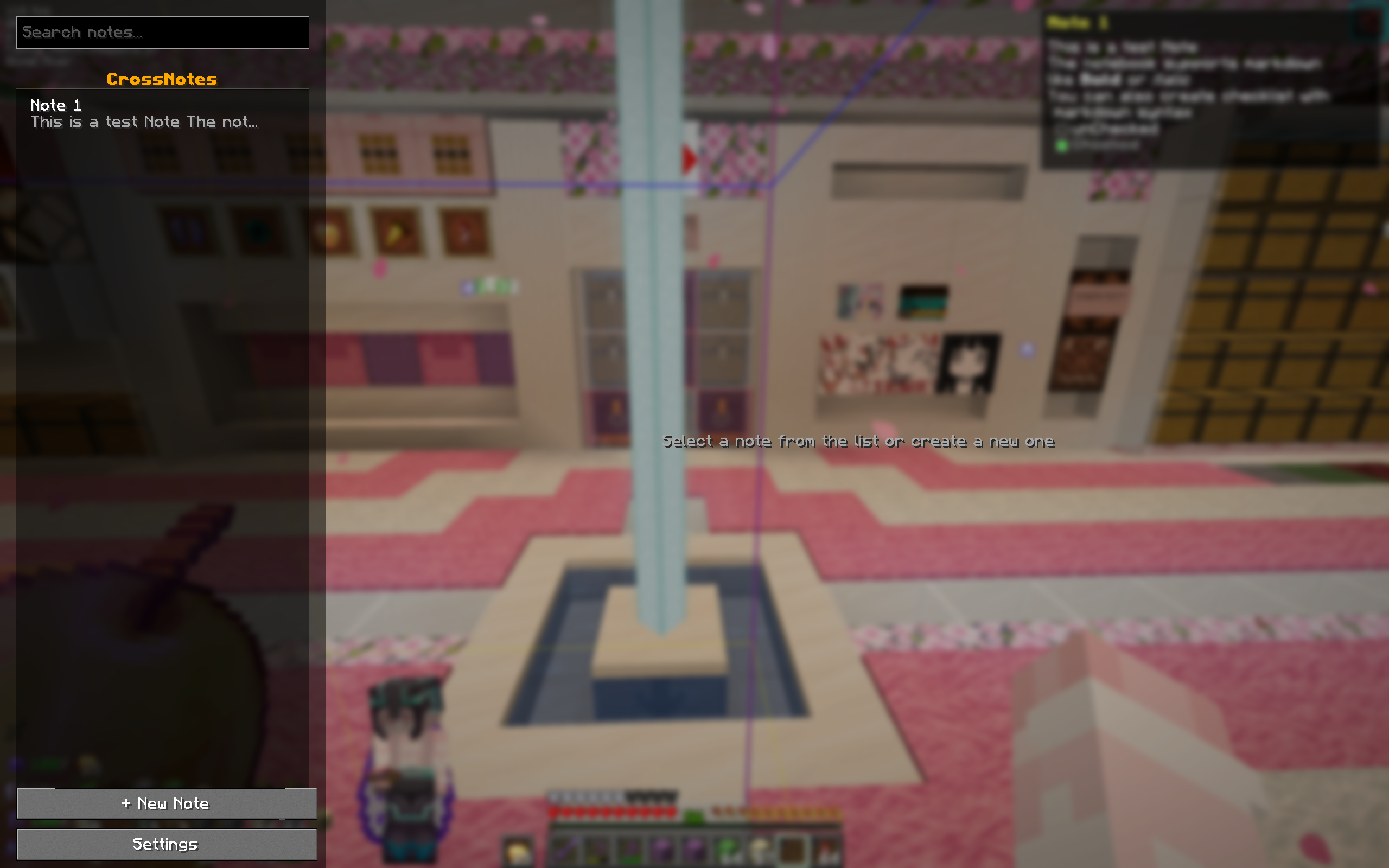
- 游戏内笔记编辑器 — 无需退出游戏即可创建、编辑和删除笔记。提供完整的文本编辑器,支持点击定位、方向键导航、文本选择以及剪贴板支持(Ctrl+C/X/V)。
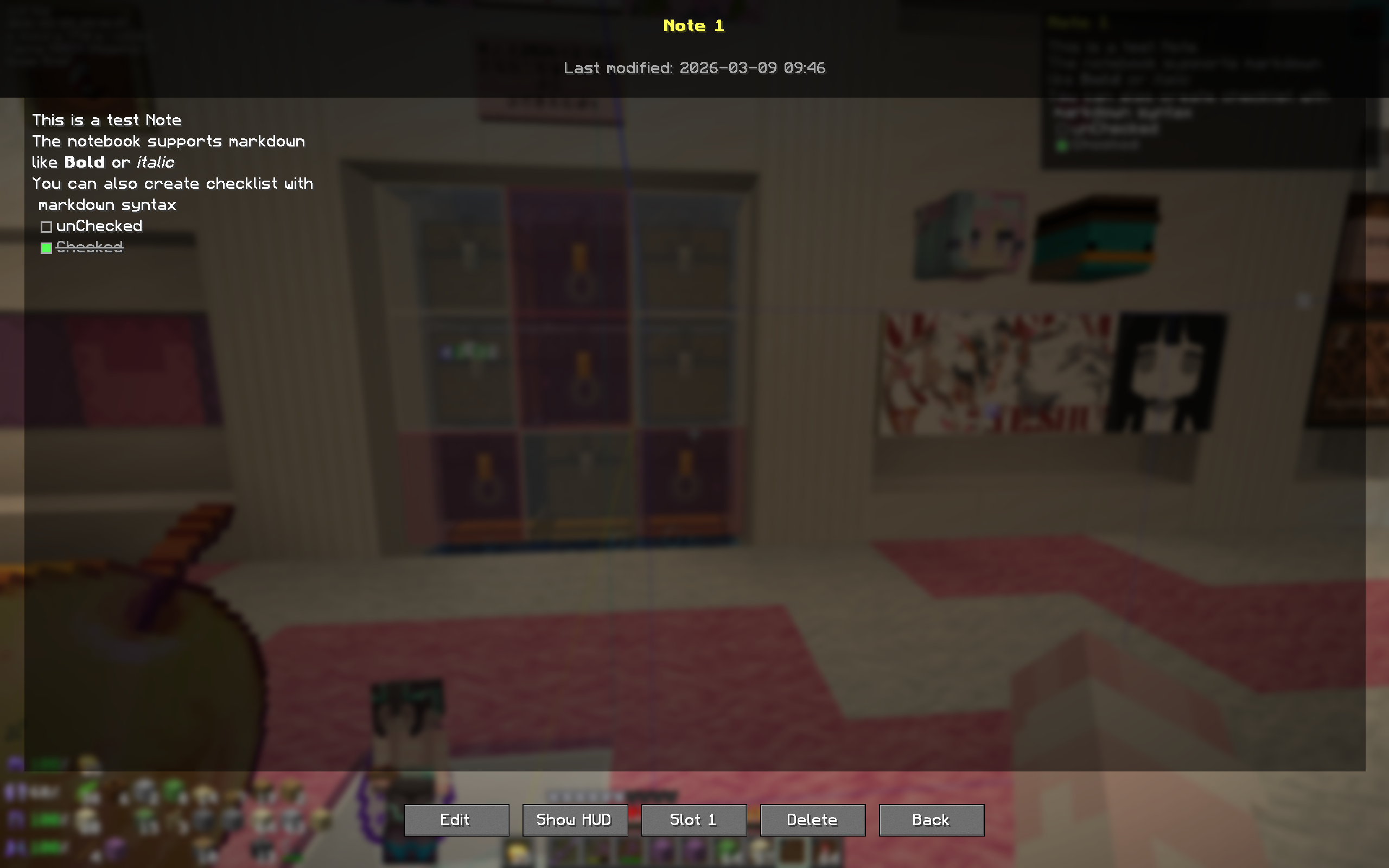
- Markdown 渲染 — 笔记支持标题、粗体、斜体、行内代码、链接、列表、引用块以及交互式复选框。
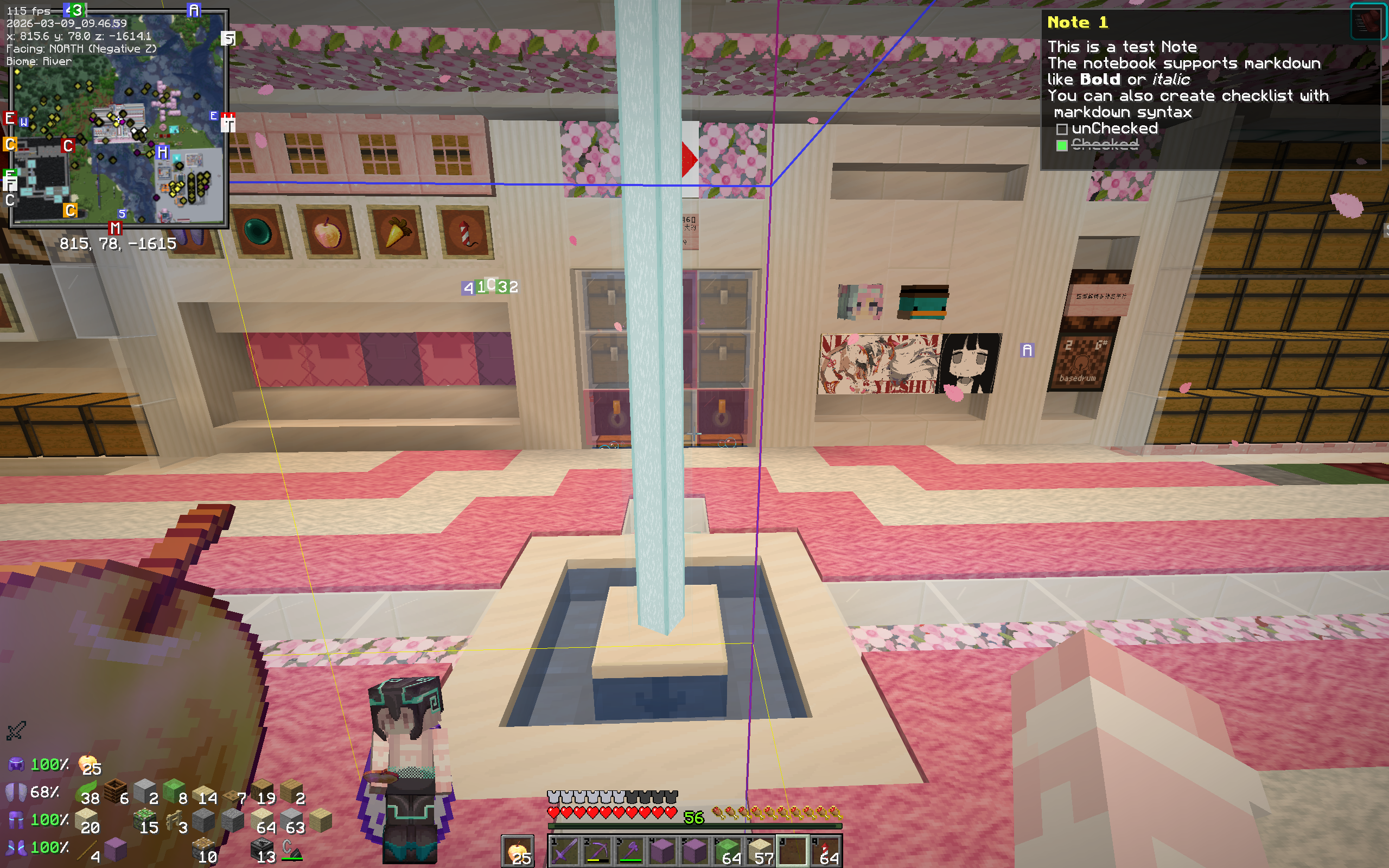
- HUD 覆盖层 — 将笔记固定为可自定义的 HUD 小部件显示在屏幕上。可调整位置、宽度和高度,并可选择溢出时优先显示首行还是尾行。
- 跨世界持久化 — 笔记存储在本地配置文件夹中,因此它们会跟随你在单人世界和多人服务器之间迁移。
- 快捷访问槽位 — 最多可将 3 个笔记绑定到键盘快捷键,以便在 HUD 上即时切换。
- 命令支持 — 完全通过聊天栏中的
/cn 命令管理笔记。
本项目仍在积极开发和调试中。如果遇到任何新发现的错误或有任何功能建议,请在 GitHub 上提交 Issue。
按键绑定
所有按键绑定均可在 选项 → 控制设置 → CrossNotes 中重新绑定。
| 操作 |
默认按键 |
描述 |
| 打开笔记本 |
Ctrl+C |
打开笔记本界面。如果已有笔记固定在 HUD 上,则打开该笔记的视图。 |
| 切换 HUD |
H |
显示或隐藏 HUD 笔记覆盖层。 |
| 笔记本槽位 1–3 |
未绑定 |
切换 HUD 上绑定的笔记。 |
命令
所有命令均以 /cn 为前缀。
| 命令 |
描述 |
/cn new [title] |
创建新笔记。如果省略标题,则使用时间戳作为标题。 |
/cn add <content> |
向当前显示的 HUD 笔记追加文本。如果没有激活的笔记,则创建新笔记。 |
/cn list |
列出所有已保存的笔记,包括标题、预览内容和 ID。 |
/cn show [id] |
切换 HUD,或通过 ID 固定特定笔记。 |
/cn delete [id] |
删除当前显示的笔记,或通过 ID 删除特定笔记。 |
/cn bind <slot> <noteId> |
将笔记绑定到快捷访问槽位(1–3)。 |
Markdown 支持
笔记查看器和 HUD 渲染以下 Markdown 元素(由于 Minecraft 显示设置的原因,部分功能可能无法正常工作):
| 语法 |
效果 |
**bold** |
Bold text |
*italic* |
Italic text |
`code` |
Inline code |
[text](url) |
Clickable link |
- item |
Bulleted list |
> quote |
Blockquote |
- [ ] task |
Unchecked checkbox |
- [x] task |
Checked checkbox (strikethrough) |
复选框是交互式的 — 在笔记视图中或直接点击 HUD 上的复选框(可能需要打开聊天或使用其他模组释放鼠标光标)以切换其状态。
设置
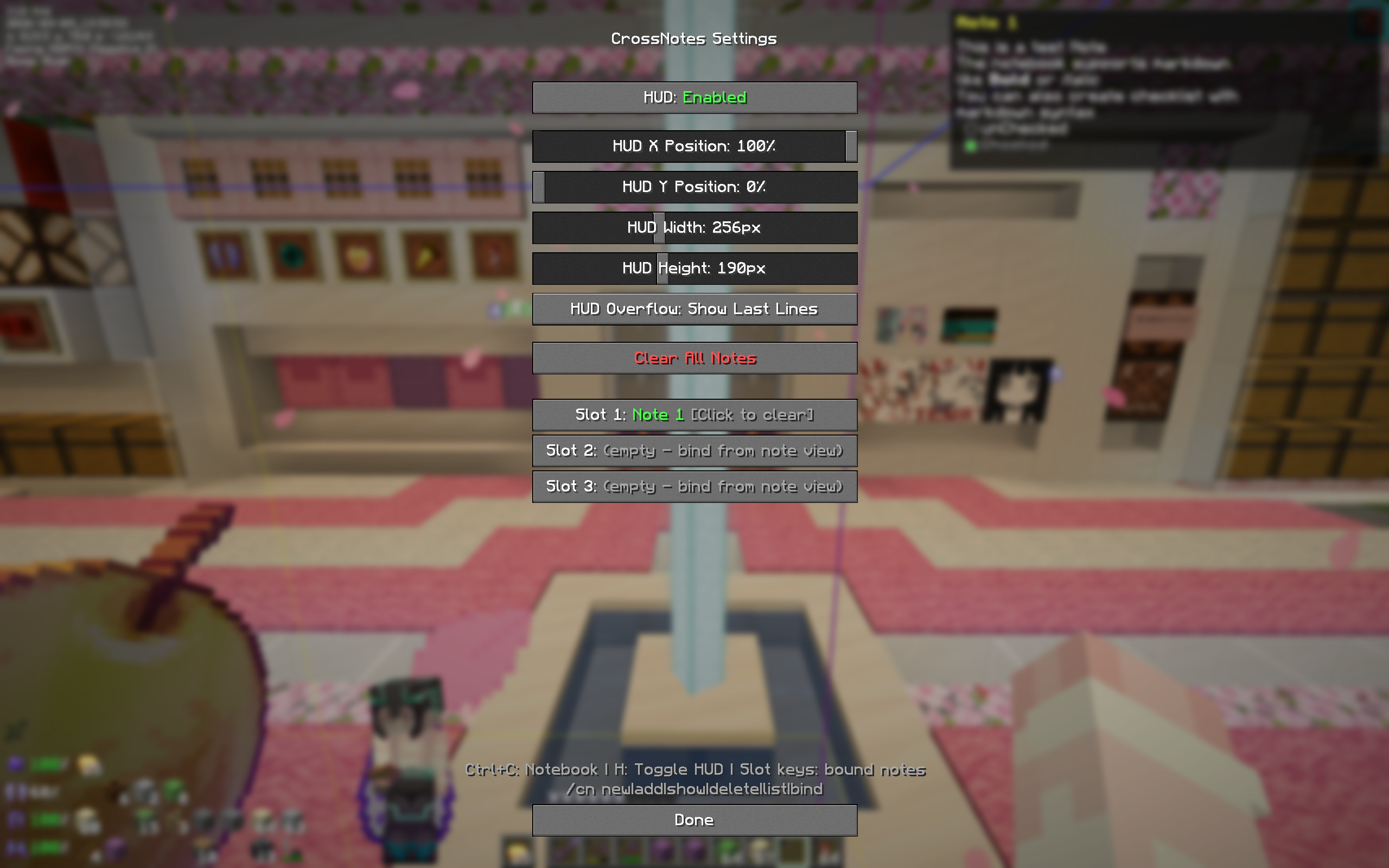
从笔记本界面打开设置屏幕。可用选项如下:
- HUD 切换 — 启用或禁用 HUD 覆盖层。
- HUD X / Y 位置 — 拖动以在屏幕上的任意位置放置 HUD。
- HUD 宽度 — 调整 HUD 宽度(100–500 像素)。
- HUD 高度 — 调整 HUD 高度(50–400 像素)。
- HUD 溢出处理 — 当笔记过长超出 HUD 时,选择显示首行还是尾行。
- 槽位绑定 — 查看并清除笔记与槽位的绑定关系。
存储位置
笔记以单独的 JSON 文件形式保存在以下目录:
.minecraft/config/crossnotes/notes/
配置文件(HUD 设置、槽位绑定)存储在:
.minecraft/config/crossnotes/config.json
所有数据均为客户端侧,并在不同世界和服务器间保持持久化。
演示图片
免责声明
本项目的部分内容由 AI 工具生成或辅助完成。所有代码均已由作者审查并整合。
本模组按“原样”提供。请勿将其用于存储重要或高价值的内容。用户需自行承担因使用本模组而导致的任何数据丢失或问题。
许可证
本项目采用 MIT 许可证授权。
CrossNotes
A client-side Minecraft Fabric mod for easily taking and managing notes in-game, cross server&worlds, with markdown rendering, HUD display, interactive control and quick command to write notes.
Features
- In-Game Note Editor — Create, edit, and delete notes without leaving the game. Full text editor with click-to-position, arrow key navigation, text selection, and clipboard support (Ctrl+C/X/V).
- Markdown Rendering — Notes support headers, bold, italic, inline code, links, lists, blockquotes, and interactive checkboxes.
- HUD Overlay — Pin a note to your screen as a customizable HUD widget. Adjust position, width, height, and choose whether overflow shows first or last lines.
- Cross-World Persistence — Notes are stored locally in your config folder, so they follow you across singleplayer worlds and multiplayer servers.
- Quick-Access Slots — Bind up to 3 notes to keyboard shortcuts for instant HUD toggling.
- Commands — Manage notes entirely from chat with the
/cn command.
This project is still under active development and debugging. If you encounter any new-found bugs or have feature suggestions, please submit an issue on GitHub.
Keybinds
All keybinds are rebindable under Options → Controls → CrossNotes.
| Action |
Default Key |
Description |
| Open Notebook |
Ctrl+C |
Opens the notebook screen. If a note is pinned to the HUD, opens that note's view instead. |
| Toggle HUD |
H |
Show or hide the HUD note overlay. |
| Notebook Slot 1–3 |
Unbound |
Toggle the bound note on the HUD. |
Commands
All commands use the /cn prefix.
| Command |
Description |
/cn new [title] |
Create a new note. Uses a timestamp title if omitted. |
/cn add <content> |
Append text to the currently displayed HUD note. Creates a new note if none is active. |
/cn list |
List all saved notes with titles, previews, and IDs. |
/cn show [id] |
Toggle the HUD, or pin a specific note by its ID. |
/cn delete [id] |
Delete the currently displayed note, or a specific note by ID. |
/cn bind <slot> <noteId> |
Bind a note to a quick-access slot (1–3). |
Markdown Support
The note viewer and HUD render the following markdown elements(Some might not work normally due to minecraft display settings):
| Syntax |
Result |
**bold** |
Bold text |
*italic* |
Italic text |
`code` |
Inline code |
[text](url) |
Clickable link |
- item |
Bulleted list |
> quote |
Blockquote |
- [ ] task |
Unchecked checkbox |
- [x] task |
Checked checkbox (strikethrough) |
Checkboxes are interactive — click them in the note view or directly on the HUD(open Chat or use other mods to free cursor) to toggle their state.
Settings
Open the settings screen from the notebook UI. Available options:
- HUD Toggle — Enable or disable the HUD overlay.
- HUD X / Y Position — Slide to position the HUD anywhere on screen.
- HUD Width — Adjust the HUD width (100–500 px).
- HUD Height — Adjust the HUD height (50–400 px).
- HUD Overflow — Choose whether to show the first lines or last lines when the note is too long for the HUD.
- Slot Bindings — View and clear note-to-slot bindings.
Storage
Notes are saved as individual JSON files under:
.minecraft/config/crossnotes/notes/
Configuration (HUD settings, slot bindings) is stored in:
.minecraft/config/crossnotes/config.json
All data is client-side and persists across worlds and servers.
Demo Images


Disclaimer
Portions of this project were generated or assisted by AI tools. All code has been reviewed and integrated by the author.
This mod is provided as-is. Do not use it to store important or valuable content. Users are responsible for any data loss or issues that may occur while using this mod.
License
This project is licensed under the MIT License.
评论 0
登录后参与评分
还没有评论,来抢沙发吧