裁剪显示实体
为显示实体实现可见性边界框。
Minecraft 使用 视锥体裁剪,简单来说就是隐藏位于摄像机背后的物体。
然而,默认情况下,当未设置 width(宽度)和 height(高度)标签时,blockdisplay 实体的此优化会被禁用(参见 Minecraft Wiki “所有显示实体通用的标签”)。
由于大多数服务器在使用 blockdisplay 实体时并未设置此属性,这意味着当这些实体位于摄像机背后时,它们不会在客户端被裁剪。
本模组通过为未配置的 blockdisplay 实体计算边界框来修复该问题。这也带来了在使用 Entity Culling 时能够裁剪实体的优势。
这可以提升性能,特别是当你游玩的服务器/世界中包含大量显示实体时。
在某些情况下,如果显示的模型过大,blockdisplay 实体可能会被错误地裁剪。
模组关闭与开启对比
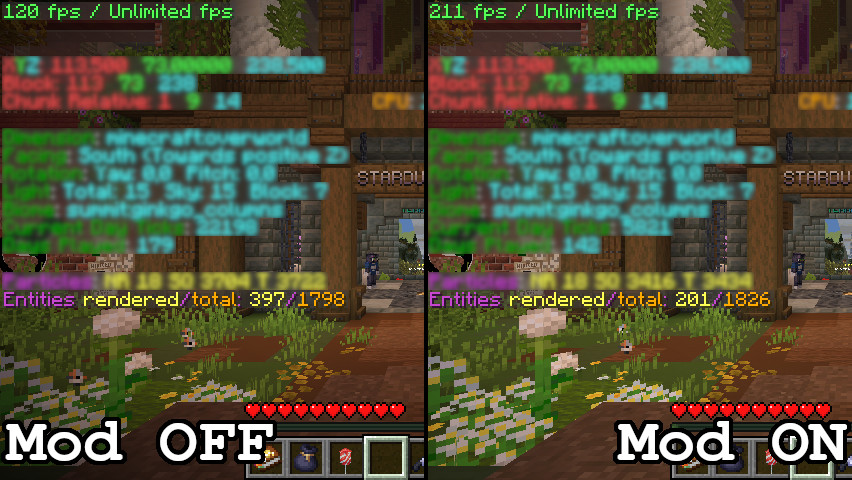
上述截图取自 summit.smithed.net,这是一个对玩家而言负载特别重的服务器(同样也是 wynncraft),无关信息已模糊处理以便图片更易观看。这是一个理想场景,其中包含大量此前无法被裁剪的显示实体(渲染实体数量从 397 降至仅 201,几乎减半!)。因此,帧率也显著提升,从 120 提升至 211。具体效果取决于你游玩的服务器,在某些情况下该模组可能完全不起作用。
Cull Display Entities
Implements visibility bounding boxes for Display Entities.
Minecraft uses Frustum Culling, which in simple terms hides things that are behind the camera.
However, by default blockdisplay entities have this optimization disabled when the "width" and "height" tag are not set (see the Minecraft Wiki "Tags common to all display entities").
Because most servers don't set this property when using blockdisplay entities, this means that they won't get culled on the client, when behind the camera. This
mod fixes that issue, by calculating the bounding box for unconfigured blockdisplay entities. This also has the advantage of culling the entities when
using Entity Culling.
This can improve performance, especially when the server/world you are playing in has a lot of display entities.
In some cases blockdisplayentities might be culled incorrectly, if the model displayed too large.
Mod OFF vs. ON
The above screenshots were taken on summit.smithed.net, a particularly heavy server to play on (wynncraft as well), unrelated information blurred to make the image easier to look at. This is an ideal case scenario with lots of display entities that couldn't be culled before (down from 397 rendered entities to just 201, almost half!). Because of this, fps significantly improved as well, from 120 to 211. Depending on the server you are playing this mod might simply do nothing at all.





评论 0
登录后参与评分
还没有评论,来抢沙发吧