Cosmic Chat Alerts
一个客户端侧的 Fabric 模组,允许你通过完全在游戏内的用户界面创建自定义聊天通知。设置要监听的短语或正则表达式模式,选择提示音,当出现匹配的消息时,该模组会播放声音。适用于任何服务器,无需安装服务端组件。
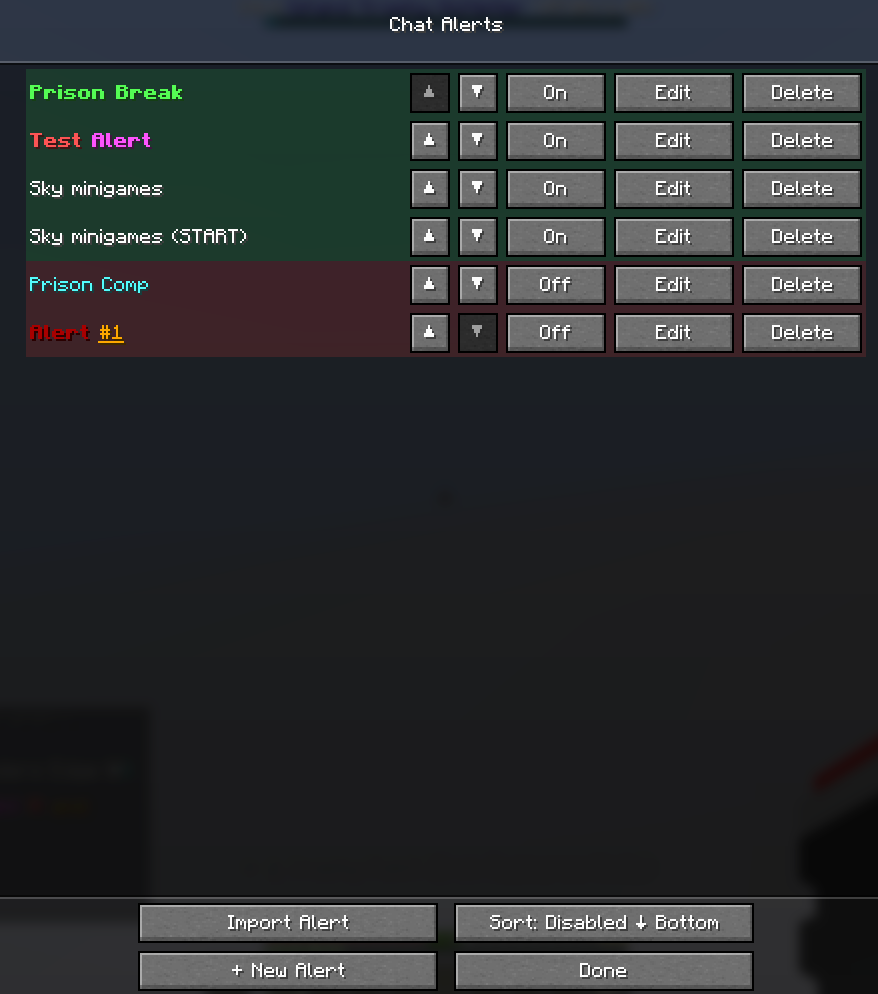
功能特性
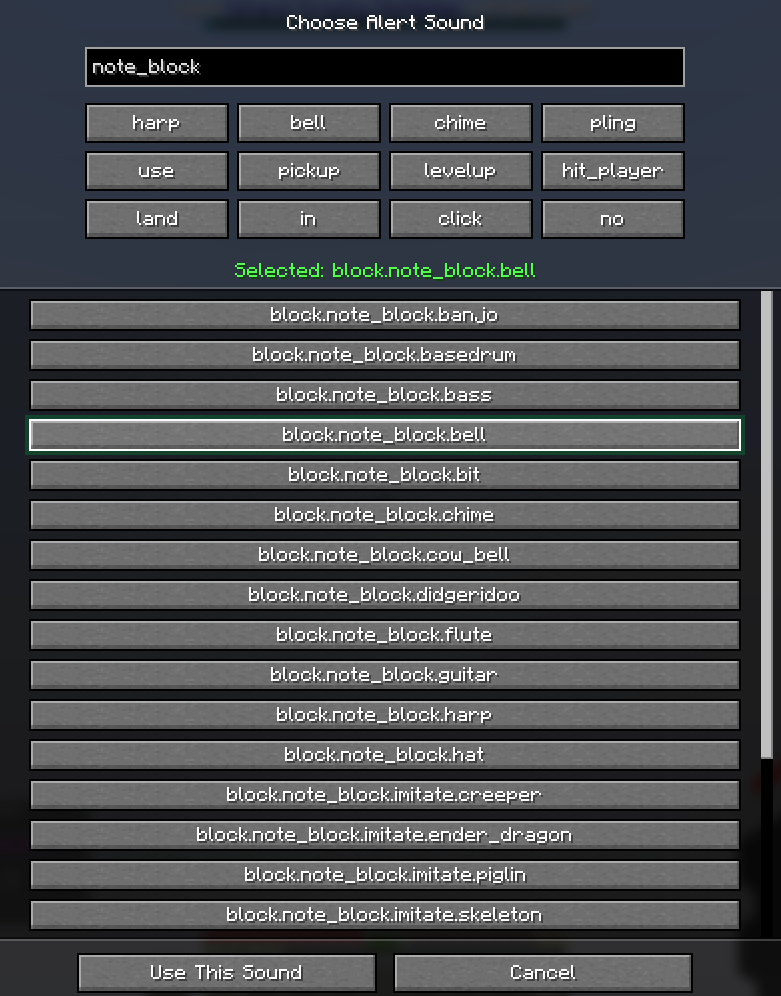
声音提醒
从可搜索的选择器中任选一种游戏内声音作为提醒音调,其中包含常用选项的快速选取行。在确认前可以预览声音。音量可针对每个提醒单独配置(0–200%),并在调整滑块时自动播放预览音。
模式匹配
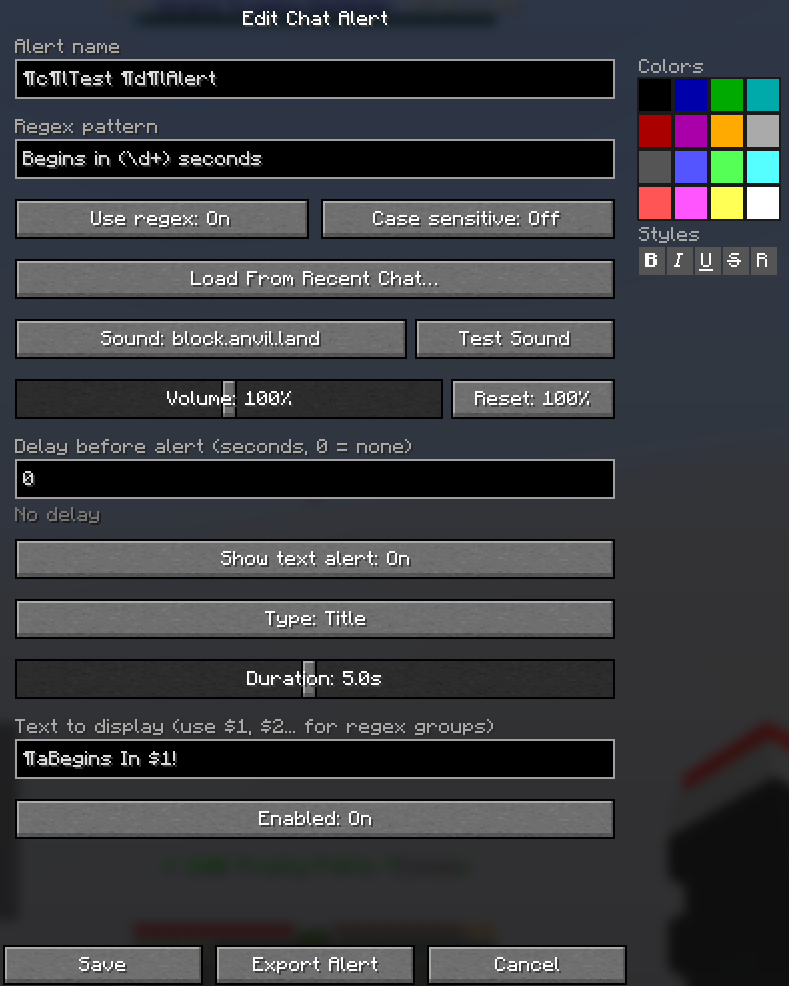
提醒可以通过纯文本子串或完整的 Java 正则表达式进行匹配,并可为每个提醒提供可选的大小写敏感切换开关。
屏幕文字提醒
可将任何提醒与屏幕上显示的文字配对,以标题(Title)、副标题(Subtitle)或操作栏(Action Bar)消息的形式展示。使用 $1、$2 等来嵌入正则表达式的捕获组到显示文本中——例如,检测 "(\d+) seconds left" 并将数字作为副标题显示。
时间延迟
在检测到消息后的指定秒数触发提醒,支持小数精度。适用于倒计时场景——检测事件的开始,并在事件即将结束时收到提醒。
格式化调色板
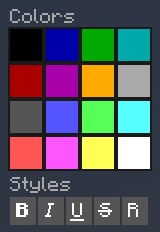
内联的颜色和样式调色板直接位于提醒编辑器中。点击 16 个颜色色块或 5 个样式按钮中的任意一个,即可将格式化代码插入光标位置——无需手动输入颜色代码。
从最近的聊天记录加载
浏览最后 100 条聊天消息,并在创建或编辑提醒时直接将任意一条消息加载到模式字段中。
导入与导出
使用紧凑的 JSON 导出代码与其他玩家分享提醒。从编辑器中复制它,通过任何方式发送,接收者可以直接将其粘贴到导入界面中。
提醒管理
- 为提醒命名以便轻松识别
- 启用或禁用单个提醒而无需删除它们
- 使用每行的 ▲ / ▼ 按钮重新排序提醒,或一键将所有禁用的提醒移至底部
- 绿色和红色行着色提供活动提醒的即时视觉概览
入门指南
在 控制 下的 Chat Alerts 类别中将按键绑定至 “Open Chat Alerts” ——默认情况下未绑定。可以从任何地方打开 UI,包括主菜单。
示例用例
- 服务器事件即将开始 —— 对
"begins in 30 seconds" 进行纯文本匹配
- 屏幕上剩余时间 —— 正则表达式
"(\d+) seconds left" 配合显示文本 $1
- 名字提及检测 —— 正则表达式
"(?i)YourName" 且关闭大小写敏感
- 延迟提醒 —— 检测事件开始消息,设置 300 秒延迟
- 多个关键词 —— 正则表达式
"(keyword1|keyword2|keyword3)"
安装
- 从此 Modrinth 项目下载 .jar 文件
- 将 Cosmic Chat Alerts jar 添加到你的 mods 文件夹
仅限客户端。 无需安装服务端。设置存储在 config/cosmic-chat-alerts.json 中。
需要: Fabric API
环境: 仅客户端
Minecraft: 1.21.11
Cosmic Chat Alerts
A client-side Fabric mod that lets you create custom chat notifications through a
fully in-game UI. Set a phrase or regex pattern to watch for, choose a sound, and
the mod plays it whenever a matching message appears. Works on any server with no
server-side installation required.
Features
Sound Alerts
Choose any in-game sound as your alert tone from a searchable picker with a
quick-pick row for common choices. Sounds can be previewed before confirming.
Volume is configurable per alert (0–200%) with automatic preview playback as you
adjust the slider.
Pattern Matching
Alerts can match by plain text substring or full Java regular expression, with an
optional case-sensitive toggle per alert.
On-Screen Text Alerts
Pair any alert with on-screen text displayed as a Title, Subtitle, or Action Bar
message. Use $1, $2, … to embed regex capture groups into the displayed text —
for example, detect "(\d+) seconds left" and display the number as a subtitle.
Time Delay
Trigger an alert a set number of seconds after a message is detected, with decimal
precision. Useful for countdowns — detect the start of an event and receive a
reminder when it is about to end.
Formatting Palette
An inline color and style palette sits directly in the alert editor. Click any of
the 16 color swatches or 5 style buttons to insert the formatting code at your
cursor — no manual color codes required.
Load From Recent Chat
Browse your last 100 chat messages and load any one directly into the pattern
field when creating or editing an alert.
Import & Export
Share alerts with other players using a compact JSON export code. Copy it from
the editor, send it however you like, and the recipient can paste it directly into
the Import screen.
Alert Management
- Name alerts for easy identification
- Enable or disable alerts individually without deleting them
- Reorder alerts with per-row ▲ / ▼ buttons, or sort all disabled alerts to the
bottom in one click
- Green and red row tinting provides an instant visual overview of active alerts
Getting Started
Bind a key to "Open Chat Alerts" under the Chat Alerts category in
Controls — it is unbound by default. The UI can be opened from anywhere, including
the main menu.
Example Use Cases
- Server event starting soon — plain text match on
"begins in 30 seconds"
- Time remaining on screen — regex
"(\d+) seconds left" with display text $1
- Name mention detection — regex
"(?i)YourName" with case-sensitive off
- Delayed reminder — detect an event start message, set a 300-second delay
- Multiple keywords — regex
"(keyword1|keyword2|keyword3)"
Installation
- Download the .jar file from this Modrinth project
- Add the Cosmic Chat Alerts jar to your mods folder
Client-side only. No server installation required. Settings are stored in
config/cosmic-chat-alerts.json.
Requires: Fabric API
Environment: Client only
Minecraft: 1.21.11


 模组

 模组
 模组

 模组
 模组
 模组
评论 0
登录后参与评分
还没有评论,来抢沙发吧