
安装
本模组支持 NeoForge 和 Fabric (*) 加载器。请参照相应加载器的安装指南,然后根据你的 Minecraft 版本下载模组文件,并将其放入 .minecraft/mods 文件夹中。
(*) 不需要 Fabric API。
配置
首次运行游戏以生成配置文件。默认情况下,窗口标题将设置为 Minecraft <version>。与原版 1.15.2 及之后的版本不同,进入世界或服务器时标题不会发生变化。
若要更改标题或图标,请导航至 .minecraft/config 文件夹,并在文本编辑器中打开 customwindowtitle-client.toml。你将看到以下条目:
title = 'Minecraft {mcversion}'
icon16 = ''
icon32 = ''
仅编辑引号或撇号内的文本。
更改标题
你可以在 title 配置条目中使用以下特殊令牌:
{mcversion}- 当前 Minecraft 版本{modversion:<mod_id>}- 标识符为<mod_id>的已安装模组版本{username}- 当前用户名
如果任何令牌无法正常工作,请在游戏日志中搜索 CustomWindowTitle,你应该能看到原因;否则,请在 问题追踪器 上提交尽可能详细的问题报告。
更改图标
Minecraft 1.21+
此功能仅在 Custom Window Title 1.4.0 及更高版本中可用。
创建一个尺寸为 2 的幂次方(如 32x32 或 48x48)的正方形 PNG 图像。将该 PNG 文件放入 .minecraft/config 文件夹中,可以直接放置,也可以放在子文件夹内。
即使不使用透明背景,图标也必须保存带有透明度,否则图标可能会损坏或完全无法显示。例如,在 Krita 中,保存时必须勾选 Store alpha channel (transparency)(存储 Alpha 通道/透明度)。
icon 配置条目指向相对于 .minecraft/config 的 PNG 文件路径。
例如,如果你将图标放置在 .minecraft/config/customwindowtitle/icon.png,则配置条目应如下所示:
icon = 'customwindowtitle/icon.png'
Minecraft 1.20
此功能在 Minecraft 1.20 中不可用。
Minecraft 1.19 及更早版本
取而代之的是两个配置条目 icon16 和 icon32,分别用于尺寸为 16x16 和 32x32 的图标。
截图
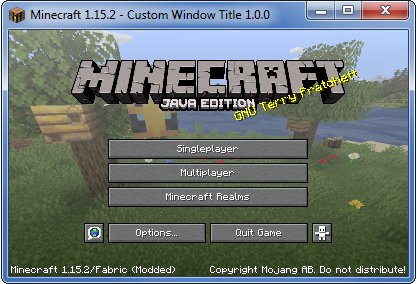
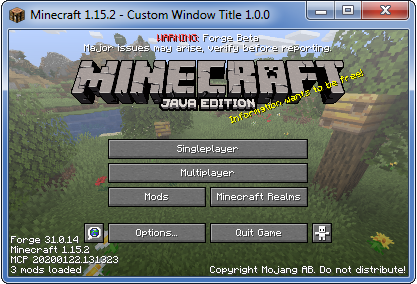
这些截图是使用以下示例配置截取的:
title = "Minecraft {mcversion} - Custom Window Title {modversion:customwindowtitle}"
Installation
The mod supports NeoForge and Fabric (*) mod loaders. Follow either mod loader's installation guide, then download the mod file for your Minecraft version, and install it into the .minecraft/mods folder.
(*) Fabric API is not required.
Configuration
Run the game once to create the configuration file. By default, the window title will be set to Minecraft <version>. Unlike in vanilla 1.15.2 onwards, the title will not change when you enter a world/server.
To change the title or icon, navigate to the .minecraft/config folder, and open customwindowtitle-client.toml in a text editor. You will see the following entries:
title = 'Minecraft {mcversion}'
icon16 = ''
icon32 = ''
Only edit text inside quotes or apostrophes.
Changing the Title
You can use the following special tokens in the title configuration entry:
{mcversion}- current Minecraft version{modversion:<mod_id>}- version of installed mod with the identifier<mod_id>{username}- current username
If any of the tokens aren't working, search the game log for CustomWindowTitle and you should see the reason, otherwise please file an issue on the issue tracker with as many details as possible.
Changing the Icon
Minecraft 1.21+
This feature is only available in Custom Window Title 1.4.0 and newer.
Create a square PNG image whose dimensions are a power of two, such as 32x32 or 48x48. Put the PNG file into the .minecraft/config folder, either directly or into a subfolder.
The icon must be saved with transparency even if it doesn't use it, otherwise the icon may be corrupted or not appear at all. In Krita, for example, you must check Store alpha channel (transparency) when saving.
The icon configuration entry points to the PNG file relative to .minecraft/config.
For example, if you placed the icon into .minecraft/config/customwindowtitle/icon.png, then the configuration entry should look like this:
icon = 'customwindowtitle/icon.png'
Minecraft 1.20
This feature is not available in Minecraft 1.20.
Minecraft 1.19 and older
Instead of one icon configuration entry, there are two configuration entries icon16 and icon32 for icons with dimensions 16x16 and 32x32.
Screenshots
These screenshots were taken using the following example configuration:
title = "Minecraft {mcversion} - Custom Window Title {modversion:customwindowtitle}"

下载 Custom Window Title
需要联机服务器吗?
稳定流畅、一键部署,几分钟即可和朋友联机开服
最低仅需 8 元/月 即可畅快联机
下载 Custom Window Title
需要联机服务器吗?
稳定流畅、一键部署,几分钟即可和朋友联机开服
最低仅需 8 元/月 即可畅快联机
下载 Custom Window Title
需要联机服务器吗?
稳定流畅、一键部署,几分钟即可和朋友联机开服
最低仅需 8 元/月 即可畅快联机
下载 Custom Window Title
需要联机服务器吗?
稳定流畅、一键部署,几分钟即可和朋友联机开服
最低仅需 8 元/月 即可畅快联机
下载 Custom Window Title
下载 Custom Window Title
需要联机服务器吗?
稳定流畅、一键部署,几分钟即可和朋友联机开服
最低仅需 8 元/月 即可畅快联机
下载 Custom Window Title
需要联机服务器吗?
稳定流畅、一键部署,几分钟即可和朋友联机开服
最低仅需 8 元/月 即可畅快联机
下载 Custom Window Title
需要联机服务器吗?
稳定流畅、一键部署,几分钟即可和朋友联机开服
最低仅需 8 元/月 即可畅快联机
下载 Custom Window Title
下载 Custom Window Title
需要联机服务器吗?
稳定流畅、一键部署,几分钟即可和朋友联机开服
最低仅需 8 元/月 即可畅快联机
- 已更新至 Minecraft 1.21.9
关于这个资源的讨论、问题反馈与使用心得
还没有讨论,来发第一帖吧
你是这个资源的作者?登录后可认领此资源。
相似资源
 模组

显示你正在注视的方块的信息。(适用于 Minecraft 1.16+ 的 Hwyla/Waila 分支)
 模组
使用 JavaScript 编辑配方、添加自定义物品、编写世界事件!
 模组

查看物品与配方
 模组
在游戏画面角落显示附近世界地形、玩家、生物和实体的地图。可创建路径点,帮助你找到标记过的位置。
 模组
AE2:一款流行的自动化与存储模组
 模组
那是什么?一个 Waila/Hwyla 的分支。
评论 0
登录后参与评分
还没有评论,来抢沙发吧