
如果您有任何反馈,请在此处 留下 或在 Discord 中留言。
Custom Screens
Custom Screens 允许您使用简单的预设文件和命令向玩家显示全屏覆盖层和轻量级提示。通过一个简单的配置文件定义您自己的布局、文本、图像和时间。
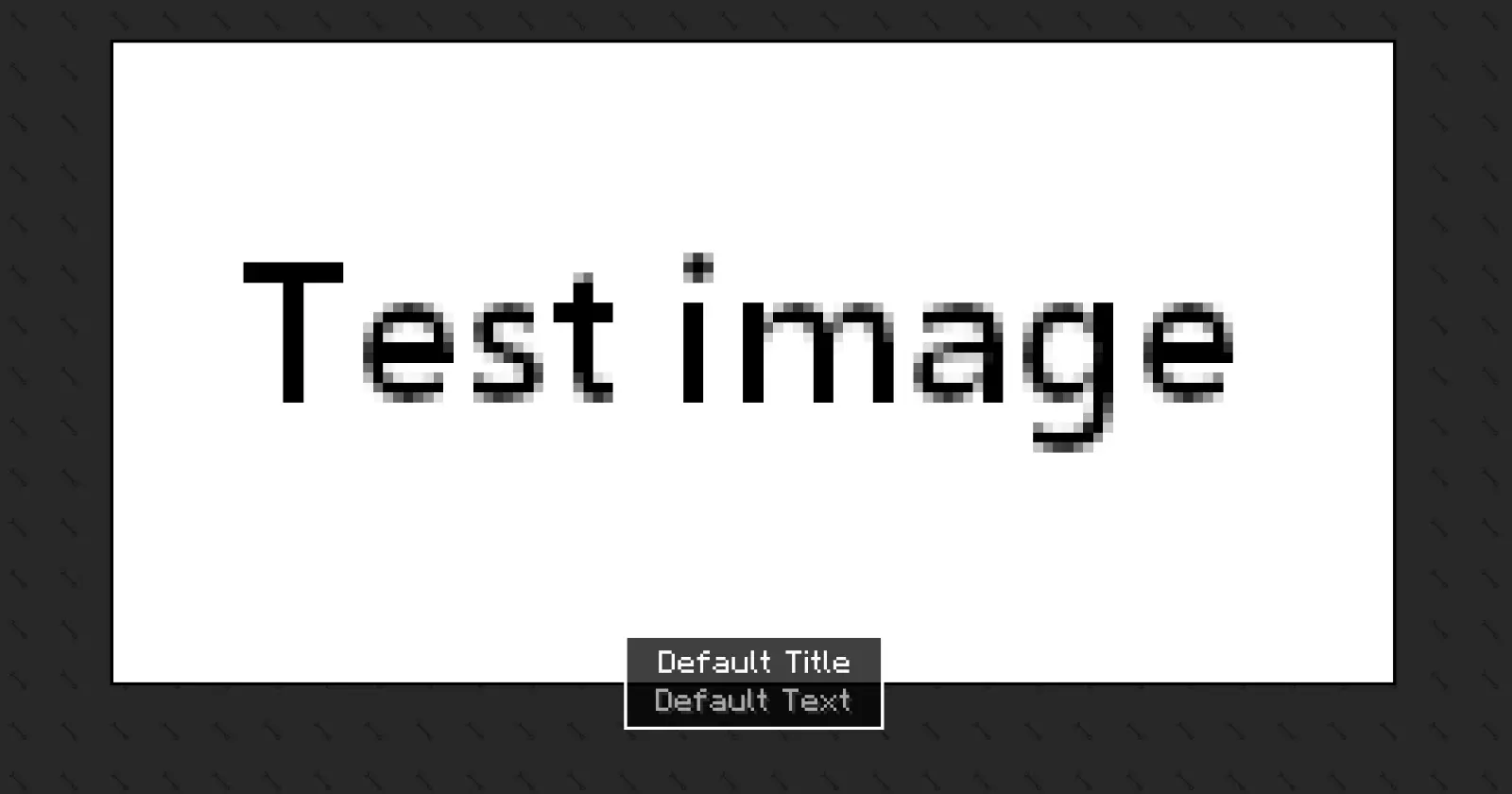
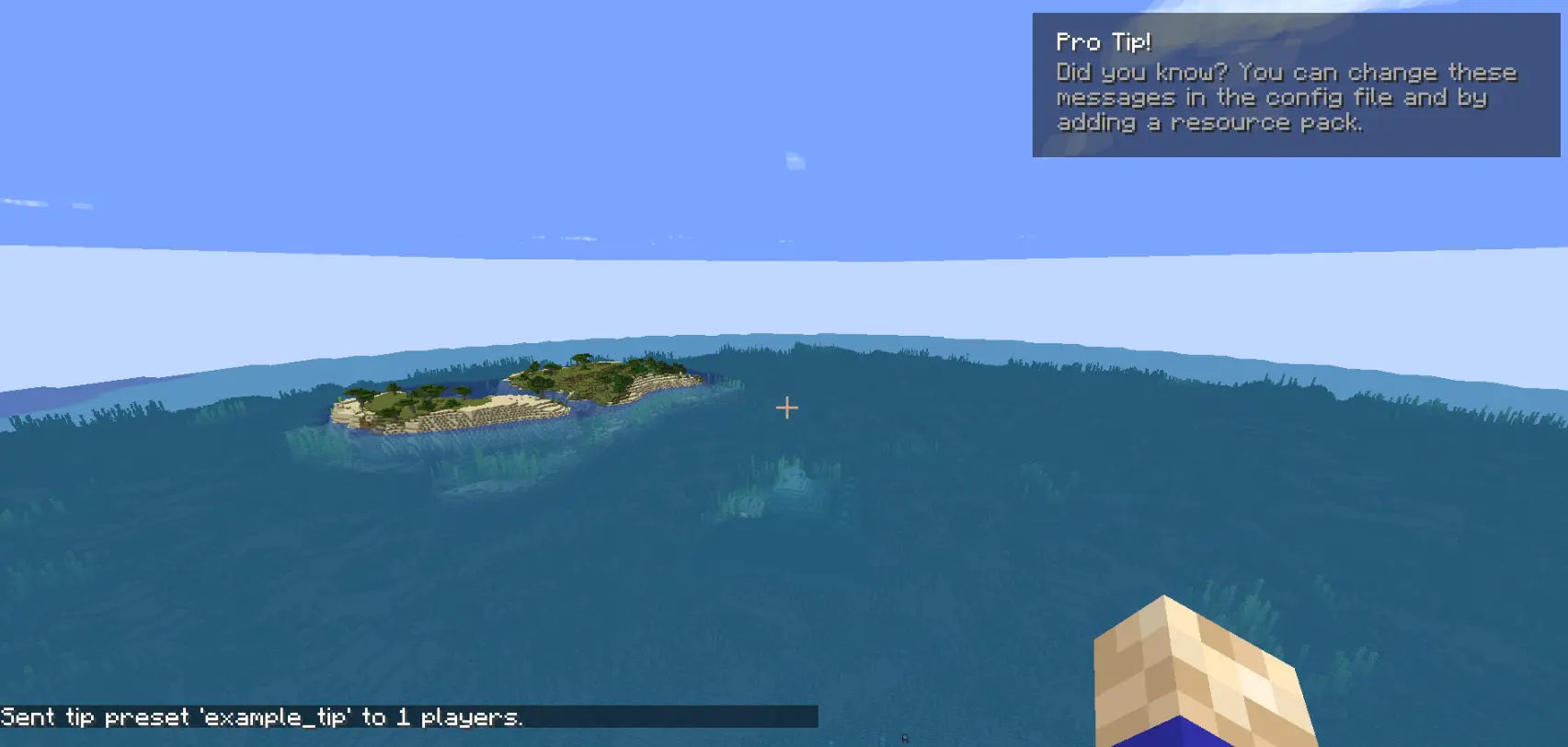
此模组可用于整合包和服务器。您必须为原作者提供署名。
这是此模组的唯一官方下载来源。您可以通过链接到此提供的官方下载页面来分享或分发此模组到其他网站或平台。禁止重新上传或重新分发模组文件本身。
请注意,从非官方来源获取的下载可能已被修改并可能包含恶意软件。为了您的安全,请始终从官方来源下载此模组。
如何使用 [BETA 版本]
模组在首次启动后生成两个配置文件:
config/arcana/custom-screens-presets.json
此文件定义每个屏幕预设,包括:
- 预设名称
- 标题和正文文本
- 文本位置
- 图像和背景(bg 大小,64x64)(可选)
- 图像大小
- 显示持续时间
注意: 如果未指定图像或背景,则不会渲染。
config/arcana/custom-tips-presets.json
此文件定义每个屏幕预设,包括:
- 预设名称
- 标题和正文文本
- 文本位置
- 显示持续时间
要添加另一个预设,请复制 JSON 文件中的示例预设并根据需要进行修改。也可以删除示例预设。
命令
与此模组相关的所有命令都在 /cs 命令下。这些是:
/cs show-screen <targets> <showToOp> <shouldCloseOnEsc> <presetName>- targets — 目标玩家。
- showToOp — 向在线的管理员发送反馈。[true/false]
- shouldCloseOnEsc — 允许玩家按 ESC 关闭屏幕。[true/false]
- presetName — 配置文件中预设的键。[string]
如果在单人游戏中使用,屏幕持续期间游戏将暂停。
-
/cs show-tip <targets> <showToOp> <title> <description> <position> <duration>- targets — 目标玩家。
- showToOp — 向在线的管理员发送反馈。[true/false]
- title / description — 写在 ```"`` 之间。
- position — 提示在屏幕上显示的位置。
- duration — 数字(以秒为单位)。
-
/cs show-tip-preset <targets> <showToOp> <presetName>- targets — 目标玩家。
- showToOp — 向在线的管理员发送反馈。[true/false]
- presetName — 配置文件中预设的键。[string]
-
/cs stop-screen <targets> -
尝试关闭选定玩家当前活动的屏幕或提示。
- targets — 目标玩家。
自定义文本和图像(通过资源包)
可以使用资源包提供图像和文本。
- 文本
"arcana.customscreens.example_title":
myresourcepack\assets\custom_screens\lang\en_us.json
- 图像:
myresourcepack\assets\custom_screens\textures\gui\*.png
重要说明:
- 背景图像将平铺以填充整个屏幕。
- 仅支持 .png 文件。
If you have any feedback please, leave it here or in discord.
Custom Screens
Custom Screens lets you display fullscreen overlays and lightweight tips to players using simple preset files and commands. Define your own layouts, text, images, and timing through a simple configuration file.
This mod may be used in modpacks and on servers. You must provide credit to the original authors.
This is the only official download source for this mod. You may share or distribute this mod on other websites or platforms only by linking to the official download page provided here. Re-uploading or redistributing the mod files themselves is not permitted.
Please be aware that downloads obtained from unofficial sources may be modified and could contain malicious software. For your security, always download this mod from the official source.
How to use [BETA Version]
The mod generates two config files after the first launch:
config/arcana/custom-screens-presets.json
This file defines each screen preset, including:
- Preset name
- Title and body text
- Text position
- Image and background (bg size, 64x64) (optional)
- Image size
- Display duration
Note: If no image or background is specified, it will not be rendered.
config/arcana/custom-tips-presets.json
This file defines each screen preset, including:
- Preset name
- Title and body text
- Text position
- Display duration
To add another preset duplicate the example preset in the JSON file and modify it as needed. The example preset can also be removed.
Commands
All commands related to this mod are under the /cs command. These are:
/cs show-screen <targets> <showToOp> <shouldCloseOnEsc> <presetName>- targets — Players to target.
- showToOp — Sends feedback to online operators. [true/false]
- shouldCloseOnEsc — Allows players to close the screen with ESC. [true/false]
- presetName — Preset key from the config file. [string]
If used in single player the game will be paused for the duration of the screen.
-
/cs show-tip <targets> <showToOp> <title> <description> <position> <duration>- targets — Players to target.
- showToOp — Sends feedback to online operators. [true/false]
- title / description — written between
". - position — where the tip shows in the screen.
- duration — number (in seconds).
-
/cs show-tip-preset <targets> <showToOp> <presetName>- targets — Players to target.
- showToOp — Sends feedback to online operators. [true/false]
- presetName — Preset key from the config file. [string]
-
/cs stop-screen <targets> -
Tries to close the currently active screen or tip for the selected players.
- targets — Players to target.
Custom text and images (via resource pack)
Images and text can be provided using a resource pack.
- Text
"arcana.customscreens.example_title":
myresourcepack\assets\custom_screens\lang\en_us.json
- Images:
myresourcepack\assets\custom_screens\textures\gui\*.png
Important notes:
- Background images will tile to fill the entire screen.
- Only .png files are supported.

下载 Custom Screens
需要联机服务器吗?
稳定流畅、一键部署,几分钟即可和朋友联机开服
最低仅需 8 元/月 即可畅快联机
下载 Custom Screens
需要联机服务器吗?
稳定流畅、一键部署,几分钟即可和朋友联机开服
最低仅需 8 元/月 即可畅快联机
下载 Custom Screens
需要联机服务器吗?
稳定流畅、一键部署,几分钟即可和朋友联机开服
最低仅需 8 元/月 即可畅快联机
下载 Custom Screens
需要联机服务器吗?
稳定流畅、一键部署,几分钟即可和朋友联机开服
最低仅需 8 元/月 即可畅快联机
下载 Custom Screens
需要联机服务器吗?
稳定流畅、一键部署,几分钟即可和朋友联机开服
最低仅需 8 元/月 即可畅快联机
下载 Custom Screens
需要联机服务器吗?
稳定流畅、一键部署,几分钟即可和朋友联机开服
最低仅需 8 元/月 即可畅快联机
下载 Custom Screens
需要联机服务器吗?
稳定流畅、一键部署,几分钟即可和朋友联机开服
最低仅需 8 元/月 即可畅快联机
- 更新了命令,使其不再忽略
showToOps值。
关于这个资源的讨论、问题反馈与使用心得
还没有讨论,来发第一帖吧
你是这个资源的作者?登录后可认领此资源。
相似资源
 模组

显示你正在注视的方块的信息。(适用于 Minecraft 1.16+ 的 Hwyla/Waila 分支)
 模组
使用 JavaScript 编辑配方、添加自定义物品、编写世界事件!
 模组

查看物品与配方
 模组
在游戏画面角落显示附近世界地形、玩家、生物和实体的地图。可创建路径点,帮助你找到标记过的位置。
 模组
AE2:一款流行的自动化与存储模组
 模组
那是什么?一个 Waila/Hwyla 的分支。
评论 0
登录后参与评分
还没有评论,来抢沙发吧