Custom Waypoints
在世界的任何位置创建路标、计时器、计数器、跟随标签和任务标记,支持背景、动画、渐变、移动、实时距离等功能。可以使用客户端命令、带有世界内辅助工具的可视化编辑器,或通过服务器上的 Custom Waypoints 插件进行控制。
支持的版本
| 加载器 |
版本 |
| Fabric |
1.20.1 · 1.20.4 · 1.21.1 · 1.21.4 · 1.21.5 · 1.21.8 · 1.21.11 · 26.2 |
| NeoForge |
1.20.1 · 1.20.4 · 1.21.1 · 1.21.4 · 1.21.5 · 1.21.8 · 1.21.11 · 26.2 |
| Forge |
1.20.1 · 1.20.4 |
基础命令
/waypoint
在 1.21.8 → 26.2 版本中,请使用 /customwaypoint,因为原版 Minecraft 已经有了自己的 /waypoint 命令。其他用法完全相同。
功能特性
- 在任何位置、缩放比例和旋转角度显示带有文本的路标
- 显示计时器(倒计时)和计数器(正向计数,可选小数),支持刻度音效以及来自原版或资源包的任意音效 ID
- 跟随路标:跟随玩家或实体,当目标重新加载时自动返回
- 图形标记:GTA 风格的任务标记,包括地面上的圆形、星形、箭头、心形等,或任意文本/数字;支持向上或向下渐隐的墙壁,可调整俯仰/翻滚角度以将其贴在墙上,并新增可调的边框 (NEW)
- 图形循环动画 (NEW):脉冲、放大、旋转、弹跳、高度变化、波浪、涟漪、呼吸、闪烁和彩虹效果,每种动画都有独立的时间和幅度参数,可同时启用多种效果
- 图形渐变 (NEW):颜色沿渐隐区域分布,通过渐变条进行编辑
- 可视化编辑器:支持实时预览、世界内辅助工具 (NEW)、滑块、色轮、撤销/重做和历史记录功能
- 移动任意路标至新位置,支持插值预设和自定义时间
- 背景:提供 4 种样式、透明度和渐隐效果,支持每行一个背景,拥有独立的颜色、大小和样式,并新增行间距滑块 (NEW)
- 进入/退出动画:缩放、滑动、弹跳、旋转、像素化、故障风
- 实时距离
{distance}、注视揭示文本 {on_view_radius:N}
- 复制和粘贴整个路标作为一个命令 (NEW)
- 文本内嵌物品和纹理、HEX 颜色、多行文本
- 路标按世界和维度分别保存
- 服务器控制:配合 Custom Waypoints 插件 (Paper) 使用,可为所有玩家以及后续加入的玩家设置路标 (NEW),同步计时器,监听玩家到达或移除路标的动作,并支持从编辑器进行实时编辑 (NEW)
- 供其他模组调用的 API (NEW)
可视化编辑器
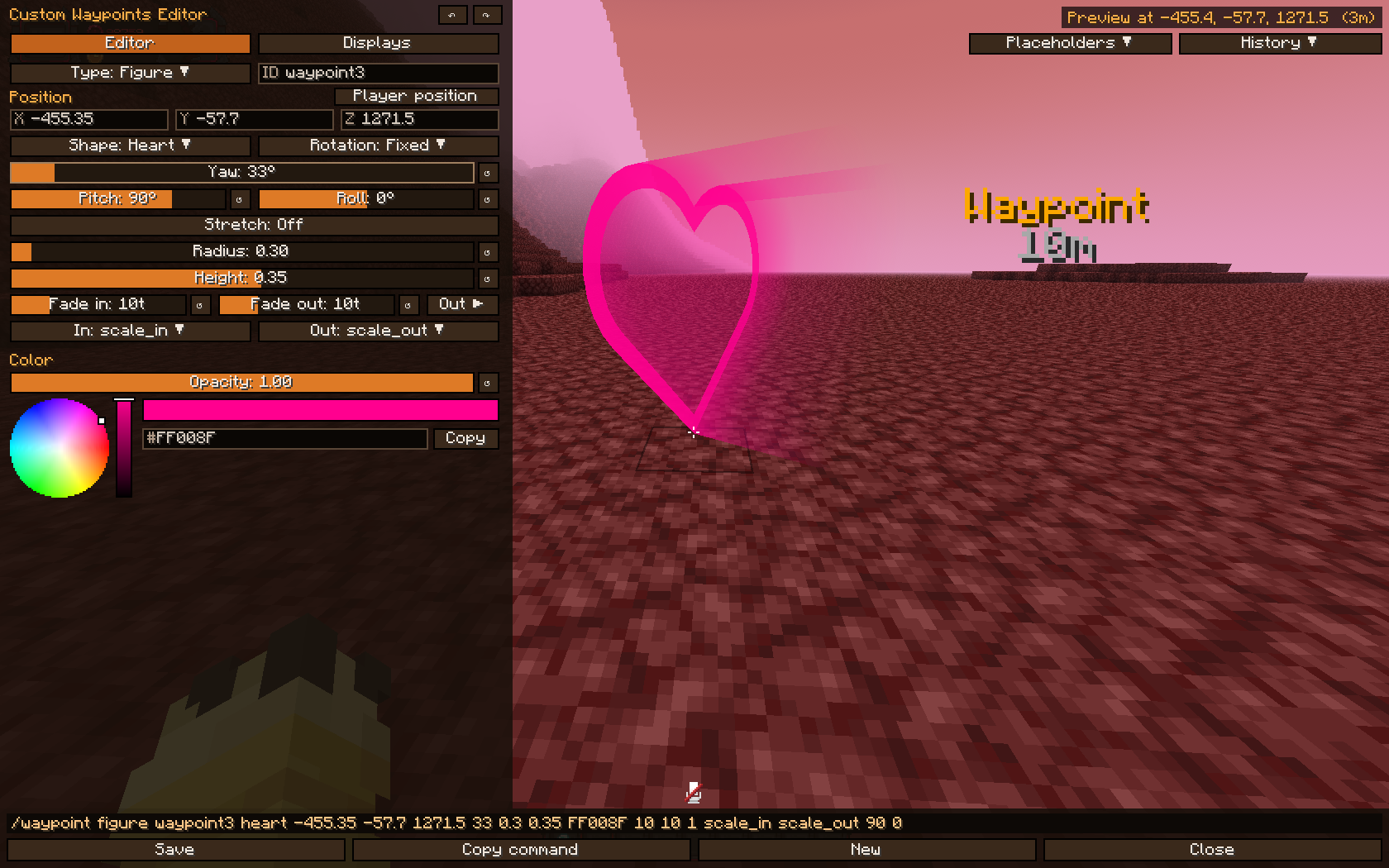 按 M(控制 → Custom Waypoints)或运行
/waypoint editor。按 N 可直接打开显示选项卡。
- 使用滑块、色轮和世界内实时预览编辑每种类型的路标(文本、计时器、计数器、跟随和图形)
- 辅助工具 (NEW):路标在世界中显示控制手柄。拖动红、绿、蓝箭头可沿轴移动,拖动中间的白色方块可自由移动,拖动绿色环可旋转,拖动红色环可倾斜图形,拖动黄色旋钮可调整大小;启用 Stretch: On 后,可通过青色手柄调整宽度。按住 Ctrl 可吸附到半格和 15° 倍数。
- 右键点击世界会旋转视角,同时你可以继续行走;F5 切换摄像机视图 (NEW)
- 显示选项卡:列出当前维度所有激活的路标,按距离排序,可编辑或删除
- 动画 (NEW):开关将每个动画展开为方形方块;开启的动画会显示在下方,各自拥有独立的时间和幅度参数
- 渐变条 (NEW):点击添加颜色,拖动移动位置,右键点击移除。它为渐隐区域上色,而基础颜色按钮用于直接编辑图形本身。
- 每行背景 (NEW):选择某一行并为其指定独立的颜色、透明度、大小和样式,或选择全部应用于整段文本
- 设为所有人 (NEW):在安装了插件的服务器上,保存会将路标发送给所有玩家,删除则对所有人移除该路标
- 底部栏显示粘贴命令:点击它或复制命令即可在聊天栏、命令方块或数据包中使用
- Ctrl+S 保存,Ctrl+Z / Ctrl+Y 撤销和重做,历史记录保留最近 8 个被保存、覆盖或删除的路标(重启后依然保留)
- ↺ 按钮将滑块重置为默认值,按住 Shift 可使滑块以 5 为步长吸附
- 占位符按钮:点击即可将占位符插入文本中
- 保存创建或更新路标,新建在你的当前位置创建一个全新的路标,并使用下一个可用的 ID
- 工作模式类似叠加层:编辑器打开期间,你可以保持行走
示例
带距离显示的商店:
/waypoint set shop 464.49 -51.71 -724.91 9 follow far_front false 20 scale_in scale_out false &eShop/n{distance}m
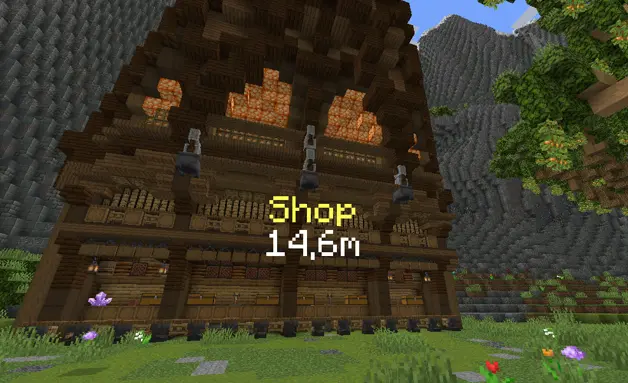
带圆角背景、仅在注视时显示的文本:
/waypoint set shop 100 70 100 1 follow behind true black 0.4 1 rounded 10 scale_in scale_out false &6Shop{on_view_radius:2}/n&7Open 24/7{/on_view}
带音效的计时器:
/waypoint timer set raid 100 70 100 1 follow front true black 0.45 1.2 rounded 10 scale_in scale_out block.note_block.pling false Time: &c"01:00:00"
带小数的秒表计数器:
/waypoint counter set stopwatch 100 70 100 1 follow behind false 10 scale_in scale_out none true true Time: &a{counter}s/nDistance: {distance}
跟随玩家的标签:
/waypoint follow boss Steve 0 2.5 0 1 far_front true black 0.5 1 rounded 10 scale_in scale_out false &c{entity_displayname}/n&7{distance}m
旋转并沿淡入淡出过程改变颜色的任务标记 (NEW):
/waypoint figure mission1 circle 100 64 100 0 1.5 2 gold 20
/waypoint animate mission1 spin+breathe 60 0.4
/waypoint gradient mission1 gold "#55FFFF"
面向你的数字“2”:
/waypoint figure step2 2 110 64 100 follow 1 1.5 "#55FFFF" 10
带有动画和淡出效果的墙面箭头:
/waypoint figure door arrow 100 66 100 0 1 0.3 "#FFAA00" 10 20 0.9 scale_in scale_out 90 0
移动一个路标并将其移回:
/waypoint move shop 470 -50 -720 9 follow smooth 40
/waypoint move_reset shop bounce 20
复制一个路标并粘贴到任意位置 (NEW):
/waypoint copy shop
/waypoint paste
命令
基础命令:/waypoint   (1.21.8 → 26.2: /customwaypoint)

文本:
/waypoint set <id> <x> <y> <z> <scale> <rotation> <render> true <bgcolor> <bgopacity> <bgscale> <bgstyle> <fade_in> [<fade_out> <opacity>] <anim_in> <anim_out> <textbackground> <text>
/waypoint set <id> <x> <y> <z> <scale> <rotation> <render> false <fade_in> [<fade_out> <opacity>] <anim_in> <anim_out> <textbackground> <text>

计时器(倒计时):
/waypoint timer set <id> <x> <y> <z> <scale> <rotation> <render> true <bgcolor> <bgopacity> <bgscale> <bgstyle> <fade_in> [<fade_out> <opacity>] <anim_in> <anim_out> <sound> <textbackground> <text + "HH:MM:SS">
/waypoint timer set <id> <x> <y> <z> <scale> <rotation> <render> false <fade_in> [<fade_out> <opacity>] <anim_in> <anim_out> <sound> <textbackground> <text + "HH:MM:SS">
/waypoint stoptimer <id>
/waypoint resumetimer <id>

计数器(正计数):
/waypoint counter set <id> <x> <y> <z> <scale> <rotation> <render> true <bgcolor> <bgopacity> <bgscale> <bgstyle> <fade_in> [<fade_out> <opacity>] <anim_in> <anim_out> <sound> <decimals> <textbackground> <text + {counter}>
/waypoint counter set <id> <x> <y> <z> <scale> <rotation> <render> false <fade_in> [<fade_out> <opacity>] <anim_in> <anim_out> <sound> <decimals> <textbackground> <text + {counter}>

跟随:
/waypoint follow <id> <player|UUID> <offsetX> <offsetY> <offsetZ> <scale> <render> true <bgcolor> <bgopacity> <bgscale> <bgstyle> <fade_in> [<fade_out> <opacity>] <anim_in> <anim_out> <textbackground> <text>
/waypoint follow <id> <player|UUID> <offsetX> <offsetY> <offsetZ> <scale> <render> false <fade_in> [<fade_out> <opacity>] <anim_in> <anim_out> <textbackground> <text>

图形:
/waypoint figure <id> <shape> <x> <y> <z> <rotation> <radius> <height> <color> <fade_in> [<fade_out> <opacity> [<anim_in> <anim_out> [<pitch> <roll> [<width_x> <width_z>]]]]
/waypoint animate <id> <preset[+preset...]> [time] [amount]        (NEW)
/waypoint animate <id> add <preset> [time] [amount]                (NEW)
/waypoint animate <id> remove <preset> | stop                      (NEW)
/waypoint gradient <id> <color[:position]>... | none               (NEW)

移动:
/waypoint move <id> <x> <y> <z> <scale> <rotation> <interpolation> <time>
/waypoint move_reset <id> <interpolation> <time>

其他:
/waypoint background <id> multiline <true|false>                   (NEW)
/waypoint copy [id]                                                (NEW)
/waypoint paste [text]                                             (NEW)
/waypoint remove <id|all> [fadeout]
/waypoint remove_radius <id> <radius> <fadeout>
/waypoint list
/waypoint editor
图形动画
可以同时运行多个动画,每个动画拥有独立的时间(单次循环的刻数)和幅度。具有相同动画的两个图形不会同步运行。
| 预设 |
作用 |
幅度 |
pulse |
变大和缩小 |
深度 0-1 |
grow |
从无到有生长出来,然后收回 |
深度 0-1 |
spin |
绕自身轴旋转 |
每循环度数 |
bob |
上下浮动 |
方块单位 |
height |
将墙壁升至该高度后恢复 |
方块单位的高度 |
wave |
墙壁顶部像波浪一样围绕图形流动 |
每循环波数 |
ripple |
同样的波浪,从中心向外扩散 |
每循环波数 |
breathe |
淡出并重新显现 |
深度 0-1 |
flicker |
不稳定,如同坏掉的招牌 |
强度 0-1 |
rainbow |
循环所有颜色 |
饱和度 0-1 |
选项
| 选项 |
值 |
| scale |
路标的大小 |
| rotation |
follow(面向摄像机)· follow_horizontal · follow_vertical / follow_vertical_<yaw> · 固定的偏航角,如 0 90 180 270 |
| render |
behind(被方块遮挡)· front(穿透方块显示)· far_behind · far_front(远距离保持可读性,编辑器中的默认值) |
| bgcolor |
BLACK DARK_BLUE DARK_GREEN DARK_AQUA DARK_RED DARK_PURPLE GOLD GRAY DARK_GRAY BLUE GREEN AQUA RED LIGHT_PURPLE YELLOW WHITE 或 HEX #RRGGBB |
| bgopacity / opacity |
0–1 |
| bgscale |
文字周围背景的大小 |
| bgstyle |
square square_small rounded rounded_small |
| fade_in / fade_out |
刻(20 刻 = 1 秒)。fade_out 和 opacity 是可选的,通常一起使用 |
| anim_in |
none scale_in left_in right_in up_in down_in bounce_in spin_in pixelate_in glitch_in |
| anim_out |
none scale_out left_out right_out up_out down_out bounce_out spin_out pixelate_out glitch_out |
| textbackground |
true / false(原版阴影/每个字母后面的背景) |
| sound |
none 或任何声音 ID:block.note_block.pling,或使用命名空间的 "mypack:tick"(带引号) |
| decimals |
true / false(十分之一秒) |
| interpolation |
smooth linear step bounce |
| time (移动) |
刻 |
| shape (图形) |
circle square star triangle diamond pentagon hexagon octagon heart plus cross arrow lightning moon crown check question exclamation pin,或任意文本如 1, A, "10" |
| rotation (图形) |
固定的偏航角、follow(随你的朝向转动)或 follow_<yaw>(follow_180 使箭头指向你) |
| radius / height (图形) |
方块数。负高度会使墙体向下褪色 |
| border (图形) |
亮边的宽度,1 为常规大小 (NEW) |
| color (图形) |
颜色名称或 "#RRGGBB" |
| pitch / roll (图形) |
角度。pitch 90 使图形像墙上的告示牌一样竖立,roll 在其自身平面内旋转 |
| width_x / width_z (图形) |
将形状拉伸至指定方块数,而不是默认的 2 × radius |
提示
文本格式
&a, &l... = Minecraft 颜色和格式代码&#RRGGBB, <#RRGGBB>, #RRGGBB 或 #(RRGGBB) = HEX 颜色/n = 换行| = 空格
计时器和计数器
- 计时器时间需加引号:
"01:00:00"。周围的文本会保留:Time: &c"00:10:00" !!!
- 小时数在不足 1 小时时隐藏(显示
59:59),分钟数在不足 1 分钟时隐藏(显示 59)
- 在计数器中,
{counter}(或 counter)标记数值出现的位置
内联物品
{"diamond"}
{"diamond_sword,scale:1.5"}
{"diamond,scale:1.5,nbt:3"}     ← nbt = CustomModelData
{"diamond,s:1.5,n:3"}           ← 简写版本
内联纹理
{"assets/minecraft/textures/item/apple.png,s:1"}
{"resourcepack MyPack/assets/minecraft/textures/custom/skull.png,scale:2.5"}
按世界和维度区分
- 路标是按单人游戏世界或服务器保存的,并且仅在其创建的维度中显示
- 相同的 ID 可以同时存在于主世界和下界中
- 图形仅在渲染距离内加载的区块上渲染
长文本
- 聊天窗口仅允许 256 个字符,因此请使用命令方块,或使用
/waypoint copy 和 /waypoint paste,后者读取剪贴板 (NEW)
复制和粘贴
/waypoint copy 将所有路标写入一个粘贴命令(所有路标均不带 ID);不带文本的 paste 命令会读取剪贴板。编辑器底部的栏会显示相同的命令,多个路标会依次排列:{(...)(...)}。
/waypoint paste {(type:figure,id:mission1,pos:[100,64,100],scale:1,rotation:0,render:far_front,fadein:20,fadeout:20,opacity:1,animin:scale_in,animout:scale_out,shape:"circle",radius:1.5,height:2,color:#FFAA00,border:1,presets:[spin:60:360],gradient:[#FFAA00:0,#55FFFF:1])}
占位符
| 占位符 |
描述 |
{distance} |
到路标的整数距离(以方块为单位) |
{distance_decimal} |
带一位小数的距离 |
{counter} |
实时计数器数值(计数器) |
"HH:MM:SS" |
实时剩余时间(计时器) |
{entity_displayname} |
跟随的玩家或实体的名称(跟随模式) |
{on_view_radius:N} |
当准星瞄准点距离路标超过 N 个方块时隐藏文本 |
{/on_view} |
结束 {on_view_radius:N} 部分 |
自定义路标插件(服务器)
在 Paper 服务器上安装该插件后,可以通过模组(Fabric、Forge 或 NeoForge)向玩家发送路标。没有安装模组的玩家仍可正常加入服务器。
- 每个客户端命令,如
/waypointplugin(别名 /wpl),在 ID 之前需要指定目标:@a 或玩家名称
@a 的路标会为后续加入的玩家保留,且它们的计时器只运行一次,因此每个人看到的时间相同 (NEW)- 路标动作:当玩家踏入路标时(
on_step)或移除路标时(on_remove)执行控制台命令,支持半径、等待时间和 PlaceholderAPI,全部在配置文件中设置
- 实时编辑 (NEW):在客户端编辑器中启用 Set to everyone,操作员可以为所有玩家保存或删除路标
- 权限:
customwaypoints.admin(默认:OP)
插件命令
/wpl set <@a|player> <id> <x> <y> <z> ...
/wpl timer set <@a|player> <id> <x> <y> <z> ...
/wpl counter set <@a|player> <id> <x> <y> <z> ...
/wpl follow <@a|player> <id> <target> ...
/wpl figure <@a|player> <id> <shape> <x> <y> <z> ...
/wpl animate <@a|player> <id> <presets|add|remove|stop> [time] [amount]   (NEW)
/wpl gradient <@a|player> <id> <color[:position]>... | none               (NEW)
/wpl background <@a|player> <id> multiline <true|false>                   (NEW)
/wpl paste <@a|player> {(...)}                                           (NEW)
/wpl copy <@a|player> [id]                                               (NEW)
/wpl move <@a|player> <id> ...
/wpl move_reset <@a|player> <id> ...
/wpl stoptimer <@a|player> <id>
/wpl resumetimer <@a|player> <id>
/wpl remove <@a|player> <id|all> [fadeout]
/wpl remove_radius <@a|player> <id> <radius> <fadeout>
/wpl list <@a|player>
/wpl reload
插件示例
/wpl set @a spawn 0 70 0 1.5 follow far_front true black 0.5 1 rounded 10 scale_in scale_out false &6&lSpawn/n&7{distance}m
/wpl timer set @a event 0 72 0 2 follow front true black 0.5 1.2 rounded 10 scale_in scale_out block.note_block.hat false &eEvent starts in &f"00:05:00"
/wpl figure Steve mission1 star 150 64 -30 0 2 3 gold 20 20 1 scale_in scale_out
/wpl animate @a mission1 wave 40 3
/wpl follow @a king Steve 0 2.5 0 1 far_front false 10 scale_in scale_out false &6King: &f{entity_displayname}
/wpl remove @a event 20
航点动作 (plugins/CustomWaypoints/config.yml)
所有设置均针对单个航点 ID 进行配置,或使用 * 对所有航点进行配置。使用 /wpl reload 应用更改。
waypoint-actions:
  mission1:                        # 航点 ID,或使用 "*" 表示所有航点
    remove_radius: 4               # 当玩家靠近此距离时移除
    remove_only_for_player: true   # true:仅对该玩家生效 / false:对所有拥有该航点的玩家生效
    on_remove:
      - "console_command: say %player% completed the mission!"
      - "wait: 1"                  # 秒
      - "console_command: give %player% minecraft:diamond 3"
      - "wait_ticks: 10"           # 刻
      - "console_command: title %player% title {\"text\":\"Mission complete\",\"color\":\"gold\"}"
  checkpoint:
    step_radius: 5                 # 在不移除航点的情况下执行 on_step
    execute_only_once: true        # on_step 每个玩家仅运行一次
    on_step:
      - "action_wait_time: 3"      # 新增:只有当玩家在航点内停留 3 秒时才继续执行后续动作
      - "console_command: title %player% actionbar {\"text\":\"Checkpoint!\",\"color\":\"aqua\"}"
      - "console_command: playsound minecraft:entity.experience_orb.pickup master %player%"
remove_radius:当玩家走入该范围时自动移除航点,无需额外指令。on_remove 中的操作将针对到达该航点的玩家执行。remove_only_for_player:true(默认值)仅对该玩家移除,false 则对所有玩家移除on_remove 也会在以下情况触发:使用 /wpl remove 命令、计时器结束或被追踪的实体死亡(针对失去该航点的每位玩家各执行一次)step_radius + on_step:每次玩家进入半径范围时运行,不会移除航点execute_only_once:设为 true 时,即使玩家离开后又返回,on_step 也仅对每位玩家运行一次(直到执行 /wpl reload、服务器重启或重新设置航点为止)console_command: <command> 以控制台身份运行命令wait: <seconds> / wait_ticks: <ticks> 在下一个动作之前等待指定时间action_wait_time: <seconds>:等待指定时长,但仅在玩家停留在航点内时计数。如果玩家走出航点范围,其后的动作将不再执行,因此可用于奖励原地站立、占领据点或完成引导过程。- 占位符:
%player%、%waypoint% 以及所有 PlaceholderAPI 占位符
任务示例: 发送标记,上述配置将为到达该位置的玩家提供奖励:
/wpl figure @a mission1 circle 150 64 -30 0 1.5 2 gold 20
其他模组的 API
CustomWaypointsApi.text("shop")
        .at(100.5, 70, 100.5)
        .text("&6Shop/n{distance}m")
        .background(0x000000, 0.4f)
        .fade(10, 20)
        .add();

CustomWaypointsApi.figure("mission1")
        .at(100, 64, 100).shape("circle").radius(1.5f).height(2.0f)
        .color(0xFFAA00).animate("spin", 60, 360).gradient(0xFFAA00, 0x55FFFF)
        .add();

CustomWaypointsApi.events().onEnter("mission1", 3.0, id -> ...);
CustomWaypointsApi.shapes().register("hexagram", outline);
CustomWaypointsApi.paste(text);
CustomWaypointsApi.remove("shop", 20);
- 构建器:
text、follow 和 figure 接受与命令相同的值;add() 返回一个句柄,用于后续读取、移动或移除该路标
- 粘贴与复制:使用与命令相同的文本格式,这是添加任何内容的最快捷方式
- 事件:当玩家进入或离开路标周围的半径范围时触发
onEnter / onLeave(对每个路标均适用,使用 *),以及 onAdded / onRemoved
- 形状:
shapes().register(name, outline) 添加自定义图形形状,随后可在命令和编辑器中显示
Custom Waypoints
Create waypoints, timers, counters, follow labels and mission markers anywhere in the world, with backgrounds, animations, gradients, movement, live distance and more. Use client commands, the visual editor with its in-world gizmo, or control everything from a server with the Custom Waypoints plugin.
Supported versions
| Loader |
Versions |
| Fabric |
1.20.1 · 1.20.4 · 1.21.1 · 1.21.4 · 1.21.5 · 1.21.8 · 1.21.11 · 26.2 |
| NeoForge |
1.20.1 · 1.20.4 · 1.21.1 · 1.21.4 · 1.21.5 · 1.21.8 · 1.21.11 · 26.2 |
| Forge |
1.20.1 · 1.20.4 |
Base command
/waypoint
On 1.21.8 → 26.2 use /customwaypoint instead, because vanilla Minecraft already has its own /waypoint. Everything else is the same.
Features
- Display waypoints with text at any position, scale and rotation
- Display timers (countdown) and counters (count up, optional decimals) with tick sounds, any sound id from vanilla or resource packs
- Follow waypoints that stay on a player or entity, and come back when the target loads again
- Figures: GTA-style mission markers on the ground (circle, star, arrow, heart...) or any text/number, with walls that fade up or down, pitch/roll to put them on walls and an adjustable border (NEW)
- Looping figure animations (NEW): pulse, grow, spin, bob, height, wave, ripple, breathe, flicker and rainbow, each with its own time and amount, several at once
- Figure gradients (NEW): colors spread along the fade, edited on a gradient bar
- Visual editor with live preview, in-world gizmo (NEW), sliders, color wheel, undo/redo and history
- Move any waypoint to another position with interpolation presets and custom time
- Backgrounds with 4 styles, opacity and fade out, one background per line with its own color, size and style, plus a line spacing slider (NEW)
- Entry / exit animations: scale, slide, bounce, spin, pixelate, glitch
- Live distance
{distance}, look-to-reveal text {on_view_radius:N}
- Copy and paste whole waypoints as one command (NEW)
- Inline items and textures inside text, HEX colors, multiline text
- Waypoints are saved per world and per dimension
- Server control with the Custom Waypoints plugin (Paper): waypoints for all players and for the ones who join later (NEW), synced timers, actions when a player reaches or removes a waypoint, and live editing from the editor (NEW)
- API for other mods (NEW)
Visual editor
Press M (Controls → Custom Waypoints) or run /waypoint editor. Press N to open the Displays tab directly.
- Edit every waypoint type (text, timer, counter, follow and figure) with sliders, a color wheel and a live preview in the world
- Gizmo (NEW): the waypoint has handles in the world. Drag the red, green and blue arrows to move it along an axis, the white square in the middle to move it freely, the green ring to turn it, the red ring to tilt figures, the yellow knob to change its size, and with Stretch: On the cyan handles to change its widths. Hold Ctrl to snap to half blocks and 15°.
- Right click over the world turns the camera, and you keep walking while you do; F5 changes the camera view (NEW)
- Displays tab: every active waypoint of your dimension, nearest first, to Edit or Delete
- Animations (NEW): the switch opens every animation as a square; the ones you turn on appear below with their own time and amount
- Gradient bar (NEW): click to add a color, drag to move it, right click to take it out. It colors the fade, and the Base color button keeps editing the figure itself.
- Background per line (NEW): pick a line and give it its own color, opacity, size and style, or pick All for the whole text
- Set to everyone (NEW): on servers with the plugin, Save sends the waypoint to every player and Delete takes it away for everyone
- The bottom bar shows the paste command: click it or Copy command to use it in chat, command blocks or datapacks
- Ctrl+S saves, Ctrl+Z / Ctrl+Y undo and redo, and History keeps the last 8 saved, overwritten or deleted waypoints (also after restarting)
- The ↺ button puts a slider back to its default value, and holding Shift snaps sliders in steps of 5
- Placeholders button: click one to insert it in the text
- Save creates or updates the waypoint, New starts a fresh one at your position with the next free ID
- Works like an overlay: you can keep walking while the editor is open
Examples
Shop with distance:
/waypoint set shop 464.49 -51.71 -724.91 9 follow far_front false 20 scale_in scale_out false &eShop/n{distance}m
Text with a rounded background, only revealed when you look at it:
/waypoint set shop 100 70 100 1 follow behind true black 0.4 1 rounded 10 scale_in scale_out false &6Shop{on_view_radius:2}/n&7Open 24/7{/on_view}
Timer with a sound:
/waypoint timer set raid 100 70 100 1 follow front true black 0.45 1.2 rounded 10 scale_in scale_out block.note_block.pling false Time: &c"01:00:00"
Stopwatch counter with decimals:
/waypoint counter set stopwatch 100 70 100 1 follow behind false 10 scale_in scale_out none true true Time: &a{counter}s/nDistance: {distance}
Label that follows a player:
/waypoint follow boss Steve 0 2.5 0 1 far_front true black 0.5 1 rounded 10 scale_in scale_out false &c{entity_displayname}/n&7{distance}m
Mission marker that spins and changes color along its fade (NEW):
/waypoint figure mission1 circle 100 64 100 0 1.5 2 gold 20
/waypoint animate mission1 spin+breathe 60 0.4
/waypoint gradient mission1 gold "#55FFFF"
Number "2" that turns to face you:
/waypoint figure step2 2 110 64 100 follow 1 1.5 "#55FFFF" 10
Arrow on a wall, with animations and fade out:
/waypoint figure door arrow 100 66 100 0 1 0.3 "#FFAA00" 10 20 0.9 scale_in scale_out 90 0
Move a waypoint and bring it back:
/waypoint move shop 470 -50 -720 9 follow smooth 40
/waypoint move_reset shop bounce 20
Copy a waypoint and paste it anywhere (NEW):
/waypoint copy shop
/waypoint paste
Commands
Base command: /waypoint   (1.21.8 → 26.2: /customwaypoint)

Text:
/waypoint set <id> <x> <y> <z> <scale> <rotation> <render> true <bgcolor> <bgopacity> <bgscale> <bgstyle> <fade_in> [<fade_out> <opacity>] <anim_in> <anim_out> <textbackground> <text>
/waypoint set <id> <x> <y> <z> <scale> <rotation> <render> false <fade_in> [<fade_out> <opacity>] <anim_in> <anim_out> <textbackground> <text>

Timer (counts down):
/waypoint timer set <id> <x> <y> <z> <scale> <rotation> <render> true <bgcolor> <bgopacity> <bgscale> <bgstyle> <fade_in> [<fade_out> <opacity>] <anim_in> <anim_out> <sound> <textbackground> <text + "HH:MM:SS">
/waypoint timer set <id> <x> <y> <z> <scale> <rotation> <render> false <fade_in> [<fade_out> <opacity>] <anim_in> <anim_out> <sound> <textbackground> <text + "HH:MM:SS">
/waypoint stoptimer <id>
/waypoint resumetimer <id>

Counter (counts up):
/waypoint counter set <id> <x> <y> <z> <scale> <rotation> <render> true <bgcolor> <bgopacity> <bgscale> <bgstyle> <fade_in> [<fade_out> <opacity>] <anim_in> <anim_out> <sound> <decimals> <textbackground> <text + {counter}>
/waypoint counter set <id> <x> <y> <z> <scale> <rotation> <render> false <fade_in> [<fade_out> <opacity>] <anim_in> <anim_out> <sound> <decimals> <textbackground> <text + {counter}>

Follow:
/waypoint follow <id> <player|UUID> <offsetX> <offsetY> <offsetZ> <scale> <render> true <bgcolor> <bgopacity> <bgscale> <bgstyle> <fade_in> [<fade_out> <opacity>] <anim_in> <anim_out> <textbackground> <text>
/waypoint follow <id> <player|UUID> <offsetX> <offsetY> <offsetZ> <scale> <render> false <fade_in> [<fade_out> <opacity>] <anim_in> <anim_out> <textbackground> <text>

Figures:
/waypoint figure <id> <shape> <x> <y> <z> <rotation> <radius> <height> <color> <fade_in> [<fade_out> <opacity> [<anim_in> <anim_out> [<pitch> <roll> [<width_x> <width_z>]]]]
/waypoint animate <id> <preset[+preset...]> [time] [amount]        (NEW)
/waypoint animate <id> add <preset> [time] [amount]                (NEW)
/waypoint animate <id> remove <preset> | stop                      (NEW)
/waypoint gradient <id> <color[:position]>... | none               (NEW)

Move:
/waypoint move <id> <x> <y> <z> <scale> <rotation> <interpolation> <time>
/waypoint move_reset <id> <interpolation> <time>

Other:
/waypoint background <id> multiline <true|false>                   (NEW)
/waypoint copy [id]                                                (NEW)
/waypoint paste [text]                                             (NEW)
/waypoint remove <id|all> [fadeout]
/waypoint remove_radius <id> <radius> <fadeout>
/waypoint list
/waypoint editor
Figure animations
Several can run at once, each with its own time (ticks of one loop) and amount. Two figures with the same animation never run in step.
| Preset |
What it does |
Amount |
pulse |
Grows and shrinks |
Depth 0-1 |
grow |
Grows out of nothing and pulls back in |
Depth 0-1 |
spin |
Turns around its own axis |
Degrees per loop |
bob |
Floats up and down |
Blocks |
height |
Takes the walls to this height and back |
Height in blocks |
wave |
The top of the walls runs around the figure like a wave |
Waves per loop |
ripple |
The same wave, from the middle outwards |
Waves per loop |
breathe |
Fades out and back in |
Depth 0-1 |
flicker |
Unsteady, like a broken sign |
Strength 0-1 |
rainbow |
Cycles every color |
Saturation 0-1 |
Options
| Option |
Values |
| scale |
Size of the waypoint |
| rotation |
follow (faces the camera) · follow_horizontal · follow_vertical / follow_vertical_<yaw> · a fixed yaw like 0 90 180 270 |
| render |
behind (hidden by blocks) · front (through blocks) · far_behind · far_front (stay readable from far away, the default in the editor) |
| bgcolor |
BLACK DARK_BLUE DARK_GREEN DARK_AQUA DARK_RED DARK_PURPLE GOLD GRAY DARK_GRAY BLUE GREEN AQUA RED LIGHT_PURPLE YELLOW WHITE or HEX #RRGGBB |
| bgopacity / opacity |
0–1 |
| bgscale |
Size of the background around the text |
| bgstyle |
square square_small rounded rounded_small |
| fade_in / fade_out |
Ticks (20 ticks = 1 second). fade_out and opacity are optional and go together |
| anim_in |
none scale_in left_in right_in up_in down_in bounce_in spin_in pixelate_in glitch_in |
| anim_out |
none scale_out left_out right_out up_out down_out bounce_out spin_out pixelate_out glitch_out |
| textbackground |
true / false (vanilla shadow/background behind each letter) |
| sound |
none or any sound id: block.note_block.pling, or "mypack:tick" with a namespace (in quotes) |
| decimals |
true / false (tenths of a second) |
| interpolation |
smooth linear step bounce |
| time (move) |
Ticks |
| shape (figure) |
circle square star triangle diamond pentagon hexagon octagon heart plus cross arrow lightning moon crown check question exclamation pin, or any text like 1, A, "10" |
| rotation (figure) |
A fixed yaw, follow (turns with your position) or follow_<yaw> (follow_180 points an arrow at you) |
| radius / height (figure) |
Blocks. A negative height fades the walls downward |
| border (figure) |
Width of the bright edge, 1 being the usual one (NEW) |
| color (figure) |
A color name or "#RRGGBB" |
| pitch / roll (figure) |
Degrees. pitch 90 stands the figure up like a sign on a wall, roll turns it in its own plane |
| width_x / width_z (figure) |
Stretch a shape to that many blocks instead of 2 × radius |
Tips
Text formatting
&a, &l... = Minecraft color and format codes&#RRGGBB, <#RRGGBB>, #RRGGBB or #(RRGGBB) = HEX color/n = new line| = space
Timers and counters
- Timer time goes in quotes:
"01:00:00". Text around it is kept: Time: &c"00:10:00" !!!
- Hours hide under 1 hour (
59:59) and minutes under 1 minute (59)
- In counters,
{counter} (or counter) marks where the value goes
Inline items
{"diamond"}
{"diamond_sword,scale:1.5"}
{"diamond,scale:1.5,nbt:3"}     ← nbt = CustomModelData
{"diamond,s:1.5,n:3"}           ← short version
Inline textures
{"assets/minecraft/textures/item/apple.png,s:1"}
{"resourcepack MyPack/assets/minecraft/textures/custom/skull.png,scale:2.5"}
Per world and dimension
- Waypoints are saved per singleplayer world or server, and only show in the dimension they were created in
- The same ID can exist in the Overworld and in the Nether
- Figures only render over loaded chunks inside your render distance
Long texts
- Chat only allows 256 characters, so use command blocks, or
/waypoint copy and /waypoint paste, which reads the clipboard (NEW)
Copy and paste
/waypoint copy writes the waypoints as one paste command (all of them without an ID); paste without text reads the clipboard. The editor's bottom bar shows the same command, and several waypoints go one after another: {(...)(...)}.
/waypoint paste {(type:figure,id:mission1,pos:[100,64,100],scale:1,rotation:0,render:far_front,fadein:20,fadeout:20,opacity:1,animin:scale_in,animout:scale_out,shape:"circle",radius:1.5,height:2,color:#FFAA00,border:1,presets:[spin:60:360],gradient:[#FFAA00:0,#55FFFF:1])}
Placeholders
| Placeholder |
Description |
{distance} |
Distance to the waypoint in whole blocks |
{distance_decimal} |
Distance with 1 decimal |
{counter} |
Live counter value (counters) |
"HH:MM:SS" |
Live remaining time (timers) |
{entity_displayname} |
Name of the followed player or entity (follow) |
{on_view_radius:N} |
Hides the text after it until your crosshair aims within N blocks of the waypoint |
{/on_view} |
Ends the {on_view_radius:N} section |
Custom Waypoints Plugin (servers)
With the plugin on a Paper server, send waypoints to players with the mod (Fabric, Forge or NeoForge). Players without the mod can still join normally.
- Every client command, as
/waypointplugin (alias /wpl) with a target before the ID: @a or a player name
@a waypoints are kept for the players who join later, and their timers run once, so everybody sees the same time (NEW)- Waypoint actions: run console commands when a player walks into a waypoint (
on_step) or when it is removed (on_remove), with radius, waits and PlaceholderAPI support, all from the config
- Live editing (NEW): with Set to everyone on in the client editor, an operator saves or deletes waypoints for every player
- Permission:
customwaypoints.admin (default: OP)
Plugin commands
/wpl set <@a|player> <id> <x> <y> <z> ...
/wpl timer set <@a|player> <id> <x> <y> <z> ...
/wpl counter set <@a|player> <id> <x> <y> <z> ...
/wpl follow <@a|player> <id> <target> ...
/wpl figure <@a|player> <id> <shape> <x> <y> <z> ...
/wpl animate <@a|player> <id> <presets|add|remove|stop> [time] [amount]   (NEW)
/wpl gradient <@a|player> <id> <color[:position]>... | none               (NEW)
/wpl background <@a|player> <id> multiline <true|false>                   (NEW)
/wpl paste <@a|player> {(...)}                                           (NEW)
/wpl copy <@a|player> [id]                                               (NEW)
/wpl move <@a|player> <id> ...
/wpl move_reset <@a|player> <id> ...
/wpl stoptimer <@a|player> <id>
/wpl resumetimer <@a|player> <id>
/wpl remove <@a|player> <id|all> [fadeout]
/wpl remove_radius <@a|player> <id> <radius> <fadeout>
/wpl list <@a|player>
/wpl reload
Plugin examples
/wpl set @a spawn 0 70 0 1.5 follow far_front true black 0.5 1 rounded 10 scale_in scale_out false &6&lSpawn/n&7{distance}m
/wpl timer set @a event 0 72 0 2 follow front true black 0.5 1.2 rounded 10 scale_in scale_out block.note_block.hat false &eEvent starts in &f"00:05:00"
/wpl figure Steve mission1 star 150 64 -30 0 2 3 gold 20 20 1 scale_in scale_out
/wpl animate @a mission1 wave 40 3
/wpl follow @a king Steve 0 2.5 0 1 far_front false 10 scale_in scale_out false &6King: &f{entity_displayname}
/wpl remove @a event 20
Waypoint actions (plugins/CustomWaypoints/config.yml)
Everything is set per waypoint id, or * for every waypoint. Apply changes with /wpl reload.
waypoint-actions:
  mission1:                        # waypoint id, or "*" for every waypoint
    remove_radius: 4               # removed when a player gets this close
    remove_only_for_player: true   # true: only for that player / false: for everyone who has it
    on_remove:
      - "console_command: say %player% completed the mission!"
      - "wait: 1"                  # seconds
      - "console_command: give %player% minecraft:diamond 3"
      - "wait_ticks: 10"           # ticks
      - "console_command: title %player% title {\"text\":\"Mission complete\",\"color\":\"gold\"}"
  checkpoint:
    step_radius: 5                 # runs on_step without removing the waypoint
    execute_only_once: true        # on_step only runs once per player
    on_step:
      - "action_wait_time: 3"      # NEW: only goes on if the player stays 3 seconds in the waypoint
      - "console_command: title %player% actionbar {\"text\":\"Checkpoint!\",\"color\":\"aqua\"}"
      - "console_command: playsound minecraft:entity.experience_orb.pickup master %player%"
remove_radius: removes the waypoint when a player walks into it, no extra command needed. on_remove runs for the player who reached it.remove_only_for_player: true (default) removes it only for that player, false removes it for every playeron_remove also runs with /wpl remove, when a timer ends or when a followed entity dies (once per player that loses the waypoint)step_radius + on_step: runs every time a player enters the radius, without removing the waypointexecute_only_once: true runs on_step only once per player, even if they leave and come back (until /wpl reload, a restart or setting the waypoint again)console_command: <command> runs a command as the consolewait: <seconds> / wait_ticks: <ticks> wait before the next actionaction_wait_time: <seconds>: waits that long, but only while the player stays inside the waypoint. If they walk out, the actions after it never run, so you can reward standing still, capturing a point or finishing a channel.- Placeholders:
%player%, %waypoint% and every PlaceholderAPI placeholder
Mission example: send the marker, and the config above rewards the player who reaches it:
/wpl figure @a mission1 circle 150 64 -30 0 1.5 2 gold 20
API for other mods
CustomWaypointsApi.text("shop")
        .at(100.5, 70, 100.5)
        .text("&6Shop/n{distance}m")
        .background(0x000000, 0.4f)
        .fade(10, 20)
        .add();

CustomWaypointsApi.figure("mission1")
        .at(100, 64, 100).shape("circle").radius(1.5f).height(2.0f)
        .color(0xFFAA00).animate("spin", 60, 360).gradient(0xFFAA00, 0x55FFFF)
        .add();

CustomWaypointsApi.events().onEnter("mission1", 3.0, id -> ...);
CustomWaypointsApi.shapes().register("hexagram", outline);
CustomWaypointsApi.paste(text);
CustomWaypointsApi.remove("shop", 20);
- Builders:
text, follow and figure take the same values as the commands; add() gives back a handle to read the waypoint, move it or remove it later
- Paste and copy: the same text format as the commands, the shortest way to add anything
- Events:
onEnter / onLeave when the player walks into or out of a radius around a waypoint (* for every waypoint), and onAdded / onRemoved
- Shapes:
shapes().register(name, outline) adds a figure shape of your own, which then shows in the command and the editor

 模组

 模组

 模组

 模组
 模组
 模组
评论 0
登录后参与评分
还没有评论,来抢沙发吧