
数据包传送门
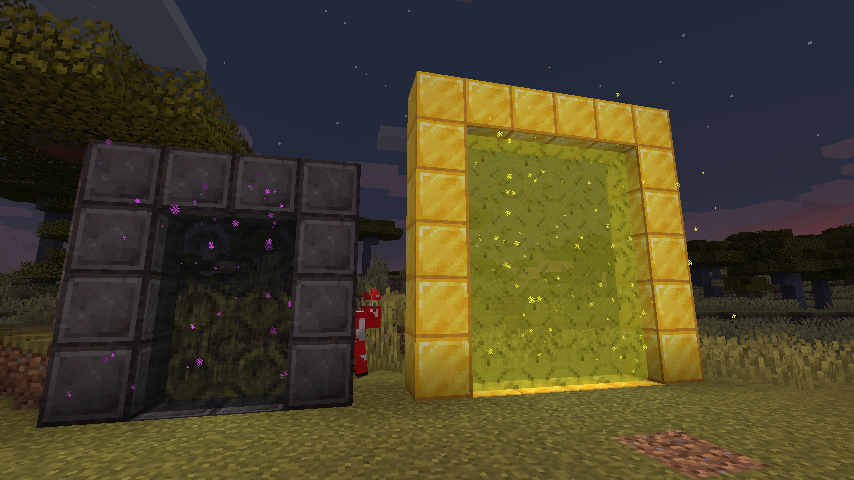
使用 CustomPortalApi 通过数据包创建自定义传送门。
在你的数据包中创建一个名为 "portals" 的文件夹,这是放置所有自定义传送门文件的地方。只要没有重复的框架方块,就没有允许传送门数量的限制。
以下是一个示例文件: stoneendportal.json
 {
    "block": "minecraft:stone",
    "dim": "minecraft:the_end",
    "r": 66,
    "g": 135,
    "b": 245
 }
- block: 用于制作框架的方块。
- dim: 要前往的维度 ID
- r, g, b: 为传送门着色的颜色值
还有一些可选参数:
- ignitionType: 使用的点火类型。选项有 "BLOCK"(方块)、"FLUID"(流体)、"ITEM"(物品)。
- ignitionSource: 用于点火的方块/物品/流体的 ID,目前仅支持方块 fire : "minecraft:fire"。所有物品和流体均受支持。
- returnDim: 返回的目标维度,允许指定除主世界以外的其他位置作为返回点
就是这样!传送门将像原版下界传送门一样运作。
Datapack Portals
Create custom portals using CustomPortalApi with datapacks.
Inside your datapack create a "portals" folder, this is where you'll put all your custom portals. There is no set limit of allowed portals, as long as there aren't any duplicate frame blocks.
Here is an example file: stoneendportal.json
 {
    "block": "minecraft:stone",
    "dim": "minecraft:the_end",
    "r": 66,
    "g": 135,
    "b": 245
 }
- block: the block used for the frame.
- dim: the dim id to travel to
- r, g, b: the color to tint the portal
There are also some optional arguments
- ignitionType: the type of ignition to use. Options are "BLOCK", "FLUID", "ITEM".
- ignitionSource: the id for block/item/fluid for ignition of the portal, the only supported block being fire : "minecraft:fire". All items and fluids are supported.
- returnDim: the dimmension to return to, allows for specifying a location other than the overworld to return to
That is all! Portals will function exactly like vanilla nether portals do

下载 Datapack Portals
下载 Datapack Portals
下载 Datapack Portals
下载 Datapack Portals
下载 Datapack Portals
下载 Datapack Portals
下载 Datapack Portals
下载 Datapack Portals
下载 Datapack Portals
下载 Datapack Portals
更新至 1.21
关于这个资源的讨论、问题反馈与使用心得
还没有讨论,来发第一帖吧
你是这个资源的作者?登录后可认领此资源。
相似资源
 模组

显示你正在注视的方块的信息。(适用于 Minecraft 1.16+ 的 Hwyla/Waila 分支)
 模组
在游戏画面角落显示附近世界地形、玩家、生物和实体的地图。可创建路径点,帮助你找到标记过的位置。
 模组
使用 JavaScript 编辑配方、添加自定义物品、编写世界事件!
 模组

查看物品与配方
 模组
AE2:一款流行的自动化与存储模组
 模组
那是什么?一个 Waila/Hwyla 的分支。
评论 0
登录后参与评分
还没有评论,来抢沙发吧