
⚠️ 重要提示:这是一个配套模组!
请注意:本模组是 MineBackup 桌面应用程序 或 FolderRewind 的配套组件,无法独立运行。您必须先下载并运行主应用程序,此模组才能正常工作。
此外,为了实现正确的进程间通信,您的电脑上必须安装 KnotLink 服务器。点击下载
例外情况:Linux/MacOS 用户无需安装 KnotLink 服务器。
概述
这款轻量级模组在游戏死亡界面添加了一个按钮:“回溯至 X 分钟前”。点击它可以让整个世界回退到之前的某个时间点。
作者创建此模组的原因是,原版“保留经验/物品”游戏规则往往令人纠结:开启它会让游戏过于简单,而关闭它对新玩家来说又可能过于严苛。
通过合理调整回溯时间限制和信息显示,本模组可以在不削弱生存的压力与紧迫感的前提下,减少高风险探索、Boss 战和硬核模式下的挫败感。
安装与使用
-
下载主程序:
- 请确保您已从上述链接(或项目页面)下载了 MineBackup(第一代)或 FolderRewind(第二代),并确保它们能在您的电脑上正常运行。
-
下载 MineRewind 插件(仅限第二代):
- 如果您使用的是 FolderRewind(第二代),建议下载并安装 MineRewind 插件,并创建一个 Minecraft Saves 配置类型,而不是使用“默认”类型。
- 您可以从 GitHub Releases 或提供的云存储链接中下载此插件。
- 第一代(MineBackup)不需要此插件。
-
安装 KnotLink 服务器(仅限 Windows):
- 为了实现进程间通信,Windows 用户必须安装 KnotLink Server。
- 从 GitHub Releases 或云存储中下载。
- Linux/macOS 用户可以跳过此步骤。
-
在主程序中启动 KnotLink 服务:
- MineBackup: 默认启用。
- FolderRewind: 默认禁用。如果使用此程序,您必须在设置中手动启用它。
-
下载本模组:
- 在 Modrinth 或其他模组页面上找到与您主程序版本匹配的文件。
-
安装模组:
- 单人/LAN: 将下载的
.jar文件放入 Minecraft 客户端的mods文件夹中。 - 专用服务器: 安装到服务器的
mods文件夹中。连接服务器的玩家可选地仅安装客户端部分。
- 单人/LAN: 将下载的
-
同时运行:
- 启动您的 Minecraft 游戏或服务器。
- 关键: 为了正常工作,请确保在您游玩时,MineBackup/FolderRewind 主程序已在后台运行。
配置设置
除了上述步骤外,您还必须将存档文件添加到主程序的管理列表中。
- 请参阅:第一代配置指南 / 第二代配置指南。
- 对于第二代用户,Bilibili 上也有教程视频。
- 有关为何采用这种“复杂”方法的原因,请参阅底部的常见问题解答。
优化配置
由于本模组的特定用途,您必须调整主程序的配置以优化游戏体验。作者无法考虑到所有的整合包或电脑配置,因此请根据以下建议进行调整:
- 备份模式:
- “覆盖备份”: 性能最佳。但是,它只保留一个备份(即用于死亡后“回溯”的那个)。
- “智能备份”(增量): 性能次佳。如果您希望在死亡回溯点之外拥有额外的备份以防意外,请使用此选项。警告: 如果与“安全删除”结合使用,会有注意事项(见下文)。
- “完整备份”: 完全备份您的存档。占用更多空间,但更让人放心。
- 压缩级别: 决定备份的压缩程度。较高级别会消耗更多 CPU/RAM 并影响游戏性能。如果您仅将此模组用于死亡回溯,请设置为 0(仅存储) 以最小化影响并保持流畅的游戏体验。
- 限制备份数量: 本模组会定期向主程序发送备份请求。限制备份数量以避免过多的磁盘占用。
- 注意: 如果在启用 “智能备份” 的同时启用了 “安全删除”,删除旧备份将触发备份链(全量-智能-智能-全量...)的 “合并” 操作,这会消耗额外的 CPU/RAM。
- 注意: 如果使用 “覆盖备份”,它只会更新最新的备份,不会创建新备份,因此不会触发数量限制。
- 恢复前备份: 让您有机会后悔这次回溯。默认禁用。
- 安全恢复: 请勿禁用此项。
- 备份黑名单 & 恢复白名单: 重要! 将 Voxy 和 Distant Horizons (DH) 相关文件添加到此列表中。这些模组占用大量空间,但在此功能中无需备份。
- CPU 线程数: 默认的
0会使用所有可用的 CPU 线程,这可能会与游戏争抢资源导致卡顿。请将其调整为合适的值。 - 以低优先级运行: 启用此项。
版本推荐:
- 如果您只想使用此模组,第一代(MineBackup,约 3MB) 就足够了。请确保使用 1.14.0 或更高版本。
- 第二代(FolderRewind,约 60+MB) 在 1.6.0 版本中仍有性能优化空间。如果您看到更新 1.6.1,请改用该版本。
配置选项
可通过版本文件夹中的 config/deathrewind.properties 进行编辑(右键 -> 用记事本打开)。
intervalMinutes: 自动创建回溯点的时间间隔(以分钟为单位)。- 注意: 当你点击“回溯”时,它并不会严格回退到
intervalMinutes分钟前。它会回退到 0 ~ intervalMinutes 之间的一个随机时间点。
- 注意: 当你点击“回溯”时,它并不会严格回退到
showBackupInfo: 是否在聊天栏中显示“回溯点创建成功/失败”的消息。forceDeathRewind: 启用“强制回溯模式”。启用后,死亡界面仅允许点击回溯按钮。
截图
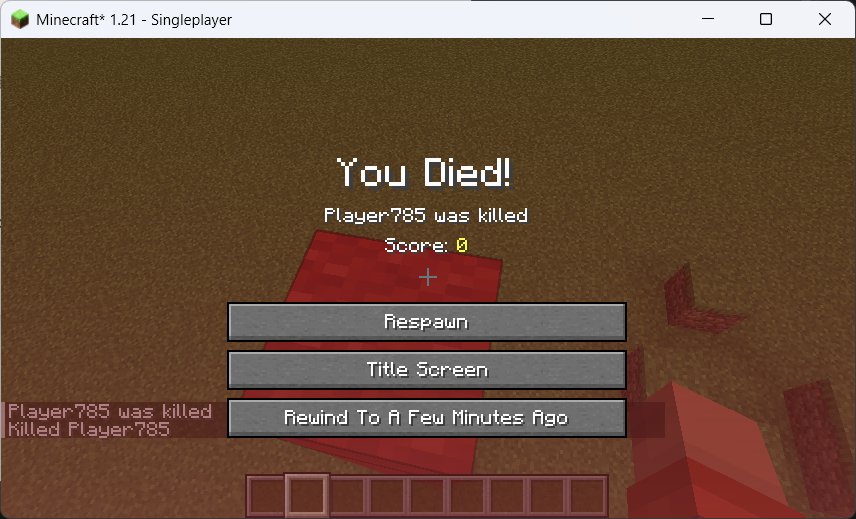
常见问题
Q: 为什么不直接将备份/恢复逻辑内置到模组中?为什么要使用外部程序? A: 从介绍中可以看出,该逻辑并不简单。使用外部程序具有以下几个好处:
- 更好的性能: 将对游戏本身的影响降至最低(稳定性、兼容性等)。Gen 1 主程序使用 C/C++ 和 7-Zip 核心,能够实现比模组更多的优化。
- 更易于维护: 如果备份/恢复功能出现问题,我只需要更新主程序即可,无需单独修复每个关联的模组。
- 更易于版本适配: 此模组处理的任务非常简单,使得版本适配变得极其容易,从而减少开发者的工作量。
Q: 未来是否有可能移除对外部程序的依赖? A: 目前暂无相关计划,但欢迎大家开发独立的“死亡回溯”版本。这一决定主要是出于开发精力有限的考虑。
Q: 对多人游戏的支持情况如何? A: 技术上,在本地局域网中,如果一名玩家触发了死亡回溯,整个存档都会回退到过去,这显然不太理想。目前不支持专用服务器。
Q: 未来计划? A: 进一步完善主程序的远程命令功能,以支持“精确回溯”,而非当前的随机 0~intervalMinutes 值。探索多人游戏支持的可行性。
⚠️ Important: This is a Companion Mod!
Please note: This mod is a companion component for the MineBackup desktop application or FolderRewind and cannot function independently. You must first download and run the main application for this mod to work properly.
Additionally, for proper inter-process communication, the KnotLink server must be installed on your computer. Click Here to Download
Exception:Linux/MacOS users do not need to install the KnotLink server.
Overview
This lightweight mod adds a button to the game's death screen: "Rewind to X Minutes Ago". Clicking it allows the entire world to revert to a previous point in time.
The author created this mod because the vanilla "Keep Inventory" gamerule is often a dilemma: enabling it makes the game too easy, while disabling it can be too punishing for new players.
With this mod, by reasonably adjusting the rewind time limit and information display, you can reduce frustration during high-risk exploration, boss fights, and hardcore gameplay, without losing the pressure and stakes of survival.
Installation & Usage
-
Download the Main Program:
- Ensure you have downloaded MineBackup (Gen 1) or FolderRewind (Gen 2) from the links provided above (or the project page) and that it runs correctly on your computer.
-
Download MineRewind Plugin (Gen 2 Only):
- If you are using FolderRewind (Gen 2), it is recommended to download and install the MineRewind Plugin and create a Minecraft Saves configuration type instead of "Default".
- You can download this plugin from GitHub Releases or the provided cloud storage links.
- Gen 1 (MineBackup) does not require this plugin.
-
Install KnotLink Server (Windows Only):
- To enable inter-process communication, Windows users must install the KnotLink Server.
- Download from GitHub Releases or cloud storage.
- Linux/macOS users can skip this step.
-
Start KnotLink Service in Main Program:
- MineBackup: Enabled by default.
- FolderRewind: Disabled by default. If using this, you must manually enable it in the settings.
-
Download This Mod:
- Find the file matching your main program version on Modrinth or other mod pages.
-
Install the Mod:
- Singleplayer/LAN: Place the downloaded
.jarfile into the Minecraft client'smodsfolder. - Dedicated Server: Install into the server's
modsfolder. Client-side installation is optional for players connecting to the server.
- Singleplayer/LAN: Place the downloaded
-
Run Simultaneously:
- Launch your Minecraft game or server.
- Crucial: To function correctly, ensure the MineBackup/FolderRewind main program is running in the background while you play.
Configuration Setup
In addition to the steps above, you must add your save file to the main program's management list.
- See: Gen 1 Configuration Guide / Gen 2 Configuration Guide.
- For Gen 2 users, there are also tutorial videos available on Bilibili.
- See the FAQ at the bottom for why this "complex" method is used.
Optimizing Configuration
Due to the specific use case of this mod, you must adjust the main program's configuration to optimize the gaming experience. The author cannot account for every modpack or PC configuration, so please adjust based on the following:
- Backup Mode:
- "Overwrite Backup": Best performance. However, it only keeps one backup (the one used for "rewind" upon death).
- "Smart Backup" (Incremental): Second best performance. Use this if you want extra backups in case of accidents besides the death rewind point. WARNING: There is a catch when combined with "Safe Delete" (see below).
- "Full Backup": Backs up your save completely. Takes more space but provides peace of mind.
- Compression Level: Determines how much backups are compressed. Higher levels use more CPU/RAM and impact game performance. If you only use this mod for death rewind, set this to 0 (Store Only) for minimal impact and smooth gameplay.
- Limit Backup Count: This mod regularly sends backup requests to the main program. Limit the backup count to avoid excessive disk usage.
- Note: If "Safe Delete" is enabled with "Smart Backup", deleting old backups will trigger a "Merge" operation on the backup chain (Full-Smart-Smart-Full...), which consumes extra CPU/RAM.
- Note: If using "Overwrite Backup", it only updates the latest backup and does not create new ones, so it will not trigger the count limit.
- Backup Before Restore: Gives you a chance to regret the rewind. Disabled by default.
- Safe Restore: Do not disable this.
- Backup Blacklist & Restore Whitelist: Important! Add files related to Voxy and Distant Horizons (DH) to these lists. These mods consume huge amounts of space but do not need to be backed up for this functionality.
- CPU Threads: The default
0uses all available CPU threads, which may compete with the game and cause lag. Please adjust this to a suitable value. - Run with Low Priority: Enable this.
Version Recommendation:
- If you only want to use this mod, Gen 1 (MineBackup, ~3MB) is sufficient. Ensure you use version 1.14.0 or higher.
- Gen 2 (FolderRewind, ~60+MB) still has performance optimization room in version 1.6.0. If you see update 1.6.1, please use that instead.
Configuration Options
Editable via config/deathrewind.properties in your version folder (Right-click -> Open with Notepad).
intervalMinutes: Interval for automatically creating rewind points (in minutes).- Note: When you click "Rewind", it does not strictly go back
intervalMinutes. It rewinds to a random point between 0 ~ intervalMinutes.
- Note: When you click "Rewind", it does not strictly go back
showBackupInfo: Whether to display "Rewind Point Created Success/Failure" messages in the chat bar.forceDeathRewind: Enable "Force Rewind Mode". When enabled, the death screen only allows clicking the Rewind button.
Screenshots
FAQ
Q: Why not build the backup/restore logic directly into the mod? Why use an external program? A: As seen from the introduction, this logic is not simple. Using an external program offers several benefits:
- Better Performance: Minimizes negative impact on the game itself (stability, compatibility, etc.). The Gen 1 main program uses C/C++ and 7-Zip core, allowing for more optimizations than a mod can handle.
- Easier Maintenance: If backup/restore functions have issues, I only need to update the main program. I don't need to fix every linked mod individually.
- Easier Version Adaptation: This mod handles very simple tasks, making version adaptation extremely easy and reducing developer workload.
Q: Is it possible to remove the dependency on the external program in the future? A: There are no current plans, but everyone is welcome to develop an independent "Death Rewind" version. This decision was made primarily due to limited development energy.
Q: How is multiplayer support? A: Technically, in local LAN, if one player triggers a death rewind, the entire save reverts to the past, which is obviously not ideal. Currently, dedicated servers are not supported.
Q: Future Plans? A: Further improve the main program's remote command functionality to support "Precise Rewind" instead of the random 0~intervalMinutes value. Exploring feasibility for multiplayer support.

下载 Death Rewind
需要联机服务器吗?
稳定流畅、一键部署,几分钟即可和朋友联机开服
最低仅需 8 元/月 即可畅快联机
下载 Death Rewind
下载 Death Rewind
下载 Death Rewind
需要联机服务器吗?
稳定流畅、一键部署,几分钟即可和朋友联机开服
最低仅需 8 元/月 即可畅快联机
下载 Death Rewind
需要联机服务器吗?
稳定流畅、一键部署,几分钟即可和朋友联机开服
最低仅需 8 元/月 即可畅快联机
下载 Death Rewind
需要联机服务器吗?
稳定流畅、一键部署,几分钟即可和朋友联机开服
最低仅需 8 元/月 即可畅快联机
下载 Death Rewind
需要联机服务器吗?
稳定流畅、一键部署,几分钟即可和朋友联机开服
最低仅需 8 元/月 即可畅快联机
下载 Death Rewind
下载 Death Rewind
需要联机服务器吗?
稳定流畅、一键部署,几分钟即可和朋友联机开服
最低仅需 8 元/月 即可畅快联机
下载 Death Rewind
需要联机服务器吗?
稳定流畅、一键部署,几分钟即可和朋友联机开服
最低仅需 8 元/月 即可畅快联机
已修复的 Bug
关于这个资源的讨论、问题反馈与使用心得
还没有讨论,来发第一帖吧
你是这个资源的作者?登录后可认领此资源。
相似资源
 模组

显示你正在注视的方块的信息。(适用于 Minecraft 1.16+ 的 Hwyla/Waila 分支)
 模组
在游戏画面角落显示附近世界地形、玩家、生物和实体的地图。可创建路径点,帮助你找到标记过的位置。
 模组
使用 JavaScript 编辑配方、添加自定义物品、编写世界事件!
 模组

查看物品与配方
 模组
AE2:一款流行的自动化与存储模组
 模组
那是什么?一个 Waila/Hwyla 的分支。
评论 0
登录后参与评分
还没有评论,来抢沙发吧