


你是否曾感到恼火,因为在笔记本电脑上仅仅为了打开 F3 菜单就需要按下 FN + F3?
你是否曾想过重新绑定与 F3 菜单相关的任何按键,却因它们被硬编码而无法实现?
我也是这么想的!
Debug Keybind(解决方案)
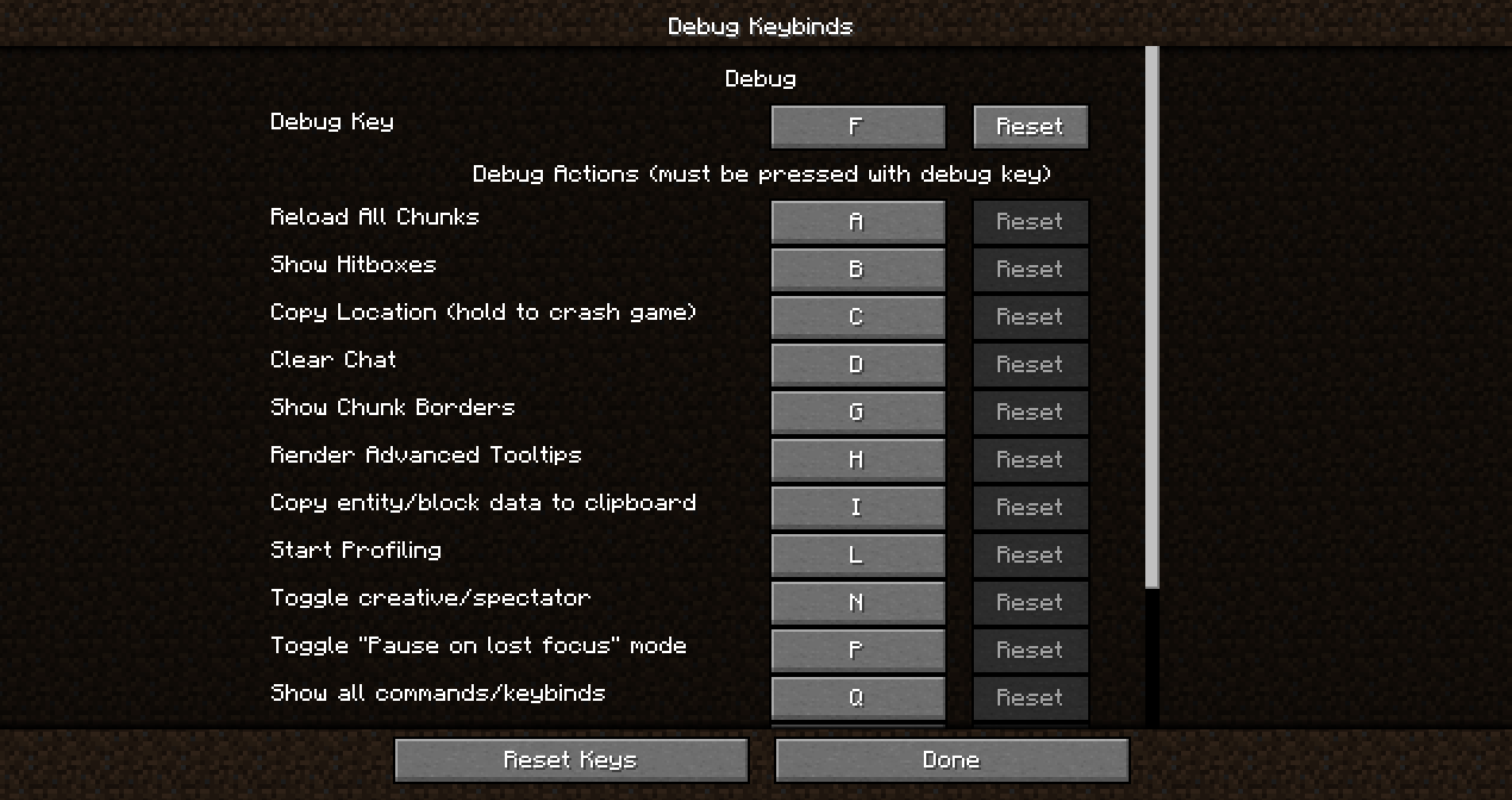
Debug Keybind 是一个模组,允许你重新绑定(之前)被硬编码的 F3 菜单及其所有操作。
不喜欢 F3+Q?你可以像普通按键绑定一样轻松重新绑定它。
不喜欢 F3+G?也可以以完全相同的方式进行重新绑定。
只需打开调试按键绑定菜单,即可开始使用!
如何打开调试按键绑定菜单?
打开菜单非常简单。你可以从你的加载器的配置屏幕中打开它,也可以通过位于普通按键绑定按钮旁边的便捷按钮来打开!
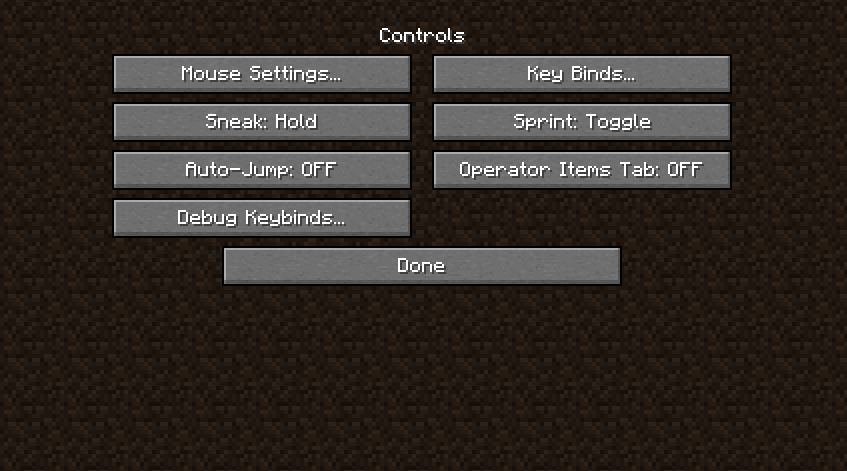
功能
- 将键盘上的任意按键绑定为激活单个调试动作或组合键。
- 通过将按键置于指尖附近来提升游戏便利性。
- 改善具有特定键盘布局或偏好的用户的可访问性。
安装/依赖项
此模组需要 BoxLib,这是一个由我开发的客户端库模组。
- 安装 Minecraft Forge/Fabric/Neoforge: 下载并安装适合你 Minecraft 版本的模组加载器。
- 下载模组: 下载适用于你特定模组加载器和 Minecraft 版本的最新 Debug Keybind 版本。
- 下载 BoxLib: 下载适用于你特定模组加载器和 Minecraft 版本的最新 BoxLib 版本。
- 放置模组 jar 文件: 将下载的 jar 文件放入你的 Minecraft mods 文件夹。该文件夹的位置因操作系统而异。
Fabric 依赖项
推荐使用 Mod Menu 进行配置。
Forge/NeoForge 依赖项
此模组需要 BoxLib,这是一个由我开发的客户端库模组。
贡献
我们欢迎贡献!请随时通过 GitHub 仓库 提交问题或拉取请求。你的意见有助于模组的改进和发展。
翻译
我们欢迎翻译!如果你有兴趣翻译此模组,请找到 本地化文件 并提交拉取请求。你的贡献将使更多全球用户能够使用该模组。
支持
如果遇到任何问题,请在 GitHub 仓库上 提交 issue。
构建
如果你想在自己机器上构建此模组,请按照以下步骤操作。
- 从 GitHub 下载源代码(Code -> Download zip)
- 将 zip 文件解压到本地机器,并打开文件夹。
- 在该文件夹中打开终端提示符
- 运行命令 "gradlew build"
- Fabric 构建结果位于 "fabric/build/libs"
- Forge 构建结果位于 "forge/build/libs"
Ever felt annoyed that you needed to press FN + F3 JUST to open the F3 menu on a laptop?
Have you ever wanted to REBIND any of the keys related to the F3 menu but couldn't because they're HARD-CODED?
WELL ME TOO!
Debug Keybind (the solution)
Debug keybind is a mod that allows you to rebind the (previously) hard-coded F3 menu and all of it's actions.
Didn't like F3+Q? You can easily rebind it as if it was a normal keybind. Don't like F3+G? It can be rebound in the exact same way.
Just open the debug keybinds menu, and you'll be on your way!
How do I open the Debug Keybinds menu?
Opening the menu is super simple. You can open it from your modloader's Config Screen, but it can also be opened with a conveniently placed button placed next to the normal keybinds button!
Features
- Bind any key on your keyboard to activate individual debug actions or combinations.
- Enhance gameplay convenience by placing these keys at your fingertips.
- Improve accessibility for users with specific keyboard layouts or preferences.
Installation/Dependencies
This mod requires BoxLib a Client-side library mod developed by me.
- Install Minecraft Forge/Fabric/Neoforge: Download and install the appropriate modloader for your Minecraft version.
- Download the mod: Download the latest release of Debug Keybind for your specific modloader and Minecraft version
- Download BoxLib: Download the latest release of BoxLib for your specific modloader and Minecaft version
- Place the mod jars: Drop the downloaded jar files into your Minecraft mods folder. The location of this folder varies depending on your operating system.
Fabric Dependencies
Mod Menu is recommended for configuration purposes.
Forge/NeoForge Dependencies
This mod requires BoxLib a Client-side library mod developed by me.
Contributing
We encourage contributions! Don't hesitate to open issues or pull requests through the GitHub Repository. Your input helps the mod improve and evolve.
Translations
We welcome translations! If you're interested in translating this mod, please locate the localization files and submit a pull request. Your contributions help make the mod accessible to more users worldwide.
Support
If you encounter any issues, please open an issue on the GitHub repository.
Building
If you'd like to build this mod on your own machine, follow these steps.
- Download the source code from GitHub (Code -> Download zip)
- Extract the zip file onto your local machine, and open the folder.
- Open a terminal prompt in said folder
- Run the command "gradlew build"
- The fabric build will be in "fabric/build/libs"
- The forge build will be in "forge/build/libs"

下载 Debug Keybind
下载 Debug Keybind
下载 Debug Keybind
需要联机服务器吗?
稳定流畅、一键部署,几分钟即可和朋友联机开服
最低仅需 8 元/月 即可畅快联机
下载 Debug Keybind
需要联机服务器吗?
稳定流畅、一键部署,几分钟即可和朋友联机开服
最低仅需 8 元/月 即可畅快联机
下载 Debug Keybind
需要联机服务器吗?
稳定流畅、一键部署,几分钟即可和朋友联机开服
最低仅需 8 元/月 即可畅快联机
下载 Debug Keybind
需要联机服务器吗?
稳定流畅、一键部署,几分钟即可和朋友联机开服
最低仅需 8 元/月 即可畅快联机
下载 Debug Keybind
下载 Debug Keybind
需要联机服务器吗?
稳定流畅、一键部署,几分钟即可和朋友联机开服
最低仅需 8 元/月 即可畅快联机
下载 Debug Keybind
下载 Debug Keybind
更新内容
- 更新至 1.21.10
- 修复了默认按键绑定的问题
关于这个资源的讨论、问题反馈与使用心得
还没有讨论,来发第一帖吧
你是这个资源的作者?登录后可认领此资源。
相似资源
 模组

一个用于收集生物掉落物的多区块模组。
 模组

显示你正在注视的方块的信息。(适用于 Minecraft 1.16+ 的 Hwyla/Waila 分支)
 模组

查看物品与配方
 模组
在游戏画面角落显示附近世界地形、玩家、生物和实体的地图。可创建路径点,帮助你找到标记过的位置。
 模组
使用 JavaScript 编辑配方、添加自定义物品、编写世界事件!
 模组
添加区块认领和玩家组队功能,并与 Xaero's Minimap 和 World Map 集成
评论 0
登录后参与评分
还没有评论,来抢沙发吧