Debug GUI Scale:一款 Fabric 模组,允许玩家独立调整调试菜单的缩放比例!
Debug GUI Scale 是一款 Fabric 模组,允许玩家在不影响游戏其他界面元素的情况下,独立调整调试菜单的缩放比例。根据你的喜好自定义调试菜单的大小!
此模组依赖于库模组 Roselib!
2026年9月19日公告:
DebugGUIScale 可能不会更新到 Minecraft 26.2 之后的版本。这是因为 Mojang 在 26.3 Snapshot 4 中添加了此项完全相同的功能,使得 DebugGUIScale 不再适用或有用……此外,也仅仅是因为缺乏可用的时间和资源。
在我将所有项目迁移至 Stonecutter 的过程中,DebugGUIScale 将在某个时间点移植到较低版本或其他加载器。
感谢大家在使用 DebugGUIScale 期间的支持!
配置说明:
与 RemoveAmbientFOV 类似,该模组直接集成到 Minecraft 的“辅助功能选项”菜单中,提供两个滑块:
- 调试 GUI 缩放 (Debug GUI Scale)
- “始终”覆盖层缩放 ("Always" Overlay Scale)
每个选项都可以独立启用或禁用,并保存到一个简单的 JSON 配置文件中:
.minecraft/config/DebugGUIScale.json

ModMenu 配置(旧版 - 点击展开)
ModMenu 已不再是修改 DebugGUIScale 的必要条件,现在可以使用在 Rose Bush 1.3.1 中引入的原版选项 API。
在未来的版本(游戏版本丢弃后)可能会放弃对 ModMenu 的支持,但 DebugGUIScale 1.2 仍支持 ModMenu 并支持新增的值。
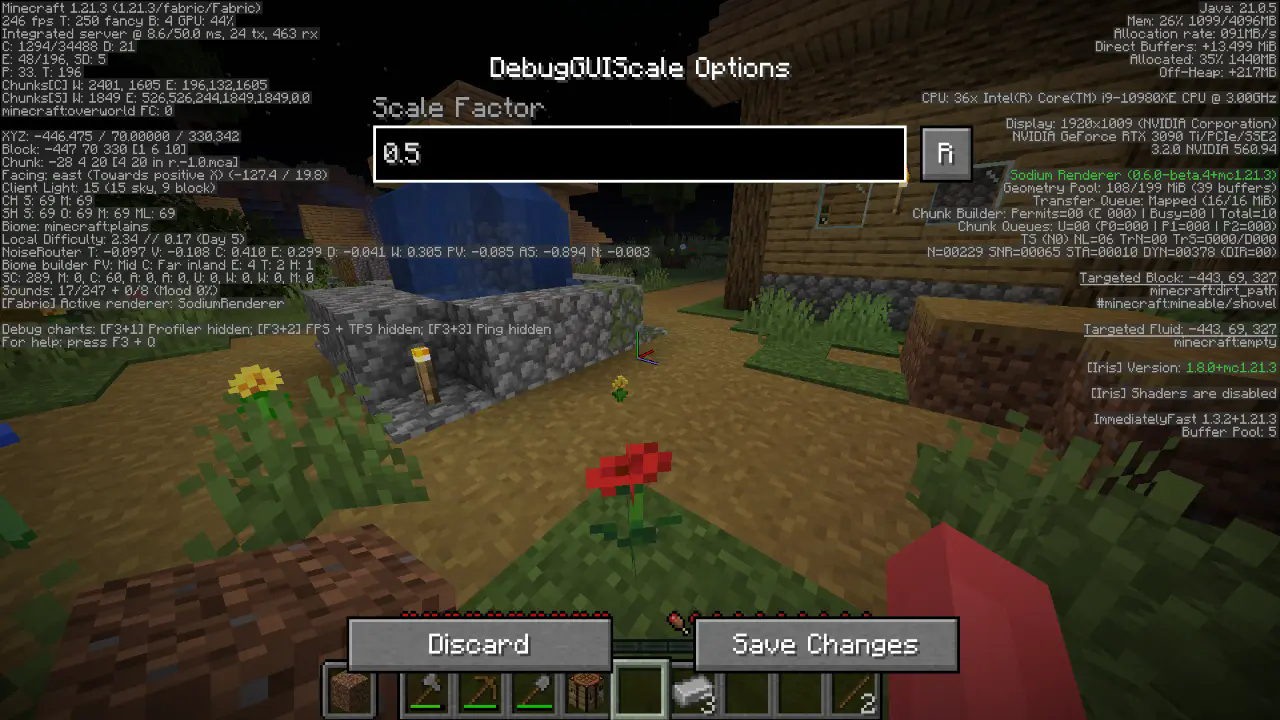
所有选项都很直观,尽情设置吧!
JSON 使用说明(适用于旧版):
快速文档 JSON:
{
"scale": 0.95 // 这是缩放比例,是的,它支持最多两位小数的精度。
}
Debug GUI Scale: A Fabric mod that allows players to modify the Debug menu's scaling independently from the GUI Scale!
Debug GUI Scale is a Fabric mod that allows players to adjust the Debug menu's scale independently of the GUI Scale. Customize the Debug menu's size to your preference without affecting the rest of your game's interface!
This mod depends on the library mod Roselib!
ANNOUNCEMENT 9/19/2026:
DebugGUIScale will likely not be updated to Minecraft versions past 26.2, This is because Mojang has added THIS exact feature in 26.3 Snapshot 4, Making DebugGUIScale no longer applicable or useful... and simply for the lack of available time and resources.
DebugGUIScale will be ported to lower versions or loaders at some point as i migrate all of my projects over to Stonecutter.
Thanks all for using DebugGUIScale while it lasted!
Configuration:
Simmiliarly to RemoveAmbientFOV, The mod integrates directly into Minecraft’s Accessibility Options menu, exposing two sliders:
- Debug GUI Scale
- "Always" Overlay Scale"
Each option can be enabled or disabled independently and is saved to a simple JSON config file:
.minecraft/config/DebugGUIScale.json

ModMenu Configuration (Legacy - Click to expand)
ModMenu is no longer required to modify DebugGUIScale in favor of the Vanilla Options API Introduced in Rose Bush 1.3.1
Support for ModMenu might be dropped in a later release (game drop), DebugGUIScale 1.2 still supports ModMenu and does support the new values added.

All options should be straightforward, so go nuts!
JSON Instructions (for legacy versions):
Quick Documentation JSON:
{
"scale": 0.95 // this is the scale, yes it supports decimals up to 2 digits precision.
}
下载 DebugGUIScale
下载 DebugGUIScale
下载 DebugGUIScale
下载 DebugGUIScale
下载 DebugGUIScale
需要联机服务器吗?
稳定流畅、一键部署,几分钟即可和朋友联机开服
最低仅需 8 元/月 即可畅快联机
下载 DebugGUIScale
需要联机服务器吗?
稳定流畅、一键部署,几分钟即可和朋友联机开服
最低仅需 8 元/月 即可畅快联机
关于这个资源的讨论、问题反馈与使用心得
还没有讨论,来发第一帖吧
你是这个资源的作者?登录后可认领此资源。
相似资源
模组
显示你正在注视的方块的信息。(适用于 Minecraft 1.16+ 的 Hwyla/Waila 分支)
模组
查看物品与配方
模组
原版世界生成优化模组
模组
在游戏画面角落显示附近世界地形、玩家、生物和实体的地图。可创建路径点,帮助你找到标记过的位置。
模组
使用 JavaScript 编辑配方、添加自定义物品、编写世界事件!
模组
缓冲的原始输入和线程化的事件轮询
评论 0
登录后参与评分
还没有评论,来抢沙发吧