
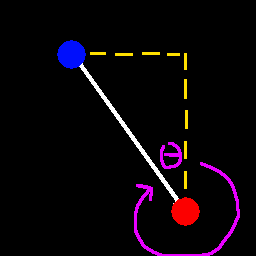
在游戏内菜单(即暂停菜单)中(包括单人游戏和多人游戏),右下角有两个文本输入框和一个文本标签。左侧的文本输入框用于输入目标 X 坐标,右侧的文本输入框用于输入目标 Z 坐标。当同时输入 X 和 Z 坐标后,系统会计算从你当前位置到该目标点的方向。文本标签会显示你应该面向并沿此方向移动的偏航角(Yaw),以便以最短的几何路径到达目标位置,因为直线是到达任何地方的最快方式。
我厌倦了手动进行三角函数计算,因此制作了一个简单的模组来自动完成这些计算。你不再需要猜测方向,它为你提供了直线路径。
**在需要长途旅行的无政府服务器(anarchy servers)上非常有用。**只需输入你想前往目的地的 X 和 Z 坐标,然后打开调试菜单或支持显示偏航角的模组菜单,调整你的视角以匹配显示的偏航角,然后向前移动即可。
你是这个资源的作者?登录后可认领此资源。
相似资源
 模组

Woot Revived
pharuxtan
一个用于收集生物掉落物的多区块模组。
生物科技
349
 模组

玉Jade ?
Snownee
显示你正在注视的方块的信息。(适用于 Minecraft 1.16+ 的 Hwyla/Waila 分支)
实用前置
339
 模组
KubeJS
Lat
使用 JavaScript 编辑配方、添加自定义物品、编写世界事件!
前置实用
239
 模组

物品管理器Just Enough Items (JEI)
mezz
查看物品与配方
前置实用
239
 模组
Xaero的小地图
thexaero
在游戏画面角落显示附近世界地形、玩家、生物和实体的地图。可创建路径点,帮助你找到标记过的位置。
冒险交通
238
 模组
Applied Energistics 2
shartte
AE2:一款流行的自动化与存储模组
存储科技
165
评论 0
登录后参与评分
还没有评论,来抢沙发吧