
版本 4.X.X
对于该模组的旧版本,请查看 wiki。
本模组允许授予或锁定对维度的访问权限。
如果某个维度被锁定,你可以站在通往该维度的传送门前,但无法切换到该维度。
如果某个维度被授予访问权限,你可以站在通往该维度的传送门前并切换到该维度。
自 Minecraft 1.19.1 起,本模组需要在服务器端和客户端都安装。
对于 1.19 及更早版本,本模组仅需在服务器端安装,但也可以在客户端使用。
想和朋友一起玩,但需要搭建服务器?不知道如何设置?直接租用已配置好的服务器吧!
点击上方的图片,选择一个套餐(建议至少 6 GB),
使用我的代码 agent 首月可享受 25% 的折扣,并与好友尽情游戏!
支持
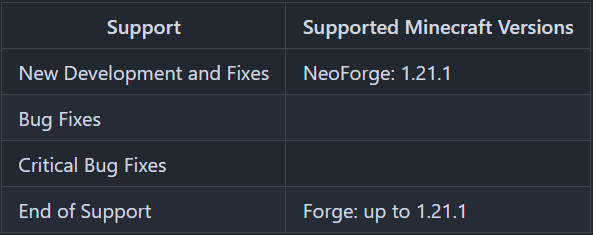
未发布该模组的 Minecraft 版本不受支持。
你可以在 这里 找到文本版本的支持列表。
授予 / 锁定
有一个全局标志、一个白名单和一个黑名单,用于管理哪些玩家可以访问某个维度。
标志 (Flag)
可以为每个维度设置其访问权限是授予还是锁定。
如果玩家不在该维度的白名单或黑名单中,则使用此标志来定义玩家是否可以传送到该维度。
对于非玩家实体,此标志用于定义它们是否可以传送到该维度。
白名单 (Whitelist)
仅当维度访问被锁定时,白名单才生效。
在白名单上的玩家可以传送到该维度,即使该维度的访问被锁定。
如果维度访问被锁定且白名单处于活动状态,只有玩家和其他实体不能传送到该维度。
黑名单 (Blacklist)
仅当维度访问被授予时,黑名单才生效。
在黑名单上的玩家无法传送到该维度,即使该维度的访问被授予。
服务器配置
配置文件位于“世界”文件夹中的 “serverconfig” 文件夹内,名为 “dimension_access_manager-server.toml”。服务器端的“世界”文件夹名称在 “server.properties” 文件中设置;客户端则是世界列表中的世界/存档名称,位于 “.minecraft” 文件夹下的 “saves” 文件夹中。
- default_dimension_access_type
定义新维度默认是 GRANTED(授予)还是 LOCKED(锁定)
默认值 = "GRANTED"
维度的访问类型在首次生成该维度时设定。
即:应在预生成维度之前设置此值。 - dimension_command_permission_level
定义运行 /dimension 命令所需的权限等级
默认值 = 3
可用值 = 0, 1, 2, 3, 4
默认情况下,只有可以更改白名单的操作员才能更改维度权限。
如果命令需要通过命令方块(例如 HQM)执行,则权限等级必须为 2 或更低。
有关 Minecraft 权限等级的更多详细信息,请参阅:
命令
- /dimensions status
显示所有维度的状态,即它们是已授予还是已锁定。 - /dimensions default defaultDimensionAccessType
显示配置选项 “default_dimension_access_type” 的值。 - /dimensions default defaultDimensionAccessType <dimensionAccessType>
设置配置选项 “default_dimension_access_type” 的值。
dimensionAccessType 的值:GRANTED 或 LOCKED - /dimension <dimension> access status
显示选定维度的状态,即它是已授予还是已锁定。 - /dimension <dimension> access grant
授予选定维度的访问权限。 - /dimension <dimension> access lock
锁定选定维度的访问权限。 - /dimension <dimension> players list
显示选定维度的白名单和黑名单上的玩家。 - /dimension <dimension> players whitelist list
显示选定维度的白名单上的玩家。 - /dimension <dimension> players whitelist add <targets>
将玩家 (<targets>) 添加到选定维度的白名单中。 - /dimension <dimension> players whitelist remove <targets>
从选定维度的白名单中移除玩家 (<targets>)。 - /dimension <dimension> players blacklist list
显示选定维度的黑名单上的玩家。 - /dimension <dimension> players blacklist add <targets>
将玩家 (<targets>) 添加到选定维度的黑名单中。 - /dimension <dimension> players blacklist remove <targets>
从选定维度的黑名单中移除玩家 (<targets>)。
感谢 Muse31 提供徽标。
你可以在非商业整合包中使用此模组,无需事先询问。
你可以在 CurseForge 和 Modrinth 上找到我制作的其他模组。

Version 4.X.X
For older versions of the mod, check the wiki.
This Mod adds, that access to dimensions can be granted or locked.
If a dimension is locked, you can stand in the portal to this dimension, but don't change to this dimension.
If a dimension is granted, you can stand in the portal to this dimension and change to this dimension.
Since Minecraft 1.19.1 the Mod is needed on the server and client side.
For 1.19 and before, the Mod is only needed on the server side, but can also be used on the client side.
You need a server to play with friends? You don't know how to set up one? Just rent an already configured server!
Click on the picture above, select a plan (with recommended at least 6 GB),
use my code agent to get 25% off your first month and enjoy playing with your friends!
Support
Minecraft versions, for which the mod is not released, are not supported.
You can find a text version here.
Granting / Locking
There is a general flag, a whitelist and a blacklist, to manage which players have access to a dimension.
Flag
For every dimension can be set, if the dimension access is granted or locked.
If a player is not on the white- or blacklist for the dimension, this flag is used to define, if the player can teleport to the dimension or not.
For non player entities, this flag is used to define, if they can teleport to the dimension or not.
Whitelist
The whitelist is only active, if the dimension access is locked.
Players on the whitelist, can teleport to the dimension, even if the dimension access is locked.
If the dimension access is locked and the whitelist is active, only players and no other entities can teleport to the dimension.
Blacklist
The blacklist is only active, if the dimension access is granted.
Players on the blacklist, cannot teleport to the dimension, even if the dimension access is granted.
Server Config
The config file can be found in the "serverconfig" folder in the "world" folder and is named "dimension_access_manager-server.toml". The name of the world folder is set for servers in the "server.properties" file and for clients it is the name of the world/save game in the world list, and it can be found in the "saves" folder in the ".minecraft" folder.
- default_dimension_access_type
Defines if new dimensions are GRANTED or LOCKED by default
Default = "GRANTED"
The access type for a dimension is set, if the dimension is generated for the first time.
I.E: This value should set before pre-generating the dimensions. - dimension_command_permission_level
Defines which permission level is required to run the /dimension command
Default = 3
Available values = 0, 1, 2, 3, 4
By default, only operators, that can change the whitelist, can change the dimension permissions.
If the commands shall be executed by a command block of i.e. HQM the permission level has to be 2 or less.
More details about minecraft permission levels, you can find here:
Commands
- /dimensions status
Shows the status of all dimension, if they are granted or locked. - /dimensions default defaultDimensionAccessType
Shows the value of the config option "default_dimension_access_type". - /dimensions default defaultDimensionAccessType <dimensionAccessType>
Sets the value of the config option "default_dimension_access_type".
dimensionAccessType values: GRANTED or LOCKED - /dimension <dimension> access status
Shows the status of the selected dimension, if it is granted or locked. - /dimension <dimension> access grant
Grants the selected Dimension. - /dimension <dimension> access lock
Locks the selected dimension. - /dimension <dimension> players list
Shows players on the whitelist and the blacklist of the selected dimension. - /dimension <dimension> players whitelist list
Shows players on the whitelist of the selected dimension. - /dimension <dimension> players whitelist add <targets>
Adds players (<targets>) to the whitelist of the selected dimension. - /dimension <dimension> players whitelist remove <targets>
Removes players (<targets>) from the whitelist of the selected dimension. - /dimension <dimension> players blacklist list
Shows players on the blacklist of the selected dimension. - /dimension <dimension> players blacklist add <targets>
Adds players (<targets>) to the blacklist of the selected dimension. - /dimension <dimension> players blacklist remove <targets>
Removes players (<targets>) from the blacklist of the selected dimension.
Thanks for the logo to Muse31.
You can use this mod in non-commercial modpacks without asking.
You can find more mods from me on CurseForge and Modrinth.
下载 Dimension Access Manager
下载 Dimension Access Manager
下载 Dimension Access Manager
需要联机服务器吗?
稳定流畅、一键部署,几分钟即可和朋友联机开服
最低仅需 8 元/月 即可畅快联机
下载 Dimension Access Manager
下载 Dimension Access Manager
需要联机服务器吗?
稳定流畅、一键部署,几分钟即可和朋友联机开服
最低仅需 8 元/月 即可畅快联机
下载 Dimension Access Manager
需要联机服务器吗?
稳定流畅、一键部署,几分钟即可和朋友联机开服
最低仅需 8 元/月 即可畅快联机
下载 Dimension Access Manager
下载 Dimension Access Manager
需要联机服务器吗?
稳定流畅、一键部署,几分钟即可和朋友联机开服
最低仅需 8 元/月 即可畅快联机
下载 Dimension Access Manager
下载 Dimension Access Manager
- 支持 NeoForge 26.3.0.37 及更高版本:服务器配置文件已使用新的配置类型进行注册(Minecraft 26.1 - 26.2 的 jar 包在此版本下会崩溃)
- 已有的世界配置文件
<world>/serverconfig会被复制一次到<world>/syncedconfig,因为 NeoForge 26.3 仅从该位置读取世界配置文件(专用服务器;在单人游戏中请手动移动文件)
关于这个资源的讨论、问题反馈与使用心得
还没有讨论,来发第一帖吧
你是这个资源的作者?登录后可认领此资源。
相似资源
 模组

显示你正在注视的方块的信息。(适用于 Minecraft 1.16+ 的 Hwyla/Waila 分支)
 模组
使用 JavaScript 编辑配方、添加自定义物品、编写世界事件!
 模组

查看物品与配方
 模组
在游戏画面角落显示附近世界地形、玩家、生物和实体的地图。可创建路径点,帮助你找到标记过的位置。
 模组
AE2:一款流行的自动化与存储模组
 模组
那是什么?一个 Waila/Hwyla 的分支。
评论 0
登录后参与评分
还没有评论,来抢沙发吧