Dimension Viewer
一款高度可定制的服务器端 Minecraft 模组,用于从标签页列表查看玩家当前所在的维度。

现已支持 Fabric、Forge 和 NeoForge!
Fabric 版本需要 Fabric API(CurseForge 或 Modrinth)
兼容性
Dimension Viewer 应该与所有维度兼容。由于使用模组 ID 来获取维度所属的模组,在某些情况下,悬停时显示的模组名称可能格式不正确。
那些更改标签页列表名称格式(甚至普通显示名称)的模组可能会导致与此模组冲突,但目前我想不到任何可以用来测试的例子。如果你发现任何问题,请提交 issue!谢谢!
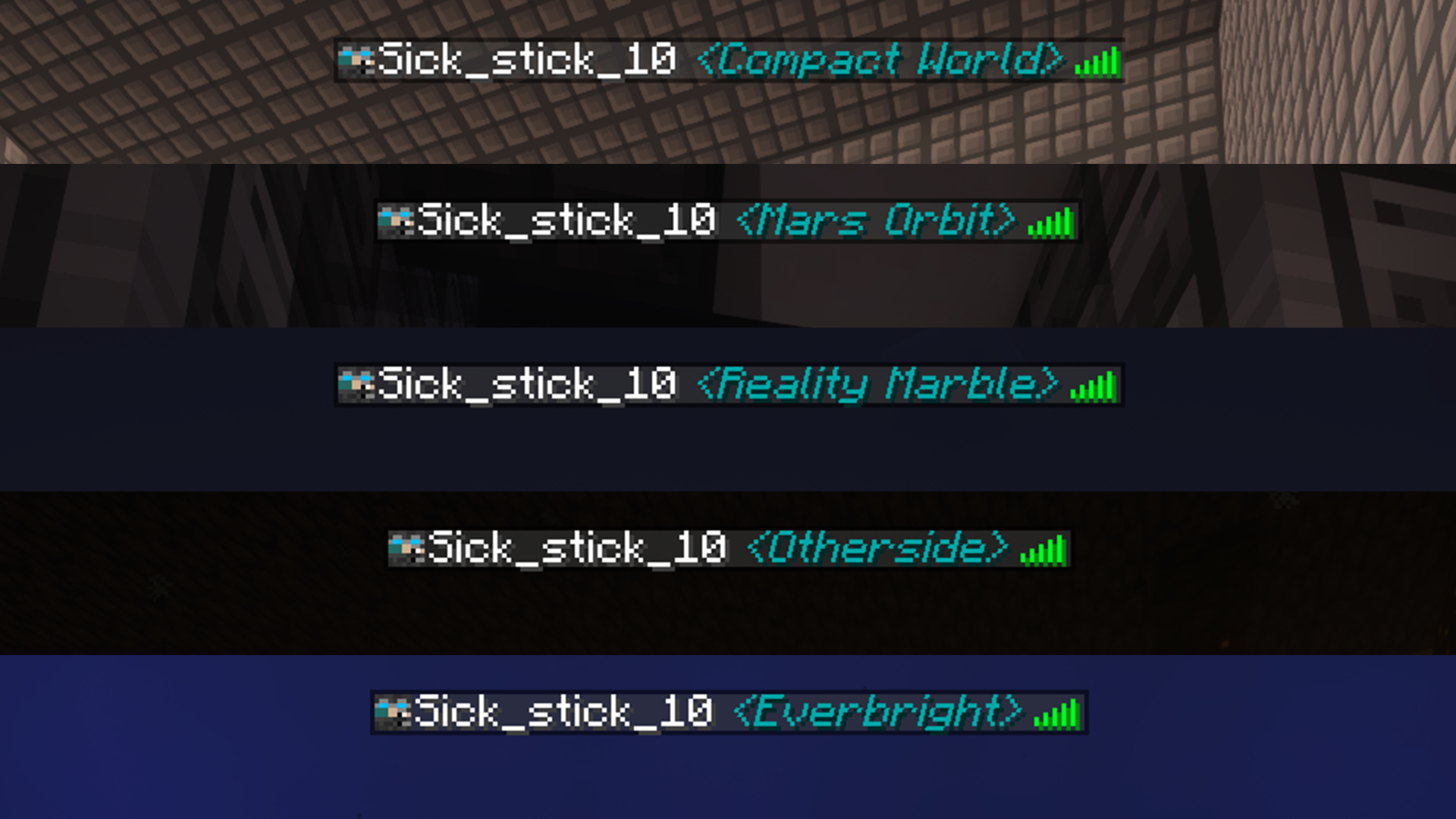
功能
现在可以独立为模组维度着色。
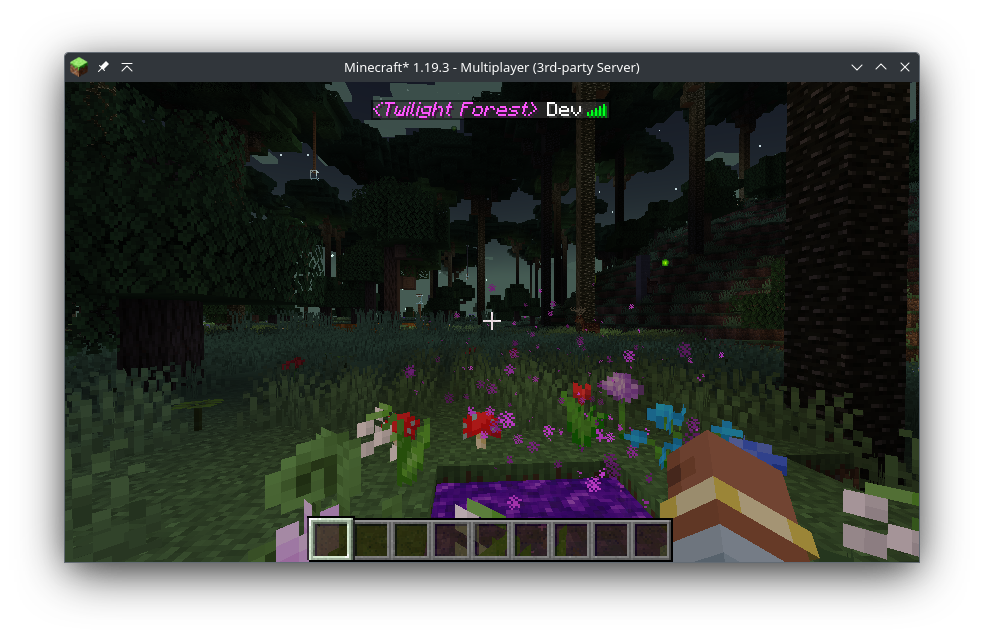
1.4.0 版本新增
现在可以将维度名称别名为其他名称,允许你修改每个维度显示的名称。
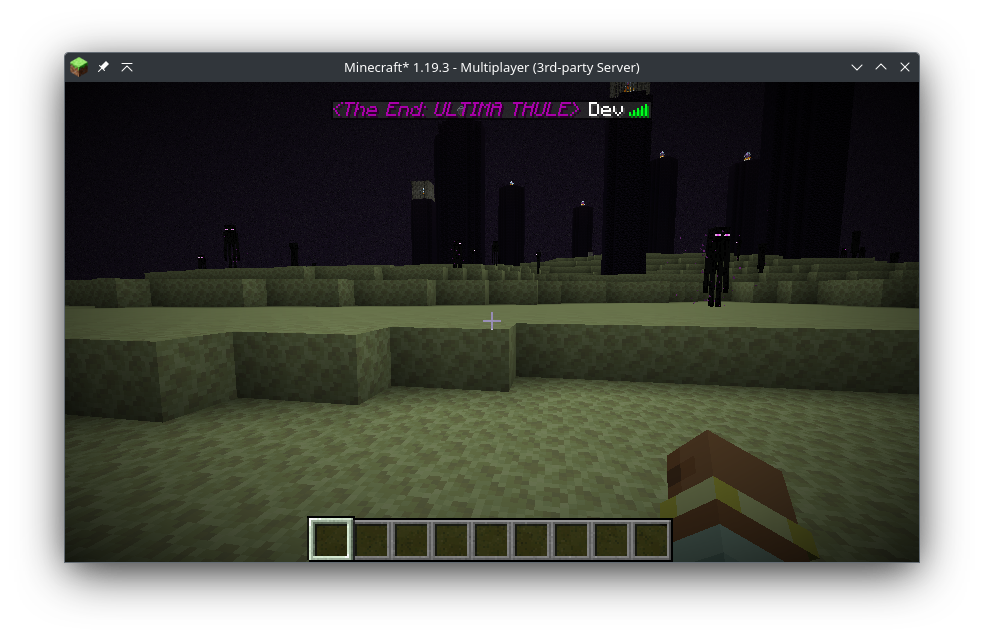
2.1.0 版本新增
通过斜杠命令配置模组,无需触碰配置文件!
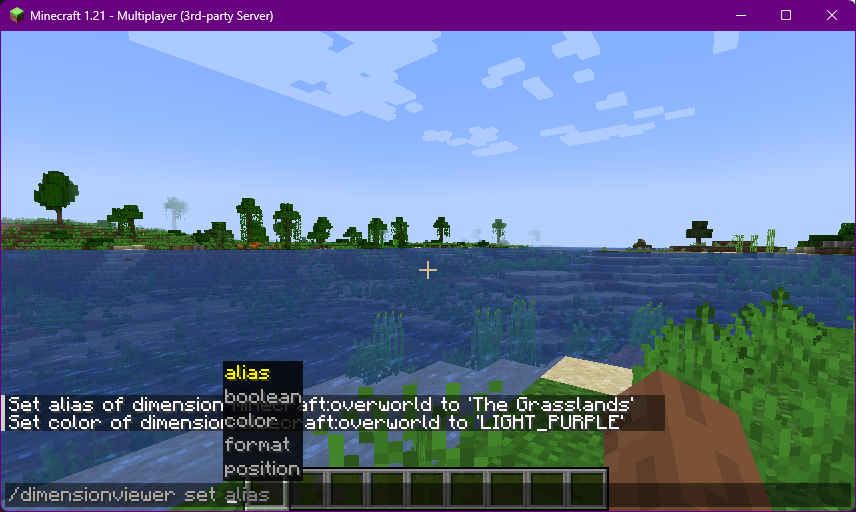
配置
通过修改配置文件,你可以按维度更改文本的颜色*,允许在聊天消息中显示维度,并更改维度的整体格式,同时支持使用 Minecraft 文本格式,如下划线、粗体和斜体字体。
(Neo)Forge 的配置文件位于 [Server Folder]/config/dimensionviewer-common.toml,Fabric 的配置文件位于 [Server Folder]/config/dimensionviewer.json。
对配置文件所做的任何更改将在保存后立即生效。
请参阅下面的示例配置:
示例配置与设置
设置及其作用
listFormat - String
- 用于在玩家列表或聊天名称中显示维度的格式。它支持一些令牌来调整布局。
%d - 维度(必需)%i - 斜体%b - 粗体%u - 下划线%s - 删除线%o - 混淆文本%% - 字面量 %
- 任何跟在
% 后面的字符都将被解释为令牌并被移除,因此如果你想在名称中使用百分号,请使用 %%
dimensionPosition - String
- 设置维度相对于玩家名称显示的位置。
PREPEND - 在玩家名称之前APPEND - 在玩家名称之后
defaultColor - String
- 如果
PER_DIM_COLOR 为 false 或未在 MODDED_DIMS 中定义的自定义维度,则设置要使用的默认字体颜色。
- 接受任何原版文本颜色:
DARK_RED, RED, GOLD, YELLOW, DARK_GREEN, GREEN, AQUA, DARK_AQUA, DARK_BLUE, BLUE, LIGHT_PURPLE, DARK_PURPLE, WHITE, GRAY, DARK_GRAY, BLACK
- 也接受
CUSTOM_COLORS 中定义的任何自定义颜色的名称
- 名称必须为大写
overworldColor, netherColor & endColor - String
- 当
perDimColor 设置为 true 时,用于更改原版维度的颜色
- 接受的输入与
defaultColor 相同
perDimColor - Boolean
- 用于启用单个维度着色。禁用此选项将显示所有维度,其颜色与
DEFAULT_COLOR 中定义的颜色相同
dimInChatName - Boolean
- 用于切换在发送聊天消息时在玩家名称中显示维度
- 关闭后,玩家的聊天名称将不受影响,仅标签页列表名称会显示玩家当前的维度
enableAliases - Boolean
- 用于切换是否使用自定义维度名称。
- 启用后,任何与
DIM_ALIASES 中的项目匹配的维度都将用别名名称替换其显示名称。
moddedDimensions - Array of Strings
- 用于更改自定义模组维度的颜色
- 使用格式
modid:dim_id color
- 例如,暮色森林设为金色将是
twilightforest:twilight_forest GOLD
dimensionAliases - Array of Strings
- 用于为给定维度显示自定义名称
- 使用格式
modid:dim_id New Name(允许空格)
- 例如,要将
Overworld 替换为 The Grasslands,你将使用 minecraft:overworld The Grasslands
- 如果
ENABLE_ALIASES 为 false,则无效
- [VERSION 2.0.0+] 允许在别名中使用令牌(参见
listFormat)
- 使用
minecraft:overworld %b%d 使主世界文本变为粗体
customColors [VERSION 2.0.0+] - Array of Strings
- 用于定义自定义字体颜色,可以是 HEX 格式或 RGB 格式。
- 十六进制颜色使用格式
COLOR_NAME #HEX,RGB 颜色使用格式 COLOR_NAME r000 g000 b000。
- 颜色名称必须为大写
- 十六进制数字必须为 6 个字符长。目前不支持截断的十六进制值和带 alpha 值的十六进制值。
- 例如,自定义粉色十六进制颜色将是
HOT_PINK #C62F75
- 另一个例子,自定义紫色 RGB 颜色将是
FUTURE_PURPLE r152 g154 b255
(Neo)Forge 示例
(Neo)Forge 配置文件包含每个设置的注释以及该设置的有效选项。
#自定义设置
[customization]
#当 perDimColorPath 为 false 时,用于维度字体的颜色。
#(如果进入的是模组添加的维度,将使用此颜色作为备用)
fontColor = "DARK_AQUA"
#维度别名的全局开关。需要在下方设置别名。
enableAliases = true
#在标签页列表中显示维度时将使用的格式,支持以下标记:
#    %d - 维度名称
#    %i - 斜体字体
#    %b - 粗体字体
#    %u - 下划线字体
#    %o - 乱码字体
#    %s - 删除线字体
listFormat = "%i<%d>"
#维度名称应置于玩家姓名之前还是之后
#允许值:PREPEND, APPEND
dimensionPosition = "APPEND"
#每个维度是否拥有独立颜色?
perDimColor = true

#按维度自定义设置
[customization.dimension]
    #用于主世界 (Overworld) 的颜色
    #允许值:DARK_RED, RED, GOLD, YELLOW, DARK_GREEN, GREEN, AQUA, DARK_AQUA, DARK_BLUE, BLUE, LIGHT_PURPLE, DARK_PURPLE, WHITE, GRAY, DARK_GRAY, BLACK
    overworldColor = "DARK_GREEN"
    #用于下界 (Nether) 的颜色
    #允许值:DARK_RED, RED, GOLD, YELLOW, DARK_GREEN, GREEN, AQUA, DARK_AQUA, DARK_BLUE, BLUE, LIGHT_PURPLE, DARK_PURPLE, WHITE, GRAY, DARK_GRAY, BLACK
    netherColor = "DARK_RED"
    #用于末地 (End) 的颜色
    #允许值:DARK_RED, RED, GOLD, YELLOW, DARK_GREEN, GREEN, AQUA, DARK_AQUA, DARK_BLUE, BLUE, LIGHT_PURPLE, DARK_PURPLE, WHITE, GRAY, DARK_GRAY, BLACK
    endColor = "FUTURE_PURPLE"

#聊天相关自定义设置
[customization.chat]
    #是否在聊天消息中添加用户当前所在的维度?
    dimInChatName = true
    #在聊天中添加悬停效果,以显示是哪个模组添加了维度信息
    #需要将 'dimInChatName' 设置为 true
    chatDimHover = true

#模组维度自定义设置
[customization.modded]
    #一组用于替代原始维度 ID 的别名列表。
    #使用格式 'modid:dim_id 新名称'。
    #例如,要将 'Overworld' 替换为 'Grasslands',请使用 'minecraft:overworld Grasslands'
    dimensionAliases = ["minecraft:the_end ULTIMA THULE"]
    #一组模组维度的资源 ID 及对应颜色,格式为 "modid:dim_id color"
    #例如,暮色森林设为金色应为 "twilightforest:twilight_forest GOLD"
    #如果颜色无效将抛出异常
    #允许值:DARK_RED, RED, GOLD, YELLOW, DARK_GREEN, GREEN, AQUA, DARK_AQUA, DARK_BLUE, BLUE, LIGHT_PURPLE, DARK_PURPLE, WHITE, GRAY, DARK_GRAY, BLACK
    moddedDimensionIds = ["twilightforest:twilight_forest GOLD"]

#额外自定义设置
[customization.extra]
    #可在此处定义自定义颜色。
    #使用格式 'COLOR_NAME #HEX' 或 'COLOR_NAME r000 g000 b000'
    #如果已存在同名自定义颜色,服务器将拒绝新的配置。
    #名称必须为大写字母,且只能包含字母和下划线。
    custom_colors = ["HOT_PINK #C62F75", "FUTURE_PURPLE r152 g154 b255"]
Fabric 配置文件
由于需要手动编写保存和加载函数,Fabric 的配置文件的存储和布局方式与 (Neo)Forge 的配置文件不同。设置项完全相同,但不幸的是没有注释。
这是我将来尝试改进的地方。
{
  "listFormat": "%i<%d>",
  "dimensionPosition": "APPEND",
  "defaultColor": "HOT_PINK",
  "overworldColor": "DARK_GREEN",
  "netherColor": "FUTURE_PURPLE",
  "endColor": "HOT_PINK",
  "perDimColor": true,
  "dimInChatName": true,
  "chatDimHover": true,
  "enableAliases": true,
  "moddedDimensions": ["twilightforest:twilight_forest GOLD"],
  "dimensionAliases": ["minecraft:overworld %bThe Grasslands", "minecraft:the_nether %u%d", "minecraft:the_end %oEnd"],
  "customColors": ["HOT_PINK #C62F75", "FUTURE_PURPLE r152 g154 b255"]
}
更新日志
查看更新日志
版本 2.1.0
- 添加了斜杠命令!
- 现在可以通过斜杠命令更改大多数(如果不是全部)设置,无需再修改配置文件!
- 修复了某些 modid 相关的问题
版本 2.0.0
- 现支持 Fabric!
- 现支持自定义 RGB 和 Hex 字体颜色!
- 简化了格式配置
- 维度别名现在支持标记,允许特定维度显示为粗体、斜体或两者兼有!
版本 1.4.0
版本 1.3.1
- 修复了一个正则表达式 bug,该 bug 导致带有下划线的 modid 无法被识别。
版本 1.3.0
- 添加了为各个模组维度单独着色的支持!
- 将命令 'refreshPlayerList' 更改为 'refreshplayerlist',以更符合原版命令的风格。
版本 1.2.0
- 首次发布!
(我记不清为什么从 1.2.0 开始了……)
Dimension Viewer
A highly customizable server-side Minecraft mod for viewing what dimension players are currently in from the tab list.
Now supporting Fabric, Forge & NeoForge!
Fabric version requires Fabric API (CurseForge or Modrinth)
Compatibility
Dimension Viewer should be compatible with all dimensions. There may be some cases where the mod name shown on hover is not formatted correctly due to the use of the modid to get which mod a dimension is from.
Mods that make changes to the tab list name format (or even the regular display name) will likely cause issues with this mod but at the moment I cannot think of any to test with. If you find any issues, please leave an issue! Thank you!
Features
Modded dimensions can now be coloured independently.
New in version 1.4.0
Dimension names can now be aliased to something else, allowing you to modify the name displayed per dimension.
New in version 2.1.0
Configure the mod without touching the config file with slash commands!
Configuration
By modifying the config file, you can change the colour* of the text on a per-dimension basis, allow showing the dimension in chat messages and change the overall format of the dimension with the ability to use Minecraft text formatting such as underlining, bold and italic fonts.
The config file is located in [Server Folder]/config/dimensionviewer-common.toml for (Neo)Forge or [Server Folder]/config/dimensionviewer.json for Fabric.
Any changes made will be applied as soon as the config file is saved.
See below for an example config:
Example Configurations & Settings
Settings and What They Do
listFormat - String
- The format that will be used to display the dimension in the player list or chat name. It supports a few tokens to tweak the layout.
%d - Dimension (required)%i - Italic%b - Bold%u - Underlined%s - Strikethrough%o - Obfuscate text%% - Literal %
- Any character following a
% will be interpreted as a token and removed, so use %% if you want a percentage sign in the name
dimensionPosition - String
- Sets the position the dimension is shown in relation to the players name.
PREPEND - Before the player nameAPPEND - After the player name
defaultColor - String
- Sets the default font colour to use if
PER_DIM_COLOR is false or is a custom dimension that is not defined in MODDED_DIMS
- Accepts any vanilla text colour:
DARK_RED, RED, GOLD, YELLOW, DARK_GREEN, GREEN, AQUA, DARK_AQUA, DARK_BLUE, BLUE, LIGHT_PURPLE, DARK_PURPLE, WHITE, GRAY, DARK_GRAY, BLACK
- Also accepts the name of any custom colours defined in
CUSTOM_COLORS
- The names must be UPPERCASE
overworldColor, netherColor & endColor - String
- Used to change the colors of vanilla dimensions when
perDimColor is set to true
- Accepts the same inputs as
defaultColor
perDimColor - Boolean
- Used to enable individual dimension colouring. Disabling this will display all dimensions the same colour as defined in
DEFAULT_COLOR
dimInChatName - Boolean
- Used to toggle showing the dimension in a players name when sending chat messages
- When turned off, the players chat name will be unaffected and only the tab list name will show the players current dimension
enableAliases - Boolean
- Used to toggle whether custom dimension names should be used.
- When enabled, any dimensions that match items in
DIM_ALIASES will have their display names swapped for the aliased name.
moddedDimensions - Array of Strings
- Used to change the colors of custom modded dimensions
- Uses the format
modid:dim_id color
- For example, Twilight Forest in Gold would be
twilightforest:twilight_forest GOLD
dimensionAliases - Array of Strings
- Used to show a custom name for a given dimension
- Uses the format
modid:dim_id New Name (Spaces allowed)
- For example, to replace
Overworld with The Grasslands you would use minecraft:overworld The Grasslands
- Has no effect if
ENABLE_ALIASES is false
- [VERSION 2.0.0+] Allows the use of tokens in the alias (see
listFormat)
- Make only the overworld text bold with
minecraft:overworld %b%d
customColors [VERSION 2.0.0+] - Array of Strings
- Used to define custom font colors in either HEX format or RGB format.
- Uses the format
COLOR_NAME #HEX for hexadecimal colours or COLOR_NAME r000 g000 b000 for RGB colors.
- The name of the color must be UPPERCASE
- Hexadecimal numbers must be 6 characters long. Truncated hex values and hex w/ alpha values are not supported at this moment.
- For example, a custom pink hex color would be
HOT_PINK #C62F75
- Another example, a custom purple RGB color would be
FUTURE_PURPLE r152 g154 b255
(Neo)Forge Example
The (Neo)Forge configuration file contains comments for every setting and the valid options available for the setting.
#Customization Settings
[customization]
#The color to use for the dimension font if perDimColorPath is false.
#(In the event of a modded dimension being entered, this color will be used as a fallback)
fontColor = "DARK_AQUA"
#Global toggle for dimension aliases. Requires aliases to be set below.
enableAliases = true
#Format that will be used to display the dimension in the tab list with the use of tokens:
#    %d - Dimension Name
#    %i - Italic font
#    %b - Bold font
#    %u - Underline font
#    %o - Obfuscated font
#    %s - Strikethrough font
listFormat = "%i<%d>"
#Whether the dimension should be placed before or after the player name
#Allowed Values: PREPEND, APPEND
dimensionPosition = "APPEND"
#Should each dimension have its own color?
perDimColor = true

#Per-Dimension Customization
[customization.dimension]
    #Color to use for the Overworld
    #Allowed Values: DARK_RED, RED, GOLD, YELLOW, DARK_GREEN, GREEN, AQUA, DARK_AQUA, DARK_BLUE, BLUE, LIGHT_PURPLE, DARK_PURPLE, WHITE, GRAY, DARK_GRAY, BLACK
    overworldColor = "DARK_GREEN"
    #Color to use for the Nether
    #Allowed Values: DARK_RED, RED, GOLD, YELLOW, DARK_GREEN, GREEN, AQUA, DARK_AQUA, DARK_BLUE, BLUE, LIGHT_PURPLE, DARK_PURPLE, WHITE, GRAY, DARK_GRAY, BLACK
    netherColor = "DARK_RED"
    #Color to use for the End
    #Allowed Values: DARK_RED, RED, GOLD, YELLOW, DARK_GREEN, GREEN, AQUA, DARK_AQUA, DARK_BLUE, BLUE, LIGHT_PURPLE, DARK_PURPLE, WHITE, GRAY, DARK_GRAY, BLACK
    endColor = "FUTURE_PURPLE"

#Chat-related Customization
[customization.chat]
    #Should a users' current dimension be added to chat messages?
    dimInChatName = true
    #Add a hover effect in chat that will display which mod added the dimension
    #Requires 'dimInChatName' to be set to true
    chatDimHover = true

#Modded Dimension Customization
[customization.modded]
    #A list of aliases to use instead of the original dimension ID.
    #Uses the format 'modid:dim_id New Name'.
    #For example, to replace 'Overworld' with 'Grasslands' you would use 'minecraft:overworld Grasslands'
    dimensionAliases = ["minecraft:the_end ULTIMA THULE"]
    #A list of modded dimension resource IDs and a color in the format of "modid:dim_id color"
    #For example, Twilight Forest in Gold would be "twilightforest:twilight_forest GOLD"
    #Will throw an exception if the color is not valid
    #Allowed Values: DARK_RED, RED, GOLD, YELLOW, DARK_GREEN, GREEN, AQUA, DARK_AQUA, DARK_BLUE, BLUE, LIGHT_PURPLE, DARK_PURPLE, WHITE, GRAY, DARK_GRAY, BLACK
    moddedDimensionIds = ["twilightforest:twilight_forest GOLD"]

#Extra Customization
[customization.extra]
    #Custom colors can be defined here.
    #Uses the format 'COLOR_NAME #HEX' or 'COLOR_NAME r000 g000 b000'
    #If a custom color of the same name already exists the server will reject the newest one.
    #The name must be uppercase and can only contain letters and underscores.
    custom_colors = ["HOT_PINK #C62F75", "FUTURE_PURPLE r152 g154 b255"]
Fabric Configuration
The Fabric configuration is stored and laid out differently to the (Neo)Forge configuration file due to having to write the saving and loading functions manually. Everything is the same in terms of settings, but there are no comments, unfortunately.
This is something that I will try to change in the future.
{
  "listFormat": "%i<%d>",
  "dimensionPosition": "APPEND",
  "defaultColor": "HOT_PINK",
  "overworldColor": "DARK_GREEN",
  "netherColor": "FUTURE_PURPLE",
  "endColor": "HOT_PINK",
  "perDimColor": true,
  "dimInChatName": true,
  "chatDimHover": true,
  "enableAliases": true,
  "moddedDimensions": ["twilightforest:twilight_forest GOLD"],
  "dimensionAliases": ["minecraft:overworld %bThe Grasslands", "minecraft:the_nether %u%d", "minecraft:the_end %oEnd"],
  "customColors": ["HOT_PINK #C62F75", "FUTURE_PURPLE r152 g154 b255"]
}
Changelog
View Changelog
Version 2.1.0
- Added slash commands!
- Most (if not all) settings can now be changed without going to the config file with slash commands!
- Fixed an issue with certain modid
Version 2.0.0
- Now supports Fabric!
- Now supports custom RGB and Hex font colours!
- Simplified the format configuration
- Dimension aliases now support tokens, allowing specific dimensions to be bold or italic, or both!
Version 1.4.0
- Added support for dimension aliases! (Custom dimension names)
Version 1.3.1
- Fixed a regex bug causing modids with underscores to not be valid.
Version 1.3.0
- Added support for colouring individual modded dimensions!
- Changed command 'refreshPlayerList' to 'refreshplayerlist' to fit better with vanilla command styling.
Version 1.2.0
- Initial release!
(I can't remember why I started at 1.2.0...)


 模组

 模组
 模组

 模组
 模组
 模组
评论 0
登录后参与评分
还没有评论,来抢沙发吧