
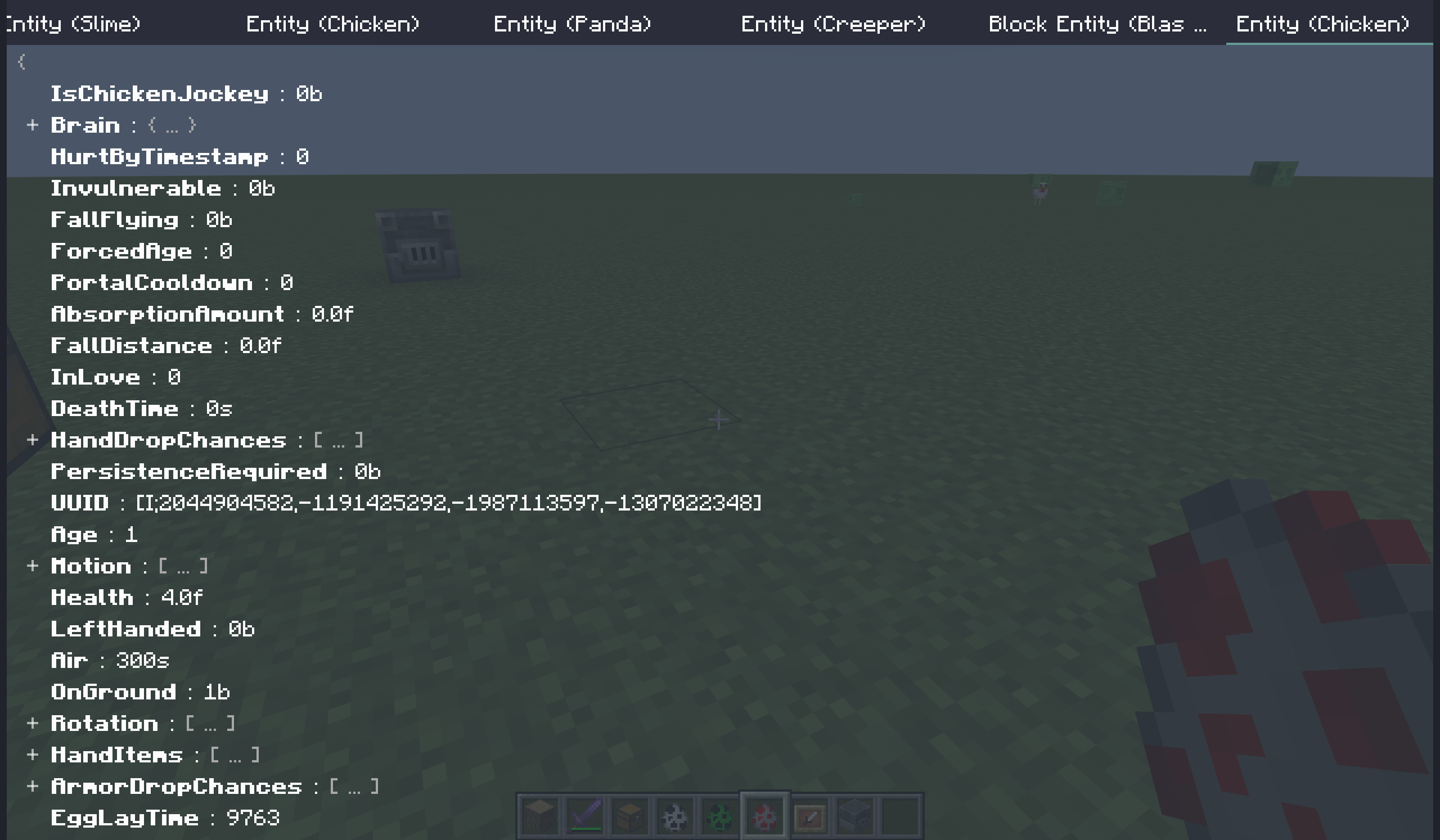
Dynamic In-Game NBT Editor (DINE) 允许你动态修改 实体 和 方块实体 的 NBT。
本模组为 仅客户端 模组。在专用服务器上安装可能会导致问题。
本模组通过向服务器发送 data 命令来修改 NBT。请确保你拥有足够的权限。
功能
动态:编辑器会获取 NBT 并在每个 tick 进行更新。你可以观察实体的动态变化。
多屏幕:你可以打开一个或多个屏幕(标签页)。
简单且用户友好:在任何给定时间最小化屏幕上显示的图标数量,同时保持完整的功能。
操作指南
多屏幕标签栏
所有打开的屏幕都列在顶部的标签栏中。
标签栏可以水平滚动。
| 按键 | 功能 |
|---|---|
| 鼠标左键单击 | 切换到选定的标签页 |
| 鼠标中键单击 | 关闭悬停的标签页屏幕 |
| 鼠标右键单击 | 调出上下文菜单 |
NBT 树
NBT 以树状结构显示。你可以展开/折叠某些节点以获得更好的可视化效果。
NBT 树可以垂直滚动。
| 按键 | 功能 |
|---|---|
| 鼠标单击 | 切换到选定的标签页 |
| 鼠标双击 | 关闭悬停的标签页屏幕 |
| 鼠标右键单击 | 调出上下文菜单 |
| Enter | 编辑选定的节点 |
| Delete | 删除选定的节点 |
| Ctrl + C | 将节点复制到剪贴板(非系统剪贴板,下同) |
| Ctrl + X | 将节点剪切到剪贴板 |
| Ctrl + V | 从剪贴板粘贴节点 |
查询服务器
你可以在右键上下文菜单中开启 查询服务器。
当此选项开启时,此屏幕将不会使用存储在客户端本地的 NBT 数据,而是尝试查询服务器以获取 NBT。此行为与 F3+I 完全相同。
在此状态下,显示的 NBT 数据保证始终与服务器同步,尽管会有 1 个 tick 的延迟。
默认情况下,服务器端会检查你的权限。如果你没有足够的权限等级,查询将会失败。
按键绑定
| 名称 | 默认值 | 功能 |
|---|---|---|
| 打开 DINE 编辑器 | 未绑定 | 打开编辑器 |
| 编辑目标 | 未绑定 | 为目标实体或方块实体打开一个新的屏幕 |
命令
所有这些命令都是客户端命令,不会被服务器处理。
- dine 打开编辑器
- target 为目标实体或方块实体打开一个新的屏幕
- entity [uuid] 查找具有指定 UUID 的实体并为其打开一个新的屏幕
- block [pos] 查找指定位置的方块实体并为其打开一个新的屏幕
配置
配置文件位于 [gameroot]/config/dine.prop。
配置文件采用 Java Properties 语言格式。
所有配置都在客户端重新加载资源时加载/重新加载(你可以通过 F3+T 触发它)。
| 配置项 | 类型 | 默认值 | 功能 |
|---|---|---|---|
defaultTryPauseGame |
boolean | false |
新屏幕是否尝试暂停游戏 |
entityDefaultFromServer |
boolean | false |
新的实体屏幕是否查询服务器 |
blockEntityDefaultFromServer |
boolean | false |
新的方块实体屏幕是否查询服务器 |
checkPermissionWhenFromServer |
boolean | true |
查询服务器前是否应检查权限 |
logSentCommand |
boolean | false |
是否在客户端日志中记录发送的命令内容 |
dataCommand |
string | data |
具有原版 data 命令功能的命令名称 |
常见问题
- 为什么没有物品 nbt/数据组件?
物品的 nbt/数据组件在代码中具有不同的处理逻辑。而在原版中,没有可以轻易修改它们的命令。
如果你确实需要它,可以尝试使用一些实体/方块实体,例如物品展示框。
- NBT 树不更新 / 与实际效果不匹配。
这经常发生在一些方块实体上。原因是服务器尚未同步其 NBT。
你可以在右键上下文菜单中开启 查询服务器 来解决这个问题。
- 我可以在别人的服务器上使用这个模组吗?
由于这是一个仅客户端模组,通常你可以加入安装了此模组的任何服务器而不会遇到问题。
然而,这并不意味着这样做是正确的。我不会对此做出任何保证。
Dynamic In-Game NBT Editor (DINE) allows you to modify entities and block entities' NBT dynamically.
This mod is client-only. Installing it in dedicated server may cause problems.
This mod modifies NBT through sending data command to server. Make sure you have enough permision.
Features
Dynamic: The editor fetches NBT and update every tick,. You can observe the dynamic changes of the entity.
Multi-screen: You can have 1 or more screens (tabs) opened.
Simple and user-friendly: Minimize the number of icons displayed on the screen at any given time, while maintaining full functionality.
Opetarion Guide
Multi Screen Tab Bar
All open screens are listed in the tab bar at the top.
The tab bar can scroll horizontally.
| Key | Function |
|---|---|
| Mouse click (left) | switch to the selected tab |
| Mouse click (middle) | close the hovered tab screen |
| Mouse click (right) | call up the context menu |
NBT Tree
NBT is displayed in a tree structure. You can unfold/fold some nodes for better visualization.
The NBT Tree can scoll vertically.
| Key | Function |
|---|---|
| Mouse click | switch to the selected tab |
| Double mouse click | close the hovered tab screen |
| Mouse click (right) | call up the context menu |
| Enter | edit the selected node |
| Delete | delete the selected node |
| Ctrl + C | copy a node to the clipboard (not system clipboard, same below) |
| Ctrl + X | cut a node to the clipboard |
| Ctrl + V | paste a node from the clipboard |
Query Server
You can turn Query server on in the right-click context menu.
When this is on, this screen will not use the NBT data stored locally on the client, but will instead attempt to query the server to fetch the NBT. This behavior functions identically to F3+I.
In this state, the displayed NBT data is guaranteed to remain synchronized with the server at all times, though it will be a delay of 1 tick.
In defualt, the server side will check your permission. If you do not have sufficient permission level, the query will fail.
Key Binds
| Name | Default | Function |
|---|---|---|
| Open DINE Editor | not bound | open the editor |
| Edit Target | not bound | open a new screen of the targeted entity or block entity |
Commands
All these commands are client-side commands that will not be processed by the server.
- dine open the editor
- target open a new screen of the targeted entity or block entity
- entity [uuid] find out an entity with the specified UUID and open a a new screen of it
- block [pos] find the block entity at the specified position and open a a new screen of it
Config
The config file is located in [gameroot]/config/dine.prop.
The config file is in Java Properties language.
All config are loaded/reloaded when the client reload resources (You can trigger it by F3+T.).
| Config Item | Type | Default | Function |
|---|---|---|---|
defaultTryPauseGame |
boolean | false |
whether a new screen try pause game |
entityDefaultFromServer |
boolean | false |
whether a new entity screen query server |
blockEntityDefaultFromServer |
boolean | false |
whether a new block entity screen query server |
checkPermissionWhenFromServer |
boolean | true |
whether should check permission before query server |
logSentCommand |
boolean | false |
whether to put sent command's content in the client log |
dataCommand |
string | data |
the command's name with function of vanilla command data |
FAQ
- Why no items' nbt/data components?
Items' nbt/data components have different processing logic in the code. While in vanilla, there are no commands that can easily modified them.
If you really need it, you can try use some entity/block entity, such as Item Frame.
- The NBT tree doesn't update / match the actual effect.
This frequently occurs on some block entities. The reason is that the server has not synchronized their NBT.
You can turn on the Query server in right-click context menu to solve this problem.
- Can I use this mod on other people's servers?
Since this is a client-only mod, you can generally join any server with this mod installed without encountering issues.
However, this does not imply that doing so is right. I will make no guarantees about it.

下载 Dynamic In-Game NBT Editor
下载 Dynamic In-Game NBT Editor
下载 Dynamic In-Game NBT Editor
下载 Dynamic In-Game NBT Editor
下载 Dynamic In-Game NBT Editor
需要联机服务器吗?
稳定流畅、一键部署,几分钟即可和朋友联机开服
最低仅需 8 元/月 即可畅快联机
下载 Dynamic In-Game NBT Editor
需要联机服务器吗?
稳定流畅、一键部署,几分钟即可和朋友联机开服
最低仅需 8 元/月 即可畅快联机
下载 Dynamic In-Game NBT Editor
需要联机服务器吗?
稳定流畅、一键部署,几分钟即可和朋友联机开服
最低仅需 8 元/月 即可畅快联机
下载 Dynamic In-Game NBT Editor
需要联机服务器吗?
稳定流畅、一键部署,几分钟即可和朋友联机开服
最低仅需 8 元/月 即可畅快联机
下载 Dynamic In-Game NBT Editor
暂无更新日志
关于这个资源的讨论、问题反馈与使用心得
还没有讨论,来发第一帖吧
你是这个资源的作者?登录后可认领此资源。
相似资源
 模组

显示你正在注视的方块的信息。(适用于 Minecraft 1.16+ 的 Hwyla/Waila 分支)
 模组

查看物品与配方
 模组
使用 JavaScript 编辑配方、添加自定义物品、编写世界事件!
 模组
在游戏画面角落显示附近世界地形、玩家、生物和实体的地图。可创建路径点,帮助你找到标记过的位置。
 模组
AE2:一款流行的自动化与存储模组
 模组
添加区块认领和玩家组队功能,并与 Xaero's Minimap 和 World Map 集成
评论 0
登录后参与评分
还没有评论,来抢沙发吧