
语言:英文 中文

Discord-MC-Chat


Discord-MC-Chat (DMCC),前身为 MC-Discord-Chat 和 MCDiscordChat (MCDC),是一个实用且强大的 Fabric 和 Quilt Minecraft <> Discord 聊天桥接模组,灵感来源于 BRForgers/DisFabric。
更多信息 + 文档:Discord-MC-Chat Docs | Xujiayao's Blog
DMCC Discord 服务器现已公开!立即通过以下链接加入:
简介
Discord-MC-Chat (DMCC),前身为 MC-Discord-Chat 和 MCDiscordChat (MCDC),是一个实用且强大的 Fabric 和 Quilt Minecraft <> Discord 聊天桥接模组,灵感来源于 BRForgers/DisFabric。

下载
所有版本均可在以下网站下载:
您可以在 GitHub Actions 找到最新的构建 JAR 文件。
支持
如果发现错误或有建议,或者有不理解的地方,您可以在 GitHub 上 提交问题。
DMCC Discord 服务器现已公开!立即通过以下链接加入:
贡献
欢迎您为 DMCC 做出贡献!
如果您有兴趣为 DMCC 做出贡献,可以在 GitHub 上提交拉取请求。
对于代码贡献,构建文件位于 /build/ 文件夹中。
对于翻译贡献,语言文件位于 /wrapper/src/main/resources/lang/ 文件夹中。复制 en_us.json 并将其重命名为您的语言代码即可开始。请提供整个文件中所有键的翻译。
功能
- 完整的多语言支持
- 支持多服务器模式(在同一 Discord 公会中运行多个 Minecraft 服务器并使用 DMCC)
- Minecraft <> Discord 跨服务器聊天
- 支持禁用 Discord 和游戏中的聊天广播
- 支持使用 Discord 频道主题功能显示服务器状态
- 支持使用语音频道显示服务器状态和玩家数量
- 支持在机器人的 Discord 在线状态中显示服务器状态
- 支持在机器人的 Discord 活动状态中显示玩家数量
- 支持 Discord Webhook 功能
- 动态创建 DMCC Webhook
- 可自定义的 Webhook 头像 API,兼容模组和插件以实现实时皮肤更改
- 当 Webhook 禁用时,使用机器人本身发送聊天消息
- 支持游戏中 Markdown 解析
- 支持在游戏中高亮并使用默认的 Unicode 和服务器自定义表情符号
- 支持在游戏中高亮贴纸
- 支持在游戏中高亮提及 (@)
- 可自定义游戏中允许的提及 (@) 范围
- 支持在游戏中禁用提及 (@)
- 支持在游戏中高亮并打开超链接和 GIF
- 支持禁用所有解析
- 支持在游戏中显示 Discord 用户角色颜色
- 支持在游戏中显示回复消息
- 支持限制 Discord 消息的新行数
- 广播玩家命令执行
- 执行命令的玩家也可以看到这些命令
- 排除特定命令执行的广播(支持正则表达式)
- 支持广播使用 /tellraw 和 /say 命令发送的消息
- 将所有控制台日志消息发送到 Discord
- 可用的 Discord 命令
- 使用 Discord 管理可以执行 DMCC 命令的频道
- 当有人执行 DMCC 命令时通知游戏内玩家
- /console 命令支持 Minecraft 命令自动补全
- 普通命令
- /help | 获取可用命令列表
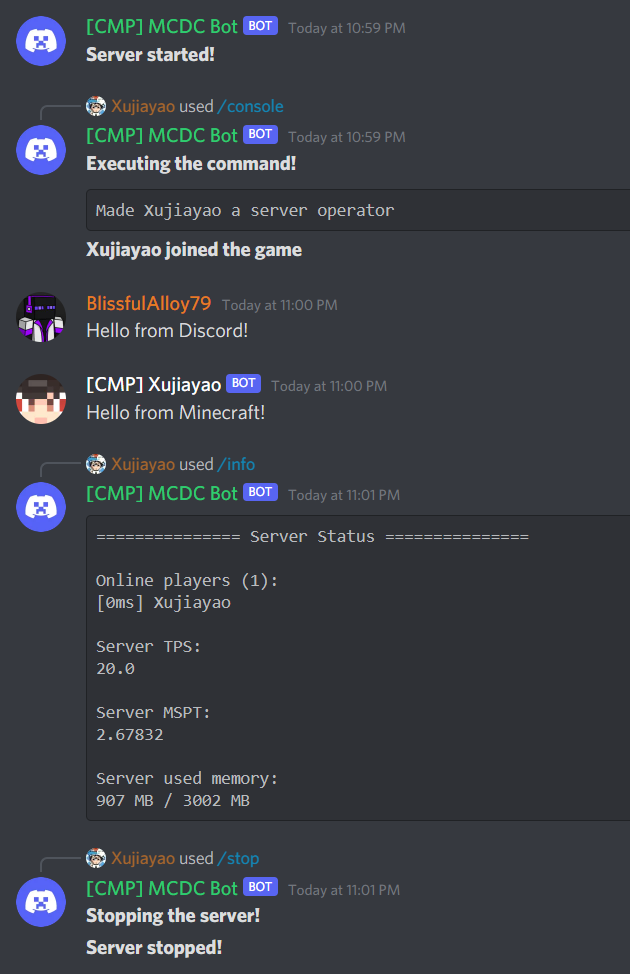
- /info | 查询服务器运行状态
- /stats <type> <name> | 查询统计数据的计分板
- /update | 检查更新
- 管理员命令
- /console <command> | 在服务器控制台中执行命令(仅限管理员)
- /log <file> | 获取指定的服务器日志(仅限管理员)
- /reload | 重新加载 Discord-MC-Chat 配置文件(仅限管理员)
- /stop | 停止服务器(仅限管理员)
- 权限可调的命令
- /whitelist <player> | 将玩家添加到服务器白名单
- 可用的 Minecraft 命令
- 仅限管理员的命令至少需要等级 4 的操作员权限
- 普通命令
- /dmcc help | 获取可用命令列表
- /dmcc info | 查询服务器运行状态
- /dmcc stats <type> <name> | 查询统计数据的计分板
- /dmcc update | 检查更新
- 管理员命令
- /dmcc reload | 重新加载 Discord-MC-Chat 配置文件(仅限管理员)
- 权限可调的命令
- /dmcc whitelist <player> | 将玩家添加到服务器白名单
- 完全可自定义的消息格式
- 可以禁用将特定服务器消息发送到 Discord
- 游戏内
- 来自 Discord 的聊天消息
- 来自 Discord 的回复消息
- 来自其他 DMCC 服务器的消息
- Discord
- 服务器启动
- 服务器停止
- 玩家加入服务器
- 玩家离开服务器
- 玩家达成进度 / 实现目标 / 完成挑战
- 多语言支持
- 支持显示任务/挑战/目标消息的描述
- 玩家死亡
- 多语言支持
- 服务器 MSPT 高于某个值
- 使用管理员列表配置用户使用特殊命令的权限
- 支持配置文件的热重载
- 每次加载配置文件时进行备份
- 定期检查更新
- 通过检查服务器 Minecraft 版本兼容性准确推送 DMCC 版本更新
- 可自定义更新通知频道
- 可以禁用检查更新
- 当用户以应用程序而非 Minecraft 模组方式运行 JAR 文件时的提示
当前可用语言:
| Code | Language |
|---|---|
de_de |
Deutsch (Deutschland) |
en_us |
English (US) |
es_es |
Español (España) |
fr_fr |
Français (France) |
it_it |
Italiano (Italia) |
ja_jp |
日本語(日本) |
ko_kr |
한국어(대한민국) |
no_no |
Norsk Bokmål (Norge) |
pl_pl |
Polski (Polska) |
pt_br |
Português (Brasil) |
ru_ru |
Русский (Россия) |
tr_tr |
Türkçe (Türkiye) |
zh_cn |
简体中文(中国大陆) |
zh_hk |
繁體中文(香港特別行政區) |
zh_tw |
繁體中文(台灣) |
贡献者
星标历史

许可证
本项目采用 MIT 许可证。
例外情况:src/main/java/com/xujiayao/discord_mc_chat/utils/MarkdownParser.java 文件于 2020 年 12 月 31 日从 BRForgers/DisFabric 获得,遵循 Mozilla Public License 2.0 (MPL-2.0) 许可。
src/main/java/com/xujiayao/discord_mc_chat/utils/MarkdownParser.java文件的更多详情:作者:allanf181 (Allan Fernando)
原始源代码链接:
许可证链接:
请注意,新创建的项目 BRForgers/DisFabric-and-DisForge 所使用的“Don't Be a Jerk”许可证与旧项目 BRForgers/DisFabric 是分开的。
- 项目名称和许可证的任何近期更改不会追溯影响之前特定时刻(即 2020 年 12 月 31 日之前)获取的代码的许可条款。
- 从 BRForgers/DisFabric 获取的任何文件仅继续受 MPL-2.0 许可证条款的约束。
“Don't Be a Jerk”许可证链接:
Language: English 中文
Discord-MC-Chat
Discord-MC-Chat (DMCC), formerly known as MC-Discord-Chat and MCDiscordChat (MCDC), is a practical and powerful Fabric and Quilt Minecraft <> Discord chat bridge inspired by BRForgers/DisFabric
More information + Docs: Discord-MC-Chat Docs | Xujiayao's Blog
DMCC Discord Server is now public! Join now through:
Introduction
Discord-MC-Chat (DMCC), formerly known as MC-Discord-Chat and MCDiscordChat (MCDC), is a practical and powerful Fabric and Quilt Minecraft <> Discord chat bridge inspired by BRForgers/DisFabric.
Download
All releases can be downloaded at the following sites:
You can find the latest build JAR files at GitHub Actions.
Support
If there is a bug or suggestion, or something you don't understand, you can submit an issue on GitHub.
DMCC Discord Server is now public! Join now through:
Contributing
You are welcome to contribute to DMCC!
If you are interested in contributing to DMCC, you can submit a pull request on GitHub.
For code contributions, the build file is located in the /build/ folder.
For translation contributions, language files are located in the /wrapper/src/main/resources/lang/ folder. Copy en_us.json and rename the new one to your language code to get started. Please provide translations for the entire file for all keys.
Features
- Full multi-language support
- Support multi-server mode (running more than one Minecraft server with DMCC in the same Discord guild)
- Minecraft <> Discord cross server chat
- Support disabling Discord and in-game chat broadcasts
- Support displaying server status using Discord channel topic feature
- Support displaying server status and player count using voice channels
- Support displaying server status in bot's Discord online status
- Support displaying server player count in bot's Discord activity status
- Support Discord Webhook feature
- Dynamic-created DMCC Webhook
- Customizable Webhook Avatar API that is compatible with mods and plugins for real-time skin changes
- Use the bot itself to send chat messages when Webhook is disabled
- Support in-game Markdown parsing
- Support highlighting and using default Unicode and server custom emoji in-game
- Support highlighting stickers in-game
- Support highlighting and mentions (@) in-game
- Customizable scope of allowed mentions (@) in-game
- Support disabling mentions (@) in-game
- Support highlighting and opening hyperlinks and GIFs in-game
- Support disabling all parsing
- Support in-game display of Discord user role colour
- Support in-game display of response messages
- Support limiting the number of newlines for Discord messages
- Broadcast player command execution
- Players who execute commands can also see the commands themselves
- Exclude broadcasts for execution of specific commands (support regular expression)
- Support broadcasting messages sent using /tellraw and /say command
- Send all console log messages to Discord
- Discord Commands available
- Use Discord to manage channels that can execute DMCC commands
- Notify in-game players when someone executes an DMCC command
- /console command supports Minecraft command auto-completion
- Normal Commands
- /help | Get a list of available commands
- /info | Query server running status
- /stats <type> <name> | Query the scoreboard of a statistic
- /update | Check for update
- Admin Commands
- /console <command> | Execute a command in the server console (admin only)
- /log <file> | Get the specified server log (admin only)
- /reload | Reload Discord-MC-Chat config file (admin only)
- /stop | Stop the server (admin only)
- Commands with Adjustable Permissions
- /whitelist <player> | Add a player to the server whitelist
- Minecraft Commands available
- Admin-only commands require a level 4 operator at minimum
- Normal Commands
- /dmcc help | Get a list of available commands
- /dmcc info | Query server running status
- /dmcc stats <type> <name> | Query the scoreboard of a statistic
- /dmcc update | Check for update
- Admin Commands
- /dmcc reload | Reload Discord-MC-Chat config file (admin only)
- Commands with Adjustable Permissions
- /dmcc whitelist <player> | Add a player to the server whitelist
- Fully customizable message format
- Sending specific server messages to Discord can be disabled
- In-game
- Chat messages from Discord
- Response messages from Discord
- Messages from other DMCC servers
- Discord
- Server started
- Server stopped
- Player joined server
- Player left server
- Player reached a progress / achieved a goal / completed a challenge
- Multilingual support
- Support displaying descriptions for task/challenge/goal messages
- Player died
- Multilingual support
- Server MSPT is higher than a certain value
- Use admin list to configure user permissions to use special commands
- Support Hot Reloading of the config file
- Backup every time the config file is loaded
- Check for updates regularly
- Push DMCC version updates accurately by checking server Minecraft version compatibility
- Customizable update notification channel
- Check for updates can be disabled
- Prompt when the user runs the JAR as an application instead of a Minecraft mod
Languages currently available:
| Code | Language |
|---|---|
de_de |
Deutsch (Deutschland) |
en_us |
English (US) |
es_es |
Español (España) |
fr_fr |
Français (France) |
it_it |
Italiano (Italia) |
ja_jp |
日本語(日本) |
ko_kr |
한국어(대한민국) |
no_no |
Norsk Bokmål (Norge) |
pl_pl |
Polski (Polska) |
pt_br |
Português (Brasil) |
ru_ru |
Русский (Россия) |
tr_tr |
Türkçe (Türkiye) |
zh_cn |
简体中文(中国大陆) |
zh_hk |
繁體中文(香港特別行政區) |
zh_tw |
繁體中文(台灣) |
Contributors
Stargazers over time
License
This project is licensed under the MIT license.
Exceptionally, the src/main/java/com/xujiayao/discord_mc_chat/utils/MarkdownParser.java file was obtained from BRForgers/DisFabric on December 31, 2020, licensed under the Mozilla Public License 2.0 (MPL-2.0).
More details of the
src/main/java/com/xujiayao/discord_mc_chat/utils/MarkdownParser.javafile:Author: allanf181 (Allan Fernando)
Link to the original source:
Link to the license:
Note that the "Don't Be a Jerk" license used in the newly created project BRForgers/DisFabric-and-DisForge is separate from the old project BRForgers/DisFabric.
- Any recent changes in the project name and license do not retroactively affect the license terms of the code obtained at a specific moment before, that is, December 31, 2020.
- Any files obtained from BRForgers/DisFabric continue to be subject to the terms of the MPL-2.0 license only.
Link to the "Don't Be a Jerk" license:

下载 Discord MC Chat
下载 Discord MC Chat
下载 Discord MC Chat
需要联机服务器吗?
稳定流畅、一键部署,几分钟即可和朋友联机开服
最低仅需 8 元/月 即可畅快联机
下载 Discord MC Chat
需要联机服务器吗?
稳定流畅、一键部署,几分钟即可和朋友联机开服
最低仅需 8 元/月 即可畅快联机
下载 Discord MC Chat
需要联机服务器吗?
稳定流畅、一键部署,几分钟即可和朋友联机开服
最低仅需 8 元/月 即可畅快联机
下载 Discord MC Chat
需要联机服务器吗?
稳定流畅、一键部署,几分钟即可和朋友联机开服
最低仅需 8 元/月 即可畅快联机
下载 Discord MC Chat
需要联机服务器吗?
稳定流畅、一键部署,几分钟即可和朋友联机开服
最低仅需 8 元/月 即可畅快联机
下载 Discord MC Chat
需要联机服务器吗?
稳定流畅、一键部署,几分钟即可和朋友联机开服
最低仅需 8 元/月 即可畅快联机
下载 Discord MC Chat
需要联机服务器吗?
稳定流畅、一键部署,几分钟即可和朋友联机开服
最低仅需 8 元/月 即可畅快联机
下载 Discord MC Chat
需要联机服务器吗?
稳定流畅、一键部署,几分钟即可和朋友联机开服
最低仅需 8 元/月 即可畅快联机
更新日志
Discord-MC-Chat 3.0.0-beta.3 - 2026/9/20
[!NOTE]
Discord-MC-Chat (DMCC) v3 现已公开发布!
DMCC v3 是一次完全重写,采用了全新架构并增加了诸多新功能。与 v2 的 alpha 版本一样,v3 的 beta 版本功能完整、可直接投入使用——尽管文档尚未就绪。
作为测试环节的一部分,请大家自行尝试完成配置,感受一下整个配置过程是否直观。如有任何问题,欢迎反馈,或随时在 Discord 服务器中寻求帮助。你们的反馈将直接塑造最终的 3.0.0 正式版!
[!NOTE]
Discord-MC-Chat (DMCC) v3 现已公开发布!
DMCC v3 是一次完全重写,采用了全新架构并增加了诸多新功能。与 v2 的 alpha 版本一样,v3 的 beta 版本功能完整、可直接投入使用——尽管文档尚未就绪。
作为测试环节的一部分,请大家自行尝试完成配置,感受一下整个配置过程是否直观。如有任何问题,欢迎反馈,或随时在 Discord 服务器中寻求帮助。你们的反馈将直接塑造最终的 3.0.0 正式版!
经过测试的版本
以下列出版本已经过测试。其他版本可能仍可运行,但尚未经过验证。
- Minecraft 26.3
新特性
- 兼容 Minecraft 26.3 兼容 Minecraft 26.3
更改
无
移除
无
贡献者
- @Xujiayao
详细信息
关于这个资源的讨论、问题反馈与使用心得
还没有讨论,来发第一帖吧
你是这个资源的作者?登录后可认领此资源。
相似资源
 模组

显示你正在注视的方块的信息。(适用于 Minecraft 1.16+ 的 Hwyla/Waila 分支)
 模组
在游戏画面角落显示附近世界地形、玩家、生物和实体的地图。可创建路径点,帮助你找到标记过的位置。
 模组

查看物品与配方
 模组
使用 JavaScript 编辑配方、添加自定义物品、编写世界事件!
 模组
AE2:一款流行的自动化与存储模组
 模组
那是什么?一个 Waila/Hwyla 的分支。
评论 0
登录后参与评分
还没有评论,来抢沙发吧