
你是否想要标记地点,却不想安装整个地图模组?想要轻松追踪你的死亡位置?想要确切知道藏宝图会带你去哪里?想要自定义你的标记?
功能
- 放置你自己的标记
- 死亡标记
- 使用物品自定义标记的颜色和图标!
- 显示到标记的距离
- 按
M键切换标记的显示 - 从地图旗帜或已追踪的位置(如藏宝图或 Wooldland 庄园)创建标记!
欢迎加入我的 Discord 服务器,并为新功能提供建议。
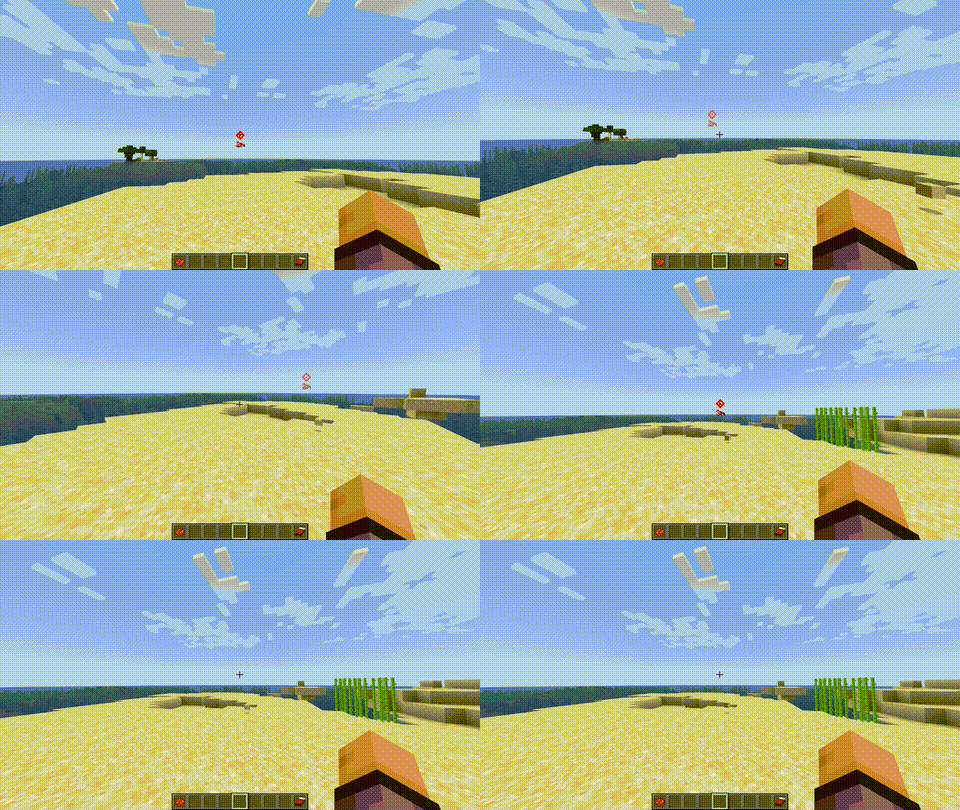
按住 使用 键可创建标记

按住 使用 键时,点击鼠标中键可自定义标记以更改图标,或右键点击染料以更改颜色。

按住 使用 键时滚动可选择不同的图标选项

按住 使用 键时击打标记即可删除它
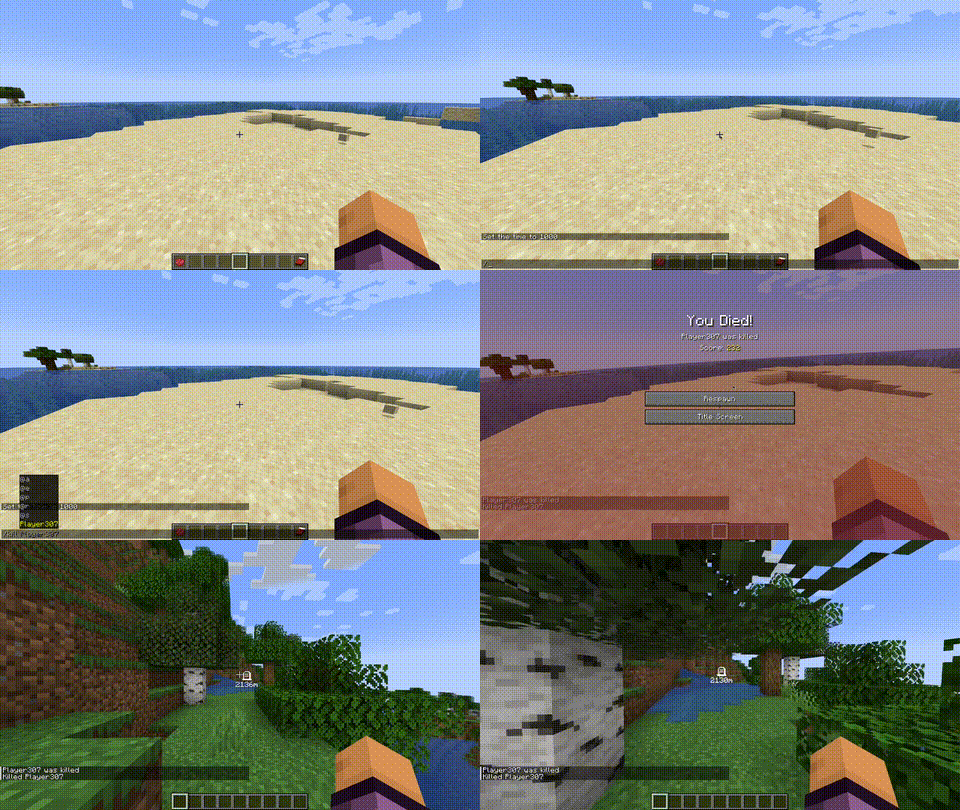
死亡时会生成一个死亡标记!
计划中
- 与其他玩家共享标记
- 用于设置选项的配置文件
使用方法
本模组主要围绕 使用 键展开。该键默认为 GRAVE 键或 `。
切换键默认为 M,但你都可以在 Minecraft 的按键绑定菜单中进行配置。
模组依赖
本模组不需要任何额外的依赖项!
常见问题
我可以在整合包中使用这个模组吗?
当然可以!如果你使用了,我也很乐意得知 :D
这会回溯移植到 1.20.1 之前的版本吗?
除非有很多人请求,否则可能不会。
这会在 1.20.1 之后继续更新吗?
绝对会的。我只是先让这个版本稳定下来,然后将其更新到更新的版本。
支持
你可以在我的 Discord 服务器 上获得支持,或者在 GitHub 仓库 这里 报告模组的任何错误。对于插件,请使用 这一个。
合作伙伴
如果需要新服务器,请查看我们的合作伙伴 lagless.gg
使用代码 Dinonuggies 可享受 20% 折扣!
Do you want to mark locations without needing a whole map mod? Want to track your Death locations without any hassle? Want to actually know how far that Buried Treasure map will take you? Want to customise your Markers?
Features
- Place your own Markers
- Death Markers
- Customise your Markers colour and icon using items!
- Display distance to Markers
- Toggle Markers with
M - Create Markers from Map Banners or tracked locations like Buried Treasure or Wooldland Mansions!
Feel free to join my Discord server and give me any suggestions for new features
Create Markers with the Use key
Customise a Marker with the Middle mouse button to change the icon or right click with Dye to change the colour. While holding the Use key
Scroll through the icon options while holding the Use key
Delete the Marker by punching it while holding the Use key
Spawns a Death Marker when you die!
Planned
- Share Markers with other players
- Config file for options
Usage
The mod revolved around the Use key. This key defaults to the GRAVE key or `.
The toggle key defaults to M but these are both configurable through Minecrafts Keybinds menu.
Mod Requirements
This mod does not require any extra dependencies!
FAQ
Can I use this mod in my modpack?
Absolutely! If you do so, I would love to know about it too :D
Will this be backported to before 1.20.1?
Unless a lot of people request this, probably not.
Will this be updated past 1.20.1?
Absolutely. I am just making this version stable first and then I will update it to newer versions.
Support
Support can be provided on my discord server or you can report any bugs for the mod on the GitHub repository here. For the plugin please use this one
Partnership
If you need a new server check out our partner lagless.gg
Use code Dinonuggies for 20% off!

下载 Doom's Markers
下载 Doom's Markers
下载 Doom's Markers
下载 Doom's Markers
下载 Doom's Markers
下载 Doom's Markers
下载 Doom's Markers
下载 Doom's Markers
下载 Doom's Markers
下载 Doom's Markers
新增
- 可配置的起始/结束淡入淡出距离
- 专用删除标记按键
- 在淡入淡出距离内创建新标记时,可配置随时间变化的淡入淡出值
- 可配置焦点状态与非焦点状态的透明度选项
新增
- 替换并添加了 20 多种新的标记图标!
- 现在可以通过命令更轻松地创建标记,您不再需要指定标记图标的索引号,而是直接指定 ID(例如
grave_big)。 - 并非所有标记都有直接对应的替代品。在更新现有世界时,某些标记可能会显示为随机新图标(自定义物品标记不受影响)。
- 现在可以通过命令更轻松地创建标记,您不再需要指定标记图标的索引号,而是直接指定 ID(例如
- 新增传送命令选项,可将玩家传送到距离标记一定范围/随机半径内的位置。
/marker <player> teleport <marker_lite> <target|minimum_range> <maxmimum_range> <target|attempts> <target>/marker Dev teleport [dimension=minecraft:overworld] 200 300 Dev/marker Dev teleport [dimension=minecraft:overworld] 250 500 5 Dev/marker Dev teleport [dimension=minecraft:overworld,type=custom_marker] 200 201 Dev
修复
- 相对位置在标记命令中正常工作
关于这个资源的讨论、问题反馈与使用心得
还没有讨论,来发第一帖吧
你是这个资源的作者?登录后可认领此资源。
相似资源
 模组

显示你正在注视的方块的信息。(适用于 Minecraft 1.16+ 的 Hwyla/Waila 分支)
 模组
在游戏画面角落显示附近世界地形、玩家、生物和实体的地图。可创建路径点,帮助你找到标记过的位置。
 模组

查看物品与配方
 模组
使用 JavaScript 编辑配方、添加自定义物品、编写世界事件!
 模组
AE2:一款流行的自动化与存储模组
 模组
那是什么?一个 Waila/Hwyla 的分支。
评论 0
登录后参与评分
还没有评论,来抢沙发吧