
Dynamic Performance
一款保留原版特性且轻量级的性能优化模组,它会根据服务器的负载情况****动态调整视距、模拟距离和生物上限。
适合那些希望在配置较低的硬件上也能保持最佳游戏体验的服务器管理员。
为什么使用此模组?
- 动态缩放: 通过检查服务器的 MSPT(每刻毫秒数),它会自动调整至理想设置,确保服务器在能力范围内运行最佳。
- 可扩展的配置: 缩放的类型以及检查间隔完全可配置,以适应你硬件的能力。
- 灵活且兼容: 此模组支持单人游戏和多人联机,兼容 Fabric 和 NeoForge,并且与所有其他性能模组兼容。
- 易于理解: 通过使用提供的命令来查看当前服务器状态、审查活动配置以及重载配置更改,你可以轻松了解正在发生的事情。
工作原理
Dynamic Performance 大约每隔 15 秒检查一次当前的 MSPT。更多信息请参阅 Configuration 部分。
补充信息:一个健康的服务器目标 TPS(每秒刻数)为 20,因此最大 MSPT 应为 50。所以,卡顿阈值应围绕此值设定。
此外,如果 MSPT 超过卡顿阈值,服务器会按照性能等级中的配置开始降低设置,直到不再超过该阈值。恢复过程也是如此:如果 MSPT 低于恢复阈值,服务器会根据上述等级开始反向提升设置。
如果 MSPT 保持在卡顿和恢复阈值之间,则不会进行任何缩放更改。此时服务器被视为稳定状态。有关更多详细信息,请参阅 Performance States 部分。
安装
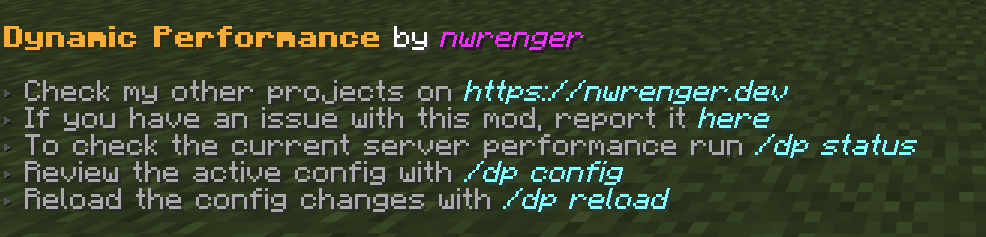
将模组添加到你的世界或服务器后,你应该能够打开关于面板,该面板完全可以通过鼠标控制:
/dp about
或者
/dynamicperformance about
状态
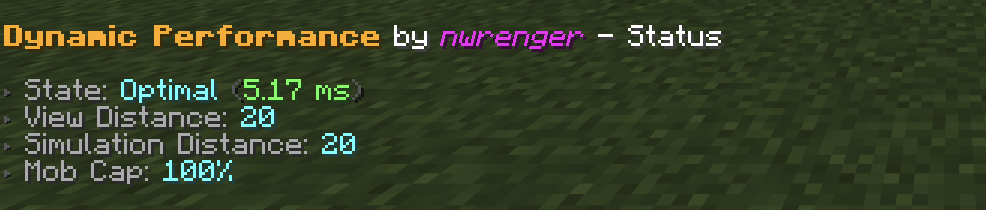
可以使用以下命令检查当前的性能状态、MSPT、视距、模拟距离和生物上限百分比:
/dp status
或者
/dynamicperformance status
性能状态
报告以下性能状态:
Optimal(最佳):所有配置的等级均已恢复。Stable(稳定):MSPT 介于恢复和卡顿阈值之间。Scaling Down(正在降低):MSPT 较高,设置仍可进一步减少。Lagging(卡顿中):MSPT 较高,但所有配置的等级都已降至最低值。Scaling Up(正在提升):设置正在恢复。
配置
配置文件创建于:
./config/dynamic-performance.json
默认内容:
{
  "interval": 15,
  "lag_threshold": 45.0,
  "recovery_threshold": 30.0,
  "levels": [
    {
      "type": "SIMULATION_DISTANCE",
      "max": 16,
      "min": 8,
      "increment": 1
    },
    {
      "type": "MOB_CAP_PERCENTAGE",
      "max": 100,
      "min": 75,
      "increment": 5
    },
    {
      "type": "SIMULATION_DISTANCE",
      "max": 8,
      "min": 5,
      "increment": 1
    },
    {
      "type": "MOB_CAP_PERCENTAGE",
      "max": 75,
      "min": 30,
      "increment": 15
    },
    {
      "type": "VIEW_DISTANCE",
      "max": 20,
      "min": 4,
      "increment": 2
    }
  ]
}
此配置将最明显的变化——视距——作为最后的降级手段,而在此之前通过模拟距离和生物生成来减轻服务器端的负载。
选项
interval:服务器性能检查和调整的间隔时间(秒)。lag_threshold:开始降低设置的 MSPT 值。recovery_threshold:开始提升设置的 MSPT 值(含等于该值的情况)。levels:用于视距、模拟距离和生物上限百分比的有序缩放规则。
等级类型
支持的等级类型:
VIEW_DISTANCE:调整服务器视距。SIMULATION_DISTANCE:调整服务器模拟距离。MOB_CAP_PERCENTAGE:以原版生物上限百分比的形式调整生物上限。
每个等级包含:
max:模组可以恢复此设置到的最高值。min:模组可以将此设置降低到的最低值。increment:缩放时使用的步长。
顺序很重要。降低设置时遵循从上到下的列表顺序,而提升设置时遵循从下到上的顺序。
活动配置
可以在游戏中使用以下命令查看活动配置:
/dp config
或者
/dynamicperformance config
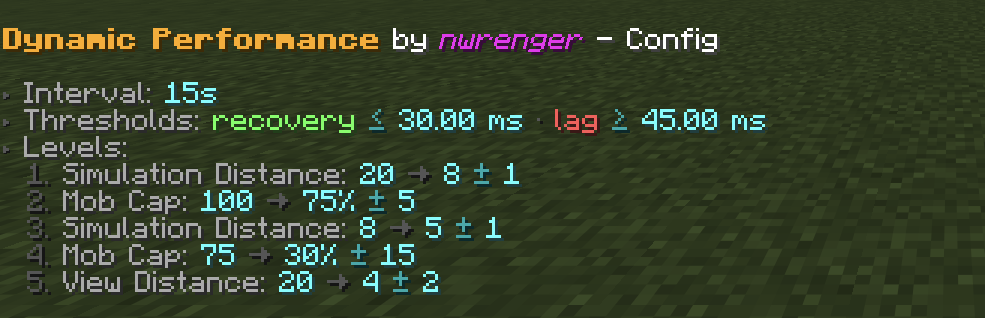
截图显示了上面列出的默认配置。
重载
编辑配置文件后,无需重启即可应用更改,请运行:
/dp reload
或者
/dynamicperformance reload
如果配置无效,命令将报告错误并保持上一个有效配置处于活动状态。
贡献与问题
我热烈欢迎:
- 错误报告
- 功能请求
- 拉取请求
请在 GitHub 上提交 Issues 或 PRs。
许可证
本项目采用 LGPLv3 License 许可。详情请参阅 LICENSE。
Dynamic Performance
A vanilla-preserving and lightweight performance mod that dynamically adjusts view distance, simulation distance, and the mob cap based on the server's load.
Ideal for server owners who want to keep the best possible playing experience even on weaker hardware.
Why use this mod?
- Dynamic Scaling: By checking the server's MSPT (milliseconds per tick), it dynamically scales to ideal settings, ensuring that the server runs as well as it is able to.
- Extensible Configuration: The kind of scaling, as well as the check interval, is fully configurable for your hardware's capabilities.
- Flexible and Compatible: This mod works in singleplayer and multiplayer, supports Fabric and NeoForge, and is compatible with all other performance mods.
- Comprehensible: By using the provided commands to check the current server status, review the active config, and reload config changes, it's easy to understand exactly what's going on.
How it works
Dynamic Performance monitors the current MSPT by checking it every 15 seconds or so. For further information, consult the Configuration section.
Side Info: A healthy server targets 20 TPS (ticks per second) and, therefore, 50 MSPT at max. So, the lag threshold should be around this value.
Furthermore, if the MSPT exceeds the lag threshold, the server starts scaling down as configured in the performance levels until it no longer exceeds the threshold. The same is true for recovery: If the MSPT is lower than the recovery threshold, the server starts scaling up based on the mentioned levels, now in reverse.
If the MSPT stays between the lag and recovery thresholds, no scaling changes are made. The server is then considered stable. See the Performance States section for more details.
Installation
After adding the mod to your world or server, you should be able to open the about panel, which is fully controllable with the mouse:
/dp about
or
/dynamicperformance about
Status
The current performance state, MSPT, view distance, simulation distance, and mob cap percentage can be checked with:
/dp status
or
/dynamicperformance status
Performance States
The following performance states are reported:
Optimal: All configured levels are restored.Stable: MSPT is between the recovery and lag thresholds.Scaling Down: MSPT is high and settings can still be reduced.Lagging: MSPT is high, but all configured levels are already at their minimum values.Scaling Up: Settings are being restored.
Configuration
A config file is created at:
./config/dynamic-performance.json
Default contents:
{
  "interval": 15,
  "lag_threshold": 45.0,
  "recovery_threshold": 30.0,
  "levels": [
    {
      "type": "SIMULATION_DISTANCE",
      "max": 16,
      "min": 8,
      "increment": 1
    },
    {
      "type": "MOB_CAP_PERCENTAGE",
      "max": 100,
      "min": 75,
      "increment": 5
    },
    {
      "type": "SIMULATION_DISTANCE",
      "max": 8,
      "min": 5,
      "increment": 1
    },
    {
      "type": "MOB_CAP_PERCENTAGE",
      "max": 75,
      "min": 30,
      "increment": 15
    },
    {
      "type": "VIEW_DISTANCE",
      "max": 20,
      "min": 4,
      "increment": 2
    }
  ]
}
This config keeps the most visible change, view distance, as the last fallback while reducing server-side load earlier through simulation distance and mob spawning.
Options
interval: How often, in seconds, the server performance is checked and adjusted.lag_threshold: MSPT value at which scaling down starts.recovery_threshold: MSPT value at or below which scaling back up starts.levels: Ordered scaling rules for view distance, simulation distance, and mob cap percentage.
Level Types
Supported level types:
VIEW_DISTANCE: Adjusts the server view distance.SIMULATION_DISTANCE: Adjusts the server simulation distance.MOB_CAP_PERCENTAGE: Adjusts the mob cap as a percentage of vanilla mob caps.
Each level has:
max: Highest value the mod may restore this setting to.min: Lowest value the mod may reduce this setting to.increment: Step size used when scaling up or down.
The order matters. Scaling down follows the list from top to bottom, while scaling back up follows it from bottom to top.
Active Configuration
The active configuration can be reviewed in-game with:
/dp config
or
/dynamicperformance config
The screenshot shows the default config listed above.
Reload
After editing the config file, apply changes without restarting by running:
/dp reload
or
/dynamicperformance reload
If the config is invalid, the command reports the error and keeps the previous valid config active.
Contributing & Issues
I warmly welcome:
- Bug reports
- Feature requests
- Pull requests
Please open issues or PRs on GitHub.
License
This project is licensed under the LGPLv3 License. See LICENSE for details.

下载 Dynamic Performance
需要联机服务器吗?
稳定流畅、一键部署,几分钟即可和朋友联机开服
最低仅需 8 元/月 即可畅快联机
下载 Dynamic Performance
需要联机服务器吗?
稳定流畅、一键部署,几分钟即可和朋友联机开服
最低仅需 8 元/月 即可畅快联机
下载 Dynamic Performance
需要联机服务器吗?
稳定流畅、一键部署,几分钟即可和朋友联机开服
最低仅需 8 元/月 即可畅快联机
下载 Dynamic Performance
需要联机服务器吗?
稳定流畅、一键部署,几分钟即可和朋友联机开服
最低仅需 8 元/月 即可畅快联机
下载 Dynamic Performance
需要联机服务器吗?
稳定流畅、一键部署,几分钟即可和朋友联机开服
最低仅需 8 元/月 即可畅快联机
下载 Dynamic Performance
需要联机服务器吗?
稳定流畅、一键部署,几分钟即可和朋友联机开服
最低仅需 8 元/月 即可畅快联机
下载 Dynamic Performance
需要联机服务器吗?
稳定流畅、一键部署,几分钟即可和朋友联机开服
最低仅需 8 元/月 即可畅快联机
下载 Dynamic Performance
需要联机服务器吗?
稳定流畅、一键部署,几分钟即可和朋友联机开服
最低仅需 8 元/月 即可畅快联机
下载 Dynamic Performance
需要联机服务器吗?
稳定流畅、一键部署,几分钟即可和朋友联机开服
最低仅需 8 元/月 即可畅快联机
下载 Dynamic Performance
需要联机服务器吗?
稳定流畅、一键部署,几分钟即可和朋友联机开服
最低仅需 8 元/月 即可畅快联机
✨ 扩展支持:Minecraft 版本 1.21–1.21.1。
关于这个资源的讨论、问题反馈与使用心得
还没有讨论,来发第一帖吧
你是这个资源的作者?登录后可认领此资源。
相似资源
 模组

一个用于收集生物掉落物的多区块模组。
 模组

显示你正在注视的方块的信息。(适用于 Minecraft 1.16+ 的 Hwyla/Waila 分支)
 模组

查看物品与配方
 模组

原版世界生成优化模组
 模组
在游戏画面角落显示附近世界地形、玩家、生物和实体的地图。可创建路径点,帮助你找到标记过的位置。
 模组
使用 JavaScript 编辑配方、添加自定义物品、编写世界事件!
评论 0
登录后参与评分
还没有评论,来抢沙发吧