
EasyVillagerTrade
一款用于自动与图书管理员交易附魔书的 Fabric 模组
EasyVillagerTrade 是什么?
EasyVillagerTrade (EVT) 是一款客户端的 Fabric 模组,可自动化循环浏览图书管理员的交易以查找特定附魔书的过程。设定你的目标,选择村民,剩下的交给模组处理——它会打破讲台、重新放置、检查新提供的交易,并在发现匹配项时立即购买书籍。
设置
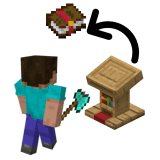
在开始之前,在主手装备一把斧头,副手持有一个或多个讲台。
在讲台位置下方搭建红石或水流装置可以确保所有掉落的讲台被自动收集。
使用方法
通过命令:
- /evt search add <maxPrice> <enchantment> [level] — 将附魔加入搜索队列
- /evt search remove <enchantment> — 从队列中移除附魔
- /evt search list — 列出所有已排队的附魔
- /evt select — 进入选择模式并手动点击你的图书管理员和讲台
- /evt select close — 自动选择最近的有效图书管理员和讲台配对
- /evt execute — 启动模组
- /evt stop — 停止模组
通过界面(F6,可重新绑定):
无需输入任何命令,直接从游戏中打开 EVT 界面。添加具有所需等级和最高价格的附魔,通过“Remove”按钮或点击条目来移除它们,然后点击“Select”和“Start”。
- 按 Enter 或 Tab 键自动补全附魔名称
- 使用 * 作为等级参数,一次性排队该附魔的所有等级
工作原理
一旦启动,EVT 运行一个完整的自动循环:
- 打破讲台
- 重新放置以重置村民的交易提供
- 将新的交易与你的队列进行比对
- 找到匹配项后自动购买书籍——只要你的背包中有足够的绿宝石和书本
可以在 config/evt 中启用调试输出,显示每次检查的交易。
示例视频(旧版本)
报告问题
如果你遇到问题:
- 使用提供的模板在 Github 仓库 上提交新问题
- 或者加入 Discord 服务器 并在支持频道发帖
你的反馈有助于推动项目前进——谢谢!
EasyVillagerTrade
A Fabric mod that automates enchanted book trading with librarians
What is EasyVillagerTrade?
EasyVillagerTrade (EVT) is a client-side Fabric mod that automates the process of cycling through librarian trades to find specific enchanted books. Set your targets, select your villager and let the mod do the rest — it breaks the lectern, places it again, checks the new offer and buys the book the moment it finds a match.
Setup
Before starting, equip an axe in your main hand and hold lecterns in your offhand.
A redstone or water contraption beneath the lectern position can be useful to guarantee all dropped lecterns are collected automatically.
Usage
Via commands:
- /evt search add <maxPrice> <enchantment> [level] — add an enchantment to your search queue
- /evt search remove <enchantment> — remove an enchantment from the queue
- /evt search list — list all queued enchantments
- /evt select — enter selection mode and manually click your librarian and lectern
- /evt select close — automatically select the closest valid librarian and lectern pair
- /evt execute — start the mod
- /evt stop — stop the mod
Via the screen (F6, rebindable):
Open the EVT screen directly from the game without typing any commands. Add enchantments with your desired level and max price, remove them via the Remove button or by clicking an entry, then hit Select and Start.
- Autocomplete enchantment names with Enter or Tab
- Use * as the level argument to queue all levels of an enchantment at once
How it works
Once started, EVT runs a full automatic cycle:
- Breaks the lectern
- Places it again to reset the villager's trade offer
- Checks the new offer against your queue
- Buys the book automatically once a match is found — as long as you have enough emeralds and books in your inventory
Debug output showing each checked trade can be enabled in config/evt.
Example video (older version)
Reporting Issues
If you run into a problem:
- Open a new issue on the Github Repository using the provided template
- Or join the Discord Server and post in the support channel
Your feedback helps keep the project moving — thank you!
下载 EasyVillagerTrade
下载 EasyVillagerTrade
下载 EasyVillagerTrade
下载 EasyVillagerTrade
下载 EasyVillagerTrade
下载 EasyVillagerTrade
需要联机服务器吗?
稳定流畅、一键部署,几分钟即可和朋友联机开服
最低仅需 8 元/月 即可畅快联机
下载 EasyVillagerTrade
需要联机服务器吗?
稳定流畅、一键部署,几分钟即可和朋友联机开服
最低仅需 8 元/月 即可畅快联机
下载 EasyVillagerTrade
下载 EasyVillagerTrade
下载 EasyVillagerTrade
需要联机服务器吗?
稳定流畅、一键部署,几分钟即可和朋友联机开服
最低仅需 8 元/月 即可畅快联机
更新至 26.2
关于这个资源的讨论、问题反馈与使用心得
还没有讨论,来发第一帖吧
你是这个资源的作者?登录后可认领此资源。
相似资源
 模组

显示你正在注视的方块的信息。(适用于 Minecraft 1.16+ 的 Hwyla/Waila 分支)
 模组
在游戏画面角落显示附近世界地形、玩家、生物和实体的地图。可创建路径点,帮助你找到标记过的位置。
 模组

查看物品与配方
 模组
使用 JavaScript 编辑配方、添加自定义物品、编写世界事件!
 模组
AE2:一款流行的自动化与存储模组
 模组
那是什么?一个 Waila/Hwyla 的分支。
评论 0
登录后参与评分
还没有评论,来抢沙发吧