⚠ EchoCore 仍处于早期开发阶段!
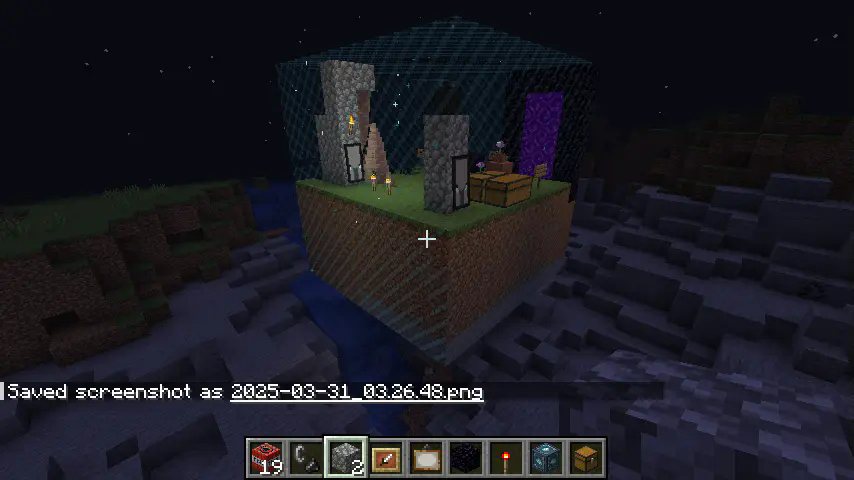
EchoCore 方块可保护一个区域免受破坏。它通过从你分配给 EchoCore 的箱子中取出方块来进行修复。如果在选项卡中关闭 use chests(使用箱子),EchoCore 便可以在不需要任何箱子或其中方块的情况下重建该区域。
更多详细信息和视频即将推出。
⚒️ 工作原理
获取 EchoCore 方块
- 创造模式:在红石标签页中找到它,或在物品搜索中输入
"echocore"。
- 生存模式:使用一个泥土方块合成(临时配方)
放置与配置
- 将其放置在世界中(你将免费获得一个 EchoCrystal)。
- 用 TNT 破坏方块,看着它们自动恢复!
- 可选:进入设置标签页,启用或禁用
useChests
装备 EchoCrystal
- 你现在可以看到 EchoCore 的保护范围及其修复光束
- 右键点击玩家以将其添加/移除至 EchoCore 的所有者列表
- 右键点击箱子以将其添加/移除至 EchoCore 的关联箱子
- 瞄准 EchoCore 保护范围的一侧以调整其位置
EchoCore 1.0.0 Alpha ?
? 新增内容
- ? EchoCore 水晶:
- ?️ 右键点击以与 EchoCore 链接
- ?️ 装备后可可视化核心区域、已分配的箱子和所有者
- ? 右键点击箱子以将其分配给核心
- ? 右键点击玩家以添加/移除为共同所有者
- ? 通过右键点击区域侧面,然后点击一个方块来调整保护范围
- ? 修复光束
- ⚙️ 重叠区域的自动调整大小
- REALISTIC 模式:重建仅使用已分配箱子中的方块。(禁用时免费生成方块)
- ? 实现所有者系统
- ? 所有者做出更改时自动保存
- ? 区域调整大小时自动保存
- ?️ 防复制机制:当 REALISTIC 模式关闭时无掉落;箱子内容物还原且不产生复制
- ?️ 丢弃之前保存方块的按钮
- ? 单次修复按钮 & 启用持续修复模式的按钮
- ? EchoCore 和水晶的新纹理
- ?️ 配置文件:位于
.minecraft/config/ 下的 echocore.toml
- ⚙️ 游戏内配置菜单(目前位于 EchoCore 方块内,后续将移至 Minecraft 选项)
- ? 调整建造速度
- ? 调整扫描速度(影响核心检测变化和建造的速度)
? 修改内容
- ? 减少数据量和网络占用
- ? 改进重建算法
- ? 更好的方块/状态扫描
- ?️ 修复统计信息:“needed”(所需)和“storage”(存储)
- ? 草方块和泥土现在可以互换
- ? UI 现支持实时更新
- ? UI 重新设计
- ? 修复方块列表表格中的列排序问题
? 已知问题
- ? 不当关机(崩溃、强制关闭)可能导致无法检测到最近被破坏的方块
- ? 部分多方块结构(床、门、高草丛等)可能仍表现异常
✅ 兼容性
完全兼容所有 1.20.1 模组。如果遇到兼容性问题,很可能是与其他模组冲突所致。EchoCore 添加的是新内容,并未修改现有的 Minecraft 代码,因此兼容性问题应该非常罕见。如果你发现了任何问题,请告诉我们!
? 投票
? 计划中的功能
? 核心机制
|
|
| 精灵建筑师 |
精灵携带方块并重建区域。 |
|
|
| 基于成就的教程 |
通过成就或其他游戏内系统进行整合。 |
|
|
| 动态扩展 |
随着玩家建造,保护范围自动扩展。 |
|
|
| 燃料系统 |
EchoCore 根据范围消耗煤炭或其他资源。 |
|
|
| 高级形状支持 |
圆形或其他形状的 EchoCore 区域。 |
| 自定义光影 |
增强区域墙壁的视觉效果。 |
? 配置与 UI 增强
|
|
| 游戏内设置菜单 |
在世界生成屏幕中可访问选项。 |
|
|
| 改进的 UI 设计 |
双视图箱子 UI:左侧 = 存储,右侧 = 总计/所需。
– 箱子管理标签页用于材料追踪。
– EchoCore 通知(警报时方块颜色变化)。
– 遗迹攻击及重建受阻的视觉警报。
– 引导式设置向导,简化 EchoCore 配置。
– EchoCore 颜色自定义选项。 |
? 可能的功能(待定)
|
|
| 傀儡建筑师 |
自主傀儡协助修复工作。 |
|
|
| 蓝图系统 |
将区域保存为 Minecraft 生态系统中常见的格式的世界编辑蓝图(如 WorldEdit...)。保存小区域的蓝图,在任何地方加载,看着精灵为你建造它们。 |
|
|
| 红石 EchoCore 链接 |
通过红石导线连接 EchoCore。 |
⚠ EchoCore is still in early development!
An EchoCore block protects a zone from destruction.
It repair it by taking blocks from chests that you've assigned to the EchoCore. If you turn off use chests in option tab, the EchoCore can rebuild the zone without the need for any chests or blocks in them.
More infos & videos comming soon.
⚒️ How It Works
Obtain the Echocore Block
- Creative: Find it in the Redstone tab or type
"echocore" in the item search.
- Survival: Craft it with one block of dirt (Temporary)
Place & Configure
- Place it down in the world (You will receive an EchoCrystal for free)
- Destroy blocks with TNT and watch as they are automatically restored!
- Optional: go to settings tab and enable or disable
useChests
Equip the EchoCrystal
- You can now see the EchoCore's protected zone and it's repair beam
- Right-click on players to add/remove them to the echocore
- Right-click on chests to add/remove them to the echocore
- Aim at one of the echocore protected side to adjust it's position
EchoCore 1.0.0 Alpha ?
? Additions
- ? Echocore's Crystal:
- ?️ Right-click to link with an EchoCore
- ?️ Equip to visualize the core's zone, assigned chests, and owners
- ? Right-click chests to assign them to the core
- ? Right-click players to add/remove them as co-owners
- ? Adjust protected zone by right-clicking the zone side, then a block
- ? Repair beam
- ⚙️ Automatic resizing of overlapping zones
- REALISTIC Mode: Rebuilding only uses blocks from assigned chests. (spawn blocks for free when disabled)
- ? Owner system implemented
- ? Auto-save when owners make changes
- ? Auto-save on zone resize
- ?️ Anti-duplication: no drops when REALISTIC mode is off; chest contents restored without duplication
- ?️ Button to discard previously saved blocks
- ? One-shot repair button & Button to enable perpetual repair mode
- ? New textures for both the echocore and crystal
- ?️ Config file:
echocore.toml in .minecraft/config/
- ⚙️ In-game config menu (currently in the EchoCore block, will move to Minecraft options)
- ? Adjust build speed
- ? Adjust scan speed (affects how fast the core detects changes and builds)
? Modifications
- ? Reduced data and network usage
- ? Improved reconstruction algorithm
- ? Better block/stat scanning
- ?️ Fixed stats: “needed” and “storage”
- ? Grass and dirt are now interchangeable
- ? UI now updates live
- ? UI redesign
- ? Fixed column sorting in block list table
? Known Bugs
- ? Improper shutdowns (crash, forced close) may prevent detection of recently broken blocks
- ? Some multiblocks (beds, doors, tall plants, etc.) may still misbehave
✅ Compatibility
Fully compatible with all 1.20.1 mods. If you experience issues, they're likely due to conflicts with another mod. EchoCore adds content but doesn't modify existing Minecraft code, so compatibility problems should be very rare, if you ever spot one let us know!
? Vote
? Planned Features
? Core Mechanics
|
|
| Allays Builders |
Allays to carry blocks and reconstruct the zone. |
|
|
| Achievement-Based Tutorial |
Integration via achievements or another in-game system. |
|
|
| Dynamic Expansion |
Auto-expanding protection range as players build. |
|
|
| Fuel System |
Echocores consuming coal or other resources based on range. |
|
|
| Advanced Shape Support |
Circular or other echocore zone shapes. |
| Custom Shader |
Enhance the look of the zone walls. |
? Configuration & UI Enhancements
|
|
| In-Game Settings Menu |
Options accessible in the world generation screen. |
|
|
| Improved UI Design |
Double-view chest UI: Left = storage, Right = total/needed.
– Chest management tab for material tracking.
– Echocore notifications (block color changes for alerts).
– Visual alerts for relic attacks & blocked reconstruction.
– Guided setup wizard for easier echocore configuration.
– Echocore color customization options. |
? Possible Features (To Be Determined)
|
|
| Golem Builders |
Autonomous golems assisting in restoration. |
|
|
| Blueprint System |
Save the zone as a blueprint in a format common to the minecraft ecosystem (world edit, ...). Save blueprints of smaller zone, load them anywhere and watch allays built them for you. |
|
|
| Redstone Echocore Links |
Connect echocores via redstone wires. |


 模组

 模组
 模组

 模组
 模组
 模组
评论 0
登录后参与评分
还没有评论,来抢沙发吧