Elementarium
完整的元素周期表,具有真实化学成分的真实矿石,以及所有添加的内容都能以完全相同的方式运作。
Elementarium 是一个面向整合包创作者的数据驱动材料库。开箱即用即可获取 全部 118 种元素,形式包括锭、板、齿轮、粉末、流体等——此外还包含 60 多种真实世界矿石(磁铁矿、铝土矿、朱砂、黑钨矿……),拥有真实的化学组成、世界生成机制以及一个多区块 矿物分析仪,可以研究来自任何模组的任意矿石。配方、标签、战利品和整洁统一的视觉效果均已配置完毕。
需要自定义合金或矿石?只需几行代码通过 JSON 或 KubeJS 添加,即可免费获得全套支持。不需要某些功能?在一个配置文件中一键关闭——每个功能都有独立的开关。
简而言之:再也不用忍受不同模组提供三种不同的钢板了 :)
亮点
- 默认包含 全部 118 种元素,完全可配置。
- 每种材料自动变为完整的形式套装:
- 锭、粒、块
- 粉末、小粉末、微粉末
- 板、双板、杆、齿轮、线
- 流体:熔融态、液态、气态(每种均配有流体方块 + 桶)
- 60+ 真实矿石 —— 每种元素对应一种真实矿物,按照地质逻辑分布在主世界、下界和末地中。
- 真实的化学 —— 每种矿物都携带其真实化学式(例如孔雀石是 Cu₂CO₃(OH)₂,而非“铜矿石”)。
- 矿物分析仪 —— 一个多区块扫描仪,用于显示任意矿石的生成位置。适用于 任何 模组的矿石。
- 内置配方统一 —— 类似 Almost-Unified 的风格:跨模组的重复材料会自动合并为单一物品。
- 默认生成配方 —— 完整的压缩网络、矿石熔炼/锻造、所有内容一应俱全。
- 跨模组的
c: 标签 覆盖所有内容(c:ingots/steel、c:ores/tin、c:raw_materials/tin …),让你的物品与其他模组的物品无缝协作。
- 秒级添加你自己的材料和矿石 —— 使用 JSON 或 KubeJS,效果相同:拥有真实物品、配方、标签、模型和世界生成的内容。
- 完全模块化 —— 可从单个配置文件中全局或单独禁用任何材料、形式、矿物或功能。
- JEI 内置支持 —— 提供元素信息页面以及目录中的所有物品和配方。
- 游戏内元素周期表 —— 一个可收集的元素浏览器(默认按键:P)。
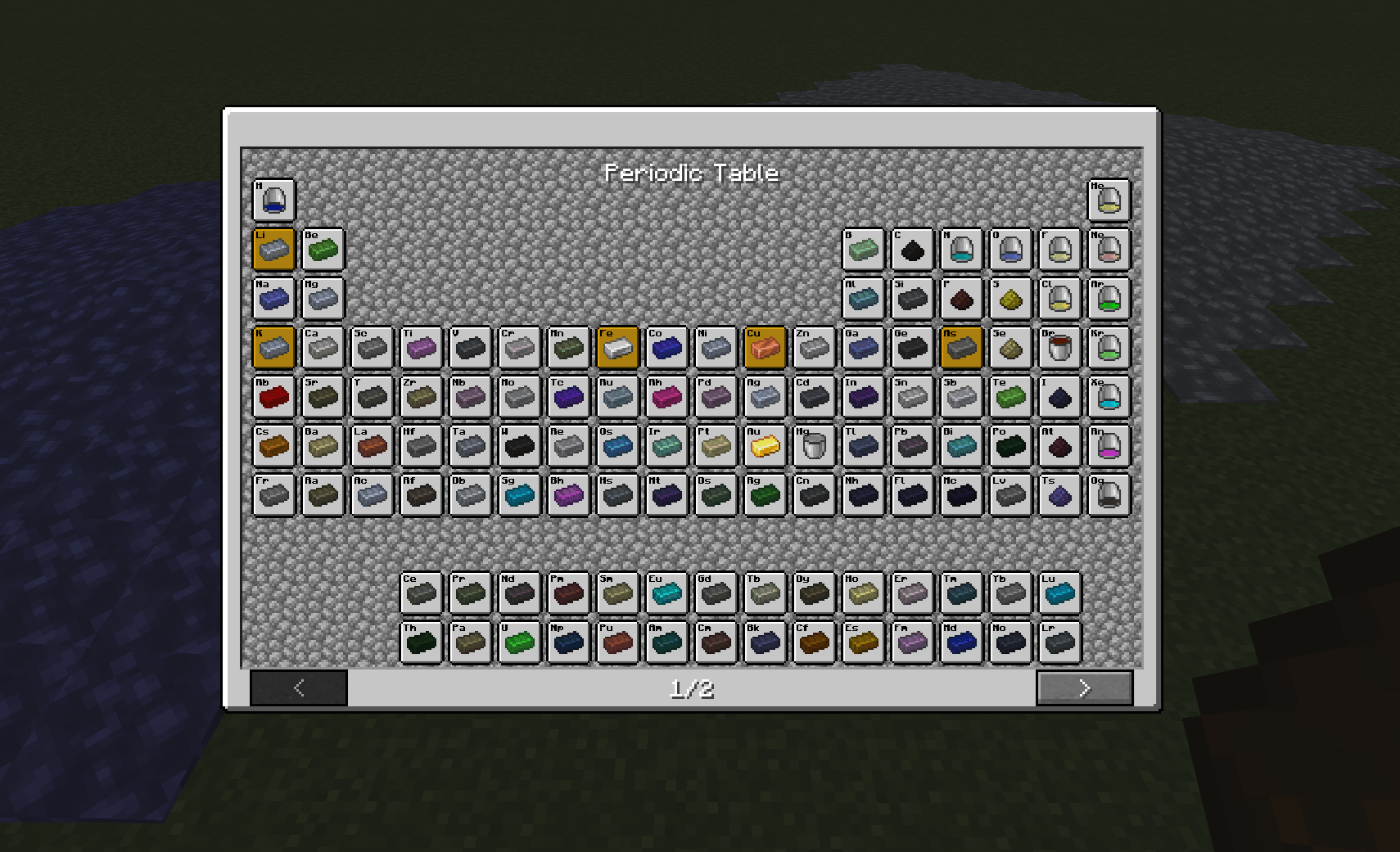
矿石种类 — 真实矿物,真实化学
在现实生活中,你开采的不是“锡矿石”,而是 锡石。Elementarium 提供了 60 多种真实矿物,每种元素对应一种,并根据地质学原理放置在合适的位置:
| 位置 |
生成的矿物 |
| 石头 |
常见地壳矿物:铝土矿、岩盐、萤石、锡石、石英、方解石… |
| 深板岩 |
深层且致密矿物:铬铁矿、自然银、砷铂矿(铂)、铀矿… |
| 下界 |
仅硫系矿物:自然硫、朱砂 (HgS)、辉锑矿、辉钼矿、铼铁矿 —— 一种 literally 发现于火山喷气孔中的矿物 |
| 末地 |
地球上极少见的物质:黑钨矿(钨)、钽铁矿、稀土矿物(独居石、磷钇矿…)、铂族合金 |
每种矿石:
- 掉落着色的 原矿矿物(精准采集掉落方块,效率魔咒生效)—— 或者如果配置如此,则直接掉落自身。
- 熔炼/锻造后转化为其 主要元素。
- 工具提示中携带其 真实化学式 —— 完整的成分数据会喂给
elementarium:contains/<element> 标签,准备好进行副产品处理。
- 根据宿主岩石(石头 / 深板岩 / 下界岩 / 末地石)烘焙出不同的纹理,由单个叠加层 + 你的矿物颜色决定。
- 在世界中生成时具有 每种矿物的矿脉大小、数量、高度范围和分布 —— 均可编辑。
按你喜欢的方式命名
namingMode: "real" → 孔雀石矿石、原锡石(沉浸感强)namingMode: "simple" → 铜矿石、原锡(熟悉感强)renameVanilla: true → 原版矿石也会获得真实名称:铁矿石变为 磁铁矿矿石,原铁变为 原磁铁矿(仅显示更改 —— 不会破坏任何东西)
铁、铜、金、煤和青金石 不会被复制:它们的矿物仅作为重命名条目存在,以保持原版内容的原汁原味。
矿物分析仪
Elementarium 的单一方块机器 —— 且无法合成。将 多区块外壳 堆叠在一起,顶部放置 升降柱,并使用 螺丝枪(来自 Navaronee CoreLib)进行组装。破坏它会返还你的方块。
输入 Forge Energy,插入 来自任何模组的任意矿石方块,它便会读取你当前实例的实际世界生成数据:
- 该矿石在哪些 维度 生成
- 高度范围(真实的 Y 值,从实际放置的特征中解析得出)
- 矿脉密度
- 化学式(针对 Elementarium 矿物)
- 自由文本描述 —— 由 你(整合包创作者)编写在
config/elementarium/descriptions.json 中,针对每个方块 ID 或每个标签。在一个文件中记录整个整合包的所有矿石。
没有硬编码列表:如果一个模组添加了矿石,分析仪就能分析它。
配方统一
Elementarium 是你整合包的材料骨干。当两个模组都添加了锡锭时,加载时会重写整个整合包的配方,以便:
- 输出 解析为一个主导物品(Elementarium 的,或铁/金/铜的原版物品)
- 输入 扩展至
c: 标签,因此所有等效物品保持可用
- 重复配方 被移除,非主导的重复项在 JEI 中隐藏
它以通用方式理解机器配方格式(已通过 Mekanism、Immersive Engineering 和 Create 验证),并且完全可配置 —— 教会它新的配方字段、排除配方类型,或直接将其关闭。
添加材料
模组自带现成的模板。首次启动时,查看 config/elementarium/examples/ 目录下的 bronze.json 和 material.js。
使用 JSON —— 无需其他模组
将任何 *.json 文件放入 config/elementarium/:
{
  "materials": [
    {
      "name": "bronze",
      "displayName": "Bronze",
      "color": "#CD7F32",
      "style": "metallic",
      "state": "solid",
      "forms": ["ingot", "nugget", "block", "dust", "plate", "rod", "gear", "wire", "molten"]
    }
  ]
}
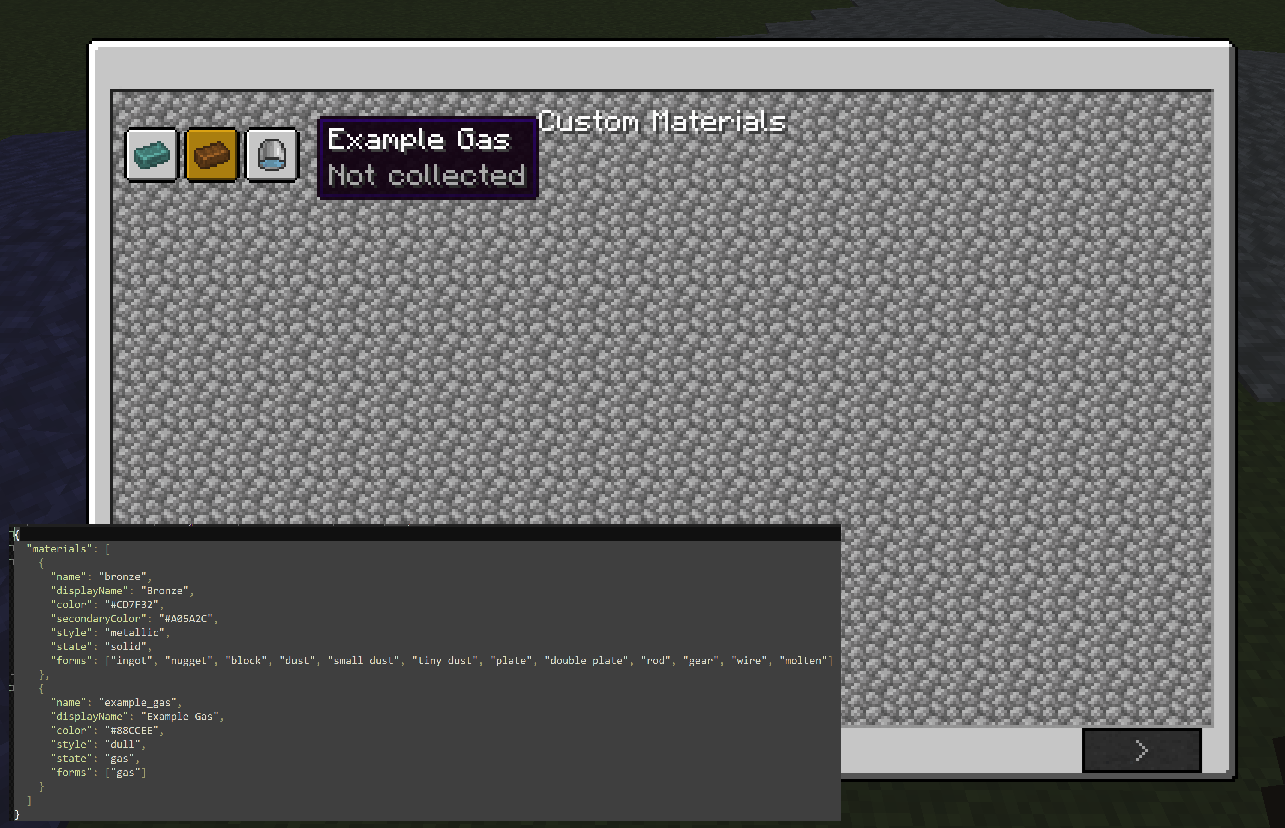
就是这样 —— 重启后,你即可获得着色的 Bronze 物品、Bronze 方块、熔融的 Bronze 流体 + 桶、所有压缩配方以及所有的 c: 标签。
| 字段 |
作用 |
name |
小写 ID,必须唯一。必填。 |
forms |
生成哪些形态(见上文列表)。必填。 |
color |
着色为 #RRGGBB 格式。 |
style |
metallic(金属)、shiny(闪亮)、dull(哑光)(或自定义纹理文件夹)。 |
state |
solid(固体)、liquid(液体)或 gas(气体)。 |
displayName |
游戏中显示的名称(可选 —— 否则从 name 派生)。 |
symbol |
化学符号,在 JEI 中显示(可选)。 |
atomicNumber |
用于排序(可选)。 |
secondaryColor |
叠加/次要着色(可选)。 |
使用 KubeJS —— 同样的功能,以脚本形式
将此放入 kubejs/startup_scripts/:
Elementarium.create('adamantium')
    .displayName('Adamantium')
    .color('#7BE3D8')
    .style('shiny')
    .state('solid')
    .forms('ingot', 'nugget', 'block', 'dust', 'plate', 'rod', 'gear', 'wire', 'molten')
    .register()
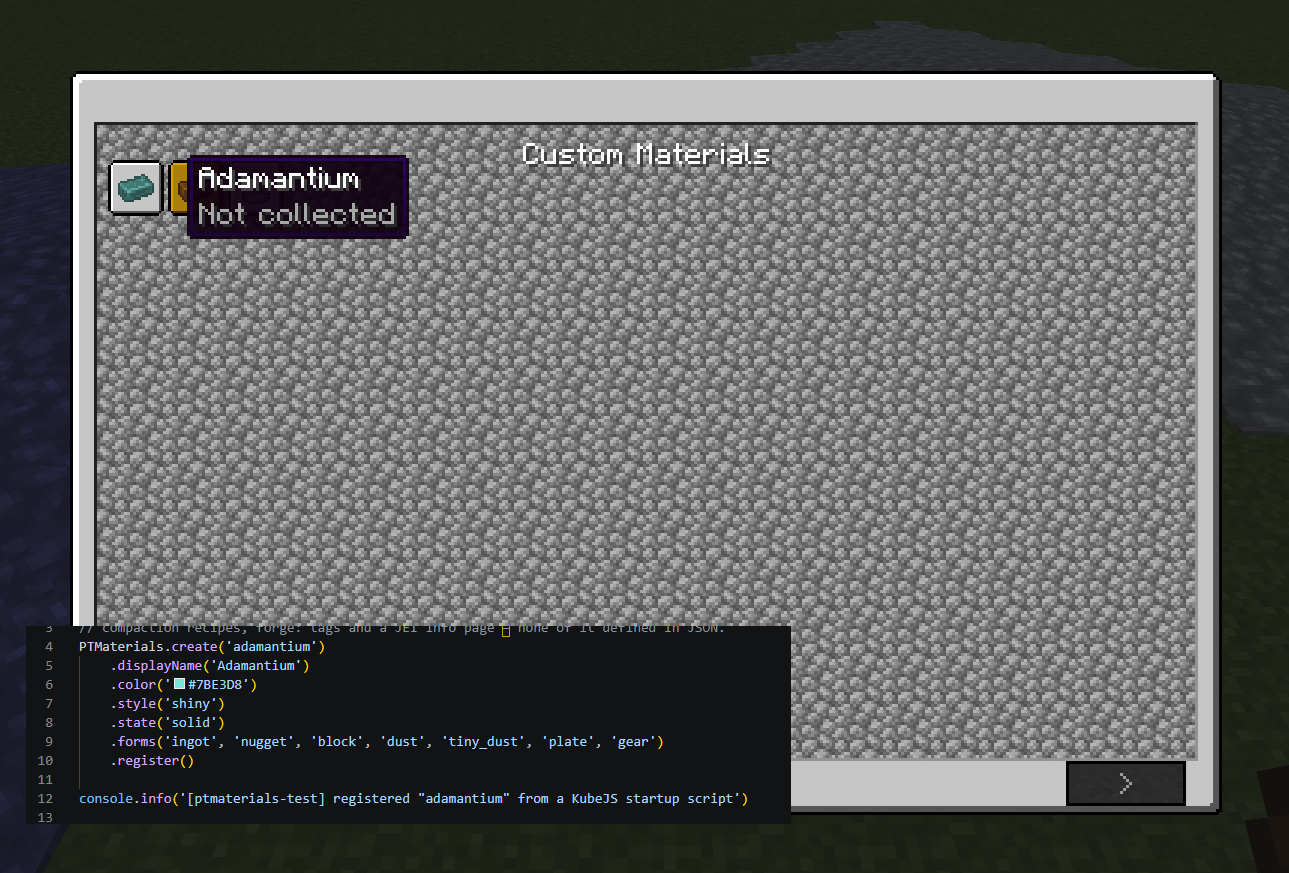
脚本定义的材质会覆盖 JSON 中的默认值,因此脚本可以覆盖默认设置。
添加矿石
理念相同,同样有两种方式。模板位于 config/elementarium/minerals/examples/(ilmenite.json 和 ore.js)。
使用 JSON
将任何 *.json 文件放入 config/elementarium/minerals/:
{
  "minerals": [
    {
      "name": "ilmenite",
      "displayName": "Ilmenite",
      "formula": "FeTiO₃",
      "composition": { "titanium": 1, "iron": 1, "oxygen": 3 },
      "oreStyle": "normal3",
      "rawStyle": "raw_1",
      "color": "#4A4E55",
      "variants": ["stone", "deepslate"],
      "miningTier": "iron",
      "drop": "raw",
      "worldgen": { "veinSize": 9, "veinsPerChunk": 8, "minY": -64, "maxY": 112, "distribution": "triangle" }
    }
  ]
}
你将获得:带有烘焙纹理的每种基岩矿石方块、着色的 Raw Ilmenite、包含丝足+fortune掉落规则的战利品表、熔炼成钛的功能、所有的 c:ores / c:raw_materials / contains 标签,以及世界生成 —— 仅从一个 JSON 条目即可实现。
| 字段 |
作用 |
composition |
真实的化学成分,元素 → 原子数量。第一个元素 = 熔炼目标。 |
formula |
工具提示中显示的化学式。 |
oreStyle |
矿石覆盖模板:dense、gems、gems2、gems3、lapis、lignite、normal–normal4、sandy。 |
rawStyle |
原矿块外观:raw_1、raw_2、raw_3。 |
variants |
基岩类型:stone、deepslate、nether、end。 |
drop |
raw(掉落 Raw 物品)或 self(矿石自身掉落并作为熔炼原料)。 |
miningTier |
wood、stone、iron、diamond。 |
worldgen |
矿脉大小、每区块矿脉数、Y 轴范围、triangle(三角形)或 uniform(均匀)分布。 |
使用 KubeJS
Elementarium.createOre('ilmenite')
    .displayName('Ilmenite')
    .formula('FeTiO₃')
    .component('titanium', 1)   // 第一个组件 = 熔炼目标
    .component('iron', 1)
    .component('oxygen', 3)
    .color('#4A4E55')
    .oreStyle('normal3')
    .drop('raw')
    .variants('stone', 'deepslate')
    .miningTier('iron')
    .worldgen(9, 8, -64, 112)
    .register()
模块化 —— 一切皆有开关
一个文件:config/elementarium/config.json。无需编辑数据集。
{
  "disabledMaterials": ["titanium"],
  "disabledForms": ["wire"],
  "materials": { "iron": { "disabledForms": ["gear"] } },

  "ores": {
    "enabled": true,
    "namingMode": "real",
    "renameVanilla": false,
    "recipes": true,
    "worldgen": { "enabled": true },
    "disabledMinerals": ["lorandite"],
    "minerals": { "cassiterite": { "veinsPerChunk": 4, "disabledVariants": ["deepslate"] } }
  },

  "analyzer": { "enabled": true, "energyCapacity": 80000, "energyPerAnalysis": 4000 },

  "unify": { "enabled": true }
}
- 禁用整个材质、形态(全局或按材质)、矿物、矿石变体、世界生成(全局或按矿物)、分析仪、统一器、矿石配方 —— 任何内容均可禁用。
- 在不触碰数据集的情况下,覆盖任意矿物的矿脉大小、数量和高度。
- 移除的内容会干净消失 —— 物品、配方、标签、战利品、世界生成和周期表条目全部一并移除,不留残留。
- 完整的矿物数据集本身位于
config/elementarium/minerals/minerals.json —— 它是默认配置,你可以随意编辑它。
调整配方
每个 Elementarium 物品都是普通的、带有 c: 标签的物品,因此 CraftTweaker 和 KubeJS 可以零特殊支持地重新调整生成的配方:
// CraftTweaker: 替换默认的方块配方
recipes.remove(<item:elementarium:steel_block>);
想要通过脚本创建新材质或矿石?请使用 JSON 或 KubeJS(上文所述)。CraftTweaker 用于调整现有内容,因为其脚本在游戏注册表构建完成后运行。
专为整合包设计
大多数科技模组都会重新发明相同的基础资源 —— 重复的物品、冲突的纹理、不兼容的 ID。Elementarium 是一个共享的材质基础:一套命名方案、一种外观、一组标签、一个适用于整个整合包的统一器。只需定义一次材质,保持所有内容一致,让模组之间使用通用语言,而不是各自开发各自的 Copper Gear。
兼容性
| 模组 |
添加内容 |
| Navaronee CoreLib |
必需。 多方块组装(螺丝枪)以及统一器使用的配方加载钩子。 |
| JEI |
可选。元素信息页面 + 完整的物品/配方目录。 |
| KubeJS |
可选。从启动脚本生成材料矿石。 |
| CraftTweaker |
可选。开箱即用地调整生成的配方/标签。 |
| Mekanism / Immersive Engineering / Create |
可选。它们的机器配方会自动统一。 |
1.20.1(旧版)说明: 旧的 Forge 1.20.1 版本使用 ptmaterials: ID 和 forge: 标签,不包含矿石、世界生成或矿物分析仪。所有新开发均针对 NeoForge 1.21.1,使用 elementarium: ID 和 c: 标签。
许可证
您可以自由地将 Elementarium 包含在任何公开或私有的整合包中,无需征得许可。
唯一的要求是提供适当的署名,并链接回本项目页面。
如果您希望进一步支持本项目,我将非常感激您同时附上我的 YouTube 频道链接。这有助于项目发展,并支持未来模组的开发。
感谢您的支持!❤️
MIT 协议。
Elementarium
The whole periodic table, real ores with real chemistry, and everything you add works exactly the same way.
Elementarium is a data-driven material library for modpack creators. Out of the box you get all 118 elements as ingots, plates, gears, dusts, fluids and more — plus 60+ real-world ores (magnetite, bauxite, cinnabar, wolframite…) with true chemical compositions, world generation, and a multiblock Mineral Analyzer that can study any ore from any mod. Recipes, tags, loot and a clean consistent look are already wired up.
Need your own alloys or ores? Add them in JSON or KubeJS with a few lines and get the full treatment for free. Don't need something? Turn it off in one config file — every single feature has a switch.
The point is: no two mods shipping three different Steel Plates anymore :)
Highlights
- All 118 elements included by default, fully configurable.
- Every material becomes a full set of forms automatically:
- Ingot, Nugget, Block
- Dust, Small Dust, Tiny Dust
- Plate, Double Plate, Rod, Gear, Wire
- Fluids: Molten, Liquid, Gas (each with a fluid block + bucket)
- 60+ real ores — one real mineral per element, placed with geological logic across the Overworld, Nether and End.
- Real chemistry — every mineral carries its true formula (malachite is Cu₂CO₃(OH)₂, not "copper rock").
- Mineral Analyzer — a multiblock scanner that tells you where any ore generates. Works on ores from any mod.
- Recipe unification built in — Almost-Unified-style: duplicate materials across mods resolve to one item, automatically.
- Recipes generated by default — the full compaction web, ore smelting/blasting, everything.
- Cross-mod
c: tags on everything (c:ingots/steel, c:ores/tin, c:raw_materials/tin, …) so your items and other mods' items just work together.
- Add your own materials AND ores in seconds — JSON or KubeJS, same result: real items with recipes, tags, models and worldgen.
- Fully modular — disable any material, form, mineral or feature, globally or individually, from one config file.
- JEI built in — element info pages plus every item and recipe in the catalog.
- In-game periodic table — a collectible element browser (default key: P).
Kinds of Ore — real minerals, real chemistry
You don't mine "Tin Ore" in real life — you mine cassiterite. Elementarium ships 60+ real minerals, one per element, each placed where geology says it belongs:
| Where |
What generates there |
| Stone |
Common crustal minerals: bauxite, halite, fluorite, cassiterite, quartz, calcite… |
| Deepslate |
Deep and dense: chromite, native silver, sperrylite (platinum), uraninite… |
| Nether |
The sulfur family only: native sulfur, cinnabar (HgS), stibnite, molybdenite, rheniite — a mineral literally found in volcano fumaroles |
| End |
Things you can barely find on Earth: wolframite (tungsten), tantalite, rare-earth minerals (monazite, xenotime…), platinum-group alloys |
Every ore:
- Drops a tinted Raw Mineral (silk touch drops the block, Fortune works) — or drops itself, if you configure it that way.
- Smelts/blasts into its primary element.
- Carries its real chemical formula in the tooltip — and the full composition feeds
elementarium:contains/<element> tags, ready for byproduct processing.
- Gets baked textures per host rock (stone / deepslate / netherrack / end stone) from a single overlay + your mineral color.
- Generates in the world with per-mineral vein size, count, height range and distribution — all editable.
Name things your way
namingMode: "real" → Malachite Ore, Raw Cassiterite (immersive)namingMode: "simple" → Copper Ore, Raw Tin (familiar)renameVanilla: true → vanilla ores get their real names too: Iron Ore becomes Magnetite Ore, Raw Iron becomes Raw Magnetite (display only — nothing breaks)
Iron, copper, gold, coal and lapis are not duplicated: their minerals exist as rename-only entries so vanilla stays vanilla.
The Mineral Analyzer
Elementarium's single machine — and you can't craft it. Stack a Multiblock Casing with a Lift Post on top and assemble it with the Screw Gun (from Navaronee CoreLib). Breaking it gives your blocks back.
Feed it Forge Energy, insert any ore block from any mod, and it reads the actual world generation data of your instance:
- Which dimensions the ore generates in
- Height range (real Y values, resolved from the actual placed features)
- Vein density
- Chemical formula (for Elementarium minerals)
- A free-text description — written by you, the pack creator, in
config/elementarium/descriptions.json, per block id or per tag. Document your whole pack's ores in one file.
No hardcoded list: if a mod adds an ore, the Analyzer can analyze it.
Recipe unification
Elementarium is the material backbone of your pack. When two mods both add a Tin Ingot, recipes across the pack are rewritten at load time so that:
- Outputs resolve to one dominant item (Elementarium's, or vanilla for iron/gold/copper)
- Inputs widen to the
c: tag, so every equivalent item stays usable
- Duplicate recipes are removed, and non-dominant duplicates are hidden from JEI
It understands machine recipe formats generically (validated with Mekanism, Immersive Engineering and Create) and it's all configurable — teach it new recipe fields, exclude recipe types, or turn it off entirely.
Add a material
Ready-made templates ship with the mod. On first launch, look in config/elementarium/examples/ for bronze.json and material.js.
With JSON — no other mods required
Drop any *.json file into config/elementarium/:
{
  "materials": [
    {
      "name": "bronze",
      "displayName": "Bronze",
      "color": "#CD7F32",
      "style": "metallic",
      "state": "solid",
      "forms": ["ingot", "nugget", "block", "dust", "plate", "rod", "gear", "wire", "molten"]
    }
  ]
}
That's it — restart and you have tinted Bronze items, a Bronze block, a molten Bronze fluid + bucket, all the compaction recipes and every c: tag.
| Field |
What it does |
name |
Lowercase id, unique. Required. |
forms |
Which forms to generate (see the list above). Required. |
color |
Tint as #RRGGBB. |
style |
metallic, shiny, dull (or your own texture folder). |
state |
solid, liquid or gas. |
displayName |
Shown in-game (optional — derived from name otherwise). |
symbol |
Chemical symbol, shown in JEI (optional). |
atomicNumber |
Used for ordering (optional). |
secondaryColor |
Overlay/secondary tint (optional). |
With KubeJS — same thing, in a script
Put this in kubejs/startup_scripts/:
Elementarium.create('adamantium')
    .displayName('Adamantium')
    .color('#7BE3D8')
    .style('shiny')
    .state('solid')
    .forms('ingot', 'nugget', 'block', 'dust', 'plate', 'rod', 'gear', 'wire', 'molten')
    .register()
Scripted materials merge on top of JSON, so a script can override a default.
Add an ore
Same philosophy, same two ways. Templates ship in config/elementarium/minerals/examples/ (ilmenite.json and ore.js).
With JSON
Drop any *.json file into config/elementarium/minerals/:
{
  "minerals": [
    {
      "name": "ilmenite",
      "displayName": "Ilmenite",
      "formula": "FeTiO₃",
      "composition": { "titanium": 1, "iron": 1, "oxygen": 3 },
      "oreStyle": "normal3",
      "rawStyle": "raw_1",
      "color": "#4A4E55",
      "variants": ["stone", "deepslate"],
      "miningTier": "iron",
      "drop": "raw",
      "worldgen": { "veinSize": 9, "veinsPerChunk": 8, "minY": -64, "maxY": 112, "distribution": "triangle" }
    }
  ]
}
You get: ore blocks with baked textures for each host rock, a tinted Raw Ilmenite, loot with silk touch + Fortune, smelting into titanium, all the c:ores / c:raw_materials / contains tags, and world generation — from one JSON entry.
| Field |
What it does |
composition |
Real chemical make-up, element → atom count. First element = smelting target. |
formula |
Display formula for the tooltip. |
oreStyle |
Ore overlay template: dense, gems, gems2, gems3, lapis, lignite, normal–normal4, sandy. |
rawStyle |
Raw chunk look: raw_1, raw_2, raw_3. |
variants |
Host rocks: stone, deepslate, nether, end. |
drop |
raw (drops a Raw item) or self (the ore drops itself and is what you smelt). |
miningTier |
wood, stone, iron, diamond. |
worldgen |
Vein size, veins per chunk, Y range, triangle or uniform distribution. |
With KubeJS
Elementarium.createOre('ilmenite')
    .displayName('Ilmenite')
    .formula('FeTiO₃')
    .component('titanium', 1)   // first component = smelting target
    .component('iron', 1)
    .component('oxygen', 3)
    .color('#4A4E55')
    .oreStyle('normal3')
    .drop('raw')
    .variants('stone', 'deepslate')
    .miningTier('iron')
    .worldgen(9, 8, -64, 112)
    .register()
Modularity — everything has a switch
One file: config/elementarium/config.json. No need to edit the datasets.
{
  "disabledMaterials": ["titanium"],
  "disabledForms": ["wire"],
  "materials": { "iron": { "disabledForms": ["gear"] } },

  "ores": {
    "enabled": true,
    "namingMode": "real",
    "renameVanilla": false,
    "recipes": true,
    "worldgen": { "enabled": true },
    "disabledMinerals": ["lorandite"],
    "minerals": { "cassiterite": { "veinsPerChunk": 4, "disabledVariants": ["deepslate"] } }
  },

  "analyzer": { "enabled": true, "energyCapacity": 80000, "energyPerAnalysis": 4000 },

  "unify": { "enabled": true }
}
- Disable whole materials, forms (globally or per material), minerals, ore variants, worldgen (globally or per mineral), the analyzer, the unifier, ore recipes — anything.
- Override any mineral's vein size, count and height without touching the dataset.
- Removed content disappears cleanly — items, recipes, tags, loot, worldgen and periodic-table entries all go together, no leftovers.
- The full mineral dataset itself lives in
config/elementarium/minerals/minerals.json — it's the default, and it's yours to edit.
Tweak the recipes
Every Elementarium item is a normal, c:-tagged item, so CraftTweaker and KubeJS can retweak the generated recipes with zero special support:
// CraftTweaker: replace the default block recipe
recipes.remove(<item:elementarium:steel_block>);
Want to create new materials or ores from a script? Use JSON or KubeJS (above). CraftTweaker is for tweaking existing content, since its scripts run after the game's registries are built.
Built for modpacks
Most tech mods reinvent the same basic resources — duplicate items, clashing textures, incompatible IDs. Elementarium is a shared material foundation: one naming scheme, one look, one set of tags, one unifier for your whole pack. Define materials once, keep everything consistent, and let mods speak a common language instead of each rolling their own Copper Gear.
Compatibility
| Mod |
What it adds |
| Navaronee CoreLib |
Required. Multiblock assembly (Screw Gun) and the recipe-load hook the unifier uses. |
| JEI |
Optional. Element info pages + full item/recipe catalog. |
| KubeJS |
Optional. Create materials and ores from startup scripts. |
| CraftTweaker |
Optional. Tweak the generated recipes/tags out of the box. |
| Mekanism / Immersive Engineering / Create |
Optional. Their machine recipes are unified automatically. |
Note for 1.20.1 (legacy): the old Forge 1.20.1 version uses the ptmaterials: id and forge: tags, and does not include ores, worldgen or the Mineral Analyzer. All new development targets NeoForge 1.21.1 with the elementarium: id and c: tags.
License
You are free to include Elementarium in any public or private modpack without asking for permission.
The only requirement is that you provide proper credit by linking back to this project page.
If you'd like to further support the project, I'd greatly appreciate including a link to my YouTube channel as well. It helps the project grow and supports the development of future mods.
Thank you for your support! ❤️
MIT.


 模组

 模组

 模组

 模组

 模组
 模组
评论 0
登录后参与评分
还没有评论,来抢沙发吧