Embellish Chat 通过物品和背包展示、内置图标、提及(Mentions)以及丰富的格式化功能,增强了 Minecraft 的聊天体验。玩家可以炫耀装备、打开展示的背包,并使用更具表现力的聊天功能,且其他玩家无需在客户端安装该模组。
✨ 主要特性
-
物品与背包展示
使用 [i]、[inv] 和 [end] 命令,直接在聊天中展示你手持的物品、背包或末影箱,允许其他玩家进行交互式查看。
-
内置聊天图标
使用 :name: 语法在消息中插入基于 Minecraft 风格的内置图标。
-
丰富的聊天格式化
为消息添加粗体、斜体、下划线、删除线、自定义字体、十六进制颜色、渐变色、预设样式以及彩虹效果。
-
智能提及系统
支持提及玩家、@here、@team(队伍名)、@world(世界名) 或 @everyone,并伴有清晰的提示通知。同时也支持 LuckPerms 的用户组提及。
-
实用的聊天工具
鼠标悬停在消息上可查看精确的时间戳,点击即可复制包含时间戳的消息内容。
-
服务端模组,可选客户端功能
Embellish Chat 的核心聊天功能完全在服务端运行。玩家无需在客户端安装该模组即可正常使用。
仅标记为 Server & Client(服务端与客户端),是因为当模组安装在客户端时,可提供可选的提及自动补全功能。
🛠️ 样式系统
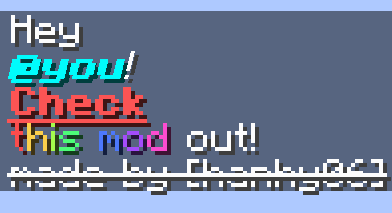
在聊天窗口中直接使用以下模式来应用样式:
| 功能 |
语法 |
示例 |
展示效果 |
| 粗体 (Bold) |
**Text** |
**You really need to read this!** |
 |
| 斜体 (Italic) |
_Text_ |
_This is top secret..._ |
 |
| 下划线 (Underline) |
__Text__ |
__Check this out__ |
 |
| 删除线 (Strikethrough) |
~~Text~~ |
~~We don’t talk about this anymore~~ |
 |
| 乱码 (Obfuscated) |
||Text|| |
||Unreadable text|| |
 |
| 颜色 (十六进制) |
[Text]<#RRGGBB> |
[Blue]<#0000FF> like the deep ocean |
 |
| 颜色 (渐变) |
[Text]<#RRGGBB #R...> |
[Grraaaaaaadieeeeent]<#ffaaaa #aaaaff #aaffaa> |
 |
| 颜色 (预设) |
[Text]<preset> |
[pink]<pink> pig |
 |
| 颜色 (彩虹) |
[Text]<RAINBOW> |
look at this [rainbow]<RAINBOW> |
 |
| 链接 (Link) |
[Text](URL) |
Download it [here](https://modrinth.com/mod/embellish-chat) |
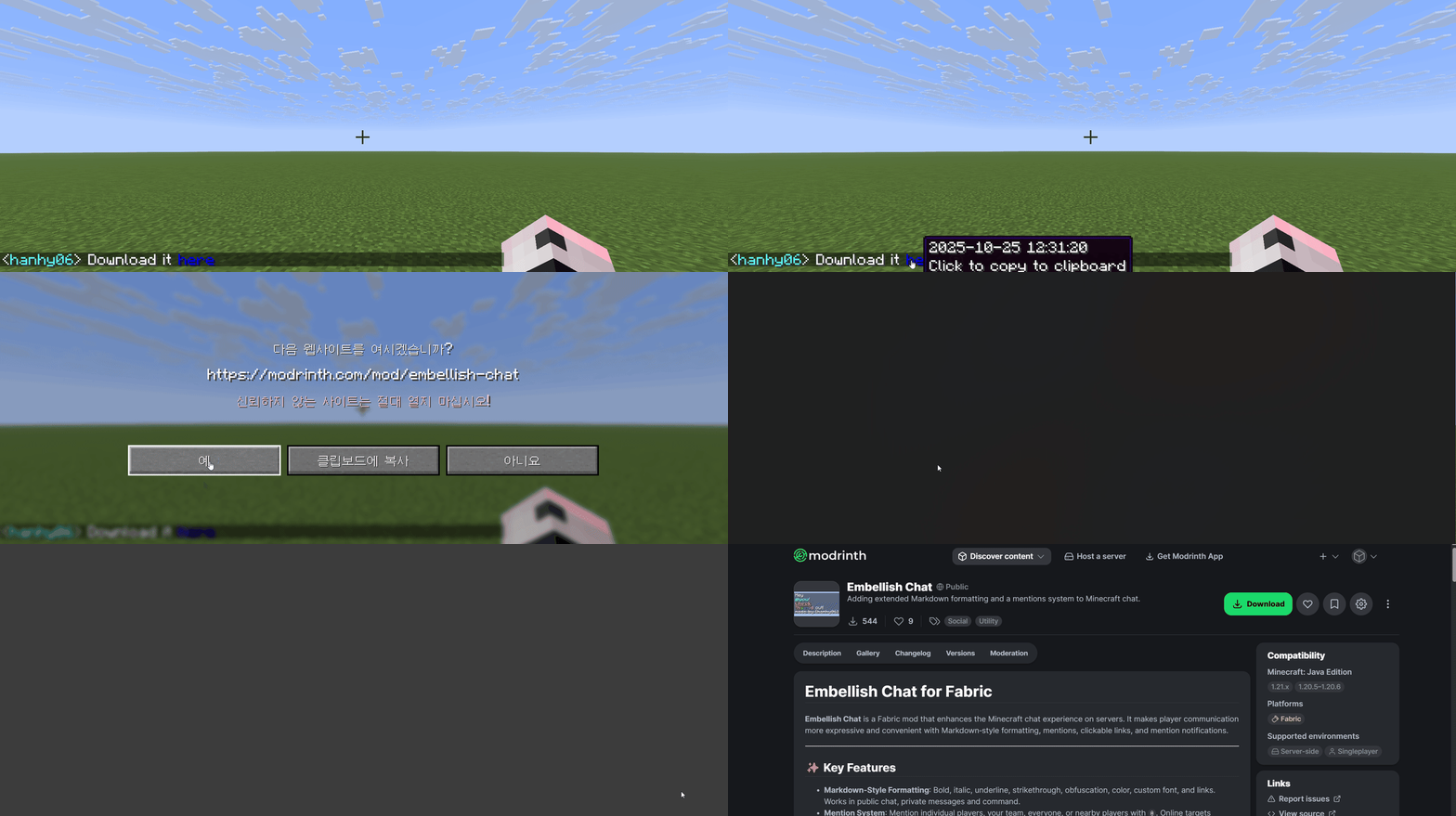 |
| 字体 (Font) |
[Text]{path} |
[Blorp Zorp]{minecraft:alt} |
 |
| 物品 (Item) |
[i] |
Look at my [i] |
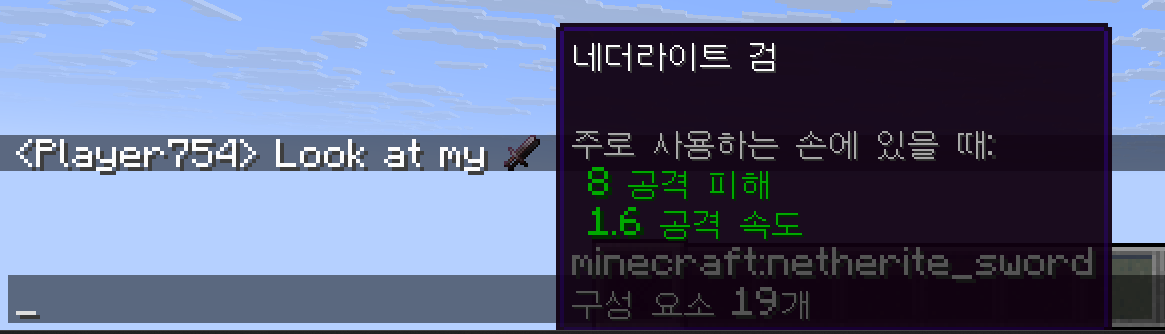 |
| 背包 (Inventory) |
[inv] |
Look at my [inv] |
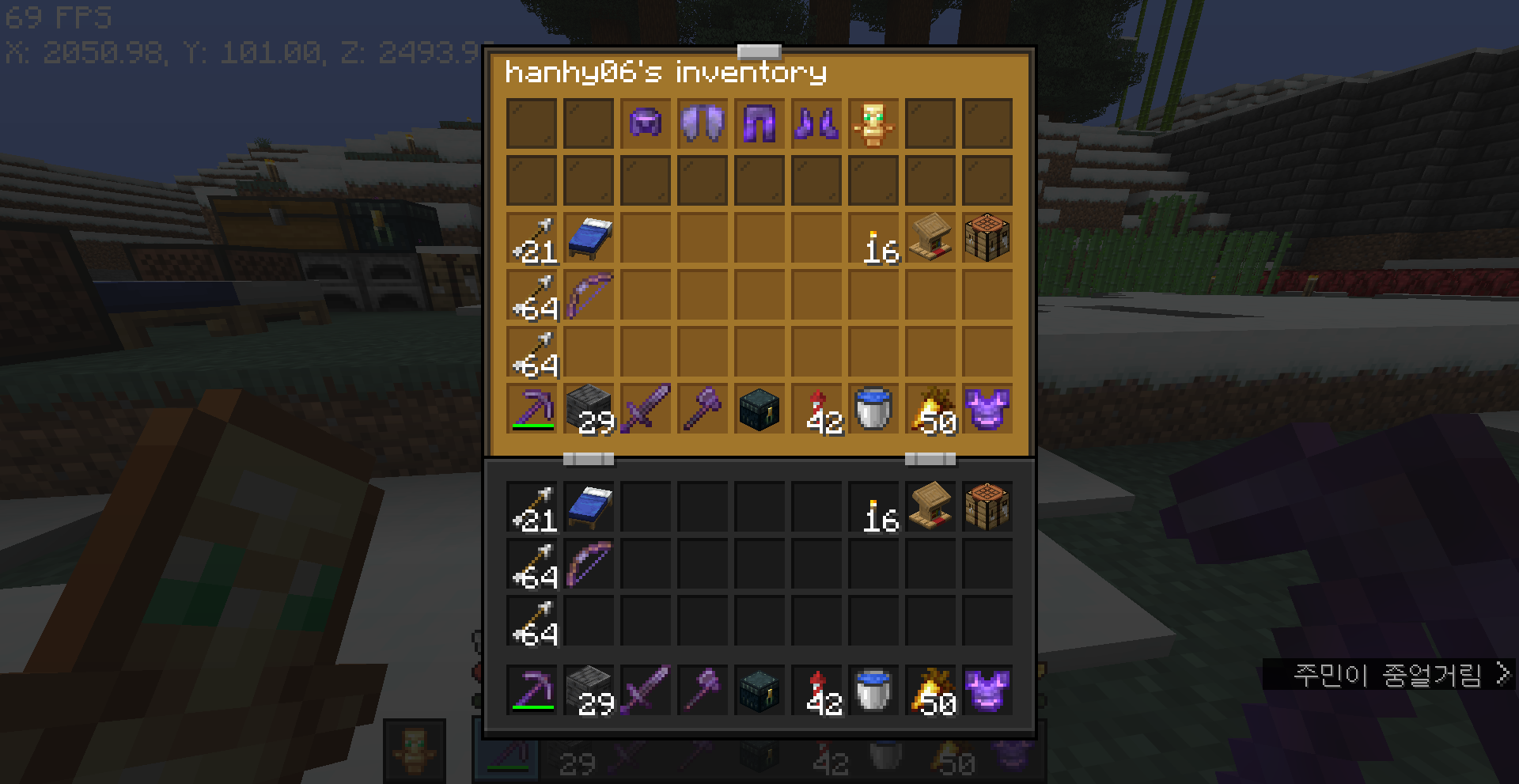 |
| 末影箱 (Ender Chest) |
[end] |
Look at my [end] |
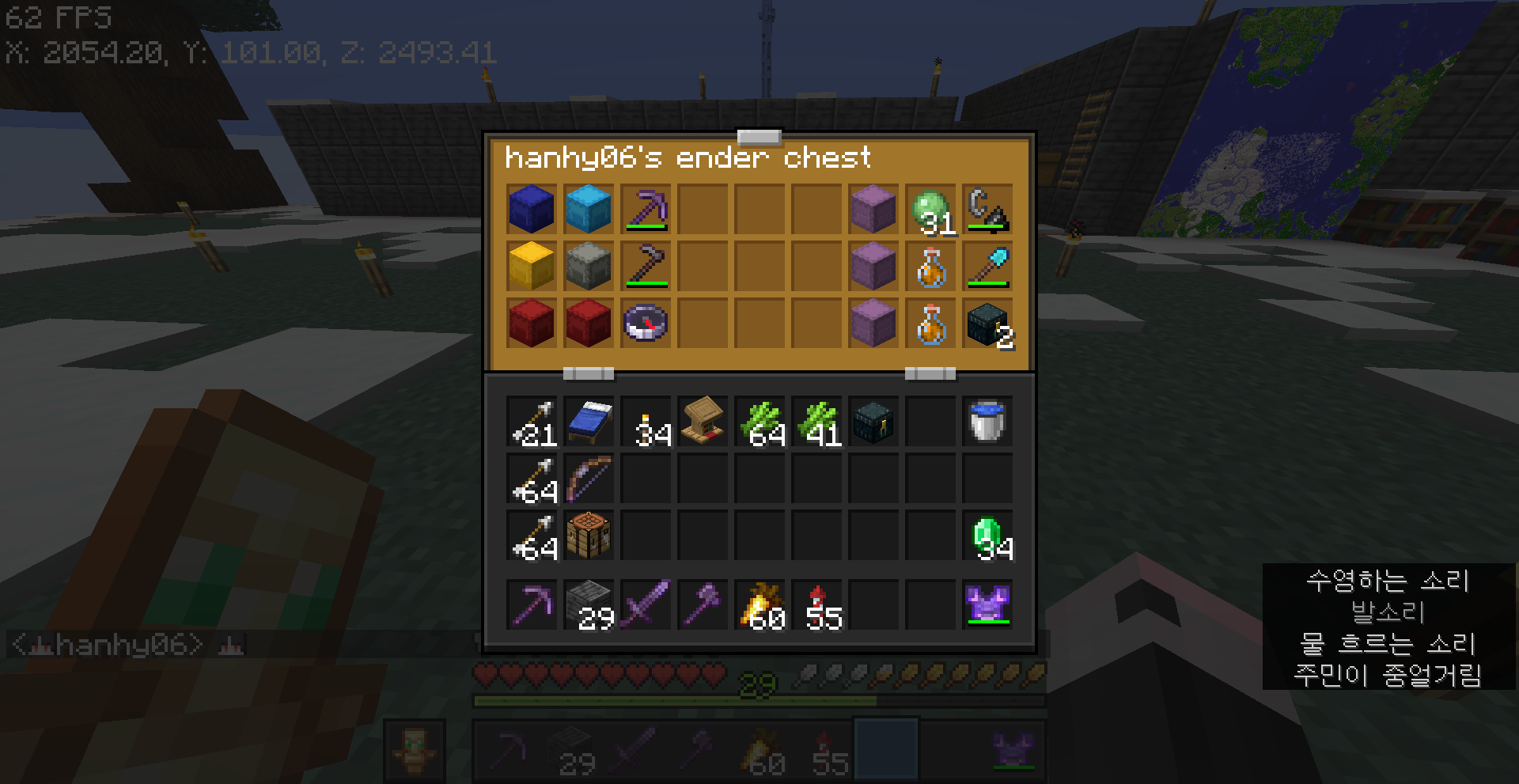 |
| 图标 (Icon) |
:name: |
I :love: you |
 |
| 提及 (Mention) |
@PlayerName |
Hello, @User |
 |
注意事项
- 链接: 内置的默认链接规则仅匹配
https:// 开头的 URL。
- 颜色: 预设颜色(例如
pink)定义在 presets.json/color 中。
- 字体:
path 需要包含命名空间 ID(例如 minecraft:alt)。
- 图标与物品精灵: 图标预设和物品精灵渲染使用基于图集(atlas-backed)的组件,因此在较旧的 Minecraft 版本中不受支持。
- 更多信息: 有关高级语法、样式组合和详细规则,请参考
/embellish-chat help style 或 StyleWiki。
🗣️ @提及系统
| 目标 |
行为 |
@PlayerName |
提及特定玩家。 |
@team(name) |
提及指定团队中的所有玩家。 |
@group(name) |
提及指定 LuckPerms 组中的所有玩家。 |
@world(name) |
提及指定世界中所有玩家。 |
@everyone |
提及服务器上的每一位玩家。 |
@here |
提及同一世界中指定半径内(默认:64 格)的玩家。 |
注意事项
- 行为: 成功提及会将通知声音发送给目标,并自动为文本着色(例如变为团队颜色)。
- 依赖项:
@group 需要安装 LuckPerms。若未安装,该提及将被忽略。
- 颜色:
@team 和 @Player 提及首先使用 config.json 中的 team_color 值,然后在可用时应用目标的团队/显示样式。如果 team_color 为 null,则提及文本保持无色。
- 声音: 通知声音使用 UI 类别(在 Minecraft 1.21.5 及更早版本中回退到 PLAYER 类别)。
- 更多信息: 如需完整的提及类型列表和高级用法,请参考 MentionWiki。
⌨️ 命令
管理员命令
需要 OP 等级 2(或在 1.21.11+ 版本中拥有 GAMEMASTERS_CHECK 权限)。
/embellish-chat reload 立即重新加载 /config/embellish-chat/ 下的所有配置文件。/embellish-chat ban/pardon <player> 阻止或恢复某位玩家访问所有模组功能。/embellish-chat stress_test <ticks> <count> <text> 重复模拟 <count> 条消息持续 <ticks> 刻,以测试服务器的消息处理性能。/embellish-chat regex_test <regex> <text> 将提供的 <regex> 应用于 <text> 进行测试,并高亮显示捕获组以分析匹配结果。
用户命令
所有玩家 均可使用(无需额外权限)。
/embellish-chat open <player> 打开指定玩家上次共享的背包/末影箱/物品。/embellish-chat help mention 根据权限显示你可用的提及规则。/embellish-chat help style 根据权限显示你可用的样式规则。/embellish-chat help icon 以 name - icon 格式显示 presets.json/icon 中可用的图标预设。/embellish-chat notification 切换你的个人提及通知偏好设置。(全局启用/禁用由配置中的 notify_command_enabled 控制)。
⚙️ 配置
Embellish Chat 使用正则表达式来定义聊天样式和提及规则。
如需帮助创建或编辑配置,请将 AGENTS.md 的内容复制到你偏好的 AI 助手,并描述你的需求。
配置文件
配置文件位于 config/embellish-chat/config.json。
{
  //version
  "version": "current mod version",

  //setting
  "delimiter": ",",
  "timestamp": "yyyy-MM-dd HH:mm:ss",
  "command_alias": "ec",
  "url_color": "#0000EE",
  "team_color": "#FF55FF",
  "notify_command_enabled": true,
  "notify_mention_enabled": true,
  "require_same_channel": true,
  "disable_vanilla_chat_format": false,

  //player list
  "banned_players": [],
  "notify_off_players": []
}
version 字段不得手动修改。ConfigManager 会分别写入 config.json、styles.json、mentions.json 和 presets.json,然后在加载时将它们合并为一个运行时 Config。- 缺失的部分会在合并步骤期间从内置默认值中恢复。
- 如果存储的
version 与当前运行的模组版本不匹配,模组将保留当前的内存配置并忽略不匹配的加载。
- 核心配置逻辑定义在
style_rules 和 mention_rules 中。
- 规则从上到下处理,因此将通配符规则放在前面可能会覆盖下方定义的更具体的规则。
delimiter 的值在内部作为正则表达式处理;特殊字符(如 |)必须正确转义。command_alias 注册一个额外的根命令,当配置加载且值非空时,该命令会重定向到 /embellish-chat。team_color 是在对 @team 和 @Player 提及进行样式化时使用的基准颜色。- 如果缺少
team_color 或设置为 null,这些提及将不会自动着色。
- 启用
require_same_channel 后,ADVANCED_CHAT_CHANNEL 提及仅限于发送者当前的 Advanced Chat 频道。
- 重新加载配置会刷新运行时的样式和提及处理器,因此更新的
style_rules、mention_rules、timestamp、url_color、whitelist、color、icon 和 item 值会立即生效。
样式
配置文件位于 config/embellish-chat/styles.json。
{
  "style_rules": {
    "embellish-chat.chat": [
      {
        "pattern": " ... ",
        "comment": "...",
        "styles": [
          {
            "styleType": " ... ",
            "preset": " ... "
          }
        ]
      }
      ...
    ]
  }
}
pattern:这是一个用于扫描文本的正则表达式。它必须包含两个捕获组。
group 1:这是需要应用样式的文本。group 2:这是作为选项传递的文本。
comment:此注释用于 /embellish-chat help style 命令中。styles:定义应用于捕获的第 1 组的样式。
styleType:这是样式类型。你可以使用 StyleWiki 中列出的所有类型。preset:这是一个预设值。如果提供了值,则始终使用该值;如果为空,则改用用户捕获的第 2 组内容。
- 每个顶级键(如
embellish-chat.chat)也被视为一个权限节点。
- 每个
styleType 名称必须与运行时 StyleRegistry 中注册的处理程序匹配。
Mention
配置文件位于 config/embellish-chat/mentions.json。
{
  "mention_rules": {
    "embellish-chat.mention": [
      {
        "pattern": " ... ",
        "comment": "...",

        "title": " ... ",
        "sound": { ... },

        "cooldown": 0,
        "onlyTarget": false,

        "mentions": [
          {
            "mentionType": " ... ",
            "preset": " ... "
          }
        ],
        "styles": [ ... ]
      }
      ...
    ]
  }
}
pattern:这是一个用于扫描文本的正则表达式。它必须包含一个捕获组。
- 这是提及选项(例如团队名称、LuckPerms 组)。
comment:此注释用于 /embellish-chat help mention 命令中。title:这是在受到提及的玩家屏幕上显示的标题。
%player:displayname% 是发送提及的玩家的显示名称。
sound:定义通知声音设置。
id:声音标识符。category:声音类别。volume:声音音量。pitch:声音音调。
cooldown:这是提及冷却时间(秒)。
onlyTarget:
- 当设置为
true 时,防止消息全局广播,仅发送给目标玩家。
mentions:定义要执行的提及操作。
mentionType:这是提及类型。你可以使用 MentionWiki 中列出的所有类型。preset:这是一个可选的预设值。
styles:定义在触发提及时应用的样式。
Presets
配置文件位于 config/embellish-chat/presets.json。
{
  "message_header": {
    " ... ": " ... "
  },
  "whitelist": [
    " ... "
  ],
  "icon": {
    " ... ": {
      "atlas": " ... ",
      "sprite": " ... "
    }
  },
  "item": {
    " ... ": {
      "atlas": " ... ",
      "sprite": " ... "
    }
  },
  "color": {
    " ... ": " ... "
  }
}
message_header:使用权限节点作为键,每个值都是解析为带有占位符标签的文本组件的消息头。whitelist:这在 URL 样式类型中使用。如果留空,则允许所有 URL。icon:这由 ICON_PRESET 和 /embellish-chat help icon 使用。item:这会覆盖特定物品 ID 的 SHOW_ITEM 所使用的图集精灵。color:这在样式颜色预设中使用。
📜 兼容性
✅ 完全支持
- Fabric Permissions API (Embedded)
- 在
style_rules 和 mention_rules 中定义的键直接充当权限节点。
- 规则根据玩家的权限从上到下进行评估。
- Text Placeholder API (Embedded)
- 支持提及标题和样式预设中的动态占位符。
- 独占功能: 使用
%embellish-chat:content% 访问原始未解析的聊天消息。
- Styled Nicknames
- LuckPerms
@group 提及类型需要此插件。如果没有它,组提及将被忽略。
- Advanced Chat
@channel 提及类型需要此插件。如果没有它,频道提及将被忽略。
- Geyser (Bedrock Edition)
- Java 版和基岩版之间的提及可以无缝工作。
- 注意: 高级样式(悬停文本、点击事件)可能无法在基岩版客户端上完全渲染。
- Minecraft LAN Play
❗ 已知冲突
- Styled Chat
- Styled Chat 具有优先权。 如果已安装,Embellish Chat 的样式功能将被覆盖。
- 提及仍然有效: 提及和通知系统保持功能正常。
- 性能提示: 如果你必须同时使用两者,请删除 Embellish Chat 中
style_rules 的所有条目,以防止不必要的后台处理。
📜 许可证与链接
本项目采用 Apache License 2.0 许可。
请从以下官方来源下载模组,以确保你拥有最新、最安全的版本。欢迎链接这些页面;请勿重新托管文件。
- 官方下载 (Modrinth):
- 源代码 (GitHub):
✨ 反馈与支持
发现了错误或有功能请求?请在项目的 Discord 服务器上提出问题或联系我们。
如果你想更早收到更新,请在我们的 Modrinth 页面上点赞 ❤️!你的支持意义重大!
Embellish Chat enhances Minecraft chat with item and inventory showcases, built-in icons, mentions, and rich formatting. Players can show off gear, open showcased inventories, and use more expressive chat features without requiring the mod on their client.
✨ Key Features
-
Item and Inventory Showcases
Showcase your held item, inventory, or ender chest directly in chat with [i], [inv], and [end], allowing other players to inspect them interactively.
-
Built-in Chat Icons
Use :name: syntax to insert built-in Minecraft-based icons into messages.
-
Rich Chat Formatting
Style messages with bold, italic, underline, strikethrough, custom fonts, hex colors, gradients, presets, and rainbow effects.
-
Smart Mention System
Mention players, @here, @team(name), @world(name), or @everyone with clear notifications. LuckPerms group mentions are also supported.
-
Useful Chat Utilities
Hover messages to see exact timestamps and click them to copy their content with the timestamp.
-
Server-side mod with optional client features
Embellish Chat works fully server-side for all core chat features. Players do not need to install the mod on their client.
It is marked as Server & Client only because an optional client-side mention autocomplete feature is available when the mod is installed on the client.
🛠️ Styling System
Use the following patterns directly in the chat window to apply styles:
| Feature |
Syntax |
Example |
Showcase |
| Bold |
**Text** |
**You really need to read this!** |
|
| Italic |
_Text_ |
_This is top secret..._ |
|
| Underline |
__Text__ |
__Check this out__ |
|
| Strikethrough |
~~Text~~ |
~~We don’t talk about this anymore~~ |
|
| Obfuscated |
||Text|| |
||Unreadable text|| |
|
| Color (Hex) |
[Text]<#RRGGBB> |
[Blue]<#0000FF> like the deep ocean |
|
| Color (Gradient) |
[Text]<#RRGGBB #R...> |
[Grraaaaaaadieeeeent]<#ffaaaa #aaaaff #aaffaa> |
|
| Color (Preset) |
[Text]<preset> |
[pink]<pink> pig |
|
| Color (Rainbow) |
[Text]<RAINBOW> |
look at this [rainbow]<RAINBOW> |
|
| Link |
[Text](URL) |
Download it [here](https://modrinth.com/mod/embellish-chat) |
|
| Font |
[Text]{path} |
[Blorp Zorp]{minecraft:alt} |
|
| Item |
[i] |
Look at my [i] |
|
| Inventory |
[inv] |
Look at my [inv] |
|
| Ender Chest |
[end] |
Look at my [end] |
|
| Icon |
:name: |
I :love: you |
|
| Mention |
@PlayerName |
Hello, @User |
|
Notes
- Links: The built-in default link rules only match
https:// URLs.
- Colors: Presets (e.g.,
pink) are defined in presets.json/color.
- Fonts: The
path requires a namespaced ID (e.g., minecraft:alt).
- Icons & Item Sprites: Icon presets and item sprite rendering use atlas-backed components, so they are not supported on older Minecraft versions.
- More Info: For advanced syntax, style combinations, and detailed rules, refer to
/embellish-chat help style or the StyleWiki.
🗣️ Mention System
| Target |
Behavior |
@PlayerName |
Mentions a specific player. |
@team(name) |
Mentions all players in the specified team. |
@group(name) |
Mentions all players in the specified LuckPerms group. |
@world(name) |
Mentions all players in the specified world. |
@everyone |
Mentions every player on the server. |
@here |
Mentions players within a configurable radius (default: 64 blocks) in the same world. |
Notes
- Behavior: Successful mentions send a notification sound to the target and automatically tint the text (e.g., to the team color).
- Dependencies:
@group requires LuckPerms. Without it, the mention will be ignored.
- Colors:
@team and @Player mentions start from the team_color value in config.json, then use the target's team/display styling when available. If team_color is null, the mention text is left uncolored.
- Sound: The notification sound uses the UI category (falls back to the PLAYER category on Minecraft 1.21.5 and earlier).
- More Info: For a full list of mention types and advanced usage, refer to MentionWiki.
⌨️ Commands
Admin Commands
Requires OP Level 2 (or GAMEMASTERS_CHECK on 1.21.11+).
/embellish-chat reload Reloads all configuration files under /config/embellish-chat/ immediately./embellish-chat ban/pardon <player> Blocks or restores a player's access to all mod features./embellish-chat stress_test <ticks> <count> <text> Repeatedly simulates <count> messages for <ticks> to stress-test the server's message-processing performance./embellish-chat regex_test <regex> <text> Tests the provided <regex> against <text> and highlights capture groups to analyze the match result.
User Commands
Available to all players (no permission required).
/embellish-chat open <player> Opens the last shared inventory/ender/item of the specified player./embellish-chat help mention Displays the mention rules available to you based on your permissions./embellish-chat help style Displays the styling rules available to you based on your permissions./embellish-chat help icon Displays available icon presets from presets.json/icon in name - icon format./embellish-chat notification Toggles your personal mention notification preferences. (Enabled/disabled globally by notify_command_enabled in the config).
⚙️ Configuration
Embellish Chat uses regular expressions to define chat styles and mentions.
For help creating or editing configs, copy the contents of AGENTS.md into your preferred AI assistant and describe what you need.
Config
The configuration file is located at config/embellish-chat/config.json.
{
  //version
  "version": "current mod version",

  //setting
  "delimiter": ",",
  "timestamp": "yyyy-MM-dd HH:mm:ss",
  "command_alias": "ec",
  "url_color": "#0000EE",
  "team_color": "#FF55FF",
  "notify_command_enabled": true,
  "notify_mention_enabled": true,
  "require_same_channel": true,
  "disable_vanilla_chat_format": false,

  //player list
  "banned_players": [],
  "notify_off_players": []
}
- The
version field must not be modified manually.
ConfigManager writes config.json, styles.json, mentions.json, and presets.json separately, then merges them into one runtime Config when loading.- Missing sections are restored from the built-in defaults during that merge step.
- If the stored
version does not match the running mod version, the mod keeps the current in-memory configuration and ignores the mismatched load.
- The core configuration logic is defined in
style_rules and mention_rules.
- Rules are processed from top to bottom, so placing a catch-all rule earlier may override more specific rules defined below.
- The
delimiter value is internally handled as a regular expression; special characters such as | must be properly escaped.
command_alias registers an additional root command that redirects to /embellish-chat when the config is loaded with a non-blank value.team_color is the base color used when styling @team and @Player mentions.- If
team_color is missing or set to null, those mentions are left without an automatic color.
require_same_channel limits ADVANCED_CHAT_CHANNEL mentions to the sender's current Advanced Chat channel when enabled.- Reloading the config refreshes the runtime style and mention processors, so updated
style_rules, mention_rules, timestamp, url_color, whitelist, color, icon, and item values take effect immediately.
Styling
The configuration file is located at config/embellish-chat/styles.json.
{
  "style_rules": {
    "embellish-chat.chat": [
      {
        "pattern": " ... ",
        "comment": "...",
        "styles": [
          {
            "styleType": " ... ",
            "preset": " ... "
          }
        ]
      }
      ...
    ]
  }
}
pattern: This is a regular expression for scanning text. It must have two capture groups.
group 1: This is text to be styled.group 2: This is text passed as an option.
comment: This comment is used in /embellish-chat help style.styles: Defines the styles to be applied to captured group 1.
styleType: This is the style type. You can use all types listed in the StyleWiki.preset: This is a preset value. If a value is provided, it is always used; if it is empty, the content of the user's captured group 2 is used instead.
- Each top-level key such as
embellish-chat.chat is also treated as a permission node.
- Each
styleType name must match a handler registered in the runtime StyleRegistry.
Mention
The configuration file is located at config/embellish-chat/mentions.json.
{
  "mention_rules": {
    "embellish-chat.mention": [
      {
        "pattern": " ... ",
        "comment": "...",

        "title": " ... ",
        "sound": { ... },

        "cooldown": 0,
        "onlyTarget": false,

        "mentions": [
          {
            "mentionType": " ... ",
            "preset": " ... "
          }
        ],
        "styles": [ ... ]
      }
      ...
    ]
  }
}
pattern: This is a regular expression for scanning text. It must have one capture group.
- This is the mention option (e.g. team name, LuckPerms group).
comment: This comment is used in /embellish-chat help mention.title: This is the title shown on the mentioned player's screen.
%player:displayname% is the display name of the player who sent the mention.
sound: Defines the notification sound settings.
id: Sound identifier.category: Sound category.volume: Sound volume.pitch: Sound pitch.
cooldown: This is the mention cooldown time in seconds.
- Set to
0 to disable the cooldown.
onlyTarget:
- When set to
true, prevents the message from being broadcast globally and sends it only to the target.
mentions: Defines the mention actions to be executed.
mentionType: This is the mention type. You can use all types listed in the MentionWiki.preset: This is an optional preset value.
styles: Defines the styles to be applied when the mention is triggered.
- Works the same way as in the styling rules section.
Presets
The configuration file is located at config/embellish-chat/presets.json.
{
  "message_header": {
    " ... ": " ... "
  },
  "whitelist": [
    " ... "
  ],
  "icon": {
    " ... ": {
      "atlas": " ... ",
      "sprite": " ... "
    }
  },
  "item": {
    " ... ": {
      "atlas": " ... ",
      "sprite": " ... "
    }
  },
  "color": {
    " ... ": " ... "
  }
}
message_header: Uses permission nodes as its keys, and each value is a message header parsed as a text component with placeholder tags.whitelist: This is used in the URL style type. If left empty, all URLs are allowed.icon: This is used by ICON_PRESET and /embellish-chat help icon.item: This overrides atlas sprites used by SHOW_ITEM for specific item IDs.color: This is used in the color presets for styling.
📜 Compatibility
✅ Fully Supported
- Fabric Permissions API (Embedded)
- The keys defined in
style_rules and mention_rules directly function as permission nodes.
- Rules are evaluated from top to bottom based on the player's permissions.
- Text Placeholder API (Embedded)
- Supports dynamic placeholders in mention titles and style presets.
- Exclusive: Use
%embellish-chat:content% to access the raw, unparsed chat message.
- Styled Nicknames
- Supports mentioning players by nickname.
- LuckPerms
- Required for the
@group mention type. Without it, group mentions will be ignored.
- Advanced Chat
- Required for the
@channel mention type. Without it, channel mentions will be ignored.
- Geyser (Bedrock Edition)
- Mentions between Java and Bedrock editions work seamlessly.
- Note: Advanced styling (hover text, click events) may not fully render on Bedrock clients.
- Minecraft LAN Play
- Tested in standard LAN worlds.
❗ Known Conflicts
- Styled Chat
- Styled Chat takes priority. If installed, Embellish Chat's styling features will be overridden.
- Mentions still work: The mention and notification system remains functional.
- Performance Tip: If you must use both, remove all entries in Embellish Chat's
style_rules to prevent unnecessary background processing.
📜 License & Links
This project is licensed under the Apache License 2.0.
Please download the mod from the official sources below to ensure you have the latest, safest version. Linking to these pages is appreciated; please avoid re‑hosting files.
- Official Download (Modrinth):
- Source Code (GitHub):
✨ Feedback & Support
Found a bug or have a feature request? Please open an issue or reach out on the project’s Discord server.
If you want to receive updates sooner, please press the heart ❤️ on our Modrinth page! Your support means a lot!


 模组

 模组
 模组

 模组
 模组
 模组
评论 0
登录后参与评分
还没有评论,来抢沙发吧