
? Emoji Type
通过简单的代码快速输入 Minecraft 表情符号和特殊字符。
Emoji Type 允许你使用直观的关键词即时在游戏中插入 200 多种表情符号。输入 :skull: 即可瞬间获得 ☠️。适用于聊天、告示牌、书本、铁砧等所有出现文本的地方。无需资源包或材质更改。
? 主要功能
- 无缝集成: 适用于聊天、告示牌、书本,甚至包括铁砧。
- 智能自动补全: 在聊天中输入冒号 (
:) 即可看到实时建议列表。 - 原版兼容: 表情符号为标准 Unicode 字符。即使其他玩家没有安装此模组,也能看到你的表情符号!
- 表情符号包: 通过内置的可视化编辑器创建、编辑你自己的表情符号包。
附带表情符号包
| 包 | 描述 | 示例 |
|---|---|---|
| Minecraft Essentials | 工具、武器和状态图标。 | ⚔️ ⛏️ ? ☀️ ❄️ |
| Text Art (Kaomoji) | 经典的 ASCII 和日式颜文字。 | ¯\_(ツ)_/¯ (╯°□°)╯ |
| Letter Emojis | 风格化的带圈字母。 | ⓐ Ⓑ ⓒ Ⓓ |
?️ 使用方法
- 安装: 将模组放入你的
mods文件夹中(仅限客户端!)。 - 触发: 在任何文本字段中按下
:键。 - 搜索: 开始输入(例如
:sw...),并使用方向键或鼠标进行选择。 - 在其他地方: 在告示牌或铁砧上,只需输入完整的代码(例如
:heart:),它便会自动转换。
自定义: 通过 Mod Menu (Fabric) 或 Mods 设置 (NeoForge) 访问配置,以启用/禁用表情符号包或从头构建你自己的包!
❓ 常见问题
我的服务器需要安装这个吗?
不需要!它是 100% 纯客户端 的。如果在服务器上安装,它将不会执行任何操作。
我的朋友能看到这些表情符号吗?
可以!由于这些是原生 Unicode 字符,任何使用现代 Minecraft 客户端的玩家都能完美查看。
我如何分享我的自定义包?
只需发送位于 config/emojitype/emoji_packs/ 中的 .yaml 文件即可。你的朋友只需将其放入他们的文件夹中即可使用。
为什么告示牌上没有自动补全?
Minecraft 的告示牌和铁砧界面比聊天窗口限制更多。目前,只需输入完整的关键词(如 :check:),它就会自动转换。
?️ 截图展示
| 聊天建议 | 配置界面 | 表情符号包 |
|---|---|---|
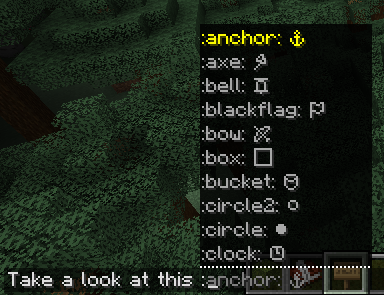 |
 |
 |
? Emoji Type
Type Minecraft emojis and symbols with simple shortcodes.
Emoji Type allows you to instantly insert 200+ emojis into your game using intuitive keywords. Type :skull: and get ☠️ instantly. Works in chat, signs, books, anvils - everywhere text appears. No resource packs or texture changes needed.
? Key Features
- Seamless Integration: Works in chat, signs, books, and even anvils.
- Smart Autocomplete: Type a colon (
:) in chat to see a real-time list of suggestions. - Vanilla Compatible: Emojis are standard Unicode. Other players can see your emojis even if they don't have the mod installed!
- Emoji Pack: Create, edit your own emoji packs via a built-in visual editor.
Bundled Emoji Packs
| Pack | Description | Examples |
|---|---|---|
| Minecraft Essentials | Tools, weapons, and status icons. | ⚔️ ⛏️ ? ☀️ ❄️ |
| Text Art (Kaomoji) | Classic ASCII and Japanese emoticons. | ¯\_(ツ)_/¯ (╯°□°)╯ |
| Letter Emojis | Stylized circled alphabets. | ⓐ Ⓑ ⓒ Ⓓ |
?️ How to Use
- Install: Drop the mod into your
modsfolder (Client-side only!). - Trigger: Press
:in any text field. - Search: Start typing (e.g.,
:sw...) and use your arrow keys or mouse to select. - Anywhere Else: On signs or anvils, simply type the full code (e.g.,
:heart:) and watch it transform.
Customizing: Access the config via Mod Menu (Fabric) or the Mods setting (NeoForge) to enable/disable emoji packs or build your own from scratch!
❓ Frequently Asked Questions
Do I need this on my server?
Nope! It’s 100% client-side. It won’t do anything if installed on a server.
Can my friends see the emojis?
Yes! Since these are native Unicode characters, anyone on a modern Minecraft client can see them perfectly.
How do I share my custom packs?
Just send the .yaml file found in config/emojitype/emoji_packs/. Your friends can just drop it in their folder and they're good to go.
Why no autocomplete on signs?
Minecraft’s sign and anvil interfaces are a bit more restrictive than chat. For now, just type the full keyword (like :check:) and it will convert automatically.
?️ Gallery
| Chat Suggestions | Config Screen | Emoji Packs |
|---|---|---|
|
|
|

下载 Emoji Type
需要联机服务器吗?
稳定流畅、一键部署,几分钟即可和朋友联机开服
最低仅需 8 元/月 即可畅快联机
下载 Emoji Type
需要联机服务器吗?
稳定流畅、一键部署,几分钟即可和朋友联机开服
最低仅需 8 元/月 即可畅快联机
下载 Emoji Type
需要联机服务器吗?
稳定流畅、一键部署,几分钟即可和朋友联机开服
最低仅需 8 元/月 即可畅快联机
下载 Emoji Type
需要联机服务器吗?
稳定流畅、一键部署,几分钟即可和朋友联机开服
最低仅需 8 元/月 即可畅快联机
下载 Emoji Type
需要联机服务器吗?
稳定流畅、一键部署,几分钟即可和朋友联机开服
最低仅需 8 元/月 即可畅快联机
下载 Emoji Type
需要联机服务器吗?
稳定流畅、一键部署,几分钟即可和朋友联机开服
最低仅需 8 元/月 即可畅快联机
下载 Emoji Type
需要联机服务器吗?
稳定流畅、一键部署,几分钟即可和朋友联机开服
最低仅需 8 元/月 即可畅快联机
下载 Emoji Type
需要联机服务器吗?
稳定流畅、一键部署,几分钟即可和朋友联机开服
最低仅需 8 元/月 即可畅快联机
下载 Emoji Type
需要联机服务器吗?
稳定流畅、一键部署,几分钟即可和朋友联机开服
最低仅需 8 元/月 即可畅快联机
下载 Emoji Type
需要联机服务器吗?
稳定流畅、一键部署,几分钟即可和朋友联机开服
最低仅需 8 元/月 即可畅快联机
这是一个测试版发布。
已更新到 Minecraft 26.2。该版本在 26.1 上应该也能正常运行,但某些功能(例如配置界面)可能会存在问题。
如果遇到任何问题,请报告它们。
完整更新日志:
关于这个资源的讨论、问题反馈与使用心得
还没有讨论,来发第一帖吧
你是这个资源的作者?登录后可认领此资源。
相似资源
 模组

显示你正在注视的方块的信息。(适用于 Minecraft 1.16+ 的 Hwyla/Waila 分支)
 模组
在游戏画面角落显示附近世界地形、玩家、生物和实体的地图。可创建路径点,帮助你找到标记过的位置。
 模组

查看物品与配方
 模组
使用 JavaScript 编辑配方、添加自定义物品、编写世界事件!
 模组
AE2:一款流行的自动化与存储模组
 模组
那是什么?一个 Waila/Hwyla 的分支。
评论 0
登录后参与评分
还没有评论,来抢沙发吧