Emote
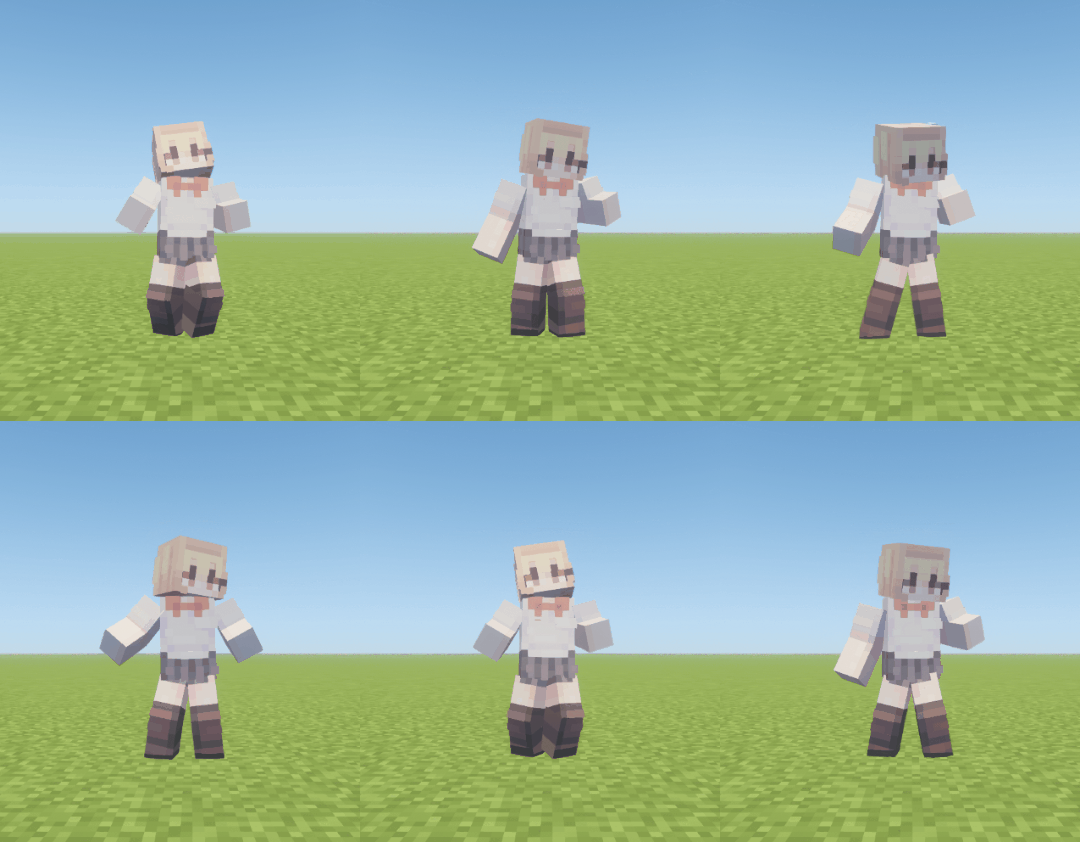
感谢 Popular Vibe 允许我们使用他们的动画!
加入 Discord 服务器,分享你制作的表情动作。
功能
Emote 是一个基于服务器的表情动作模组,使用 Minecraft 显示实体播放动画。仅安装在服务器上即可启用所有服务器端功能。客户端安装为可选操作,会增加表情动作轮盘以及在播放期间自动切换到第三人称视角的功能。
Web 转换器支持导入 BD Engine、GeckoLib 和 Animated Java 项目,并实验性支持 Bedrock 和 Emotecraft。在导出前可配置皮肤部件、元数据、播放设置和事件。
在服务器端,可通过 LuckPerms 权限为每个玩家分配表情动作及待机表情动作。序列(Sequences)可以连接多个动画,并将玩家的皮肤应用到兼容的动画中。此外还提供服务器 API,供其他模组注册表情动作、控制播放以及接收事件。
命令
玩家
| 命令 |
描述 |
/emote |
打开表情动作菜单对话框。 |
/emote play <id> |
通过 ID 播放表情动作。 |
V |
打开客户端表情动作轮盘。 |
使用轮盘的“编辑轮盘”按钮来添加、移除或重新排序条目。顺序会在客户端按服务器分别存储。
表情动作菜单和轮盘编辑器可按名称、ID、描述中包含的 #标签 进行搜索。多个 #标签 会匹配包含所有指定标签的表情动作。
管理
| 命令 |
描述 |
/emote list |
列出已加载的表情动作及其 ID、持续时间和可用性。 |
/emote info |
显示当前播放状态、显示实体容量、皮肤处理队列以及已加载表情动作的状态。 |
/emote reload |
重新加载配置和动画。 |
/emote enable/disable <id> |
启用或禁用某个表情动作。 |
/emote stop <player>, /emote stop @a |
停止选定玩家的表情动作;使用 @a 可停止所有玩家。 |
/emote stress-test <time> [load] |
测量服务器和表情动作处理性能,进行并发表情动作测试(默认 50 个实例)。50 或 50i 请求 50 个实例;768d 请求最多 768 个显示实体。 |
/emote account |
列出已注册的烘焙账户及选定的皮肤提供商。 |
/emote account login |
使用 Microsoft 设备登录连接 Minecraft 账户。 |
/emote account remove <account> |
通过名称或 UUID 移除一个烘焙账户。 |
管理命令需要使用 emote.manage 权限,游戏主操作员(OP)默认拥有该权限。
服务器管理
config/emote/
├── config.json
├── emotes.json
├── emote/
└── resource-pack/
目录和配置文件会在首次启动时自动生成,其中 emote/ 目录下包含 20 多个 示例表情动作。
将转换器导出的 JSON 文件放置在 emote/ 下。子目录也会被加载,且表情动作使用 JSON 中的 id 而非文件名。无效文件会被单独跳过,而任何共享重复 ID 的文件都会被拒绝。
config.json
{
  "schema_version": 1,
  "menu_page_size": 6,
  "mineskin_api_key": "",
  "mineskin_poll_interval_seconds": 3,
  "mineskin_cache_retention_days": 30,
  "mineskin_cache_max_mib": 256,
  "max_active_display_entities": 768,
  "default_skin": ""
}
将 mineskin_api_key 设置为在尚未注册烘焙账户时生成玩家皮肤纹理。已缓存的纹理无需任何凭据即可继续使用。
emotes.json
{
  "schema_version": 3,
  "disabled": ["emote:anvil"],
  "permissions": [
    {
      "permission": "emote.default",
      "emotes": ["emote:hello", "emote:backflip"]
    },
    {
      "permission": "emote.vip",
      "emotes": ["emote:vip\\..*"],
      "idle": {"delay": "300s", "emote": ["sit:idle.sit", 70, "music:idle.piano", 30]},
      "cooldown": "x0.8"
    },
    {
      "permission": "emote.admin",
      "emotes": ["*"]
    }
  ]
}
disabled 用于禁用表情动作,而 permissions 则决定每位玩家可用的表情动作和待机表情动作。emotes 中的有效表情 ID 采用字面量匹配;其他条目作为 Java 正则表达式与完整的表情 ID 进行匹配。* 是一个特殊值,授予所有启用的独立表情动作。正则表达式中的反斜杠也必须在 JSON 中进行转义。除非明确禁止,否则默认允许 emote.default。emote.bypass 是管理员和开发人员的覆盖权限,可忽略 standalone、禁用的 ID、权限和冷却时间。
Web 转换器
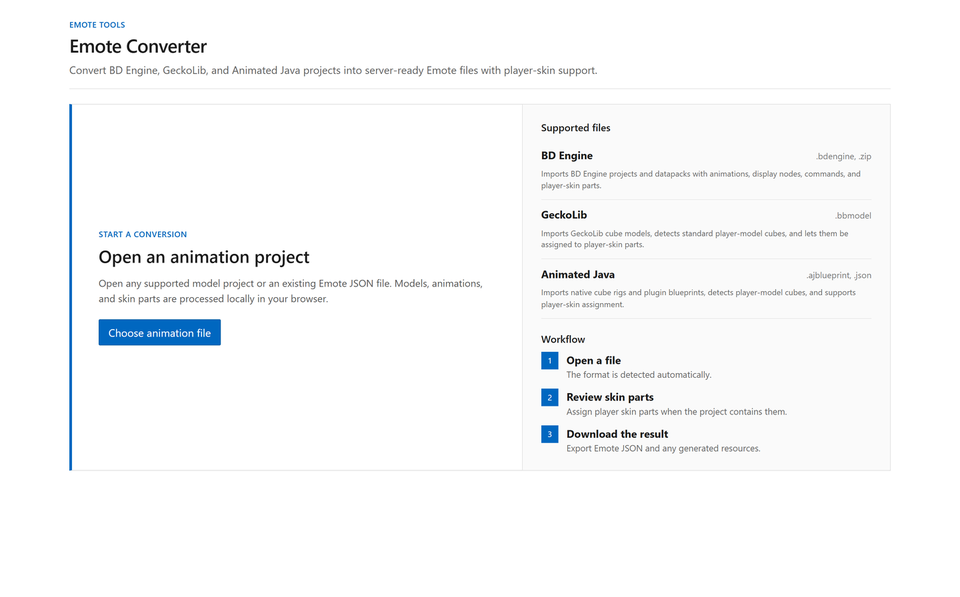
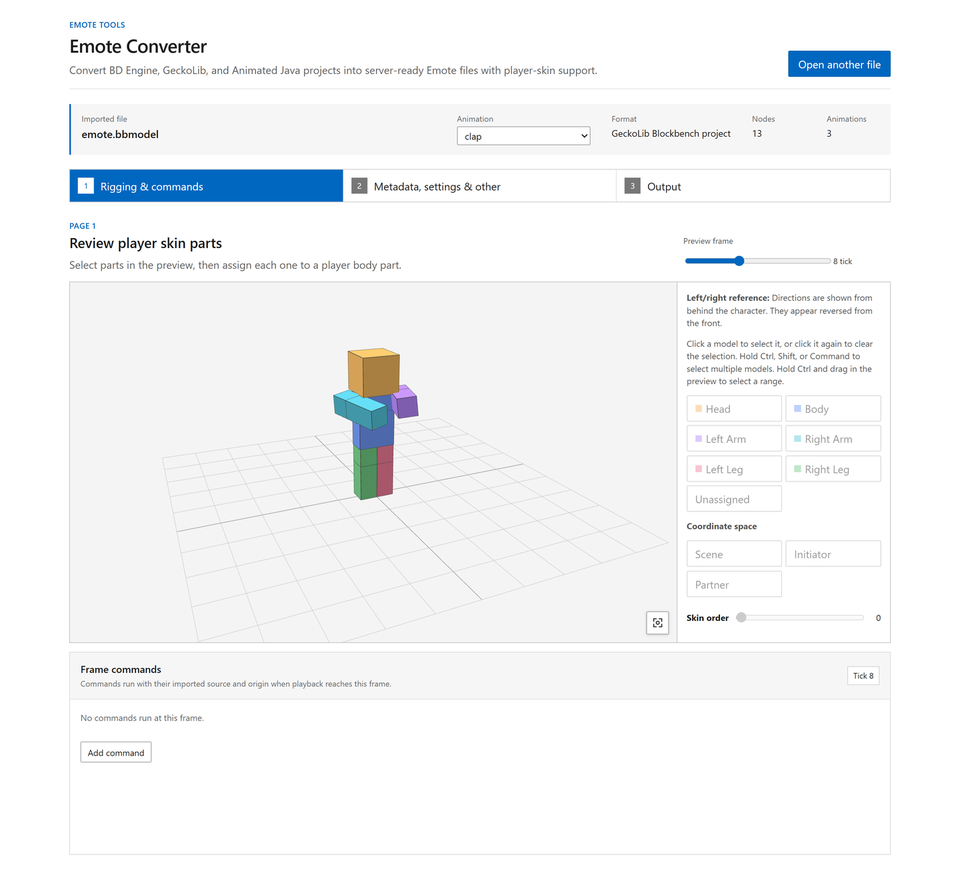
Emote Converter 可在不直接编辑 Animation JSON 的情况下转换和配置项目。所有处理均在浏览器本地完成。
有关转换和安装自定义表情动作的分步指南,请参阅 Adding Custom Emotes。
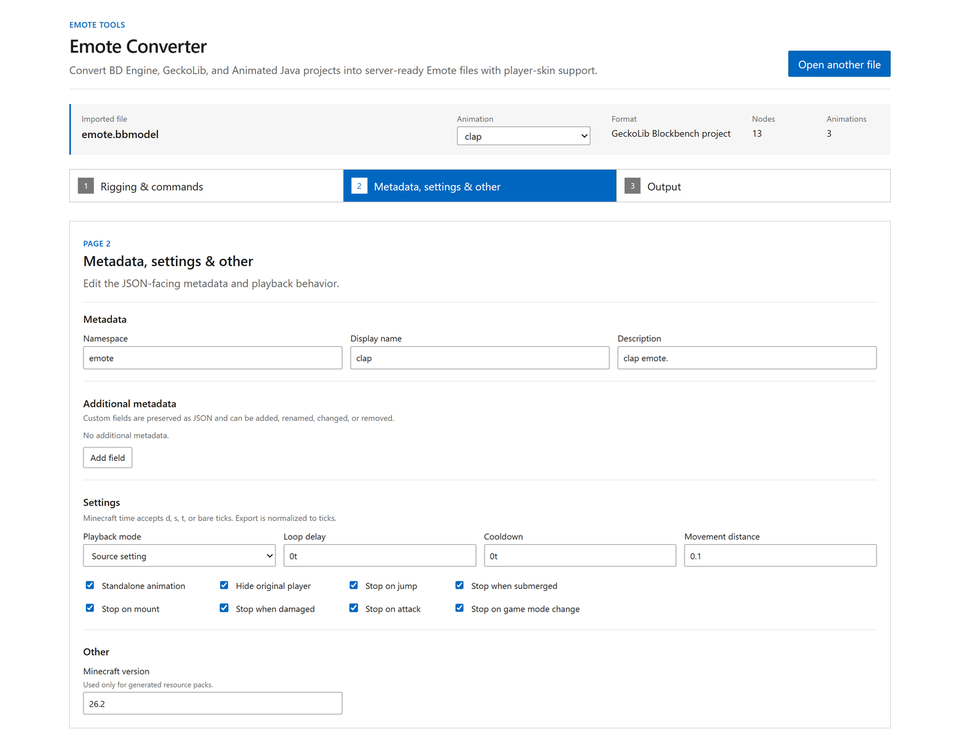
使用 3D 预览分配皮肤部件,然后配置元数据、播放行为、停止条件和事件。
动画转换
Web 转换器支持包括贝塞尔曲线(Bézier)、Catmull-Rom 样条线、弹跳和弹性运动在内的动画曲线。浏览器预览有助于检查皮肤分配情况,但可能与游戏内播放效果有所不同。
每个动画都可以定义冷却时间、玩家可见性、停止条件(如移动、跳跃、攻击和受伤)以及事件。
序列(Sequence)
按顺序连接短动画片段,并结合等待、加权随机选择和重复操作来创建单个表情动作。安装 Sequence 及其引用的所有 Animation。以下摘录展示了其步骤:
{
  "steps": [
    {"emote": "sit:sit_down"},
    {"wait": "10t"},
    {
      "emote": [
        "sit:idle_sky", 45,
        "sit:idle_butterfly", 45,
        "emote:break", 10
      ],
      "repeat": 3
    },
    {"emote": "sit:stand_up1"}
  ]
}
Mod API
EmoteApi.getInstance() 提供播放控制、运行时注册、状态查询、可取消的播放监听器、播放生命周期监听器以及命名生命周期回调。使用 EmoteApi.registerCallbacks 注册回调,并在 Animation 或 Sequence 的根 callbacks 数组中选择它们。状态更改必须在服务器线程上运行,且运行时注册在重载后依然有效。
故障排除
| 问题 |
检查内容 |
| 表情动作未显示 |
检查 /emote reload 的结果、服务器日志、重复 ID、disabled 设置,以及该动画是否为仅适用于序列的动画。 |
| 玩家皮肤未应用 |
检查转换器的皮肤部件分配和皮肤提供程序配置。待皮肤处理完成后再次运行表情动作。 |
| 玩家皮肤应用错误 |
在 Web 转换器中重新分配每个节点的皮肤部件及其顺序。 |
如果此处未涵盖您的问题,请在 Discord 或 GitHub Issues 上报告。
许可证
本项目根据 Apache License 2.0 发布。
Emote
Thanks to Popular Vibe for allowing us to use their animation!
Join the Discord server to share emotes you have made.
Features
Emote is a server-side emote mod that plays animations with Minecraft display entities. All server features work when the mod is installed only on the server. Installing it on the client is optional and adds an emote wheel and automatic third-person view during playback.
The web converter imports BD Engine, GeckoLib, and Animated Java projects, with experimental support for Bedrock and Emotecraft. Configure skin parts, metadata, playback settings, and events before export.
On the server, LuckPerms permissions can assign emotes and idle emotes per player. Sequences can connect multiple animations, with the player's skin applied to compatible animations. A server API is also available for other mods to register emotes, control playback, and receive events.
Commands
Player
| Command |
Description |
/emote |
Opens the Emote Menu dialog. |
/emote play <id> |
Plays an emote by ID. |
V |
Opens the client emote wheel. |
Use the wheel's Edit Wheel button to add, remove, or reorder entries. The order is stored on the client separately for each server.
The emote menu and wheel editor can search by name, ID, description, or #tags included in the description. Multiple #tags match emotes containing all specified tags.
Administration
| Command |
Description |
/emote list |
Lists loaded emotes with their IDs, durations, and availability. |
/emote info |
Shows current playback, display-entity capacity, skin-processing queue, and loaded-emote status. |
/emote reload |
Reloads configuration and animations. |
/emote enable/disable <id> |
Enables or disables an emote. |
/emote stop <player>, /emote stop @a |
Stops selected players' emotes; use @a for all players. |
/emote stress-test <time> [load] |
Measures server and emote processing performance with concurrent emotes (default 50 instances). 50 or 50i requests 50 instances; 768d requests up to 768 display entities. |
/emote account |
Lists registered bake accounts and the selected skin provider. |
/emote account login |
Connects a Minecraft account using Microsoft device login. |
/emote account remove <account> |
Removes a bake account by name or UUID. |
Administrative commands use the emote.manage permission and are granted to game master operators by default.
Server management
config/emote/
├── config.json
├── emotes.json
├── emote/
└── resource-pack/
The directory and configuration files are created automatically on first startup, with 20+ sample emotes included under emote/.
Place JSON exported by the converter under emote/. Subdirectories are loaded as well, and emotes use the id in the JSON rather than the filename. Invalid files are skipped individually, while every file sharing a duplicate ID is rejected.
config.json
{
  "schema_version": 1,
  "menu_page_size": 6,
  "mineskin_api_key": "",
  "mineskin_poll_interval_seconds": 3,
  "mineskin_cache_retention_days": 30,
  "mineskin_cache_max_mib": 256,
  "max_active_display_entities": 768,
  "default_skin": ""
}
Set mineskin_api_key to generate player skin textures when no bake accounts are registered. Completed cached textures remain usable without either credential.
emotes.json
{
  "schema_version": 3,
  "disabled": ["emote:anvil"],
  "permissions": [
    {
      "permission": "emote.default",
      "emotes": ["emote:hello", "emote:backflip"]
    },
    {
      "permission": "emote.vip",
      "emotes": ["emote:vip\\..*"],
      "idle": {"delay": "300s", "emote": ["sit:idle.sit", 70, "music:idle.piano", 30]},
      "cooldown": "x0.8"
    },
    {
      "permission": "emote.admin",
      "emotes": ["*"]
    }
  ]
}
disabled turns off emotes, while permissions determines the emotes and idle emotes available to each player. Valid emote IDs in emotes are matched literally; other entries are Java regular expressions matched against the complete emote ID. * is a special value that grants every enabled standalone emote. Regular-expression backslashes must also be escaped for JSON. emote.default is allowed unless explicitly denied. emote.bypass is an administrator and development override that ignores standalone, disabled IDs, permissions, and cooldowns.
Web converter
Emote Converter converts and configures projects without requiring direct edits to Animation JSON. All processing happens locally in the browser.
For a step-by-step guide to converting and installing your own emotes, see Adding Custom Emotes.
Use the 3D preview to assign skin parts, then configure metadata, playback behavior, stop conditions, and events.
Animation conversion
The web converter supports animation curves including Bézier, Catmull-Rom, bounce, and elastic motion. The browser preview helps check skin assignments and may differ from in-game playback.
Each animation can define a cooldown, player visibility, stop conditions such as movement, jumping, attacking, and taking damage, and events.
Sequence
Connect short animation clips in order and combine waits, weighted random choices, and repeats to create a single emote. Install the Sequence and every referenced Animation together. The following excerpt shows its steps:
{
  "steps": [
    {"emote": "sit:sit_down"},
    {"wait": "10t"},
    {
      "emote": [
        "sit:idle_sky", 45,
        "sit:idle_butterfly", 45,
        "emote:break", 10
      ],
      "repeat": 3
    },
    {"emote": "sit:stand_up1"}
  ]
}
Mod API
EmoteApi.getInstance() provides playback control, runtime registration, state queries, cancellable play listeners, playback lifecycle listeners, and named lifecycle callbacks. Register callbacks with EmoteApi.registerCallbacks and select them in the Animation or Sequence's root callbacks array. State changes must run on the server thread, and runtime registrations survive reloads.
Troubleshooting
| Problem |
Check |
| An emote does not appear |
Check the /emote reload result, server log, duplicate IDs, disabled, and whether the animation is sequence-only. |
| A player skin is not applied |
Check the converter's skin part assignments and the skin provider configuration. Run the emote again after skin processing finishes. |
| A player skin is applied incorrectly |
Reassign each node's skin part and order in the web converter. |
If the problem is not covered here, report it on Discord or GitHub Issues.
License
This project is distributed under the Apache License 2.0.
 模组

 模组

 模组
 模组

 模组
 模组

评论 0
登录后参与评分
还没有评论,来抢沙发吧