
自定义附魔台
受够了在原版附魔台前苦刷经验、搭建图书馆并囤积大量 XP,只为获得你想要的附魔?这个模组提供了两个新的工作台,让你能像整理物品栏一样自由地重新排列附魔。
- 自定义附魔台允许你直接对工具或附魔书进行“修改”——添加一个附魔、移除一个附魔、将高等级附魔拆分为低等级附魔,或将两本相同的书合并为更强的版本。
- 附魔转换台可以将普通书加上少量绿宝石转化为你想要的附魔书——甚至还能为你“复印”一本完全相同的副本。
开箱即用,本模组在设计上故意偏向宽松和易于游玩。如果你(或你正在构建的整合包)希望游戏更加平衡且具有挑战性,可以在配置文件中开启一些更严格的选项——详见下文。
从 CurseForge 或 Modrinth 获取发布版本。发现 Bug 或有新想法?请在 GitHub Issues 中告诉我们。
支持版本
提供适用于 NeoForge 和 Fabric 加载器的构建版本,涵盖 Minecraft 1.21.1 至 1.21.11,以及 26.1、26.1.1 和 26.1.2,同时也支持旧版 1.20.1。
提示: 下载时,请确保两件事对齐——你的加载器(NeoForge 或 Fabric)以及 你的 Minecraft 版本。两者都必须与 jar 文件匹配,否则游戏将无法加载它。
自定义附魔台:重新排列你的附魔
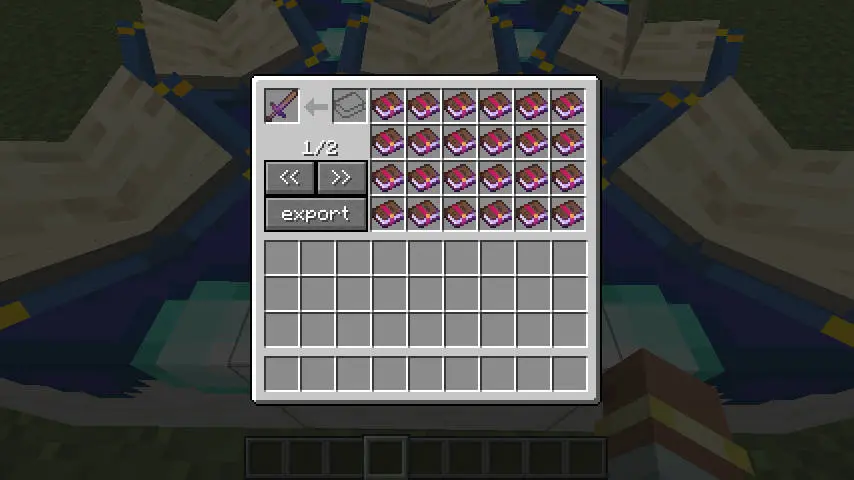 !
将 工具 或 附魔书 放入左上角的槽位,工作台会将上面的每个附魔作为单独的附魔书显示在右侧。在此基础上你可以:
- 想要移除附魔? 只需从右侧取出那本书——对应的附魔就会从物品上移除。
- 想要添加附魔? 将附魔书放入输入槽,或放入右侧的任何空槽中,它就会应用到物品上。
- 想要强化已有的附魔? 将一本书堆叠到右侧对应的书上,两者便会合并。
- 想要拆分高等级书? 将一本包含 单个 附魔的书放入左上角槽位,它会拆分为几本低等级的书供你选择。
- 想要一次性清除所有附魔? 点击导出按钮——所有附魔都会从物品上移除,并打包成一本附魔书交给你。
默认情况下,当合并时,两个相同的附魔会 叠加它们的等级。因此锋利 IV + 锋利 IV 变为锋利 VIII。(如果觉得这太强了,下面提到的严格配置选项可以限制这一点。)
附魔转换台:用普通书交易附魔书
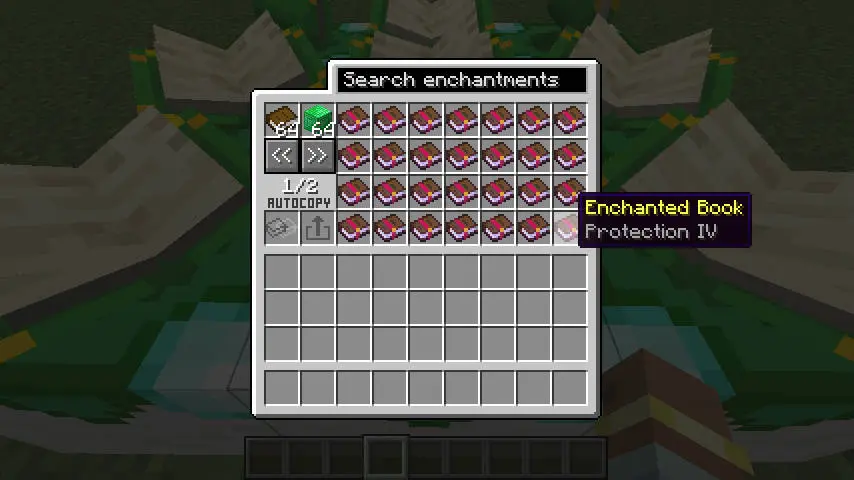
正常交易模式 很简单:加入一些普通书,然后加入足够的绿宝石或绿宝石块作为“费用”。一旦费用足够,右侧会列出你可以获得的附魔书。每取出一本书都需要消耗一本普通书加上相应的绿宝石支付。
书太多无法浏览?使用顶部的 搜索框 按附魔名称进行筛选。
你能获得的等级由 convertOnlyLevelOneBook 选项控制:默认情况下你会获得 最高可用等级;开启该选项后,你将只能获得 一级 书。
复制模板模式:复印一本书
将一本附魔书放入 模板槽,工作台将切换到复制模式。右侧的交易列表关闭,取而代之的是:只要工作台里有一本普通书加上足够的绿宝石,输出槽就会产生你模板书的 精确副本。
只有满足以下规则的书才能用作模板:
- 它必须是 附魔书(而不是工具)。
- 它必须只包含 恰好一个 附魔,不能同时包含多个。
- 附魔等级必须 大于 0。
- 等级 不能超过 该附魔的正常上限。
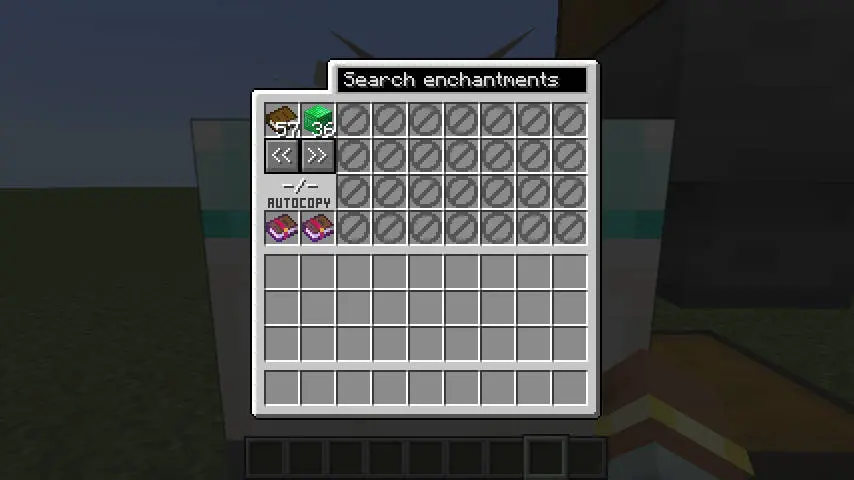
自动化(漏斗、管道等)
无论放入哪个工作台的东西都 真的存储在那里——它们保持原位,如果方块被破坏则会掉落出来。没有任何东西会消失。
为了防止漏斗和物流模组绕过你手动操作时的规则,自动化功能 故意受到限制:
- 自定义附魔台: 漏斗可以向输入槽输送附魔书,并与工作台内已有的物品合并——但内部的主要工具/书 无法被自动化提取。
- 附魔转换台: 你可以自动输入普通书和绿宝石支付,但你 只能从复制输出槽中提取物品。
- 模板槽 必须由玩家手动设置——自动化无法插入或替换它。
- 右侧的交易书只是给玩家的屏幕选项,并非真实物品,因此自动化无法触碰它们。
- 若要自动反复生产同一本书,请使用复制模板模式,而不是使用右侧的交易列表。
有一条值得记住的规则:模板书必须只包含一个附魔,且其等级不超过该附魔的正常上限。
配置:调整以获得更平衡的体验
- 在 NeoForge 上: 可以通过游戏内的模组配置屏幕直接在-game 编辑,或者在加载器管理的通用配置文件中编辑。
- 在 Fabric 上: 配置文件位于你的 Fabric
config文件夹中,名为enchantment_custom_table.json。
| 选项 | 默认值 | 作用说明 |
|---|---|---|
minimumEmeraldCost |
36 |
转换台收取的绿宝石数量。将其设置为 0 可完全取消绿宝石消耗。 |
minimumEmeraldBlockCost |
4 |
转换台收取的绿宝石块数量。将其设置为 0 可取消绿宝石块消耗。 |
enforceEnchantmentLevel限制 |
false |
开启后,合并重复附魔时不能超过该附魔的正常最高等级。注意:添加全新的附魔不受此限制影响,因此其他模组制作的高等级附魔书仍然有效。 |
incrementalSameLevelMerge |
false |
一种更平衡的合并规则。开启后,同名附魔书仅在等级完全相同时才能合并,且合并后等级仅提升 +1。例如,锋利 V + 锋利 V 将变成锋利 VI,而不是锋利 X。 |
convertOnlyLevelOneBook |
false |
开启后,转换台只会生成一级附魔书,而非最高等级的附魔书。 |
需要注意的几点:
enforceEnchantmentLevelLimit和incrementalSameLevelMerge是独立的——可以单独开启其中一个或同时开启两者。当两者都开启时,同等级合并仍不会超过正常最高等级。- 开启
incrementalSameLevelMerge还会改变附魔书的分解方式:锋利 V 附魔书会分解为两本锋利 IV 附魔书,而不是默认的“对半分解”选项。
已弃用(不再使用)的选项
这些是旧版选项名称,目前已无效。如果你的旧配置文件中仍包含它们,请重新生成配置文件或手动重命名:
ignoreEnchantmentLevelLimit→ 现已改为enforceEnchantmentLevelLimit(含义相反)。convert_max_level_book→ 现已改为convertOnlyLevelOneBook(含义相反)。enableXpRequirement→ 已移除,无替代选项。
如何合成这两种工作台
两种配方中,带星号 (*) 的槽位接受任意种类的石英方块——具体包括以下类型(对应物品标签 enchantment_custom_table:quartz_blocks):
- 石英块 (Quartz Block)
- 凿制石英块 (Chiseled Quartz Block)
- 平滑石英块 (Smooth Quartz Block)
- 石英柱 (Quartz Pillar)
- 石英砖 (Quartz Bricks)
自定义附魔工作台合成配方
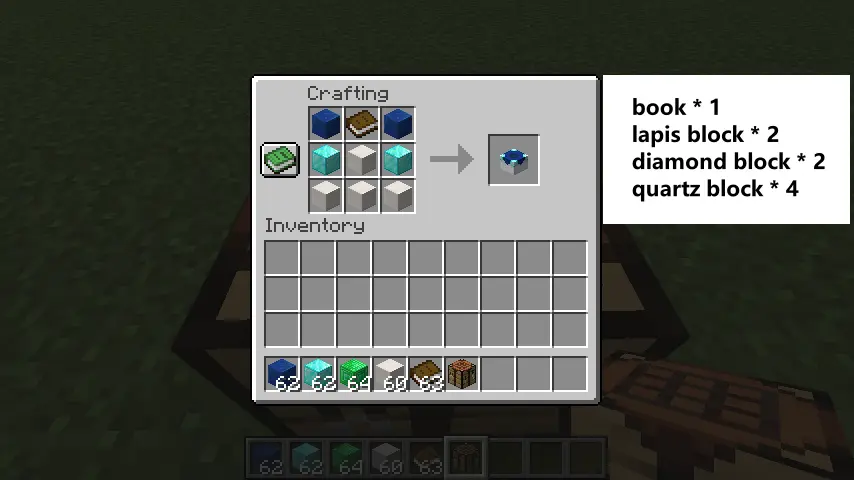
在 3×3 合成台中按如下方式摆放:
| 左列 | 中列 | 右列 |
|---|---|---|
| 青金石块 | 书 | 青金石块 |
| 钻石块 | 石英方块* | 钻石块 |
| 石英方块* | 石英方块* | 石英方块* |
* 带星号的槽位可放入上述任意一种石英方块。
附魔转换工作台合成配方
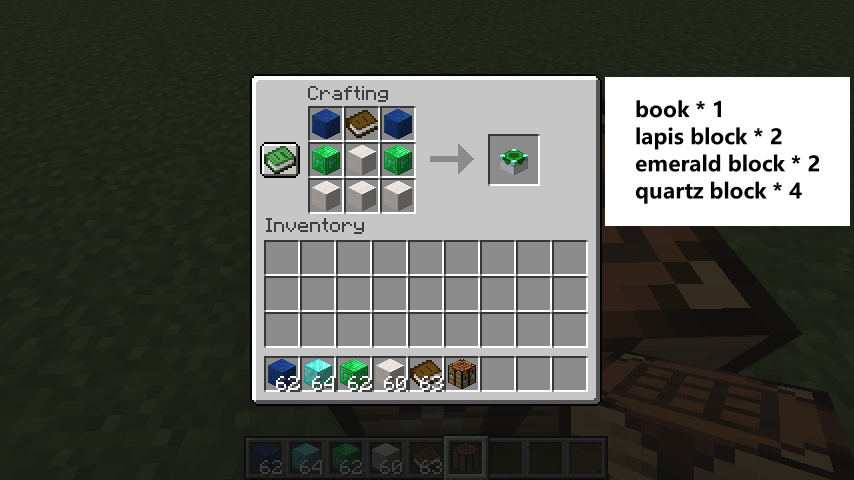
在 3×3 合成台中按如下方式摆放:
| 左列 | 中列 | 右列 |
|---|---|---|
| 青金石块 | 书 | 青金石块 |
| 绿宝石块 | 石英方块* | 绿宝石块 |
| 石英方块* | 石英方块* | 石英方块* |
* 带星号的槽位可放入上述任意一种石英方块。
Enchantment Custom Table
Tired of grinding the vanilla enchanting table, building libraries, and hoarding XP just to land the enchantments you actually want? This mod gives you two new workstations that let you rearrange enchantments as freely as you sort your inventory.
- Enchanting Custom Table lets you "mod" the enchantments on a tool or enchanted book directly — add one, remove one, split a high-level enchantment into lower ones, or merge two matching books into something stronger.
- Enchantment Conversion Table turns plain books plus a few emeralds into the enchanted books you want — and can even "photocopy" an exact duplicate of a book you give it.
Out of the box, this mod is intentionally generous and easy to play with. If you (or a modpack you're building) want something more balanced and challenging, you can flip on a few stricter switches in the config — more on that below.
Grab a release from CurseForge or Modrinth. Found a bug or have an idea? Let us know on GitHub Issues.
Supported Versions
There are builds for both the NeoForge and Fabric loaders, covering Minecraft 1.21.1 through 1.21.11, plus 26.1, 26.1.1, and 26.1.2, also legacy 1.20.1.
Tip: when you download, make sure two things line up — your loader (NeoForge or Fabric) and your Minecraft version. Both have to match the jar, or the game won't load it.
Enchanting Custom Table: rearrange your enchantments
!
Drop a tool or an enchanted book into the top-left slot, and the table lays out every enchantment on it as a separate enchanted book on the right. From there you can:
- Want to remove an enchantment? Just take that book from the right side — the matching enchantment comes off the item.
- Want to add one? Put an enchanted book in the input slot, or into any empty slot on the right, and it gets applied to the item.
- Want to strengthen an enchantment you already have? Stack a book onto the matching one on the right and the two merge together.
- Want to break a high-level book apart? Put a book that holds a single enchantment into the top-left slot, and it splits into a few lower-level books to choose from.
- Want to clear everything at once? Hit the export button — all enchantments come off the item and are bundled into a single enchanted book for you.
By default, two of the same enchantment add their levels together when merged. So Sharpness IV + Sharpness IV becomes Sharpness VIII. (If that feels too strong, the stricter config options below can rein it in.)
Enchantment Conversion Table: trade plain books for enchanted ones
Normal trade mode is straightforward: add some plain books, then add enough emeralds or emerald blocks as the "fee." Once you've got enough, the right side lists the enchanted books you can get. Every book you take costs one plain book plus the emerald payment.
Too many books to scroll through? Use the search box at the top to filter by enchantment name.
What level you get is controlled by the convertOnlyLevelOneBook option: by default you get the highest available level; flip it on and you only get level-one books.
Copy Template Mode: photocopy a book
Put an enchanted book into the template slot and the table switches to copy mode. The right-side trade list turns off, and instead: as long as the table holds one plain book plus enough emeralds, the output slot produces an exact copy of your template.
A book can only be used as a template if it meets these rules:
- It must be an enchanted book (not a tool).
- It must hold exactly one enchantment, not several at once.
- The enchantment level must be greater than 0.
- The level must not exceed that enchantment's normal maximum.
Automation (hoppers, pipes, and the like)
Whatever you put in either table is really stored there — it stays put, and drops back out if the block is broken. Nothing disappears.
To keep hoppers and logistics mods from sneaking around the rules you'd follow by hand, automation is deliberately limited:
- Enchanting Custom Table: a hopper can feed enchanted books into the input slot, and they merge onto whatever item is already in the table — but the main tool/book inside can't be pulled out by automation.
- Enchantment Conversion Table: you can auto-feed plain books and emerald payment, but you can only pull items out of the copy output slot.
- The template slot must be set by a player by hand — automation can't insert or swap it.
- The trade books on the right are just on-screen choices for players, not real items, so automation can't touch them.
- To auto-produce the same book over and over, use Copy Template Mode rather than the right-side trade list.
The one rule worth memorizing: a template book must hold a single enchantment whose level doesn't go above that enchantment's normal maximum.
Configuration: tune it to be more balanced
- On NeoForge: edit it right in-game through the Mod config screen, or in the loader-managed common config file.
- On Fabric: the config file lives in your Fabric
configfolder, namedenchantment_custom_table.json.
| Option | Default | What it does |
|---|---|---|
minimumEmeraldCost |
36 |
How many emeralds the conversion table charges. Set it to 0 to drop the emerald cost entirely. |
minimumEmeraldBlockCost |
4 |
How many emerald blocks it charges. Set it to 0 to drop the emerald-block cost. |
enforceEnchantmentLevelLimit |
false |
When on, merging duplicate enchantments can't go above that enchantment's normal max level. Note: adding a brand-new enchantment isn't limited by this, so over-level books made by other mods still work. |
incrementalSameLevelMerge |
false |
A more balanced merge rule. When on, two same-name books only merge if their levels match exactly, and a merge bumps the level by just +1. So Sharpness V + Sharpness V becomes Sharpness VI instead of Sharpness X. |
convertOnlyLevelOneBook |
false |
When on, the conversion table only produces level-one books instead of max-level ones. |
A couple of things to know:
enforceEnchantmentLevelLimitandincrementalSameLevelMergeare independent — turn on either or both. With both on, same-level merges still won't exceed the normal max.- Turning on
incrementalSameLevelMergealso changes how books split: a Sharpness V book splits into two Sharpness IV books, instead of the default "split in half" options.
Retired (deprecated) options
These are old option names that no longer do anything. If your old config file still has them, regenerate the file or rename them by hand:
ignoreEnchantmentLevelLimit→ nowenforceEnchantmentLevelLimit(the meaning is reversed).convert_max_level_book→ nowconvertOnlyLevelOneBook(the meaning is reversed).enableXpRequirement→ removed, with no replacement.
How to craft the two tables
In both recipes, the starred (*) slots accept any kind of quartz block — specifically these (the enchantment_custom_table:quartz_blocks item tag):
- Quartz Block
- Chiseled Quartz Block
- Smooth Quartz Block
- Quartz Pillar
- Quartz Bricks
Enchanting Custom Table recipe
Lay it out on the 3×3 crafting grid like this:
| Left | Middle | Right |
|---|---|---|
| Lapis Block | Book | Lapis Block |
| Diamond Block | Quartz Block* | Diamond Block |
| Quartz Block* | Quartz Block* | Quartz Block* |
* Starred slots take any of the quartz blocks listed above.
Enchantment Conversion Table recipe
Lay it out on the 3×3 crafting grid like this:
| Left | Middle | Right |
|---|---|---|
| Lapis Block | Book | Lapis Block |
| Emerald Block | Quartz Block* | Emerald Block |
| Quartz Block* | Quartz Block* | Quartz Block* |
* Starred slots take any of the quartz blocks listed above.

下载 Enchantment Custom Table
下载 Enchantment Custom Table
下载 Enchantment Custom Table
下载 Enchantment Custom Table
下载 Enchantment Custom Table
下载 Enchantment Custom Table
下载 Enchantment Custom Table
下载 Enchantment Custom Table
下载 Enchantment Custom Table
下载 Enchantment Custom Table
本文件:NeoForge / Minecraft 26.3。需要 Java 25。客户端和服务器均需安装。
更改内容
- 修复了生成槽位书插入路径的问题,该问题可能导致在未消耗携带书籍的情况下施加附魔,从而允许重复提升等级(#25)。拆分后的书籍在移除并重新放入时,也能保留正确的剩余附魔等级。
- 修复了转换表支付持久化的问题,防止保存和重载后已消耗的书籍和绿宝石被返还。
- 修复了 Fabric 复制生成在客户端运行的问题,这可能导致材料数量看似消失或与服务器不一致。
- 为 Fabric 和 NeoForge 添加了 Minecraft 26.3 的支持,包括其渲染、方块和物品掉落 API 的更改。
- 将相关修复和回归检查应用到了单独的 1.18.2、1.19.2 和 1.20.1 Fabric/Forge 分支。
下载
本次发布包含 38 个模组 JAR 文件。请选择同时匹配您的 Minecraft 版本和加载器的文件。
| Minecraft 版本 | 加载器 | Java |
|---|---|---|
| 1.18.2, 1.19.2, 1.20.1 | Fabric / Forge | 17 |
| 1.21.1 至 1.21.11 | Fabric / NeoForge | 21 |
| 26.1, 26.1.1, 26.1.2, 26.2, 26.3 | Fabric / NeoForge | 25 |
SHA256SUMS.txt 包含 JAR 文件和 RELEASE-MANIFEST.json 的校验和。清单记录了每个构件的版本、加载器、源提交和校验和。
验证
- 所有四个源分支均通过了本地的
buildReleaseArtifacts构建,使用了 Gradle 的正常增量检查。完整的 38-JAR 集合已检查 ZIP 完整性、嵌入式版本和目标元数据、Java 字节码版本和校验和。 - 实际 GUI 回归测试覆盖了主线版本矩阵(使用完整或快速套件),以及每个旧版分支的两种加载器。Minecraft 26.3 在每个加载器上均有 30/30 项检查通过,加上严格的 Shift 扩展;重用的历史检查可在 完整报告 中查看。
- 报告的 Forge 1.20.1 拆分/重新插入场景已通过三次 GUI 循环(抢夺 III → II → III)进行了验证,返还的书籍已被正确消耗。旧版验证。
- Apple Silicon 上的 Forge 1.18.2 GUI 检查使用了 ARM 测试运行时;它们不认证原始的 Intel 原生运行时。发布的 JAR 保留了正常的项目依赖关系。多人游戏、完整整合包兼容性和压力场景未包含在此 GUI 套件中。
已知问题
- 在不同 Minecraft 版本之间的一些升级可能会导致表格库存或存储的附魔组件丢失。迁移修复仍被推迟。请在升级 Minecraft 之前备份世界并从表格中移除物品;同版本保存/重载检查不能确立跨版本迁移的安全性。
- 在 NeoForge 1.21.9 与 NeoForge 21.9.16-beta 下,打开模组列表可能会在到达此模组的配置屏幕之前崩溃。如果受影响,请直接编辑通用配置文件。
- 在 26.3 中,空附魔台候选页面在导出后立即显示
-/-,并在重新打开后显示1/1。测试的物品数量和附魔保持不变;此显示不一致性仍在跟踪中。
源修订
2.0.2 标签指向主线的源代码。旧版 JAR 是从各自的分支构建的;GitHub 的自动源归档仅包含主线代码。
| 源 | 提交 |
|---|---|
| dev — 主线 Fabric / NeoForge | a9269cc |
| codex/port-1.18.2 — Fabric / Forge | 700337d |
| codex/port-1.19.2 — Fabric / Forge | 90803f3 |
| codex/port-1.20.1 — Fabric / Forge | fab3d78 |
关于这个资源的讨论、问题反馈与使用心得
还没有讨论,来发第一帖吧
你是这个资源的作者?登录后可认领此资源。
相似资源
 模组

显示你正在注视的方块的信息。(适用于 Minecraft 1.16+ 的 Hwyla/Waila 分支)
 模组
在游戏画面角落显示附近世界地形、玩家、生物和实体的地图。可创建路径点,帮助你找到标记过的位置。
 模组

查看物品与配方
 模组
使用 JavaScript 编辑配方、添加自定义物品、编写世界事件!
 模组
AE2:一款流行的自动化与存储模组
 模组
那是什么?一个 Waila/Hwyla 的分支。
评论 0
登录后参与评分
还没有评论,来抢沙发吧