EnchantMenu:概览 ⚡
EnchantMenu 是一款适用于 Minecraft 1.21.11 的强大 Fabric 模组,它将物品定制转变为一种快速、可视化且无需命令的体验。你不再需要输入冗长的附魔或组件命令,而是可以通过一个完整的内置图形用户界面(GUI),仅用几次点击即可编辑、附魔、升级、装饰、复制和转换物品。
该模组专为创意玩家、服务器管理员、地图制作者、数据包创作者以及物品设计师打造,EnchantMenu 为你提供了一系列工具,让你能够创造出从整洁的生存风格装备到完全超规格的神级武器、护甲和自定义展示物品的一切内容。
命令 - /enchantmenu
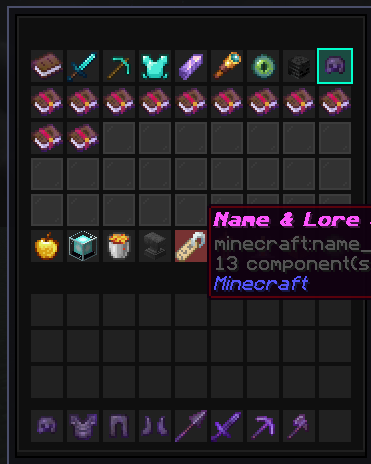
主要功能
EnchantMenu 允许你打开一个自定义的物品编辑器菜单,并直接从 GUI 中修改所选物品。
你可以使用它来:
- 添加和移除附魔。
- 将附魔等级突破原版正常限制。
- 重命名并装饰物品。
- 添加背景故事文本(Lore)和稀有度效果。
- 修改属性,如伤害、速度、生命值和抗性。
- 应用护甲纹饰和皮革染色。
- 添加药水风格的武器效果。
- 保存和加载物品预设。
- 瞬间复制已完成的物品。
无论你是正在构建自定义服务器套装、测试战斗装备、制作 Boss 战掉落物,还是为地图创作传奇物品,EnchantMenu 都能赋予你完全的创意控制权。
如何打开它
在游戏中使用以下命令:
/enchantmenu
你需要拥有创造模式权限或操作员(Operator)级别权限才能使用此命令。
附魔系统
主菜单将附魔显示为可点击的附魔书图标。
你可以:
- 左键点击以增加附魔等级。
- 右键点击以降低附魔等级。
- Shift+左键点击将附魔推至极高的等级。
- Shift+右键点击以移除该附魔。
- 使用 Max All Vanilla 应用正常的最大附魔等级。
- 使用 God Tier Override 应用极高等级的附魔。
这使得创建普通附魔装备、满级工具或完全超规格的神级物品变得轻而易举。
搜索与过滤 ?
EnchantMenu 包含搜索和过滤工具,使你无需手动滚动浏览所有内容。
功能包括:
- 按名称搜索附魔。
- 显示所有附魔。
- 筛选战斗类附魔。
- 筛选工具与辅助类附魔。
- 筛选护甲类附魔。
- 单独显示模组附加(Modded)附魔。
- 隐藏诅咒。
- 显示诅咒。
- 仅显示诅咒。
- 切换 Universal Mode(通用模式),允许在通常无法接受附魔的物品上施加附魔。
通用模式对于实验性装备、自定义地图物品以及故意设计出的“破坏平衡”或趣味创作特别有用。
属性编辑器
属性编辑器允许你直接更改物品威力和玩家统计数据。
你可以调整:
- 攻击伤害。
- 攻击速度。
- 移动速度。
- 最大生命值。
- 击退抗性。
普通点击进行微调,而 Shift+点击则应用较大的变化幅度。这让你既能精细调校平衡性良好的物品,也能制造出威力荒谬的高功率装备。
名称与背景故事样式设置
名称与背景故事工具让你可以自定义物品在玩家背包中的外观表现。
你可以:
- 设置自定义预设名称。
- 添加背景故事文本。
- 清除自定义背景故事。
- 更改物品稀有度。
- 切换附魔发光效果。
- 编辑自定义模型数据。
- 隐藏提示框详情。
这对于制作传奇武器、自定义 RPG 物品、服务器奖励、管理员工具或具有隐藏属性的纯净物品非常有用。
纹饰与染色工具
纹饰与染色菜单专注于物品的外观定制。
你可以:
- 应用护甲纹饰图案,如 Bolt、Flow、Silence 和 Spire。
- 应用纹饰材质,如 Copper、Gold、Netherite 和 Redstone。
- 使用预设颜色对皮革护甲进行染色。
这有助于你创建自定义护甲套装,而无需依赖单独的命令或手动编辑物品。
药水与耐久度工具 ?
此菜单允许你添加特殊的实用功能和战斗效果。
你可以:
- 将耐久度设为满值。
- 将耐久度设得很低。
- 切换“不可破坏”状态。
- 为武器添加药水风格的效果。
- 使武器在攻击时对目标施加效果。
这对于自定义剑、Boss 武器、诅咒物品、活动装备以及实验性 PvP 工具来说非常棒。
预设管理器
预设系统允许你快速保存和加载物品配置。
你可以:
- 左键点击预设槽位以保存当前物品配置。
- 右键点击预设槽位以加载已保存的配置。
预设可以存储:
- 附魔。
- 自定义名称。
- 背景故事。
- 稀有度。
- 自定义模型数据。
- 发光设置。
- 不可破坏状态。
- 伤害数值。
这使得重复使用物品设计变得更加容易,无需从头重新构建。
物品复制器
EnchantMenu 内置了实时物品复制功能。
它会将选定的目标物品复制到空的背包槽位中,使得复制成品装备、测试多个版本或准备全套物品变得非常容易。
适用人群
EnchantMenu 适合以下用户:
- 创意建造者。
- 服务器管理员。
- 地图制作者。
- 数据包创作者。
- 整合包测试者。
- 自定义物品设计师。
- 创建套装或奖励的管理员。
- 尝试附魔和物品组件的玩家。
- 任何希望获得神级装备而不必编写冗长命令的人。
简短总结
EnchantMenu 是适用于 Minecraft Fabric 1.21.11 的高级基于 GUI 的物品编辑器。它让你能够快速访问附魔、属性、名称、背景故事、纹饰、染色、药水效果、耐久度工具、预设以及复制功能。
它旨在服务于那些希望在 Minecraft 内部直接创建强大、精致且高度定制化物品的玩家。
通过以下命令打开:
/enchantmenu
然后选择你的物品,点击升级选项,打造你完美的武器、工具或护甲套装。
加入我们的社区 -
EcProjects
EnchantMenu: Overview ⚡
EnchantMenu is a powerful Fabric mod for Minecraft 1.21.11 that turns item customization into a fast, visual, command-free experience. Instead of typing long enchantment or component commands, you get a full in-game GUI where you can edit, enchant, upgrade, style, duplicate, and transform items with just a few clicks.
Built for creative players, server operators, map makers, datapack creators, and item designers, EnchantMenu gives you the tools to create everything from clean survival-style gear to completely overpowered god-tier weapons, armor, and custom showcase items.
Command - /enchantmenu
Main Purpose
EnchantMenu lets you open a custom item editor menu and modify your selected item directly from a GUI.
You can use it to:
- Add and remove enchantments.
- Push enchantments far beyond normal vanilla limits.
- Rename and style items.
- Add lore and rarity effects.
- Modify attributes like damage, speed, health, and resistance.
- Apply armor trims and leather dyes.
- Add potion-style weapon effects.
- Save and load item presets.
- Duplicate finished items instantly.
Whether you are building a custom server kit, testing combat gear, making boss loot, or creating a legendary item for a map, EnchantMenu gives you full creative control.
How To Open It
Use this command in-game:
/enchantmenu
You need creative/operator-level permission to use it.
Enchantments
The main menu shows enchantments as clickable enchanted books.
You can:
- Left-click to increase an enchantment level.
- Right-click to decrease an enchantment level.
- Shift-left-click to push an enchantment to a very high level.
- Shift-right-click to remove that enchantment.
- Use Max All Vanilla to apply normal maximum enchantment levels.
- Use God Tier Override to apply extreme high-level enchantments.
This makes it easy to create normal enchanted gear, maxed-out tools, or completely overpowered god items.
Search And Filters ?
EnchantMenu includes search and filtering tools so you do not have to scroll through everything manually.
Features include:
- Search enchantments by name.
- Show all enchantments.
- Filter combat enchantments.
- Filter tool and utility enchantments.
- Filter armor enchantments.
- Show modded enchantments separately.
- Hide curses.
- Show curses.
- Show only curses.
- Toggle Universal Mode to allow enchantments on items that normally cannot accept them.
Universal Mode is especially useful for experimental gear, custom map items, and intentionally broken/fun creations.
Attribute Editor
The attribute editor lets you directly change item power and player stats.
You can adjust:
- Attack damage.
- Attack speed.
- Movement speed.
- Max health.
- Knockback resistance.
Normal clicks make small changes, while shift-clicks apply larger changes. This lets you fine-tune balanced items or create ridiculous high-power equipment.
Name And Lore Styling
The name and lore tools let you customize how the item looks in the player’s inventory.
You can:
- Set custom preset names.
- Add lore text.
- Clear custom lore.
- Change item rarity.
- Toggle enchantment glow.
- Edit custom model data.
- Hide tooltip details.
This is useful for making legendary weapons, custom RPG items, server rewards, admin tools, or clean hidden-stat items.
Trim And Dye Tools
The trim and dye menu focuses on item appearance.
You can:
- Apply armor trim patterns like Bolt, Flow, Silence, and Spire.
- Apply trim materials like Copper, Gold, Netherite, and Redstone.
- Dye leather armor with preset colors.
This helps you create custom armor sets without needing separate commands or manual item editing.
Potion And Durability Tools ?
This menu lets you add special utility and combat effects.
You can:
- Set durability to full.
- Set durability very low.
- Toggle unbreakable.
- Add potion-style effects to weapons.
- Make weapons apply effects to targets when attacking.
This is great for custom swords, boss weapons, cursed items, event gear, and experimental PvP tools.
Preset Manager
The preset system lets you save and load item setups quickly.
You can:
- Left-click a preset slot to save the current item setup.
- Right-click a preset slot to load a saved setup.
Presets can store:
- Enchantments.
- Custom names.
- Lore.
- Rarity.
- Custom model data.
- Glow settings.
- Unbreakable state.
- Damage value.
This makes it easier to reuse item designs without rebuilding them from scratch.
Item Duplicator
EnchantMenu includes a live item duplicator.
It copies the selected target item into an empty inventory slot, making it easy to duplicate finished gear, test multiple versions, or prepare full item sets.
Who It Is For
EnchantMenu is useful for:
- Creative builders.
- Server operators.
- Map makers.
- Datapack creators.
- Modpack testers.
- Custom item designers.
- Admins creating kits or rewards.
- Players experimenting with enchantments and item components.
- Anyone who wants god-tier gear without writing long commands.
Short Summary
EnchantMenu is an advanced GUI-based item editor for Minecraft Fabric 1.21.11. It gives you fast access to enchantments, attributes, names, lore, trims, dyes, potion effects, durability tools, presets, and duplication.
It is designed for players who want to create powerful, polished, and highly customized items directly inside Minecraft.
Open it with:
/enchantmenu
Then choose your item, click your upgrades, and build your perfect weapon, tool, or armor set.
Join us on -
EcProjects


 模组

 模组

 模组
 模组

 模组
 模组

评论 0
登录后参与评分
还没有评论,来抢沙发吧