
纠缠箱子
从任何地方存储物品。 纠缠箱子添加了一个你可以与箱子绑定的束包——无论距离多远,你放入束包中的物品都会被直接传送到与其绑定的箱子中。把它想象成通往基地储物区的私人滑道。
适用于 Fabric 和 NeoForge。
✨ 特性
- 纠缠束包 — 一种能将内容物传输到绑定箱子的束包。
- 纠缠箱子 — 具有唯一身份的箱子,束包可以锁定它。在铁砧上命名以区分不同的箱子。
- 纠缠水晶 — 驱动这一切的 crafting 原料。
- 可以将任意数量的束包链接到单个箱子。
- 束包会在保存、维度切换甚至离线时记住它们的链接状态。
- 微妙的附魔光泽让你一眼就能看出哪些是已链接的。
? 使用方法
1. 制作纠缠水晶
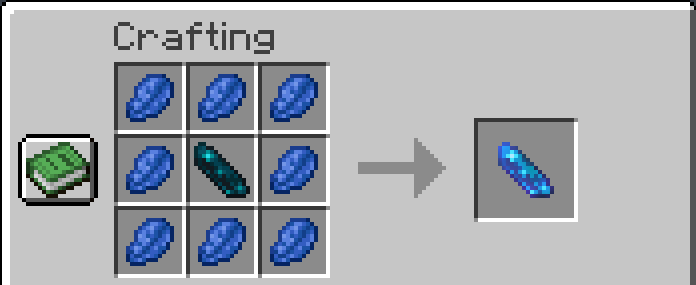
由一个被青金石环绕的回声碎片组成:
2. 制作纠缠箱子
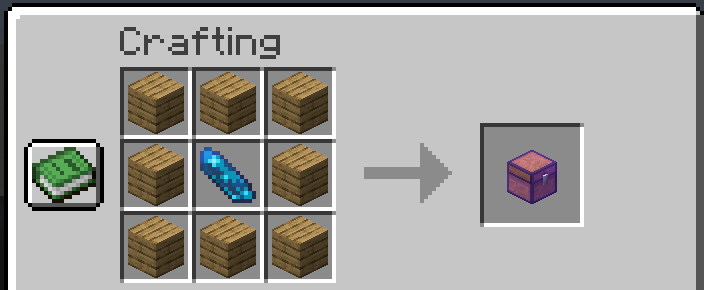
使用正常的箱子配方,中间加入一个纠缠水晶:
3. 制作纠缠束包
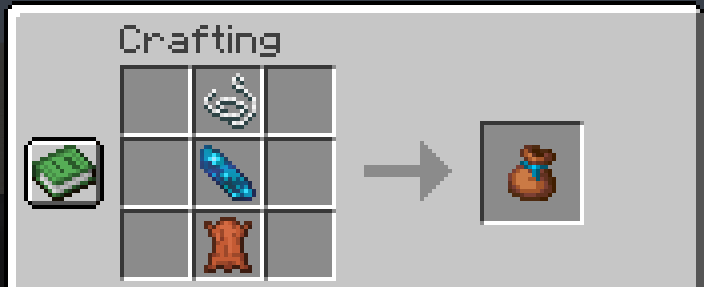
使用正常的束包配方(皮革上放线),并在中间加入一个纠缠水晶:
4. 链接并使用
- 放置你的纠缠箱子。 首次放置时,它内部已经包含一个纠缠束包,并已预先链接到自身——拿起它直接使用,或者稍后链接更多。
- 链接束包: 手持一个未链接的纠缠束包并右键点击箱子。该束包现在会发出光泽,其工具提示会显示它链接到的箱子。
- 从任何地方存储: 像使用普通束包一样将物品放入链接的束包中(将一组物品扔给它)。它们会瞬间被送入箱子。外出挖矿时,可以将矿石存入基地箱子,无需返回家中。
? 须知
- 未链接的束包只是普通的束包 — 携带物品、取出物品,随你喜欢。只有当它与箱子链接后,魔法才会开始生效。
- 你不能手动从链接的束包中取出物品 — 其内容物现在属于箱子。(破坏箱子会使束包解除链接,释放其中仍存在的任何物品。)
- 如果链接的箱子已满, 物品会在束包中等待,直到有空位为止。
- 破坏或拾取箱子 会立即解除所有与其关联的束包的链接——即使这些束包在其他玩家的背包中,无论在线与否。
- 在铁砧上为箱子命名(放置之前),链接的束包将显示该名称而不是 ID —— 这对于“矿石”、“食物”、“杂物”等非常有用。
- 每个束包一次只能链接一个箱子。将其链接到新箱子即可移动它。
? 要求
- Minecraft 1.21.11
- Java 21+
- Architectury API 19.0.1+ (两个加载器均需要)
然后,根据你的加载器:
| 加载器 | 还需要 |
|---|---|
| Fabric | Fabric Loader 0.19.3+ 和 Fabric API |
| NeoForge | NeoForge 21.11.44+ |
下载与你的加载器匹配的 jar 文件。支持单人游戏和服务器——要在多人游戏中使用,请在客户端和服务端都安装。
❓ 常见问题
如果箱子满了,物品会丢失吗? 不会。它们安全地留在束包中,一旦有空位就会流入箱子。
如果我破坏了它的箱子,链接的束包会发生什么? 它会解除链接并变回普通束包。缓冲在其中的一切变得可检索。
多个束包可以为同一个箱子提供物品吗? 是的——你可以将任意数量的束包链接到一个箱子。
链接是否跨维度工作? 是的。无论你们身在何处,束包都会保持与其箱子的链接。
我可以在放置箱子后重命名它吗? 命名是在放置前对物品进行的。要重命名,请破坏箱子,在铁砧上重命名物品,然后再次放置(这将创建一个新箱子)。
? 许可证
根据 MIT 许可证发布。
享受吧,祝你囤积愉快!
Entangled Chests
Store items from anywhere. Entangled Chests adds a bundle you can link to a chest — anything you drop into the bundle is teleported straight into its linked chest, no matter how far away you are. Think of it as a personal chute to your base storage.
Available for Fabric and NeoForge.
✨ Features
- Entangled Bundle — a bundle that beams its contents into a linked chest.
- Entangled Chest — a chest with a unique identity that bundles can lock onto. Name it on an anvil to tell your chests apart.
- Entanglement Crystal — the crafting ingredient that powers it all.
- Link as many bundles as you like to a single chest.
- Bundles remember their link across saves, dimensions, and even while you're offline.
- Subtle enchantment glint so you can tell at a glance what's linked.
? How to use it
1. Craft an Entanglement Crystal
An Echo Shard surrounded by Lapis Lazuli:
2. Craft an Entangled Chest
A normal Chest recipe with an Entanglement Crystal in the middle:
3. Craft an Entangled Bundle
A normal Bundle recipe (String over Leather) with an Entanglement Crystal added in the middle:
4. Link and go
- Place your Entangled Chest. When first placed it already contains one Entangled Bundle, pre-linked to itself — grab it and go, or link more later.
- Link a bundle: hold an unlinked Entangled Bundle and right-click the chest. The bundle now glints and its tooltip shows the chest it's linked to.
- Store from anywhere: put items into the linked bundle just like a normal bundle (drop a stack onto it). They're whisked into the chest instantly. Head out mining and deposit ore into your base chest without a single trip home.
? Good to know
- Unlinked bundles are just normal bundles — carry items, take them out, whatever you like. The magic starts once you link one to a chest.
- You can't pull items out of a linked bundle by hand — its contents belong to the chest now. (Break the chest and the bundle unlinks, freeing anything still inside.)
- If the linked chest is full, items wait in the bundle until space opens up.
- Destroying or picking up a chest instantly unlinks every bundle tied to it — even ones in other players' inventories, online or not.
- Name a chest on an anvil (before placing it) and linked bundles will show that name instead of an ID — handy for "Ores", "Food", "Junk", and so on.
- Each bundle links to one chest at a time. Link it to a new chest to move it.
? Requirements
- Minecraft 1.21.11
- Java 21+
- Architectury API 19.0.1+ (required on both loaders)
Then, depending on your loader:
| Loader | Also needs |
|---|---|
| Fabric | Fabric Loader 0.19.3+ and Fabric API |
| NeoForge | NeoForge 21.11.44+ |
Download the jar matching your loader. Works in single-player and on servers — install on both the client and the server for multiplayer.
❓ FAQ
Do items get lost if the chest fills up? No. They stay safe in the bundle and flow into the chest as soon as room frees up.
What happens to a linked bundle if I break its chest? It unlinks and becomes a normal bundle again. Anything buffered inside becomes retrievable.
Can several bundles feed the same chest? Yes — link as many as you want to one chest.
Does linking work across dimensions? Yes. A bundle stays linked to its chest wherever you both are.
Can I rename a chest after placing it? Naming is done on the item before placement. To rename, break the chest, rename the item on an anvil, and place it again (this makes a fresh chest).
? License
Released under the MIT License.
Enjoy, and happy hoarding!

下载 Entangled Chests
需要联机服务器吗?
稳定流畅、一键部署,几分钟即可和朋友联机开服
最低仅需 8 元/月 即可畅快联机
下载 Entangled Chests
需要联机服务器吗?
稳定流畅、一键部署,几分钟即可和朋友联机开服
最低仅需 8 元/月 即可畅快联机
下载 Entangled Chests
下载 Entangled Chests
下载 Entangled Chests
下载 Entangled Chests
下载 Entangled Chests
下载 Entangled Chests
更新日志
此处记录了 Entangled Chests 的所有重要变更。本项目遵循 语义化版本控制。
[2.0.0] - 2026-07-30
支持 Minecraft 26.1–26.2(Fabric + NeoForge)。
新增
- 支持 Minecraft 26.1 和 26.2。 单个构建现在面向去混淆的 26.x 系列——基于 26.1 编译,并兼容至 26.2。
更改
- 现要求 Minecraft 26.1+ 和 Java 25。(对于 Minecraft 1.21.11,请使用 1.1.x 版本。)
- 更新至去混淆时代工具链(无混淆映射 —— Minecraft 自 26.1 起使用真实的类名),并刷新了依赖项:Fabric API
0.155.2+26.1.2、Architectury20.0.9、NeoForge26.1.2.87。 - 刷新了 Entangled Chest 的纹理,并在物品图标和已放置的方块上保留附魔光泽,以便在 26.x 中使连接箱与原版箱子保持明显区分。
备注
无游戏性变更——机制、配方和行为与 1.1.x 系列完全相同。
[1.1.2] - 2026-07-28
修复
- 将 Minecraft 兼容性限制在 1.21.x 系列。 之前的开放式范围允许模组在 Minecraft 26.x 上加载,由于二进制不兼容,会导致游戏启动时崩溃。现在仅声明支持
1.21.11(Fabric~1.21.11,NeoForge[1.21.11,1.22)),因此不兼容的版本会收到清晰的“需要 Minecraft 1.21.11”提示,而不是直接崩溃。(26.x 的支持单独包含在 2.0.0 版本中。)
[1.1.1] - 2026-07-28
更改
- 声明的 Minecraft 兼容性现在是开放式的——模组可在
1.21.11及任何更高版本上加载,适用于两种加载器(此前仅限于1.21.11系列)。请注意,它仍仅针对1.21.11进行构建和测试。
内部
- 构建现在将每个平台的可分发 jar 收集到根目录
build/libs/中,命名为entangledchests-<version>-<platform>.jar。
无游戏性变更。
[1.1.0] - 2026-07-21
新增
- NeoForge 支持。 该模组现从单一共享代码库为 Fabric 和 NeoForge 提供构建,使用 Architectury 进行构建。请下载与您加载器匹配的 jar 文件。
更改
- Architectury API 现为两种加载器的必需依赖项。
无游戏性变更——机制、配方和行为与 1.0.0 完全相同。
[1.0.0] - 2026-07-20
初始版本,支持 Minecraft 1.21.11(Fabric)。
新增
- 纠缠水晶 —— 由被青金石环绕的回声碎片合成。
- 连接箱 —— 一个具有唯一身份的单人箱(27 格),可以链接捆绑包。首次放置时,会掉落一个已与其链接的捆绑包。放置在砧台上命名以标记它。
- 连接捆绑包 —— 一个真实的捆绑包,一旦链接到箱子,放入其中的物品会直接传送到该箱子。
- 右键点击已放置的连接箱来链接捆绑包。
- 可以将任意数量的捆绑包链接到单个箱子。
- 无法从已链接的捆绑包中提取物品;如果箱子已满,物品会在捆绑包中缓冲,直到腾出空间。
- 破坏或拾取箱子会断开所有与其关联的捆绑包的链接——即使对于离线玩家也是如此。
- 工具提示显示链接箱子的名称(或简短 ID)。
- 水晶和箱子(物品和已放置的方块)上的附魔光泽,以及捆绑包仅在链接状态下的附魔光泽。
- 跨维度链接及世界保存时的持久性。
关于这个资源的讨论、问题反馈与使用心得
还没有讨论,来发第一帖吧
你是这个资源的作者?登录后可认领此资源。
相似资源
 模组

显示你正在注视的方块的信息。(适用于 Minecraft 1.16+ 的 Hwyla/Waila 分支)
 模组
使用 JavaScript 编辑配方、添加自定义物品、编写世界事件!
 模组

查看物品与配方
 模组
在游戏画面角落显示附近世界地形、玩家、生物和实体的地图。可创建路径点,帮助你找到标记过的位置。
 模组
AE2:一款流行的自动化与存储模组
 模组
那是什么?一个 Waila/Hwyla 的分支。
评论 0
登录后参与评分
还没有评论,来抢沙发吧