功能说明
问题在于地面上漂浮的物品太多,或者服务器中残留了过多的隐形实体,又或者是生成的粒子效果过多,甚至某个神秘区域导致玩家每次靠近时都会引发严重的延迟(进而拖慢整个服务器的运行)。
作为管理员(op),你可以前往问题发生的位置,最好是该区域的中心,然后执行 /entitycount 命令来查看该区域内实体(Entities)、方块实体(TileEntities)和物品实体(EntityItems)的数量。如果数量看起来异常庞大,例如蜂房农场上方悬浮着 4100+ 个神秘实体,它们偶尔只在天空中表现为火焰,那么请尝试使用:/nukeentities,它可能会几乎立即消除延迟,就像对我起作用的那样。该命令会移除区域内的所有实体。作用范围默认为你四周 32 格半径的范围,因此在使用前请留意周围的情况。你也可以通过参数指定具体的半径。
在我的服务器上,我在不同情况下多次需要用到这个工具。我曾见过圆石生成器喷出数千个方块导致延迟;也曾见过服务器崩溃后遗留故障模组,以及意外(或非意外)爆炸导致数千个物品散落空中。甚至还有 700+ 支箭矢卡在墙壁里不消失。该工具经过充分测试,支持单人游戏和多人游戏。
请注意谨慎操作。如果你使用了较大的半径数值,很可能会影响服务器上的所有活跃区域。这意味着玩家的动物养殖场也会受到影响。家畜、怪物、宠物 以及 所有其他动物 都是实体。游戏中还存在其他类型的实体。/nukeentities 会移除范围内的所有实体。请注意,方块实体包括 机器、箱子 和 许多植物。实体 和 方块实体 是游戏中两组不同的事物。移除它们意味着它们将永久消失,无法找回。这也是为什么这是一组仅限操作员使用的命令的原因。请明智且负责任地使用。
这是一个仅限管理员(op)使用的工具,只需安装在服务端即可。客户端无需安装即可使用。安装方法与其他 Forge 模组一样,只需将下载的文件放入 /mods/ 文件夹并重启游戏即可。
命令列表
在聊天栏输入...
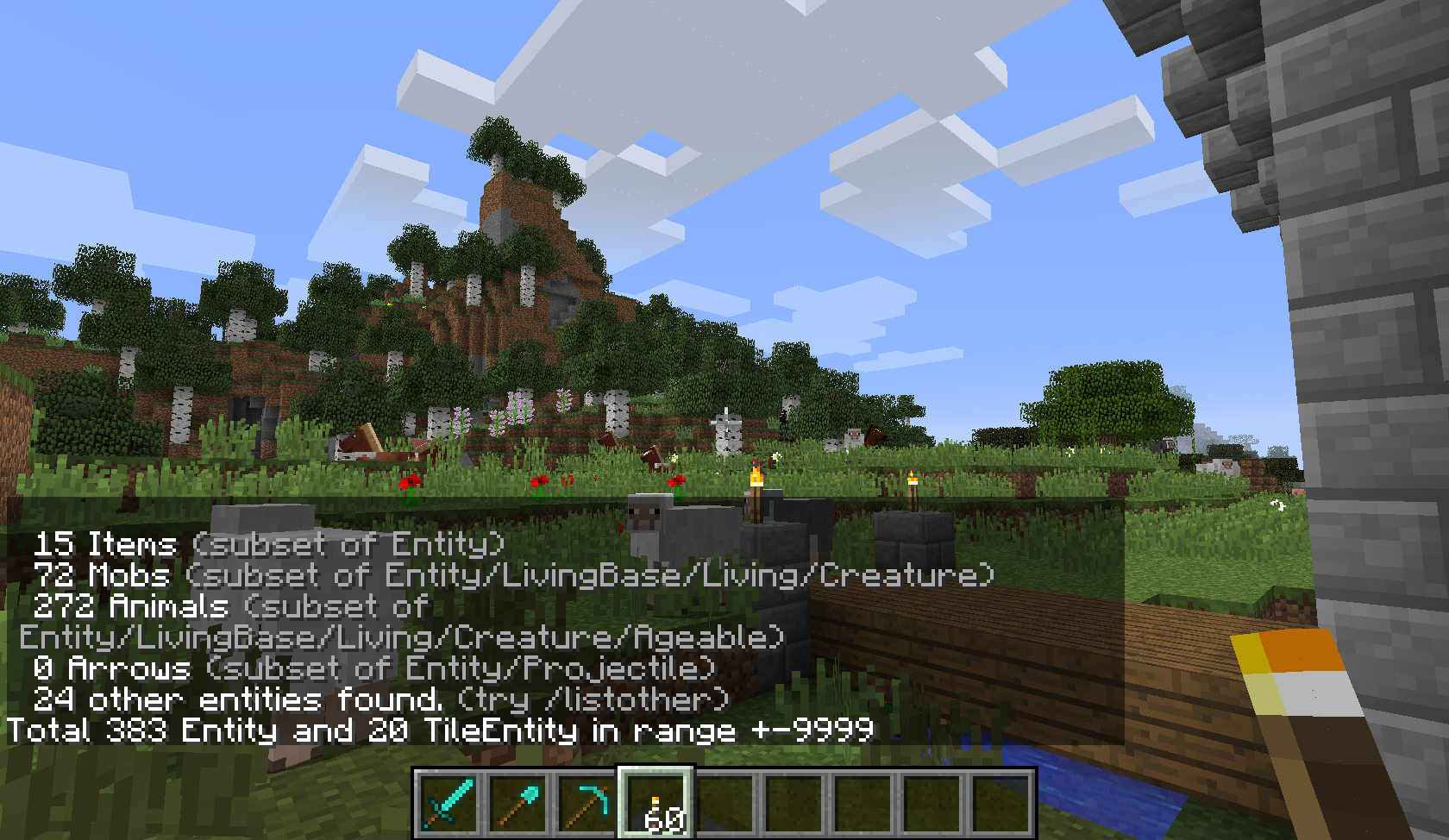
/entitycount 或 /ecount 用于统计范围内的所有实体。它会显示以下数量:物品、敌对怪物(mobs)、动物、箭矢、其他实体、实体总数以及方块实体。
/nukeitems 用于移除 EntityItems,例如掉落在地上的物品。(这是 Entity 的一种子类型)
/nukearrows 移除范围内的所有箭矢。由于 Minecraft 中存在一个 bug,箭矢有时不会自然消失。
/limitanimals range limit 将移除范围内除保留数量外的所有同类动物。家畜属于实体动物。如果你在范围内有 300 只鸡、500 头牛和 26 头猪,执行 /limitanimals 32 40 将以 32 格为半径进行操作,最终你将剩下 40 只鸡、40 头牛和 26 头猪。如果不指定限制数量,默认为 40。
/nukenonanimals 将移除范围内所有非动物的活体实体,但不会移除任何动物。家畜如绵羊和猪属于实体动物,不会被移除。
/listother 显示范围内“其他实体”的简称及其数量。这指的是由 /entitycount 统计的“其他实体”。请参阅
此示例。
/nukeother 移除范围内的所有“其他实体”。这指的是由 /entitycount 统计的“其他实体”。
/nukemobs 用于移除 EntityMobs。(这是 Entity 的一种子类型)
/nukeentities 或 /nukeents 用于移除范围内所有实体。
/listtiles 按简短名称和数量显示所有方块实体(TileEntity)类型的列表。
/nuketileentities 或 /nuketiles 用于移除范围内所有方块实体。请记住,方块实体与实体是不同的。
/nukeup 用于从你站立的位置向上清除所有方块,直至顶端。
/filldown 用于从你站立的位置下方填充至基岩层。它还会修复基岩底层中的任何空洞。
/lagfix 显示本模组中所有命令的快速参考。任何命令后加 "help" 也会产生相同效果。
具体来说,filldown 会用以下图层填充所有空气、流动的水和流动的熔岩:草方块(1格深)、泥土(2格深)、石头(3格深)、圆石(填满...),最底层为基岩(1格深)。请注意,该区域下方的所有洞穴都将被圆石填满,这可以防止怪物在该区域下方生成。此命令非常适合制作大片平坦的草地,或者在飞行时使用小半径(/filldown 0)瞬间建造一个位置标记塔。这个命令最初是为了快速修补巨大的空洞而设计的,它是为了粗略地填补由 /nukeup 造成的空洞而添加的。这是一个仅限操作员使用的命令。
一个可选参数指定了任何命令的作用半径。
默认值为 32。即从你所站立的方块向外延伸 32 格。
直径为 65 = 32+1+32,覆盖一个 65x65 的正方形区域。
兼容命令方块。使用 /nukeup 的命令方块会从直接位于其上方的方块开始向上清除。由于命令方块属于方块实体,当它们使用 /nuketileentities 时,会在半径范围内摧毁每个方块实体,除了命令方块本身。
注意事项
支持单人游戏和多人游戏。
仅在多人游戏服务器的服务端需要安装。
包含源代码。
这是一个 Forge 模组。不需要Bukkit。
这些命令非常简单。
MinecraftForum.net 上的官方页面链接
其他模组
你可能也会喜欢其他作者制作的这些非常有用的相关实用模组:Opis(Forge) 和 ClearLag(Bukkit),以及 LagGoggles。
我的其他项目链接。
WHAT DOES IT DO
The problem is too many items floating on the ground or too many invisible ones that stay in the server or too many generated effects or even a mystery area causing huge lag times every time a player goes near that place (lagging the whole server).
As an op you may go to the problem location, preferably the middle of it, and do an /entitycount to see the number of Entities and TileEntities and EntityItems in that area. If it seems excessive such as the 4100+ mysterious entities floating above a beehive farm, that only occasionally appear as flames in the sky, then try this: /nukeentities and it may almost instantly remove the lag, as it did for me. The command removed all entities in the area. The area of effect is a default distance of 32 blocks in all directions from you, so know what is around you before you use this. Also you may specify the radius as a parameter.
I needed this for my server several times under different curcumstances. I've seen cobble generators spew 1000s of blocks out causing lag time. Also server crashes leaving malfunctioning mods, and accidental(or not) explosions leaving 1000s of items floating about. Or even 700+ arrows still stuck in the walls and not despawning. The tool has been tested well. It works in single or multiplayer.
Be careful. If you use a large radius number you are probably affecting all active areas of the server. This means player's animal farms too. Farm animals, monsters, pets, and all other animals are entities. There are other types of entities in game as well. /nukeentities removes them all in an area. Note that TileEntities include machines, chests, and many plants. Entities and TileEntities are different sets of things in game. Removing them means they are gone. You do not get them back. There is a reason this is an operator only set of commands. Be smart and responsible.
This is an op only tool and only needs to be installed on the server side. Clients do not need it, for it to be used. Installing it is just dropping the downloaded file into the /mods/ folder and restarting the game as usual for any forge mod.
COMMANDS
In chat type...
/entitycount or /ecount to count all entities in range. It displays the number of: items, hostile monsters(mobs), animals, arrows, other entities, total entities, and tile entities.
/nukeitems to remove EntityItems such as those dropped on the ground. (a sub type of Entity)
/nukearrows Removes all arrows in range. Due to a bug in Minecraft, arrows sometimes do not despawn
/limitanimals range limit will remove all but the limit-number of animals of each type of animal in range. Farm animals are entity animals. If you have 300 chickens, 500 cows, and 26 pigs within the range, then if you do a /limitanimals 32 40 it will affect a radius of 32 and you should end up with 40 chickens, 40 cows, and 26 pigs. 40 is the default if you do not spefify the limit.
/nukenonanimals will remove all living entities but not remove any animals in range. Farm animals such as sheep and pigs are entity animals and would not be removed.
/listother Displays a list of other entity's short names and counts in range. This refers to the "other entities" counted by /entitycount. See
example of this.
/nukeother Removes all other entities in range. This refers to the "other entities" counted by /entitycount.
/nukemobs to remove EntityMobs. (a sub type of Entity)
/nukeentities or /nukeents to remove all Entities in range
/listtiles Displays a list of tile entity types by their short names and counts.
/nuketileentities or /nuketiles to remove all TileEntities in range. Remember that TileEntities are different than Entities.
/nukeup to remove all blocks from your standing location to up all the way
/filldown to add fill from below your standing location to bedrock. Also it repairs any holes in the bedrock bottom layer.
/lagfix Displays a quick reference of all commands in this mod. Any command with "help" after it will do the same.
Specifically filldown fills all air and flowing water and flowing lava with layers as follows: grass(1 deep) dirt(2 deep) stone(3 deep) cobble(fill...) then bedrock(1 deep) at the very bottom layer. Do note that all caves below the area will be filled with cobble which should prevent monsters from spawning below the area. Its handy to make big flat grassy areas, or with a small radius (/filldown 0) make an instant location marker tower if you are flying. This command was just a quick fix for large gaping holes. It was added to crudely fill in holes from /nukeup. It is an operator only command.
One optional parameter specifies the radius of the area for any of the commands.
Its default is 32. So the block you are on then 32 blocks out.
Diameter is 65 = 32+1+32, covering a 65 by 65 square area.
CommandBlock Compatible. Command blocks using /nukeup will clear from the block directly above itself up. Since CommandBlocks are TileEntities, when they use /nuketileentities they will nuke every tile entity except command blocks within the radius.
NOTES
Both Single and Multi player.
Only needed on server side for multiplayer servers.
Source code is included.
This is a Forge mod. No Bukkit is needed.
The commands are simple.
Link to official page on MinecraftForum.net
OTHER MODS
You may love these other related utility mods by others that are very useful: Opis(forge) and ClearLag(bukkit). also LagGoggles.
A link to my other projects.

 模组

 模组
 模组

 模组
 模组

 模组

评论 0
登录后参与评分
还没有评论,来抢沙发吧