你好,冒险者!
正在寻找人生中最棒的冒险体验吗?无需再找!有了这款模组,你将全方位满足你的冒险需求!
这款 Minecraft 模组旨在通过允许玩家创建、管理和部署自定义营地来增强玩家的探索与生存体验。无论是在穿越世界还是在新的区域定居,玩家都可以使用此模组搭建临时或永久营地,以满足自身需求。
支持多人游戏! 在末地和下界同样适用!
使用本模组你可以
创建 11x10x11 大小的自己的营地,或者使用精美的预设模板!
打包营地(移动基地),并在任何地方展开营地!
随意修改你的营地!
使用精美的预设模板,利用收集到的材料快速建造你的营地(当然也可以进行修改)!
如何创建营地
制作露营箱:
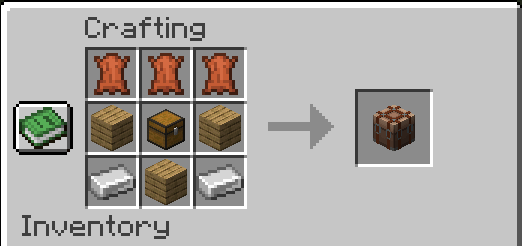
注意: 可以使用任何类型的木板!
将露营箱放置在你想要的位置,并对该方块执行Shift+右键。
你所站立的位置将成为营地的中心。
一个投掷器也会放置在营地的中心。当投掷器位于营地中心时,粒子效果将指示营地的边界。
如果你破坏掉投掷器并想重新放置它,只需在主手持有投掷器,粒子效果就会指示营地的中心位置。
如何打包和展开营地
打包营地
放置露营箱方块并对该方块执行 Shift+右键——营地将在10 秒内完成打包。
展开营地
将露营箱放置在你想要的位置,并对该方块执行Shift+右键。你所站立的位置将成为营地的中心。后退一步,看着你的营地自动搭建吧!
使用预设模板
在投掷器中放入所需材料(确保投掷器已放置在营地中心),后退一步,看着预设模板自动构建!
重生点
当玩家创建或展开营地时,该玩家会将重生点设置为营地被创建或展开的位置,针对他自己以及周围 10 格半径内的所有玩家!
简而言之,玩家和他的营地伙伴们会在上次营地被展开或创建的位置重生!
建议在平坦开阔的区域创建和展开营地!
问题反馈
请在 GitHub 上报告所有错误和问题,这会有很大帮助!
GitHub 上的讨论区现已开放! 分享你的创意、作品和建议!
未来计划
- 我的下一个大目标是让可自定义的营地尺寸成为可能,可以通过设置或升级实现。我需要知道你们的意见,所以请在 GitHub 上进行投票!
- 添加更多可供使用的营地预设模板!
限制条件:
尽管这款模组非常酷,但它也存在一些缺点:
- 无法打包实体(盔甲架、画作、生物等)。
- 无法直接将掉落物方块(铁砧、沙子、沙砾)放置在营地地面上。
- 在一个世界中最多可以存在38 个营地。
Hello Adventurer!
Are you looking for the best adventure of your life? Look no further! With this mod you will fulfill your adventure needs at its fullest!
This Minecraft mod is designed to enhance players' exploration and survival experiences by allowing them to create, manage, and deploy customizable camps! Whether traveling through the world or settling in new areas, players can use this mod to set up temporary or permanent camps that cater to their needs.
Multiplayer compatible! Works in the End and The Nether aswell!
Using this mod you can
Create 11x10x11 your own camps or use beautiful presets!
Pack your camp (mobile base) and unpack your camp wherever you go!
Modify you camp however you want!
Use beautiful presets using gathered materials to quickly build your camp (and modify, of course)!
How to create a camp
Crafting a camping crate:
Note: any type of planks can be used!
Place camping crate wherever you want and shift right-click on the block.
Where you stand will be the middle of the camp.
A dropper is placed in the middle of the camp aswell. While dropper is placed in the middle of the camp particles will indicate boundries of the camp.
If you breake the dropper and want to place it again just hold the dropper in your main hand and particles will indicate the middle of the camp.
How to pack and unpack camps
Packing camp
Place the camping crate block and shift right-click on the block - camp will pack in 10 seconds.
Unpacking camp
Place camping crate wherever you want and shift right-click on the block. Wherever you stand will be the middle of the camp. Stand back and watch your camp set up!
Using presets
Place required materials in the dropper (while it is placed in the middle of the camp), stand back and watch the preset being built!
Respawn
When a player creates or unpacks a camp the player sets respawn point where the camp is created or unpacked for himself and all the players around that are within 10 blocks radius!
Basically the player and his camp buddies respawn at the location where the last time camp is unpacked or created!
Its recommended to create and unpack camps on flat and open areas!
Issues
Please report all bugs and issues github, it helps a lot!
Discussions is now open on github aswell! Share you ideas, creations and suggestions!
Future plans
- My next big goal is to make customisable camp size in settings or via upgrades. I need to know your opinion on this so please vote on the github!
- Add more camp preset for you to use!
Limitations:
However cool this mod is, it has its drawbacks:
- No entities (armor stands, paintins, mobs etc.) can be packed within the camp.
- No falling blocks (anvils, sand, gravel) can be placed directly on the camp ground.
- In one world can be up to 38 camps.


 模组

 模组
 模组

 模组
 模组
 模组

评论 0
登录后参与评分
还没有评论,来抢沙发吧