

如果你喜欢这个模组,请考虑给它点赞/收藏!这将对作者有很大帮助。
F34
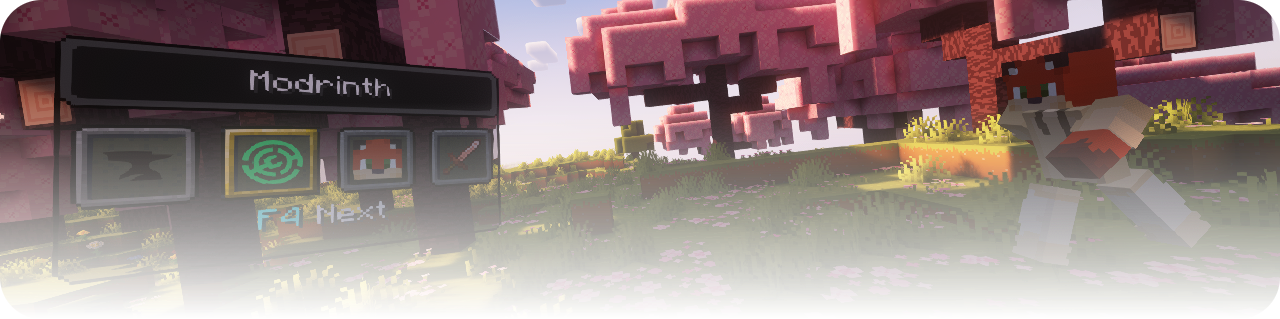
**F34 是适用于 Minecraft Java 版的可自定义游戏内动作切换器。**
创建您自己的切换窗口,将按钮组织到多个实例中,并执行命令或客户端操作,而不会中断您的游戏体验。
无论你经常切换游戏模式、执行长命令、将多个命令串联起来、离开服务器,还是使用自定义插件操作,F34 都让你能够通过一个紧凑且完全可配置的界面来访问这些功能。
特性
自定义切换器实例
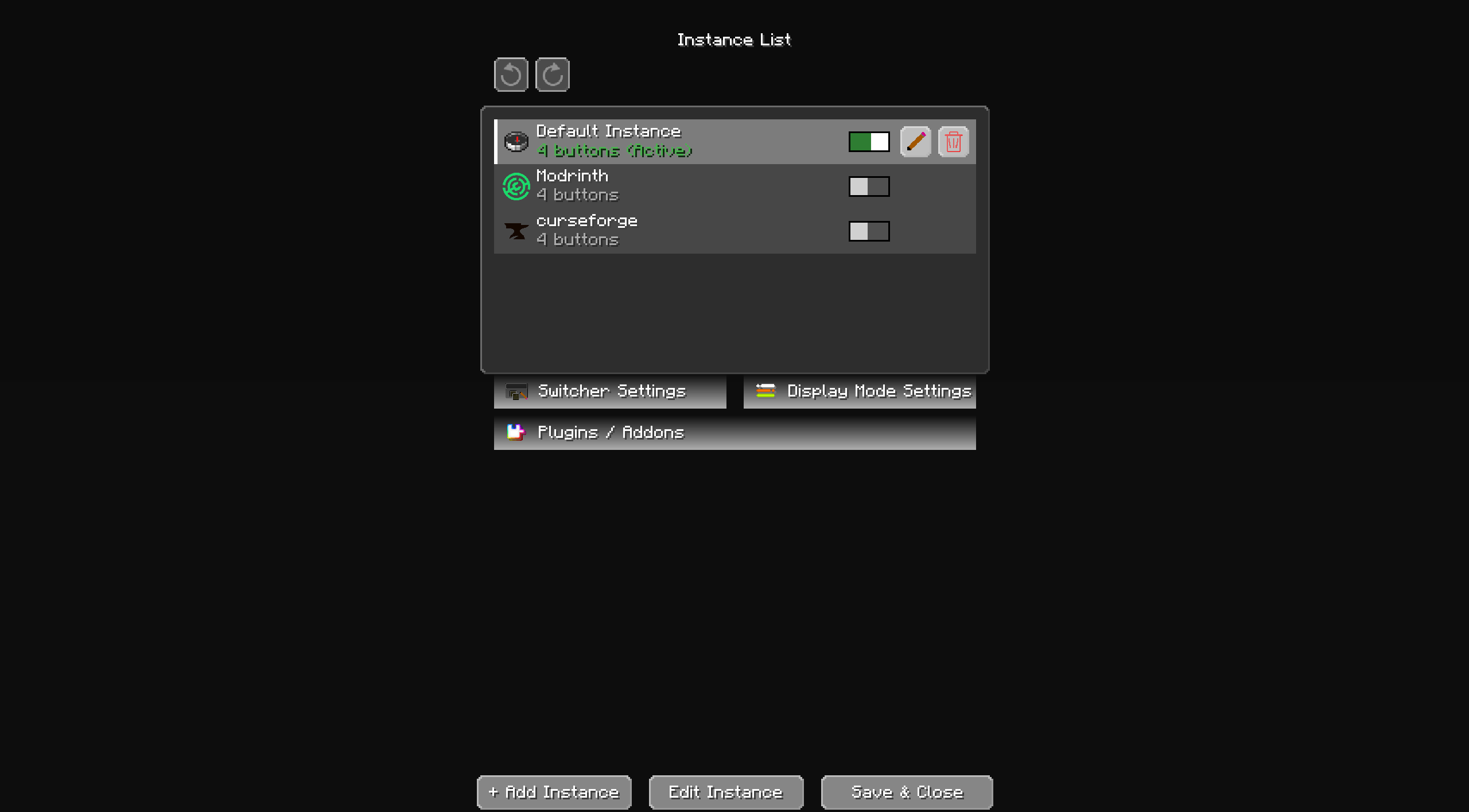
为不同场景创建多个独立的切换器实例,例如:
- 创造模式工具
- 生存模式实用功能
- 服务器命令
- 建筑工具
- 传送快捷方式
- 小游戏控制
- 自定义附加组件动作
每个实例都可以拥有自己的名称、图标、按钮、启用状态和布局。
命令与动作链
单个按钮可以按顺序执行一个或多个动作。
支持的命令模式包括:
- 普通命令
- 链式命令
- 循环命令
- 条件命令
- 多行命令输入
- 命令自动补全
F34 遵循正常的 Minecraft 权限规则。当玩家没有相应权限时,需要操作员(OP)权限的命令将被禁用。
客户端动作
按钮还可以执行客户端动作,包括:
- 离开当前服务器
- 退出 Minecraft
- 由 F34 附加组件注册的动作
会立即改变游戏状态的动作在使用前会明确显示提示。
灵活的图标
使用以下方式为每个实例和槽位选择图标:
- Minecraft 物品和方块
- 自定义图片文件
- 玩家头颅
- 2D 玩家头颅
- 3D 玩家头颅
可自定义界面
调整切换器的外观和位置:
- 窗口位置和缩放比例
- 标题背景
- 主背景
- 槽位按钮外观
- 选中槽位外观
- 底部文本
- 全部显示模式
- 四槽滑动模式
界面设计确保在不同窗口大小和 GUI 缩放比例下均可用。
选择动画
F34 内置了 10 种选择动画:
- 平滑滑动
- 线性滑动
- 加速
- 缓入缓出
- 弹跳
- 过冲
- 弹性
- 跳跃
- 波浪
- 缩放脉冲
动画默认处于关闭状态,可从“显示模式设置”中启用。附加组件也可以注册自己的动画。
附加组件 API
F34 包含附加组件 API,允许其他模组注册:
- 自定义动作
- 预配置实例
- 槽位按钮
- 选择动画
- 创作者信息和自定义图标
新安装的附加组件不会自动激活。必须先通过 插件 / 附加组件 屏幕进行审核和批准。
内置的 AI 创作提示 可以为 Fabric、NeoForge 或 Forge 生成详细且适合初学者的附加组件开发指南。
对多人游戏友好
F34 是一个客户端模组。服务器无需安装它。
该模组不会绕过服务器权限。命令会正常发送,并且仍然需要服务器配置的权限。
加载器支持
F34 提供以下版本:
- Fabric
- NeoForge
- Forge
请始终安装适用于你当前加载器的版本。不要混用不同加载器的构建文件。
Fabric 版本还需要 Fabric API。
使用方法
- 为你的加载器安装正确的 F34 构建版。
- 启动 Minecraft,在主菜单或游戏菜单中打开 F34 配置按钮。
- 打开 控制 → 按键绑定 → F34 Mod 并为以下功能分配按键:
- 打开切换界面
- 打开切换配置
- 创建一个实例。
- 添加槽位并选择它们的图标。
- 为每个槽位添加命令或客户端操作。
- 保存配置。
- 打开切换器并选择一个槽位以执行其操作。
槽位内的命令按从第一个到最后一个的顺序执行。
注意事项
- F34 不会授予操作员权限。
- 服务器命令仍然遵循正常的服务器权限规则。
- 模组必须与你的 Minecraft 版本和加载器匹配。
- Fabric、NeoForge 和 Forge 的构建是单独的文件。
- 插件必须与已安装的 F34 构建使用相同的加载器。
- 在替换或降级版本之前,请备份重要配置。
链接
许可证
版权所有 © magbFox。保留所有权利。
你可以在你的 Minecraft 安装中正常使用该模组。未经创作者许可,禁止编辑、重新打包或重新分发该模组。
If you enjoy this mod, please consider giving it a like/heart! It helps a lot.
F34
**F34 is a customizable in-game action switcher for Minecraft Java Edition.**
Create your own switcher windows, organize buttons into multiple instances, and execute commands or client-side actions without interrupting your gameplay.
Whether you frequently change game modes, run long commands, connect several commands together, leave a server, or use custom addon actions, F34 lets you access them through a compact and fully configurable interface.
Features
Custom switcher instances
Create multiple independent switcher instances for different situations, such as:
- Creative tools
- Survival utilities
- Server commands
- Building tools
- Teleport shortcuts
- Minigame controls
- Custom addon actions
Each instance can have its own name, icon, buttons, enabled state, and layout.
Commands and action chains
A single button can execute one or multiple actions in order.
Supported command modes include:
- Normal commands
- Chain commands
- Repeating commands
- Conditional commands
- Multi-line command input
- Command autocomplete
F34 follows normal Minecraft permission rules. Commands that require operator permissions are disabled when the player does not have permission.
Client-side actions
Buttons can also perform client actions, including:
- Leave the current server
- Quit Minecraft
- Actions registered by F34 addons
Actions that immediately change the game state are clearly shown before use.
Flexible icons
Choose an icon for every instance and slot using:
- Minecraft items and blocks
- Custom image files
- Player heads
- 2D player heads
- 3D player heads
Customizable interface
Adjust the appearance and position of the switcher:
- Window position and scale
- Title background
- Main background
- Slot button appearance
- Selected slot appearance
- Bottom text
- Show-all mode
- Four-slot scrolling mode
The interface is designed to remain usable at different window sizes and GUI scales.
Selection animations
F34 includes 10 built-in selection animations:
- Smooth Slide
- Linear Slide
- Accelerate
- Ease In and Out
- Bounce
- Overshoot
- Elastic
- Hop
- Wave
- Scale Pulse
Animations are disabled by default and can be enabled from Display Mode Settings. Addons can also register their own animations.
Addon API
F34 includes an addon API that allows other mods to register:
- Custom actions
- Preconfigured instances
- Slot buttons
- Selection animations
- Creator information and custom icons
New addons are not activated automatically. They must first be reviewed and approved from the Plugins / Addons screen.
The built-in AI Creation Prompt can generate detailed, beginner-friendly addon development instructions for Fabric, NeoForge, or Forge.
Multiplayer friendly
F34 is a client-side mod. Servers do not need to install it.
The mod does not bypass server permissions. Commands are sent normally and still require the permissions configured by the server.
Loader support
F34 is available for:
- Fabric
- NeoForge
- Forge
Always install the file made for your current mod loader. Do not mix builds from different loaders.
The Fabric version also requires Fabric API.
How to use
- Install the correct F34 build for your mod loader.
- Start Minecraft and open the F34 configuration button from the main or game menu.
- Open Controls → Key Binds → F34 Mod and assign keys for:
- Open Switcher Screen
- Open Switcher Configuration
- Create an instance.
- Add slots and choose their icons.
- Add commands or client actions to each slot.
- Save the configuration.
- Open the switcher and select a slot to execute its actions.
Commands inside a slot are executed from first to last.
Important notes
- F34 does not grant operator permissions.
- Server commands still follow normal server permission rules.
- The mod must match your Minecraft version and mod loader.
- Fabric, NeoForge, and Forge builds are separate files.
- Addons must be made for the same loader as the installed F34 build.
- Back up important configurations before replacing or downgrading versions.
Links
License
Copyright © magbFox. All rights reserved.
You may use the mod normally in your Minecraft installation. Editing, repackaging, or redistributing the mod is not permitted without the creator's permission.
下载 F34
下载 F34
下载 F34
下载 F34
下载 F34
下载 F34
下载 F34
下载 F34
下载 F34
下载 F34
暂无更新日志
关于这个资源的讨论、问题反馈与使用心得
还没有讨论,来发第一帖吧
你是这个资源的作者?登录后可认领此资源。
相似资源
 模组

一个用于收集生物掉落物的多区块模组。
 模组

显示你正在注视的方块的信息。(适用于 Minecraft 1.16+ 的 Hwyla/Waila 分支)
 模组

查看物品与配方
 模组
在游戏画面角落显示附近世界地形、玩家、生物和实体的地图。可创建路径点,帮助你找到标记过的位置。
 模组
使用 JavaScript 编辑配方、添加自定义物品、编写世界事件!
 模组
添加区块认领和玩家组队功能,并与 Xaero's Minimap 和 World Map 集成
评论 0
登录后参与评分
还没有评论,来抢沙发吧