facetrackermod
警告:这是一个较难处理的模组!
此模组需要特殊的客户端。
在 下载
或
在(旧版) 下载
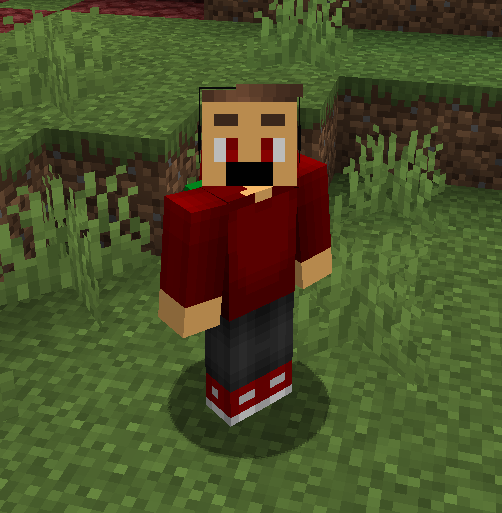
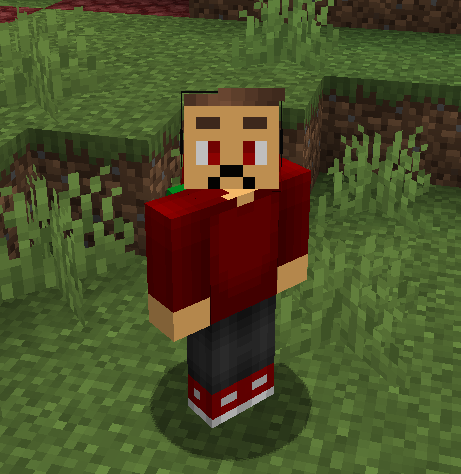
facetrackermod 将本地摄像头表情追踪器连接到 Minecraft,并在玩家脸上显示检测到的情绪。它由 Antara89 为 Fabric 1.21.1 构建,并在 ./client 文件夹中包含一个独立的 Java 桌面客户端。
配套客户端在本地读取你的摄像头画面,估算你当前的面部表情,并通过 localhost 将紧凑的表情数据发送到 Minecraft。Fabric 模组接收这些数据,通过服务器进行同步,并在玩家脸上渲染面部覆盖纹理,以便其他玩家也能看到表情。
功能
- 通过包含的 Java 客户端实时摄像头表情追踪。
- 通过 Fabric 网络实现多人联机表情同步。
- 针对中性、开心、悲伤、惊讶、说话、眨眼、单眼 wink 和专注表情的玩家面部覆盖层。
- 可选的分层面部部件,包括嘴巴、左眼、右眼、左眉毛和右眉毛。
- 从
run/expressions 加载自定义 8x8 PNG 面部纹理。
- 支持
base.png 用于在绘制表情之前替换原始面部背景。
- 纹理同步:每个玩家的本地表情纹理集上传至服务器,并在其他玩家加入时分发给其他客户端。
- 可选的本地 HUD 面部预览,可配置角落位置、偏移量和缩放比例。
- 桌面客户端内置本地录制和截图工具,用于测试和调整。
工作原理
- 在 Minecraft 客户端和服务端安装 Fabric 模组。
- 启动安装了模组的 Minecraft。
- 从仓库根目录运行配套应用:
./gradlew -p client run
在 Windows 上,使用:
.\gradlew.bat -p client run
- 在面部表情客户端中启动摄像头。
- 客户端通过
127.0.0.1:34321 向 Minecraft 客户端发送表情更新。
- 如果服务器已安装该模组,Minecraft 客户端会将表情状态和纹理集发送给服务器。
- 模组服务器会将其分发给其他模组客户端。在普通服务器上,表情面部仍会在本地为你渲染,但其他玩家无法看到。
自定义纹理
表情纹理存储在以下位置:
run/expressions/
支持的文件:
base.png
neutral.png
happy.png
sad.png
surprised.png
talking.png
blinking.png
winking.png
focused.png
每个文件应为 8x8 PNG 格式。表情纹理中的透明像素允许 base.png 图层透出。base.png 中的透明像素允许原始 Minecraft 皮肤的面部透出。
分层面部部件为可选功能。创建以下文件夹以启用它们:
run/expressions/parts/
当存在 parts 文件夹时,模组会创建并同步缺失的默认部件纹理,并在所有选定的部件可用时渲染这些图层,而不是完整表情的 PNG:
parts/mouth/neutral.png
parts/mouth/happy.png
parts/mouth/sad.png
parts/mouth/surprised.png
parts/mouth/talking.png
parts/left_eye/open.png
parts/left_eye/closed.png
parts/left_eye/focused.png
parts/right_eye/open.png
parts/right_eye/closed.png
parts/right_eye/focused.png
parts/left_eyebrow/neutral.png
parts/left_eyebrow/raised.png
parts/left_eyebrow/sad.png
parts/left_eyebrow/focused.png
parts/right_eyebrow/neutral.png
parts/right_eyebrow/raised.png
parts/right_eyebrow/sad.png
parts/right_eyebrow/focused.png
本地桥接
本地 UDP 桥接监听端口:
127.0.0.1:34321
模组仍接受原始的 FaceTrack 数据包格式:
facetrack|1|timestampMillis|expression|confidence|faceCount|smileScore|mouthOpen|mouthWide|sadScore|blinkScore|winkScore
配套客户端现在发送感知部件的数据包:
facetrack_parts|1|timestampMillis|expression|confidence|faceCount|smileScore|mouthOpen|mouthWide|sadScore|blinkScore|winkScore|fps|mouth|leftEye|rightEye|leftEyebrow|rightEyebrow
即使尚未收到第一个表情数据包,也会为本地玩家渲染 base.png 面部图层。同步远程玩家的基础纹理在其纹理集接收完成后渲染。
模组可在普通服务器上仅作为客户端侧使用。在此模式下,/facetrack status 报告 Server sync: local only;本地面部覆盖层和 HUD 预览仍然有效,但远程玩家不会接收到你的表情状态或纹理。
HUD 面部预览
模组还可以将你的本地表情面部渲染为 HUD 预览。默认情况下禁用,启用后默认位于右上角。
/facetrack hud on
/facetrack hud off
/facetrack hud status
/facetrack hud corner top_right
/facetrack hud corner top_left
/facetrack hud corner bottom_right
/facetrack hud corner bottom_left
/facetrack hud offset 8 8
/facetrack hud scale 6
偏移量是从选定角落向内测量的。HUD 设置保存在:
run/config/facetrackermod-client.properties
隐私
摄像头视频由配套的 Java 客户端在本地处理。视频帧不会发送到 Minecraft 服务器。客户端仅向本地 Minecraft 客户端发送紧凑的表情值,而模组通过服务器同步表情状态和小尺寸的 8x8 纹理 PNG。
要求
- Minecraft 1.21.1
- Fabric Loader
- Fabric API
- Java 21
- 用于实时表情追踪的网络摄像头
- 包含的
./client 应用用于摄像头输入
备注
表情检测使用 OpenCV 的 Haar 级联和轻量级启发式算法,因此准确性取决于光照条件、摄像头位置和校准。为了获得最佳效果,请确保脸部清晰可见并在校准时保持中性表情。
facetrackermod
WARNING: THIS IS A DIFFICULT MOD TO HANDLE!
THIS MOD REQUIRES A SPECIAL CLIENT.
Download it at
or
Download it at(legacy)
facetrackermod connects a local webcam expression tracker to Minecraft and displays the detected emotion on the player's face. It is built for Fabric 1.21.1 by Antara89 and includes a standalone Java desktop client in the ./client folder.
The companion client reads your webcam locally, estimates your current facial expression, and sends compact expression data to Minecraft over localhost. The Fabric mod receives that data, syncs it through the server, and renders face overlay textures on players so other players can see the expression too.
Features
- Real-time webcam expression tracking through the included Java client.
- Multiplayer expression sync through Fabric networking.
- Player face overlays for neutral, happy, sad, surprised, talking, blinking, winking, and focused expressions.
- Optional layered face parts for mouth, left eye, right eye, left eyebrow, and right eyebrow.
- Custom 8x8 PNG face textures loaded from
run/expressions.
base.png support for replacing the original face background before the expression is drawn.- Texture sync: each player's local expression texture set is uploaded to the server and distributed to other clients when they join.
- Optional local HUD face preview with configurable corner, offset, and scale.
- Local recording and snapshot tools in the desktop client for testing and tuning.
How It Works
- Install the Fabric mod on the Minecraft client and server.
- Start Minecraft with the mod installed.
- Run the companion app from the repository root:
./gradlew -p client run
On Windows, use:
.\gradlew.bat -p client run
- Start the camera in the Face Expression Client.
- The client sends expression updates to the Minecraft client over
127.0.0.1:34321.
- If the server has the mod installed, the Minecraft client sends the expression state and texture set to the server.
- Modded servers distribute it to other modded clients. On normal servers, the expression face still renders locally for you, but other players cannot see it.
Custom Textures
Expression textures are stored in:
run/expressions/
Supported files:
base.png
neutral.png
happy.png
sad.png
surprised.png
talking.png
blinking.png
winking.png
focused.png
Each file should be an 8x8 PNG. Transparent pixels in expression textures allow the base.png layer to show through. Transparent pixels in base.png allow the original Minecraft skin face to show through.
Layered face parts are opt-in. Create this folder to enable them:
run/expressions/parts/
When the parts folder exists, the mod creates and syncs missing default part textures and renders these layers instead of the full-expression PNG whenever all selected parts are available:
parts/mouth/neutral.png
parts/mouth/happy.png
parts/mouth/sad.png
parts/mouth/surprised.png
parts/mouth/talking.png
parts/left_eye/open.png
parts/left_eye/closed.png
parts/left_eye/focused.png
parts/right_eye/open.png
parts/right_eye/closed.png
parts/right_eye/focused.png
parts/left_eyebrow/neutral.png
parts/left_eyebrow/raised.png
parts/left_eyebrow/sad.png
parts/left_eyebrow/focused.png
parts/right_eyebrow/neutral.png
parts/right_eyebrow/raised.png
parts/right_eyebrow/sad.png
parts/right_eyebrow/focused.png
Local Bridge
The local UDP bridge listens on:
127.0.0.1:34321
The mod still accepts the original FaceTrack packet format:
facetrack|1|timestampMillis|expression|confidence|faceCount|smileScore|mouthOpen|mouthWide|sadScore|blinkScore|winkScore
The companion client now sends part-aware packets:
facetrack_parts|1|timestampMillis|expression|confidence|faceCount|smileScore|mouthOpen|mouthWide|sadScore|blinkScore|winkScore|fps|mouth|leftEye|rightEye|leftEyebrow|rightEyebrow
The base.png face layer is rendered for the local player even before the first expression packet arrives. Synced remote player base textures render after their texture set has been received.
The mod can be used client-side on normal servers. In that mode, /facetrack status reports Server sync: local only; local face overlays and the HUD preview still work, but remote players do not receive your expression state or textures.
HUD Face Preview
The mod can also render your local expression face as a HUD preview. It is disabled by default and defaults to the top-right corner when enabled.
/facetrack hud on
/facetrack hud off
/facetrack hud status
/facetrack hud corner top_right
/facetrack hud corner top_left
/facetrack hud corner bottom_right
/facetrack hud corner bottom_left
/facetrack hud offset 8 8
/facetrack hud scale 6
The offset is measured inward from the selected corner. HUD settings are saved in:
run/config/facetrackermod-client.properties
Privacy
The webcam video is processed locally by the companion Java client. Video frames are not sent to the Minecraft server. The client only sends compact expression values to the local Minecraft client, and the mod syncs expression state and small 8x8 texture PNGs through the server.
Requirements
- Minecraft 1.21.1
- Fabric Loader
- Fabric API
- Java 21
- A webcam for live expression tracking
- The included
./client app for webcam input
Notes
Expression detection uses OpenCV Haar cascades and lightweight heuristics, so accuracy depends on lighting, camera position, and calibration. For best results, start with your face clearly visible and hold a neutral expression during calibration.


 模组

 模组
 模组

 模组

 模组

 模组
评论 0
登录后参与评分
还没有评论,来抢沙发吧