
加入我的 Discord 服务器!
FancyFormatDock
?• 信息
在 Modernbeta 等服务器上游玩时,我遇到了一个相同的问题:不得不频繁查阅聊天格式化代码。这种挫败感催生了这个模组的想法。FancyFormatDock 为你的聊天界面添加了一个简单的停靠栏(Dock)。只需打开聊天,点击颜色按钮,格式化代码就会立即为你插入。
?• 功能
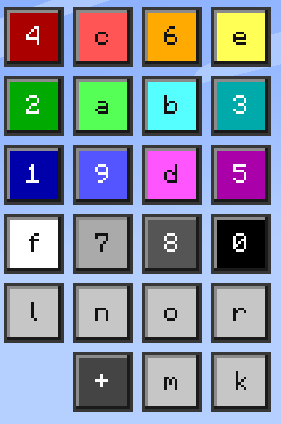
类停靠栏的按钮面板
打开聊天时,右上角会出现一个覆盖层。点击按钮即可将格式化代码导入到聊天中。可以在配置文件中关闭格式标签显示。
4 个预设颜色按钮
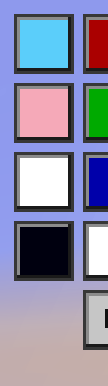
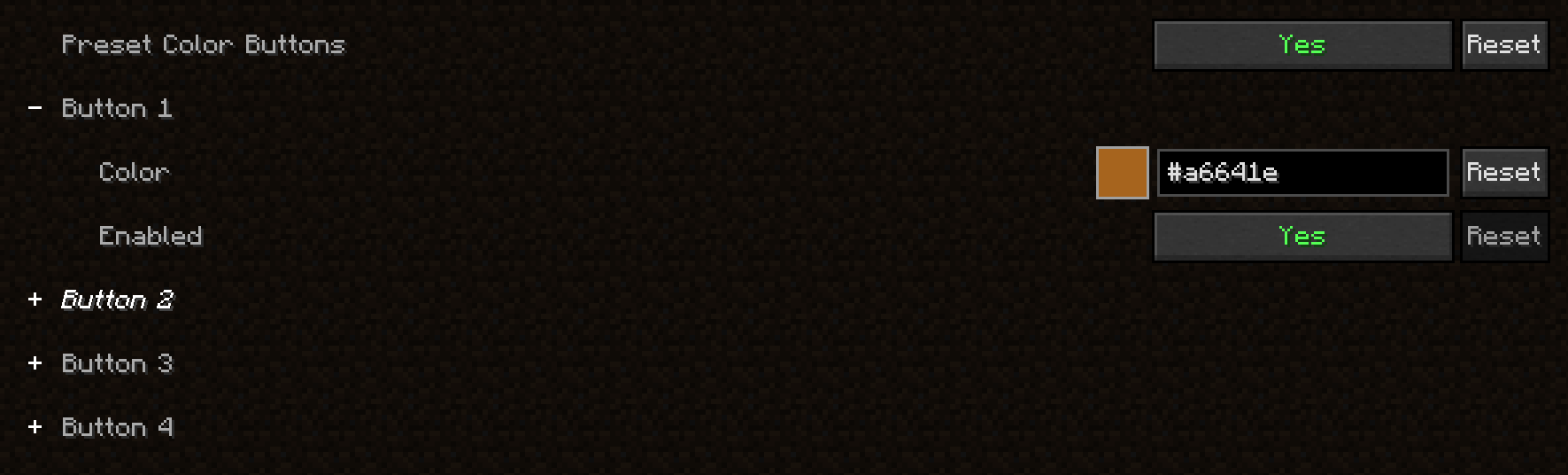
选择 4 种自定义颜色并将其作为按钮添加到按钮面板中。每个按钮都可以启用/禁用。
自定义颜色
点击 + 按钮,会弹出一个菜单。在这里你可以选择一种自定义颜色并将其导入到聊天中!

自定义渐变色
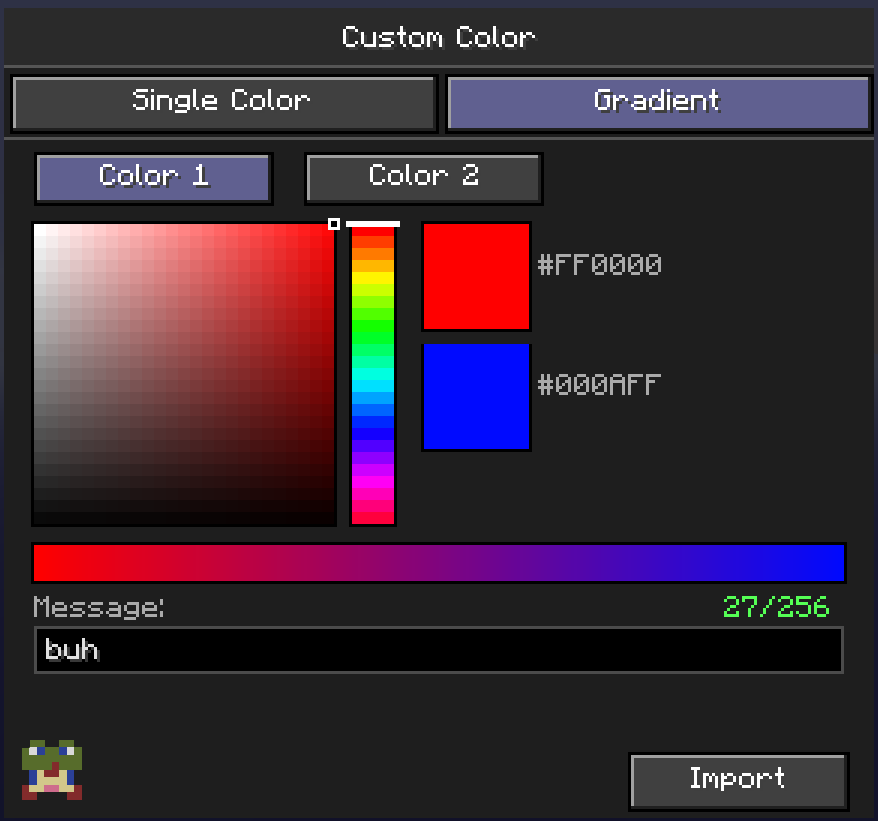
点击 + 按钮,会弹出一个菜单,从那里你可以进入 gradient(渐变)选项卡。你可以在这里选择 2 种自定义颜色,输入你的消息并点击 Import(导入)!这将自动使你的文本具有你选择的两种颜色的渐变效果。
快速显示/隐藏按钮
点击此按钮,类停靠栏的按钮面板将显示或隐藏。

颜色前缀警告前的文本前缀
仅限 1.21.1 版本 当在颜色前缀之前使用文本格式化(粗体、斜体...)时,颜色会覆盖文本格式化。在配置文件中启用警告以获取提示!

配置文件
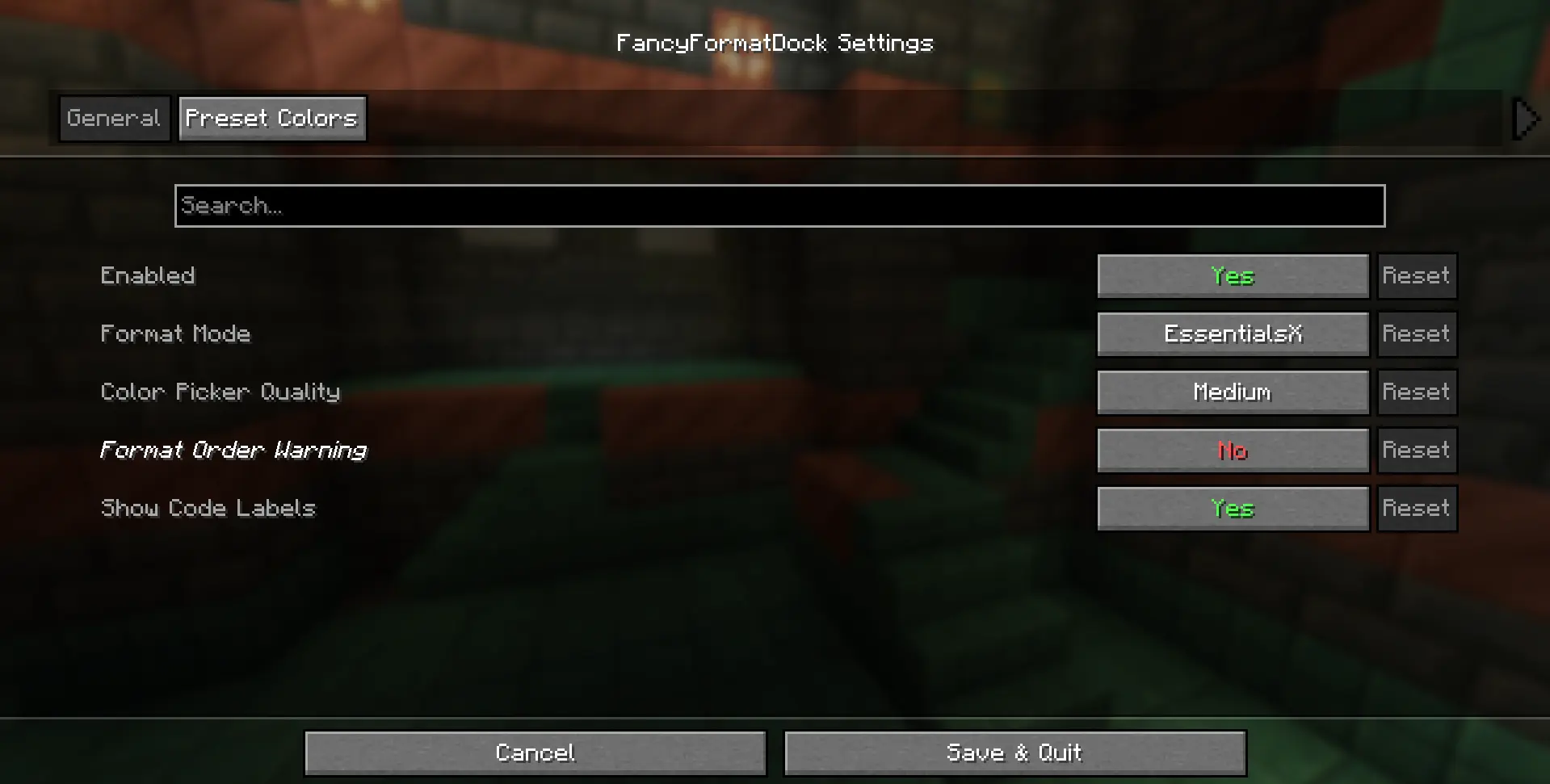
通过使用 Mod Menu,你可以访问配置文件,在这里你可以:
- 启用/禁用按钮覆盖层
- 更改格式化代码,目前支持:
- Vanilla 格式化 (§c)
- EssentialsX 格式化 (&c) - [默认]
- MiniMessage 格式化 (<red>)
- 更改颜色选择器的质量,当前选项有:
- Low(低)
- Medium(中) - [默认]
- High(高)
- 切换按钮上的格式标签(默认开启) 仅限 1.21.1 版本
- 切换警告(默认关闭) 仅限 1.21.1 版本
- 选择 4 个预设自定义颜色
- 切换预设按钮的启用/禁用状态
?• 依赖项
- Fabric API
- Cloth API
- Mod Menu (仅当你想要访问配置文件时需要)
?• 版本支持
✅ 当前支持
fabric 1.21.1
fabric 1.21.2
fabric 1.21.3
fabric 1.21.4
fabric 1.21.5
fabric 1.21.6
fabric 1.21.7
fabric 1.21.8
fabric 1.21.9
fabric 1.21.10
fabric 1.21.11
❎ 当前不支持
fabric 26.1
fabric 26.2
?• 更新与报告错误
想知道模组何时更新或错误何时被修复吗?加入我的 Discord 服务器!
?• 致谢
创意 - debrooo
软件 - IntelliJ IDEA
Join my discord server!
FancyFormatDock
?• Info
While playing on servers like Modernbeta, I kept running into the same problem, constantly needing to look up chat formatting codes. That frustration sparked the idea for this mod. FancyFormatDock adds a simple dock to your chat screen. Just open chat, click a color button, and the formatting code is instantly inserted for you.
?• Features
dock-like button panel
When opening chat, an overlay at the top right appears. Clicking on a button will import the formatting code in chat. Format label can be toggled off in the config.
4 preset color buttons
Choose 4 custom colors and add them as a button to the button panel. Each button can be enabled/disabled.
custom color
By clicking on the + button, a menu pops up. Here you can pick a custom color and import it in chat!
custom gradient color
By clicking on the + button, a menu pops up, from there you can go to the gradient tab. You can pick 2 custom colors here, insert your message and hit Import! This will automaticly make your text have a gradient with the 2 colors you selected
quick show/hide button
By clicking this button, the button-like dock shows/hides.
Text prefix before a color prefix warning
1.21.1 version only When using text formatting (bold, italc...) before a color prefix, the color overrides the text formatting. Enable the warning in the config to get a warning!
config
By using Mod Menu, you can acces the config, here you can:
- enable/disable the button overlay
- change format code, currently supports:
- Vanilla formatting (§c)
- EssentialsX formatting (&c) - [default]
- MiniMessage formatting (<red>)
- change color picker quality, current options:
- Low
- Medium - [default]
- High
- toggle format labels on buttons (on by default) 1.21.1 version only
- toggle waring (off by default) 1.21.1 version only
- choose 4 preset custom colors
- toggle preset button on/off
?• Dependencies
- Fabric API
- Cloth API
- Mod Menu (only needed if you want to acces the config)
?• Version support
✅ Currently supported
fabric 1.21.1
fabric 1.21.2
fabric 1.21.3
fabric 1.21.4
fabric 1.21.5
fabric 1.21.6
fabric 1.21.7
fabric 1.21.8
fabric 1.21.9
fabric 1.21.10
fabric 1.21.11
❎ Currently not supported
fabric 26.1
fabric 26.2
?• Updates & Report bugs
Want to know exactly when the mod updates or when bugs get patched? Join my discord server!
?• Credits
Idea - debrooo
Code - debrooo with help from Claude
Software - IntelliJ IDEA

下载 FancyFormatDock
下载 FancyFormatDock
下载 FancyFormatDock
下载 FancyFormatDock
下载 FancyFormatDock
下载 FancyFormatDock
下载 FancyFormatDock
下载 FancyFormatDock
下载 FancyFormatDock
下载 FancyFormatDock
- 修复了纹理错误
- 修复了法线格式标签未显示的问题
关于这个资源的讨论、问题反馈与使用心得
还没有讨论,来发第一帖吧
你是这个资源的作者?登录后可认领此资源。
相似资源
 模组

一个用于收集生物掉落物的多区块模组。
 模组

显示你正在注视的方块的信息。(适用于 Minecraft 1.16+ 的 Hwyla/Waila 分支)
 模组

查看物品与配方
 模组
在游戏画面角落显示附近世界地形、玩家、生物和实体的地图。可创建路径点,帮助你找到标记过的位置。
 模组
使用 JavaScript 编辑配方、添加自定义物品、编写世界事件!
 模组
添加区块认领和玩家组队功能,并与 Xaero's Minimap 和 World Map 集成
评论 0
登录后参与评分
还没有评论,来抢沙发吧