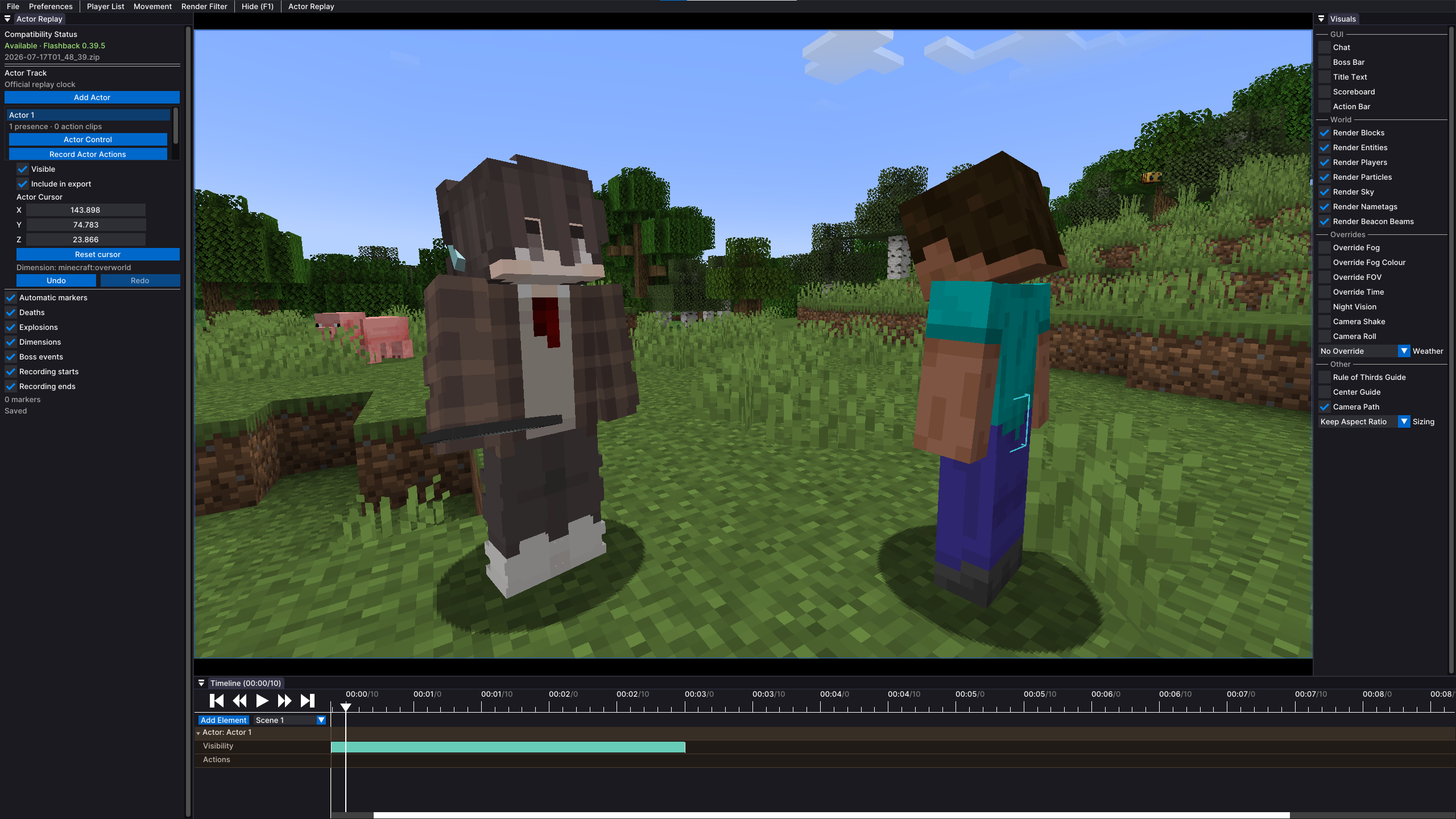
 Flashback Actor Replay 是 Flashback 的一个第三方附加组件,它为回放世界添加了可控制的演员(角色)。
分别录制每个角色的表演,然后在同一个回放中一起播放所有演员的表演。它专为 Minecraft 视频创作者、动画师、电影制作人以及制作多角色场景的单人创作者设计。
添加演员,像控制玩家一样控制它们,记录它们的动作,并在 Flashback 时间轴上编辑结果。
功能
- 向回放世界添加多个演员
- 以第一人称或第三人称控制演员
- 记录移动和视角旋转
- 记录跳跃、疾跑、潜行、攻击和使用物品
- 为每个演员提供独立的背包和快捷栏
- 装备盔甲、副手物品、武器、工具和模组物品
- 为每个演员创建单独的时间轴轨道
- 将录制内容作为动作片段进行编辑
- 拆分和删除演员片段
- 控制演员的可见性
- 将演员数据与 Flashback 回放分开保存
- 重新打开项目并继续编辑
使用方法
- 使用 Flashback 录制一段回放。
- 打开已完成的回放。
- 打开 Actor Replay 面板。
- 选择 Add Actor(添加演员)。
- 设置演员的位置和旋转角度。
- 配置演员的背包和装备。
- 将 Flashback 播放头移动到录制开始时间。
- 进入演员控制模式。
- 开始录制演员。
- 等待五秒倒计时结束。
- 执行场景动作。
- 按
B 键完成并保存。
- 播放回放以预览结果。
- 对额外的演员重复上述过程。
每个演员都是独立录制的,允许一个人在场景中扮演所有角色。
演员设置
每个演员拥有独立的数据:
- 名称
- 位置
- 旋转角度
- 背包
- 快捷栏
- 选中物品
- 盔甲
- 副手物品
- 可见性
- 时间轴轨道
- 动作片段
位置控制包括:
- X
- Y
- Z
- 偏航角 (Yaw)
- 俯仰角 (Pitch)
在录制之前,请确保演员:
- 站在有效的表面上
- 没有卡在方块内部
- 面向正确的方向
- 选中了正确的物品
- 拥有所需的装备
- 在正确的回放时间点开始
演员设置时可以使用创造模式的物品选择,但演员控制仍然使用正常的重力和碰撞机制。
控制键
| 按键 |
操作 |
W, A, S, D |
移动 |
| 鼠标 |
环顾四周 |
Space (空格) |
跳跃 |
| 疾跑键 |
疾跑 |
| 潜行键 |
潜行 |
| 左键点击 |
攻击 |
| 右键点击 |
使用物品 |
| 鼠标滚轮 |
切换快捷栏槽位 |
| 数字键 |
选择快捷栏槽位 |
F5 |
更改相机视角 |
F6 |
开始录制 |
B |
完成并保存 |
按键绑定可以在 Minecraft 的控制设置中更改。
当其他模组也使用 F6、B 或其他演员控制键时,请检查按键冲突。
录制
当录制开始时:
- 回放会返回到选定的开始时间。
- 演员会回到其初始状态。
- 开始五秒倒计时。
- 演员控制变为激活状态。
- 记录移动和支持的动作。
在执行场景动作之前,请等待倒计时结束。
录制的动作可能包括:
- 站立
- 行走
- 奔跑
- 跳跃
- 潜行
- 环顾四周
- 转头
- 切换物品
- 攻击
- 挥动手臂
- 使用物品
表演完成后按 B 键。
录制内容将作为动作片段保存到所选演员的时间轴轨道上。
时间轴
每个演员都有独立的时间轴轨道。
时间轴内容可能包括:
可用的编辑操作可能包括:
常用快捷键:
| 快捷键 |
操作 |
Ctrl + B |
拆分片段 |
Delete |
删除片段 |
演员时间轴的编辑不会直接修改 Flashback 回放存档文件。
项目
演员数据存储在单独的 .farp 项目文件中。
一个项目可能包含:
- 演员定义
- 位置和旋转角度
- 背包和装备
- 可见性数据
- 时间轴轨道
- 录制的动作片段
当相关的 Flashback 回放再次打开时,附加组件会尝试自动加载其 .farp 项目文件。
在移动或备份项目时,请将回放文件及其相关的 .farp 文件放在一起。
兼容性
当前版本针对以下环境:
| 要求 |
版本 |
| Minecraft |
1.21.1 |
| 加载器 |
Fabric |
| Java |
21 |
| Flashback |
0.39.5 |
| 依赖项 |
Fabric API |
此表格仅描述当前发布版本。
未来版本可能会支持其他 Minecraft 版本、加载器和 Flashback 版本。下载前请务必查看版本页面上的兼容性信息。
必须单独安装 Flashback。
安装
- 安装支持的 Minecraft 版本。
- 安装 Fabric Loader。
- 安装 Fabric API。
- 安装所需版本的 Flashback。
- 将 Flashback Actor Replay 放入同一个
mods 文件夹中。
- 确保只安装了一个附加组件版本。
- 启动 Minecraft 并打开 Flashback 回放。
状态
Alpha 软件: 功能、控制、兼容性和项目数据可能会发生变化。
在更新之前,请备份重要的回放文件和 .farp 文件。
无法保证与以下任何组合的兼容性:
- 渲染模组
- 光影模组
- 动画模组
- 玩家模型模组
- 相机模组
- 背包模组
- 性能优化模组
- 大型整合包
未列出的模组应被视为 未经测试。
问题报告
在报告问题时,请包含以下内容:
- Minecraft 版本
- 加载器版本
- Fabric API 版本
- Flashback 版本
- 插件版本
- 完整模组列表
- 复现步骤
latest.log- 崩溃报告
- 在精简实例中是否也会发生
提供日志和清晰的复现步骤将使问题排查变得容易得多。
项目
Flashback Actor Replay 是 Flashback 的一个独立开发的第三方插件。
它与 Flashback 开发者无关,不由其维护,也未得到其认可。
Flashback 是一个独立的项目,不包含在此下载中。
许可证
Flashback Actor Replay 根据保留所有权利的许可证分发。
请参阅随附的许可证文件以获取完整条款。
Flashback Actor Replay is a third-party addon for Flashback that adds controllable actors to replay worlds.
Record each character separately, then play all actor performances together in the same replay. It is designed for Minecraft video creators, animators, machinima creators, and solo creators making multi-character scenes.
Add actors, control them like players, record their actions, and edit the results on the Flashback timeline.
Features
- Add multiple actors to a replay world
- Control actors in first-person or third-person
- Record movement and view rotation
- Record jumping, sprinting, sneaking, attacks, and item use
- Give each actor an independent inventory and hotbar
- Equip armor, offhand items, weapons, tools, and modded items
- Create separate timeline tracks for every actor
- Edit recordings as action clips
- Split and delete actor clips
- Control actor visibility
- Save actor data separately from the Flashback replay
- Reopen projects and continue editing
Usage
- Record a replay with Flashback.
- Open the completed replay.
- Open the Actor Replay panel.
- Select Add Actor.
- Set the actor's position and rotation.
- Configure the actor's inventory and equipment.
- Move the Flashback playhead to the recording start time.
- Enter actor control mode.
- Start actor recording.
- Wait for the five-second countdown.
- Perform the scene.
- Press
B to finish and save.
- Play the replay to preview the result.
- Repeat the process for additional actors.
Each actor is recorded independently, allowing one person to perform every character in a scene.
Actor Setup
Each actor has independent data:
- Name
- Position
- Rotation
- Inventory
- Hotbar
- Selected item
- Armor
- Offhand item
- Visibility
- Timeline track
- Action clips
Position controls include:
Before recording, make sure the actor:
- Is standing on a valid surface
- Is not inside a block
- Faces the correct direction
- Has the correct item selected
- Has the required equipment
- Starts at the correct replay time
Creative item selection is available for actor setup, but actor control still uses normal gravity and collision.
Controls
| Key |
Action |
W, A, S, D |
Move |
| Mouse |
Look around |
Space |
Jump |
| Sprint key |
Sprint |
| Sneak key |
Sneak |
| Left click |
Attack |
| Right click |
Use item |
| Mouse wheel |
Change hotbar slot |
| Number keys |
Select hotbar slot |
F5 |
Change camera view |
F6 |
Start recording |
B |
Finish and save |
Key bindings can be changed in Minecraft's control settings.
Check for key conflicts when other mods also use F6, B, or another actor control key.
Recording
When recording starts:
- The replay returns to the selected start time.
- The actor returns to its starting state.
- A five-second countdown begins.
- Actor controls become active.
- Movement and supported actions are recorded.
Wait until the countdown ends before performing the scene.
Recorded actions may include:
- Standing
- Walking
- Running
- Jumping
- Sneaking
- Looking around
- Turning the head
- Switching items
- Attacking
- Swinging the hand
- Using items
Press B when the performance is complete.
The recording will be saved as an action clip on the selected actor's timeline track.
Timeline
Each actor has an independent timeline track.
Timeline content may include:
- Actor track
- Visibility track
- Action track
- Recorded clips
Available editing actions may include:
Common shortcuts:
| Shortcut |
Action |
Ctrl + B |
Split a clip |
Delete |
Delete a clip |
Actor timeline edits do not directly modify the Flashback replay archive.
Projects
Actor data is stored in a separate .farp project file.
A project may contain:
- Actor definitions
- Positions and rotations
- Inventories and equipment
- Visibility data
- Timeline tracks
- Recorded action clips
When the related Flashback replay is opened again, the addon attempts to load its .farp project automatically.
Keep the replay file and its related .farp file together when moving or backing up a project.
Compatibility
The current release targets:
| Requirement |
Version |
| Minecraft |
1.21.1 |
| Loader |
Fabric |
| Java |
21 |
| Flashback |
0.39.5 |
| Dependency |
Fabric API |
This table only describes the current release.
Future releases may support other Minecraft versions, loaders, and Flashback versions. Always check the compatibility information on the version page before downloading.
Flashback is required and must be installed separately.
Install
- Install the supported Minecraft version.
- Install Fabric Loader.
- Install Fabric API.
- Install the required Flashback version.
- Place Flashback Actor Replay in the same
mods folder.
- Make sure only one addon version is installed.
- Start Minecraft and open a Flashback replay.
Status
Alpha software: Features, controls, compatibility, and project data may change.
Back up important replay and .farp files before updating.
Compatibility is not guaranteed with every combination of:
- Rendering mods
- Shader mods
- Animation mods
- Player model mods
- Camera mods
- Inventory mods
- Performance mods
- Large modpacks
Unlisted mods should be considered untested.
Reports
Include the following when reporting an issue:
- Minecraft version
- Loader version
- Fabric API version
- Flashback version
- Addon version
- Complete mod list
- Reproduction steps
latest.log- Crash report
- Whether it also happens in a minimal instance
Logs and clear reproduction steps make problems much easier to investigate.
Project
Flashback Actor Replay is an independently developed third-party addon for Flashback.
It is not affiliated with, maintained by, or endorsed by the Flashback developers.
Flashback is a separate project and is not included in this download.
License
Flashback Actor Replay is distributed under an All Rights Reserved license.
See the included license file for the complete terms.


 模组

 模组
 模组

 模组
 模组
 模组
评论 0
登录后参与评分
还没有评论,来抢沙发吧