
浮动伤害指示器
在你击中的每个目标上方显示浮动伤害数字,同时也显示你自身受到的伤害。完全可配置。
注意: 在多人服务器中,FDI 必须在服务器端和客户端都安装才能正常工作。
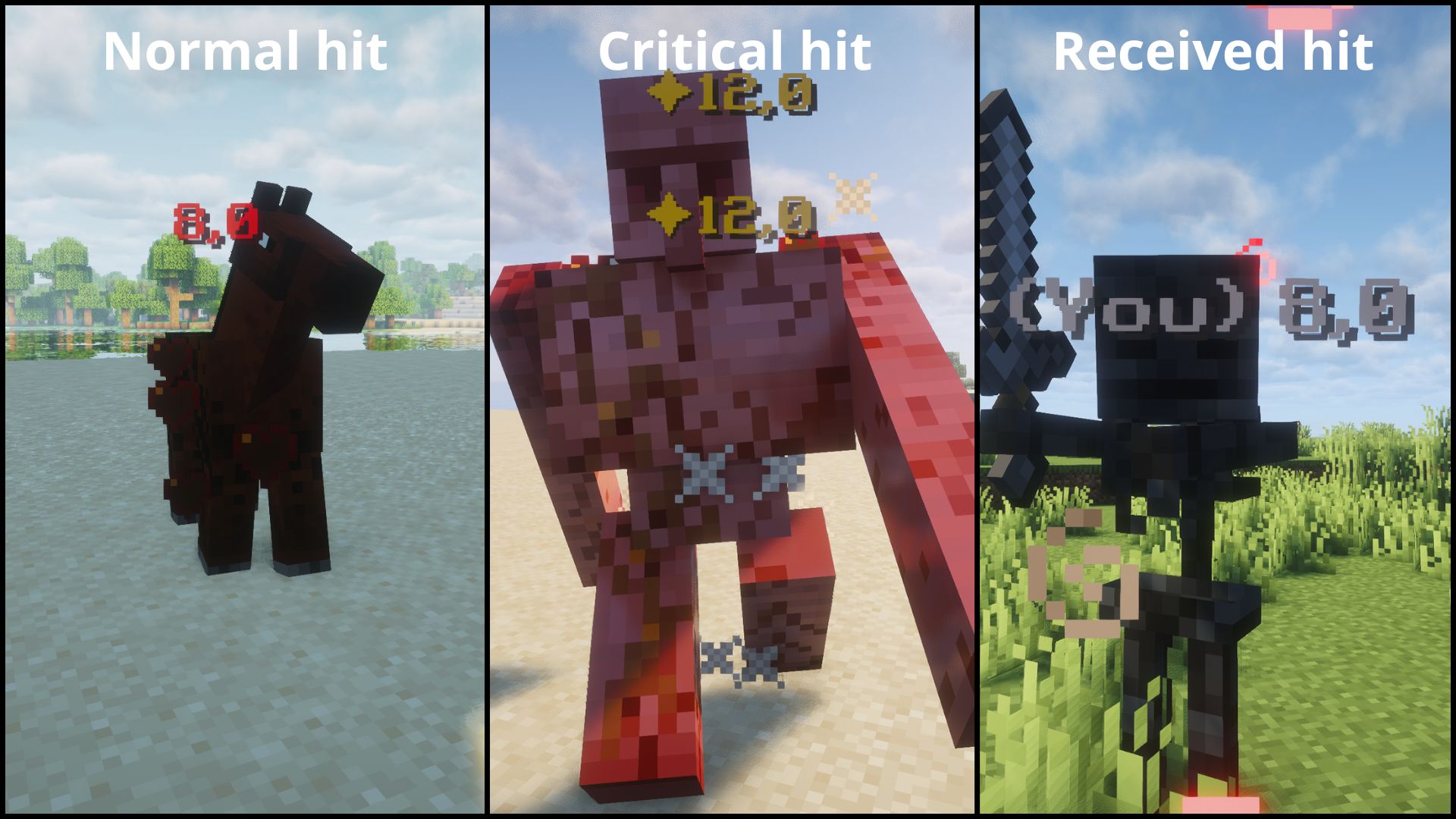
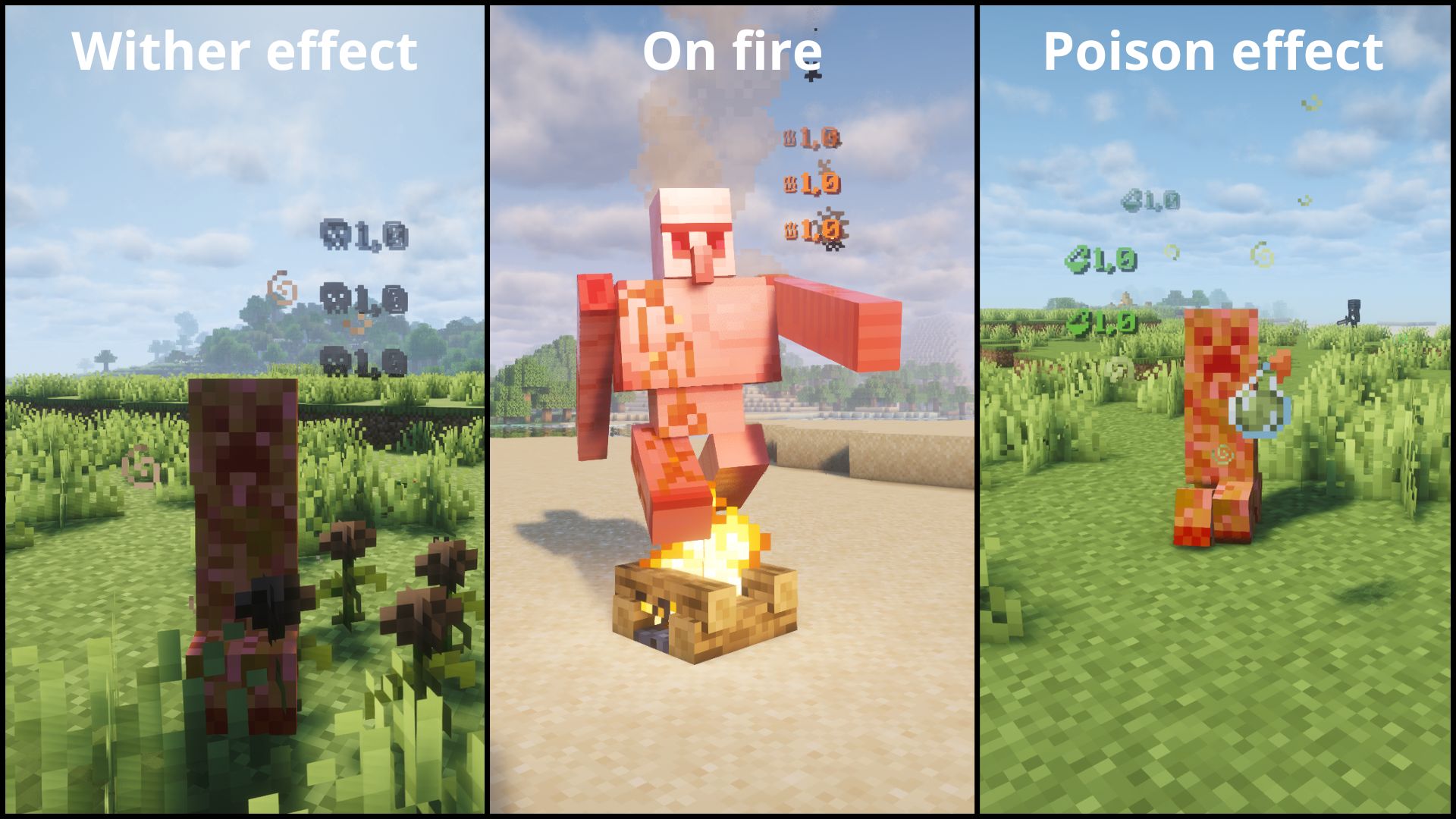
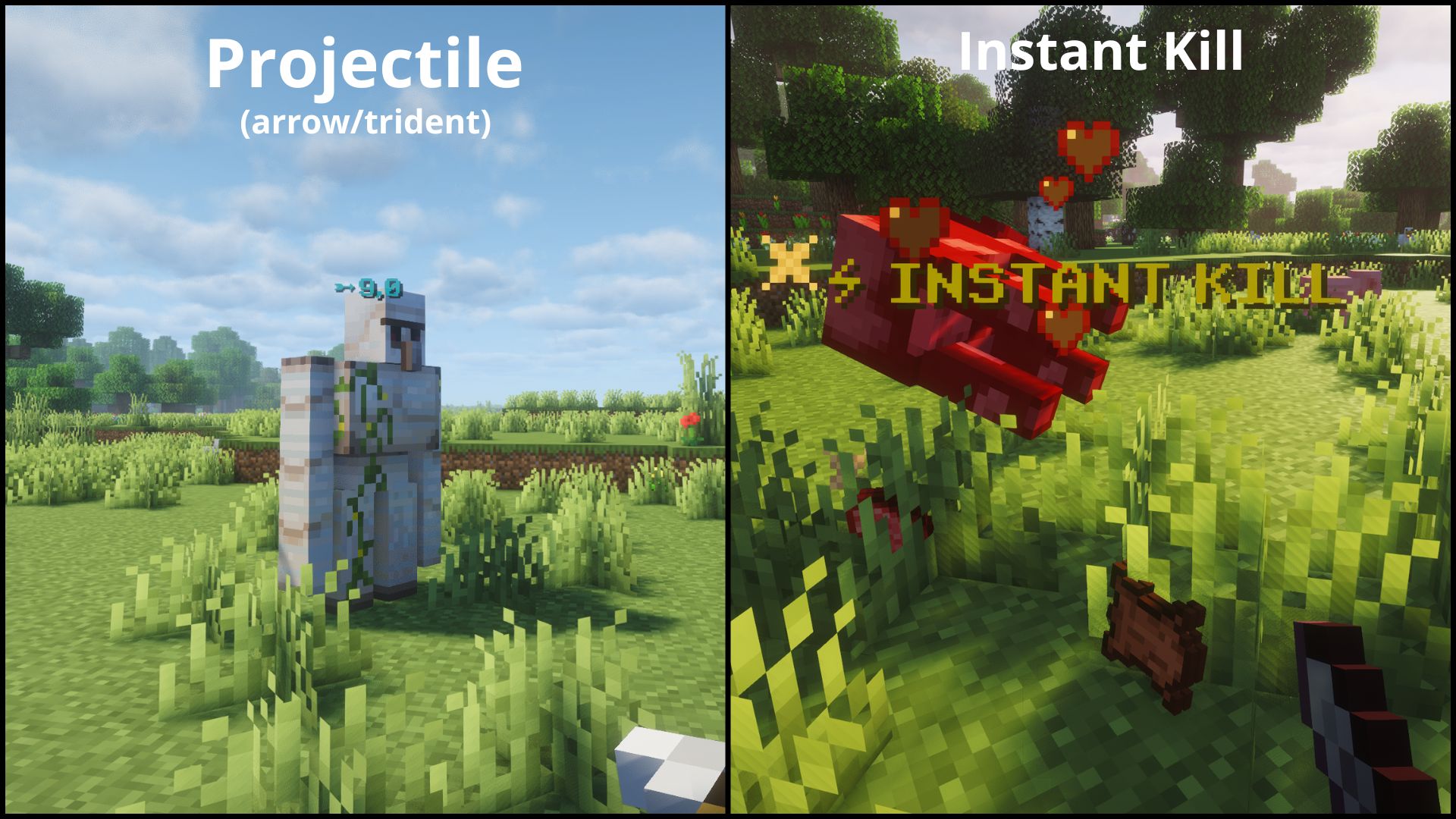
⚡ 功能特性
- 在你击中的任何实体上方显示浮动伤害数字。
- 同时查看你自身受到的伤害。
- 按伤害类型进行颜色编码。
- 完全可配置。
- 支持单人游戏和专用多人服务器。
| 类型 | 图标 | 颜色 | 示例 |
|---|---|---|---|
| NORMAL | — | 红色 | 普通命中 |
| CRITICAL | ✦ | 金色 | 跳跃暴击 |
| PROJECTILE | ➵ | 青色 | 箭矢、三叉戟 |
| FIRE | ♨ | 橙色 | 火焰附加 |
| POISON | ⚗ | 绿色 | 中毒 |
| WITHER | ☠ | 深灰色 | 凋零效果 |
| RECEIVING | — | 浅灰色 | 你受到的伤害 |
| INSTANT_KILL | ⚡ INSTANT KILL | 金色 | 一击击杀敌人 |
⚙️ 配置
配置 Floating Damage Indicators 最简单的方法是在游戏中操作:打开 Mod Menu(Fabric)或模组列表中的 Config 按钮(NeoForge)。
注意: 界面包含两个选项卡:General 用于主要的两个开关,Formats 用于设置颜色、前缀以及按类型的选项。客户端的更改无需重启游戏即可生效。
首次启动游戏后,将生成一个配置文件:
config/floatingdamageindicators.json
可用选项:
重要:
showDamage是总开关。如果设置为false,则不会显示任何数字,包括你自身受到的伤害。showReceivedDamage仅在showDamage为true时生效。
注意:
formats部分仅限客户端,除了INSTANT_KILL的enabled字段,服务器端也会读取该字段。服务器仅读取showDamage、showReceivedDamage以及INSTANT_KILL的enabled。在专用服务器上,服务器端的值仍需重启服务器才能生效。提示: 某些 Unicode 字符或表情符号可能因你的 Minecraft 字体而无法正确显示。如果字符显示为空白方块,请尝试使用其他字符。建议使用基本 Unicode 符号以获得最佳效果。
提示: 颜色使用
#RRGGBB格式。无效值如"ZZZ123"或"FF"将静默回退到该伤害类型的默认值。
{
  "showDamage": true,
  "showReceivedDamage": true,
  "formats": {
    "NORMAL":       { "enabled": true, "prefix": "", "color": "#FF3333", "showDamage": true },
    "CRITICAL":     { "enabled": true, "prefix": "\u2726", "color": "#FFD700", "showDamage": true },
    "PROJECTILE":   { "enabled": true, "prefix": "\u27B5", "color": "#00FFFF", "showDamage": true },
    "FIRE":         { "enabled": true, "prefix": "\u2668", "color": "#FF6600", "showDamage": true },
    "POISON":       { "enabled": true, "prefix": "\u2697", "color": "#4A9E2F", "showDamage": true },
    "WITHER":       { "enabled": true, "prefix": "\u2620", "color": "#3C3C3C", "showDamage": true },
    "RECEIVING":    { "enabled": true, "prefix": "(You) ", "color": "#AAAAAA", "showDamage": true },
    "INSTANT_KILL": { "enabled": true, "prefix": "\u26A1 INSTANT KILL", "color": "#FFD700", "showDamage": false }
  }
}
每个格式条目的说明:
- enabled: 完全显示/隐藏此伤害类型
- prefix: 显示在数字之前(或替代数字)的自定义文本
- color: 6位十六进制颜色代码(RGB)
- showDamage: 如果为 false,则仅显示前缀(不显示伤害数字)
📦 依赖要求
Fabric
- Fabric API
- Mod Menu(可选)
- (+26.X) Java 25 或更高版本
NeoForge
- (+26.X) Java 25 或更高版本
💬 建议与问题
如果你有想法、建议或发现了 bug,欢迎在 CurseForge 页面留下评论,或在 GitHub 仓库提交 Issue。
❓ 常见问题
我可以在公共整合包中使用此模组吗?
当然可以!你可以自由地将其包含在任何公开或私有的整合包中,无需额外许可。
📜 许可证
本项目采用 MIT License 授权。
Floating Damage Indicators
Floating damage numbers above every target you hit, and your own incoming damage too. Fully configurable.
Note: FDI must be installed on both the server and client for multiplayer servers.
⚡ Features
- Floating damage numbers above any entity you hit.
- See your own incoming damage too.
- Color-coded by damage type.
- Fully Configurable.
- Works in both singleplayer and dedicated multiplayer.
| Type | Icon | Color | Example |
|---|---|---|---|
| NORMAL | — | Red | Normal hit |
| CRITICAL | ✦ | Gold | Jump crit |
| PROJECTILE | ➵ | Cyan | Arrow, trident |
| FIRE | ♨ | Orange | Fire Aspect |
| POISON | ⚗ | Green | Poison |
| WITHER | ☠ | Dark gray | Wither effect |
| RECEIVING | — | Light gray | Damage you take |
| INSTANT_KILL | ⚡ INSTANT KILL | Gold | Kill an enemy in one hit |
⚙️ Configuration
The easiest way to configure Floating Damage Indicators is in-game: open Mod Menu (Fabric) or the Config button in the mods list (NeoForge).
Note: The screen has two tabs: General for the two main toggles and Formats for the color, prefix and per-type options. Client-side changes are applied without restarting the game.
After launching the game once, a configuration file will be generated:
config/floatingdamageindicators.json
Available options:
Important:
showDamageis the master switch. If it is set tofalse, no numbers are shown at all, including your own incoming damage.showReceivedDamageonly takes effect whileshowDamageistrue.
Note: The
formatssection is client-side only, exceptINSTANT_KILL'senabled, which the server also reads. The server only readsshowDamage,showReceivedDamage, andINSTANT_KILL'senabled. On a dedicated server, the server-side values still require a server restart.Tip: Some Unicode characters or emojis may not display correctly depending on your Minecraft font. If a character shows as a blank square, try a different one. Stick to basic Unicode symbols for best results.
Tip: Colors use
#RRGGBB. Invalid values like"ZZZ123"or"FF"will silently fall back to the default for that damage type.
{
  "showDamage": true,
  "showReceivedDamage": true,
  "formats": {
    "NORMAL":       { "enabled": true, "prefix": "", "color": "#FF3333", "showDamage": true },
    "CRITICAL":     { "enabled": true, "prefix": "\u2726", "color": "#FFD700", "showDamage": true },
    "PROJECTILE":   { "enabled": true, "prefix": "\u27B5", "color": "#00FFFF", "showDamage": true },
    "FIRE":         { "enabled": true, "prefix": "\u2668", "color": "#FF6600", "showDamage": true },
    "POISON":       { "enabled": true, "prefix": "\u2697", "color": "#4A9E2F", "showDamage": true },
    "WITHER":       { "enabled": true, "prefix": "\u2620", "color": "#3C3C3C", "showDamage": true },
    "RECEIVING":    { "enabled": true, "prefix": "(You) ", "color": "#AAAAAA", "showDamage": true },
    "INSTANT_KILL": { "enabled": true, "prefix": "\u26A1 INSTANT KILL", "color": "#FFD700", "showDamage": false }
  }
}
Each format entry:
- enabled: show/hide this damage type entirely
- prefix: custom text shown before (or instead of) the number
- color: 6-digit hex color (RGB)
- showDamage: if false, only the prefix is shown (no damage number)
📦 Requirements
Fabric
- Fabric API
- Mod Menu (optional)
- (+26.X) Java 25 or newer
NeoForge
- (+26.X) Java 25 or newer
💬 Suggestions & Issues
If you have an idea, a suggestion, or found a bug, feel free to leave a comment on the CurseForge page or open an issue on the GitHub repository.
❓ FAQ
Can I use this mod in a public modpack?
Yes! You're free to include it in any public or private modpack, no permission needed.
📜 License
This project is licensed under the MIT License.

下载 Floating Damage Indicators
需要联机服务器吗?
稳定流畅、一键部署,几分钟即可和朋友联机开服
最低仅需 8 元/月 即可畅快联机
下载 Floating Damage Indicators
需要联机服务器吗?
稳定流畅、一键部署,几分钟即可和朋友联机开服
最低仅需 8 元/月 即可畅快联机
下载 Floating Damage Indicators
需要联机服务器吗?
稳定流畅、一键部署,几分钟即可和朋友联机开服
最低仅需 8 元/月 即可畅快联机
下载 Floating Damage Indicators
需要联机服务器吗?
稳定流畅、一键部署,几分钟即可和朋友联机开服
最低仅需 8 元/月 即可畅快联机
下载 Floating Damage Indicators
需要联机服务器吗?
稳定流畅、一键部署,几分钟即可和朋友联机开服
最低仅需 8 元/月 即可畅快联机
下载 Floating Damage Indicators
需要联机服务器吗?
稳定流畅、一键部署,几分钟即可和朋友联机开服
最低仅需 8 元/月 即可畅快联机
下载 Floating Damage Indicators
需要联机服务器吗?
稳定流畅、一键部署,几分钟即可和朋友联机开服
最低仅需 8 元/月 即可畅快联机
下载 Floating Damage Indicators
需要联机服务器吗?
稳定流畅、一键部署,几分钟即可和朋友联机开服
最低仅需 8 元/月 即可畅快联机
下载 Floating Damage Indicators
需要联机服务器吗?
稳定流畅、一键部署,几分钟即可和朋友联机开服
最低仅需 8 元/月 即可畅快联机
下载 Floating Damage Indicators
需要联机服务器吗?
稳定流畅、一键部署,几分钟即可和朋友联机开服
最低仅需 8 元/月 即可畅快联机
暂无更新日志
关于这个资源的讨论、问题反馈与使用心得
还没有讨论,来发第一帖吧
你是这个资源的作者?登录后可认领此资源。
相似资源
 模组

显示你正在注视的方块的信息。(适用于 Minecraft 1.16+ 的 Hwyla/Waila 分支)
 模组
使用 JavaScript 编辑配方、添加自定义物品、编写世界事件!
 模组

查看物品与配方
 模组
在游戏画面角落显示附近世界地形、玩家、生物和实体的地图。可创建路径点,帮助你找到标记过的位置。
 模组
AE2:一款流行的自动化与存储模组
 模组
那是什么?一个 Waila/Hwyla 的分支。
评论 0
登录后参与评分
还没有评论,来抢沙发吧