
Flow Sort
Flow Sort 自动整理你的物品栏,无需额外点击。
游玩时即可整理物品:新堆叠的物品会自动归位,分裂的堆叠会合并在一起,主物品栏保持整洁,而快捷栏不受影响。
自动或手动
更喜欢完全掌控?随时可以关闭自动排序。你仍然可以通过按钮、鼠标中键或按键绑定来手动排序。
功能
- 自动物品栏排序
- 为原版箱子和许多类似箱子的模组存储界面提供手动排序按钮
- 即时堆叠合并
- 可排序已打开的箱子和存储界面
- 支持对鼠标悬停的物品栏区域进行中键排序
- 保护快捷栏安全
- 配置简单
- 与流行的存储模组兼容良好
开箱即享
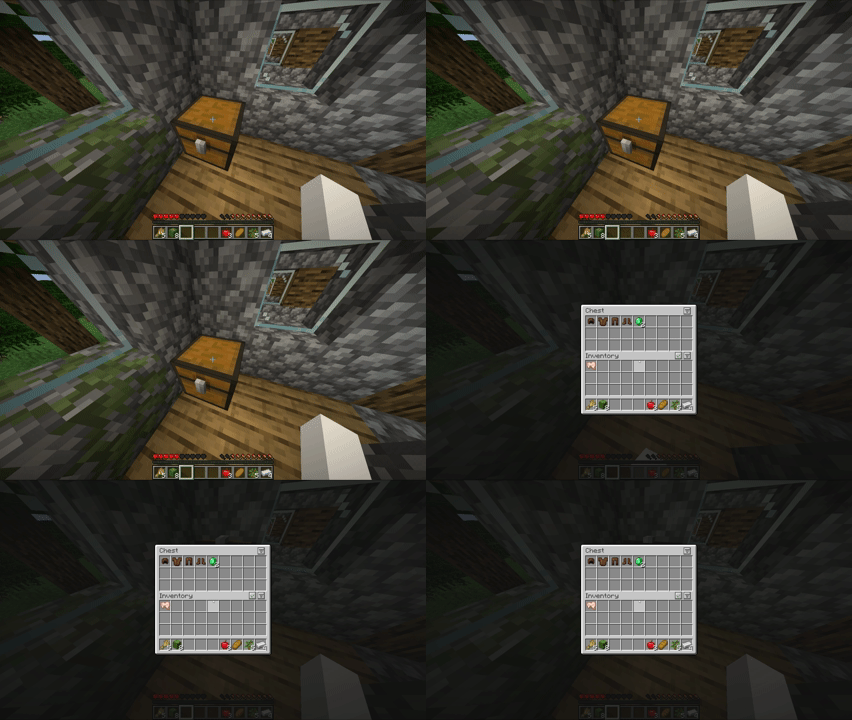
打开一个箱子,Flow Sort 会立即将其整理干净。
整理前 / 整理后
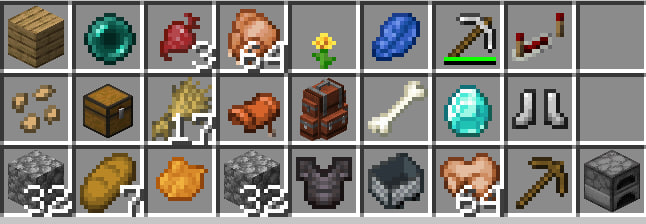
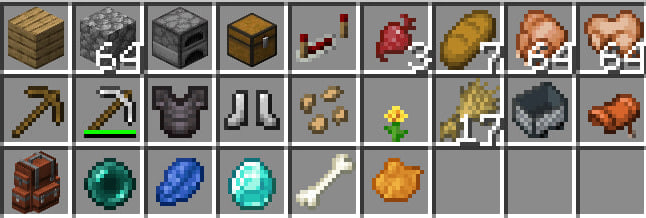
控制方式
- 鼠标中键:排序鼠标光标下方的物品栏区域
- K:排序你的物品栏
- 按钮:手动排序或切换自动排序
按键绑定可以在 Minecraft 的控制菜单中进行更改。
按钮

勾选按钮用于切换自动排序。列表按钮用于即时手动排序当前物品栏区域。
配置
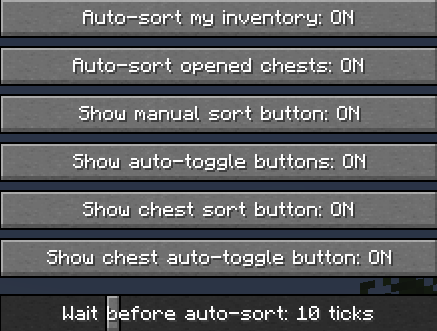
Flow Sort 可以从游戏内的配置屏幕进行调整。在 Fabric 上,此屏幕可通过 Mod Menu 访问。
- 自动整理我的物品栏:自动保持主物品栏整齐。
- 自动整理已打开的箱子:当你打开或更新受支持的存储界面时进行排序。
- 显示手动排序按钮:显示列表按钮以进行即时手动排序。
- 显示自动切换按钮:显示勾选按钮以便快速开启或关闭自动排序。
- 显示箱子排序按钮:为已打开的存储界面显示手动排序按钮。
- 显示箱子自动切换按钮:为已打开的存储界面显示自动排序切换按钮。
- 自动排序延迟:控制 Flow Sort 在检测到变化后等待多久才开始排序。
兼容性
Flow Sort 在客户端运行,支持原版箱子、潜影盒以及许多类似箱子的模组存储界面。
如果其他模组已经提供了自己的排序按钮,Flow Sort 会尽量避免添加重复按钮,同时保留快捷键和自动排序功能。
依赖项
- Fabric: Fabric API
- 可选 (Fabric): Mod Menu 用于在 Fabric 上进行游戏内配置。
Flow Sort
Flow Sort keeps your inventory organized automatically, without extra clicks.
Items are sorted as you play: new stacks settle into place, split stacks merge together, and your main inventory stays clean while your hotbar is left untouched.
Automatic or manual
Prefer full control? Auto-sorting can be turned off at any time. You can still sort manually with buttons, middle-click, or a keybind.
Features
- Automatic inventory sorting
- Manual sort buttons for vanilla chests and many chest-like modded storage screens
- Instant stack merging
- Sort opened chests and storage screens
- Middle-click sorting for the hovered inventory area
- Hotbar-safe sorting
- Simple configuration
- Clean compatibility with popular storage mods
Sort as you loot
Open a chest and Flow Sort cleans it up instantly.
Before / After
Controls
- Middle mouse button: sort the inventory area under your cursor
- K: sort your inventory
- Buttons: sort manually or toggle auto-sorting
Keybinds can be changed in Minecraft's controls menu.
Buttons
The check button toggles automatic sorting. The list button sorts the current inventory area instantly.
Configuration
Flow Sort can be adjusted from the in-game config screen. On Fabric, this screen is available through Mod Menu.
- Auto-sort my inventory: automatically keeps your main inventory sorted.
- Auto-sort opened chests: sorts supported storage screens when you open or update them.
- Show manual sort button: shows the list button for instant manual sorting.
- Show auto-toggle buttons: shows the check button for quickly turning auto-sort on or off.
- Show chest sort button: shows a manual sort button for opened storage screens.
- Show chest auto-toggle button: shows an auto-sort toggle for opened storage screens.
- Wait before auto-sort: controls how long Flow Sort waits before sorting after changes.
Compatibility
Flow Sort works client-side and supports vanilla chests, shulker boxes, and many chest-like modded storage screens.
If another mod already provides its own sorting buttons, Flow Sort avoids adding duplicate buttons where possible while keeping hotkeys and automatic sorting available.
Requirements
- Fabric: Fabric API
- Optional (Fabric): Mod Menu for in-game configuration on Fabric.

下载 Flow Sort
下载 Flow Sort
下载 Flow Sort
下载 Flow Sort
下载 Flow Sort
下载 Flow Sort
下载 Flow Sort
下载 Flow Sort
下载 Flow Sort
下载 Flow Sort
Flow Sort 发布,搭载最新的共享排序核心,并经过 gameplay 测试确保兼容性。
关于这个资源的讨论、问题反馈与使用心得
还没有讨论,来发第一帖吧
你是这个资源的作者?登录后可认领此资源。
相似资源
 模组

显示你正在注视的方块的信息。(适用于 Minecraft 1.16+ 的 Hwyla/Waila 分支)
 模组
使用 JavaScript 编辑配方、添加自定义物品、编写世界事件!
 模组

查看物品与配方
 模组
在游戏画面角落显示附近世界地形、玩家、生物和实体的地图。可创建路径点,帮助你找到标记过的位置。
 模组
AE2:一款流行的自动化与存储模组
 模组
那是什么?一个 Waila/Hwyla 的分支。
评论 0
登录后参与评分
还没有评论,来抢沙发吧