


需要 Fabric API(适用于 Fabric)和 M.R.U。
Fog
正如其名——Fog 是一个完全重制 Minecraft 雾气处理方式的模组,包括雾气的颜色、起始点和终点。它通过将雾气起始点前移,在保持相同视距的同时极大地提升了游戏的视觉效果,从而营造出更强烈的深度感和氛围感。
功能
需要注意的是,大多数这些功能都可以通过配置界面或资源包进行完全自定义——如果你使用的是 Fabric,你需要 Mod Menu 才能访问配置界面。
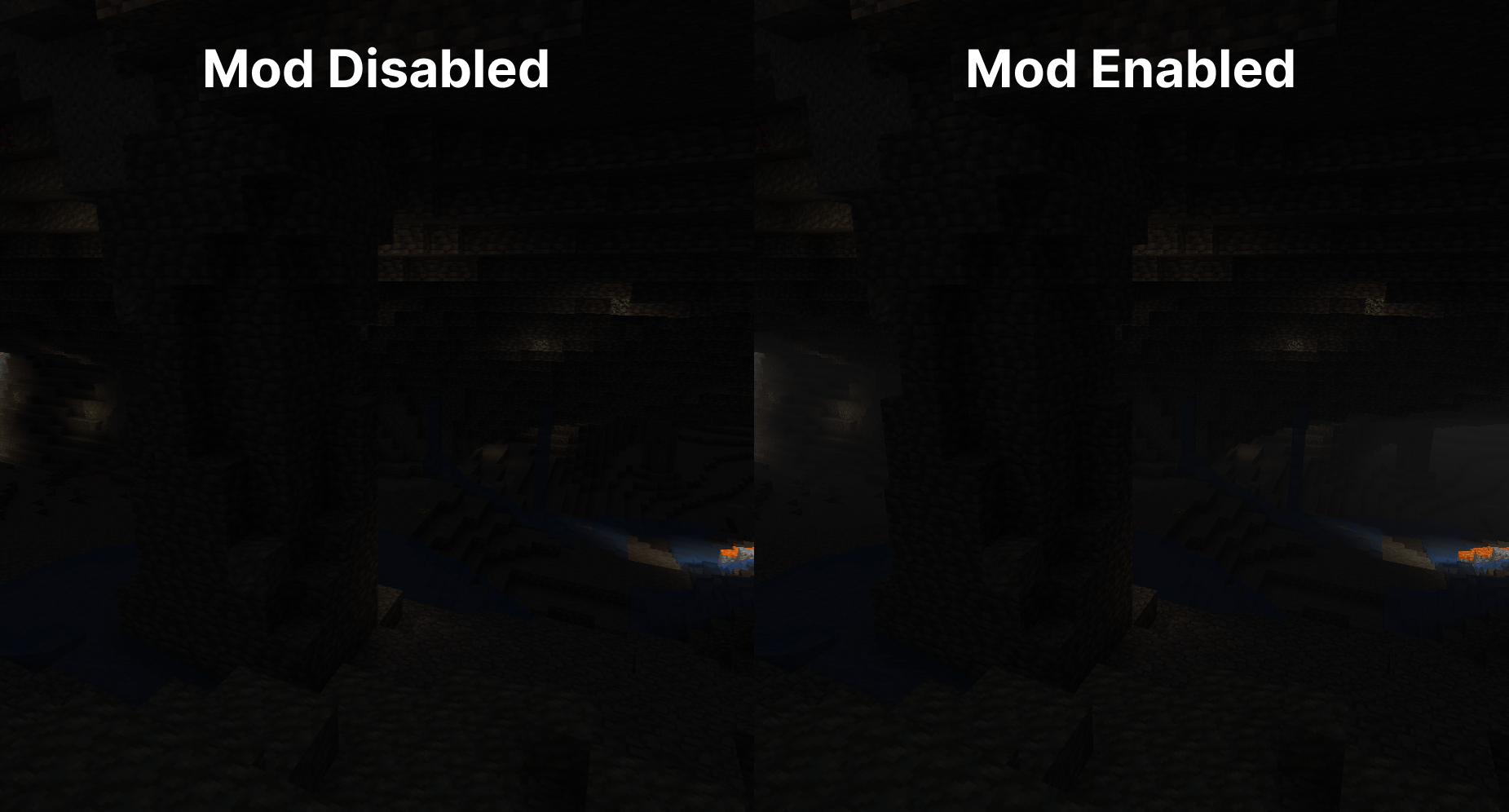
洞穴雾气
随着你深入地下,雾气会变得愈发浓重。这增强了洞穴的阴森与神秘感,使探索过程更加紧张和沉浸。它有助于营造深度感,让地下环境感觉更加生动和引人入胜。
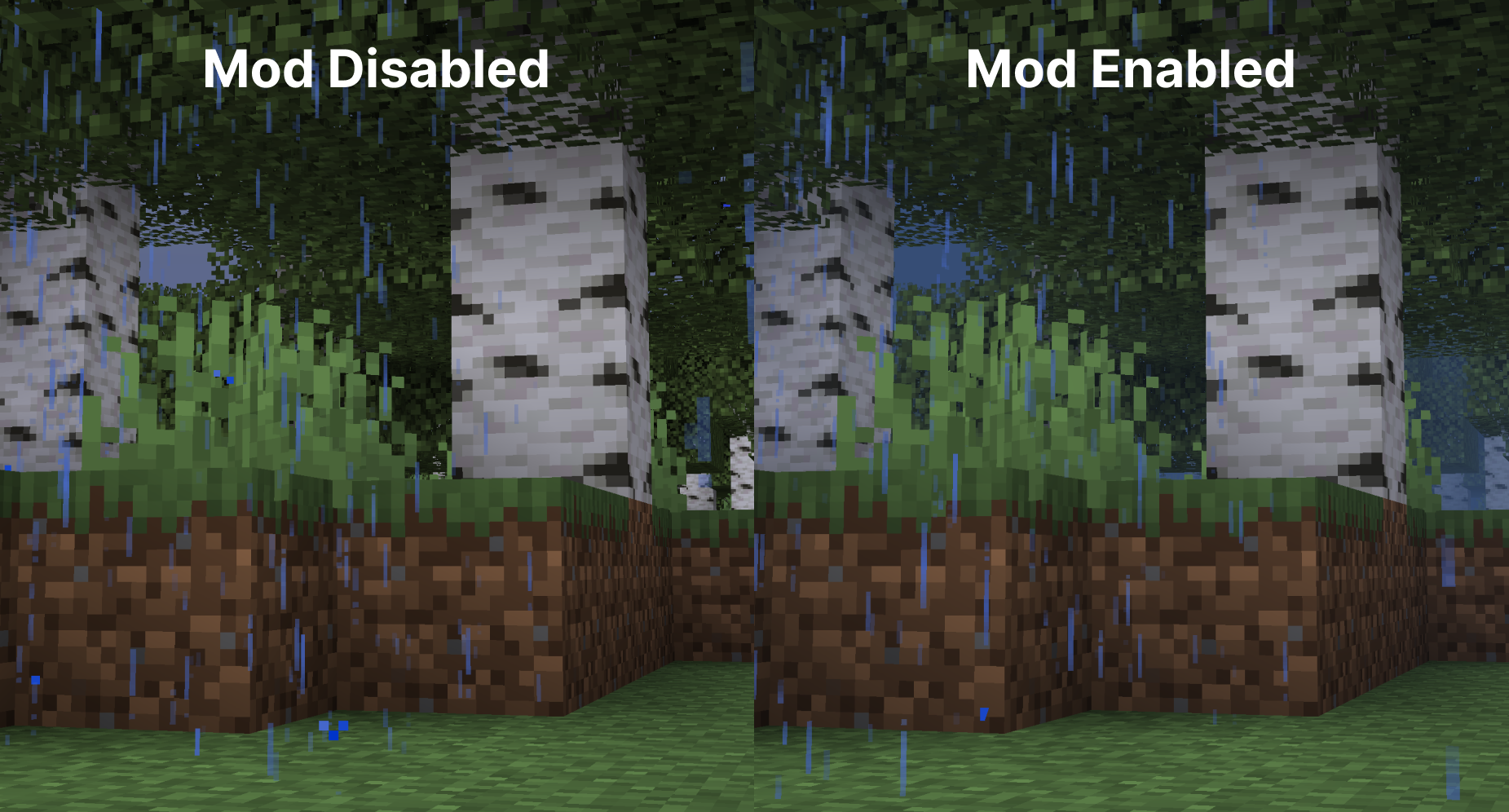
天气雾气修饰器
雾气会随天气状况进行调整,因此在雨天或雪天,雾气会相应变化。这增添了整体氛围,使每种天气条件看起来既独特又具有视觉吸引力。
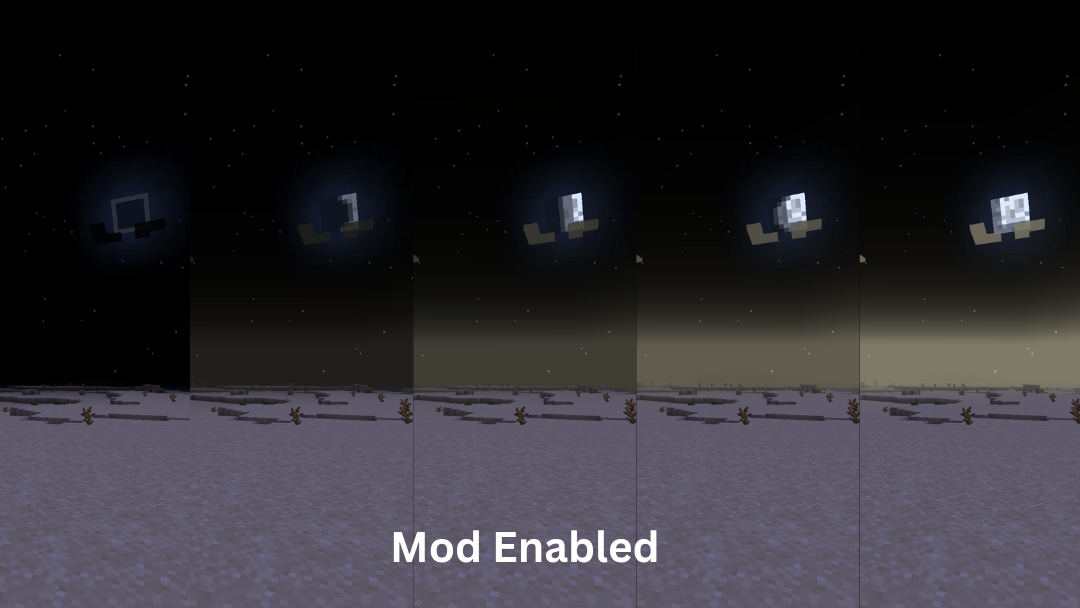
基于时间的修饰器
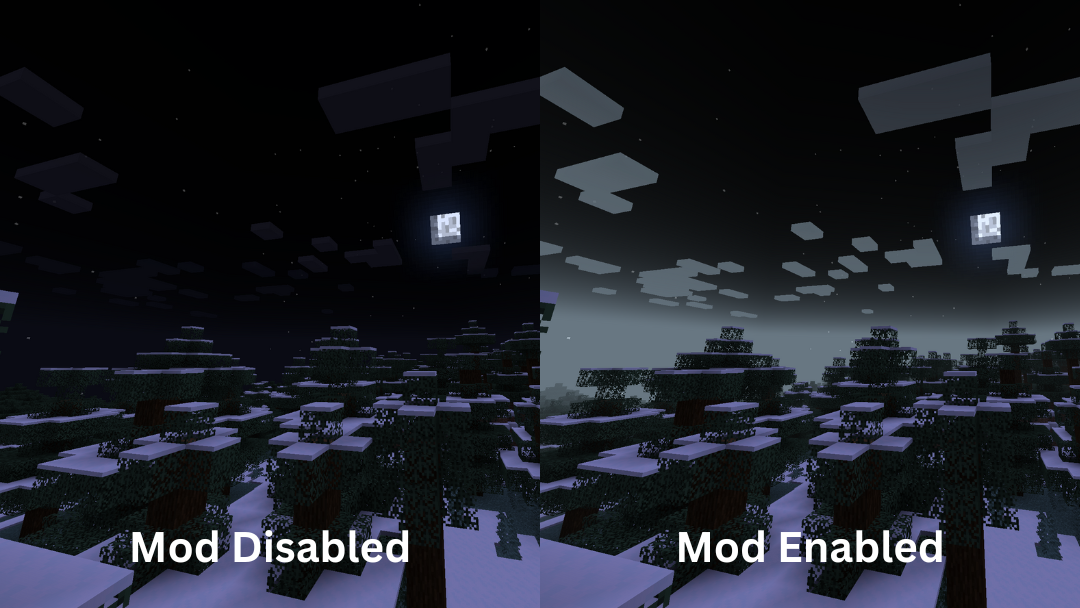
在日落和日出期间,雾气变得更加多彩和鲜艳。在夜间,雾气的颜色将取决于当前的月相周期。
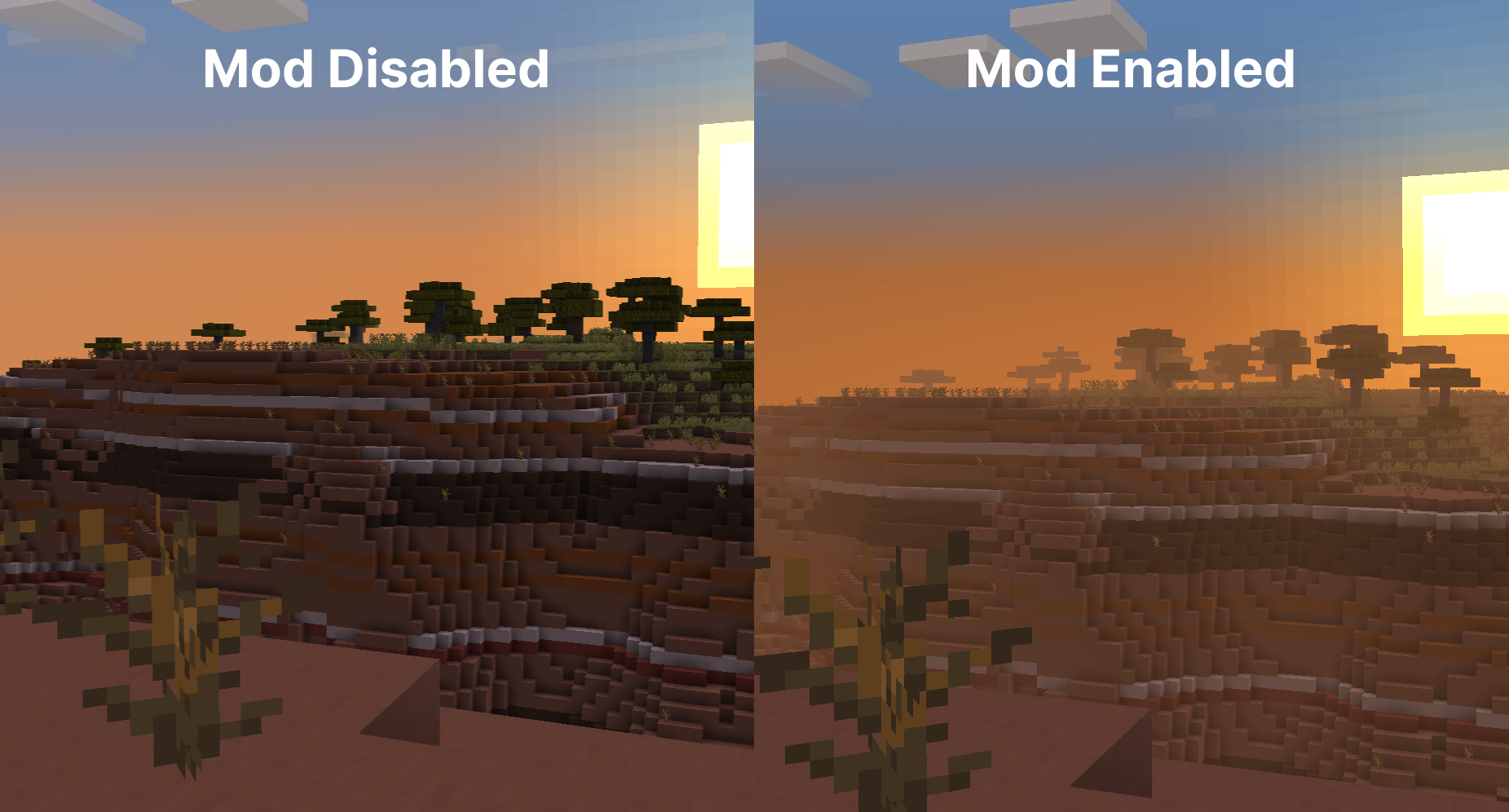
生物群系雾气颜色
雾气会根据你所处的生物群系改变颜色,赋予每个区域独特的外观和感觉。这有助于你在穿越不同生物群系时创造连贯的视觉体验。它支持模组添加的生物群系,并且使用资源包进行自定义非常简单,允许高度个性化的游戏体验。
天空修复
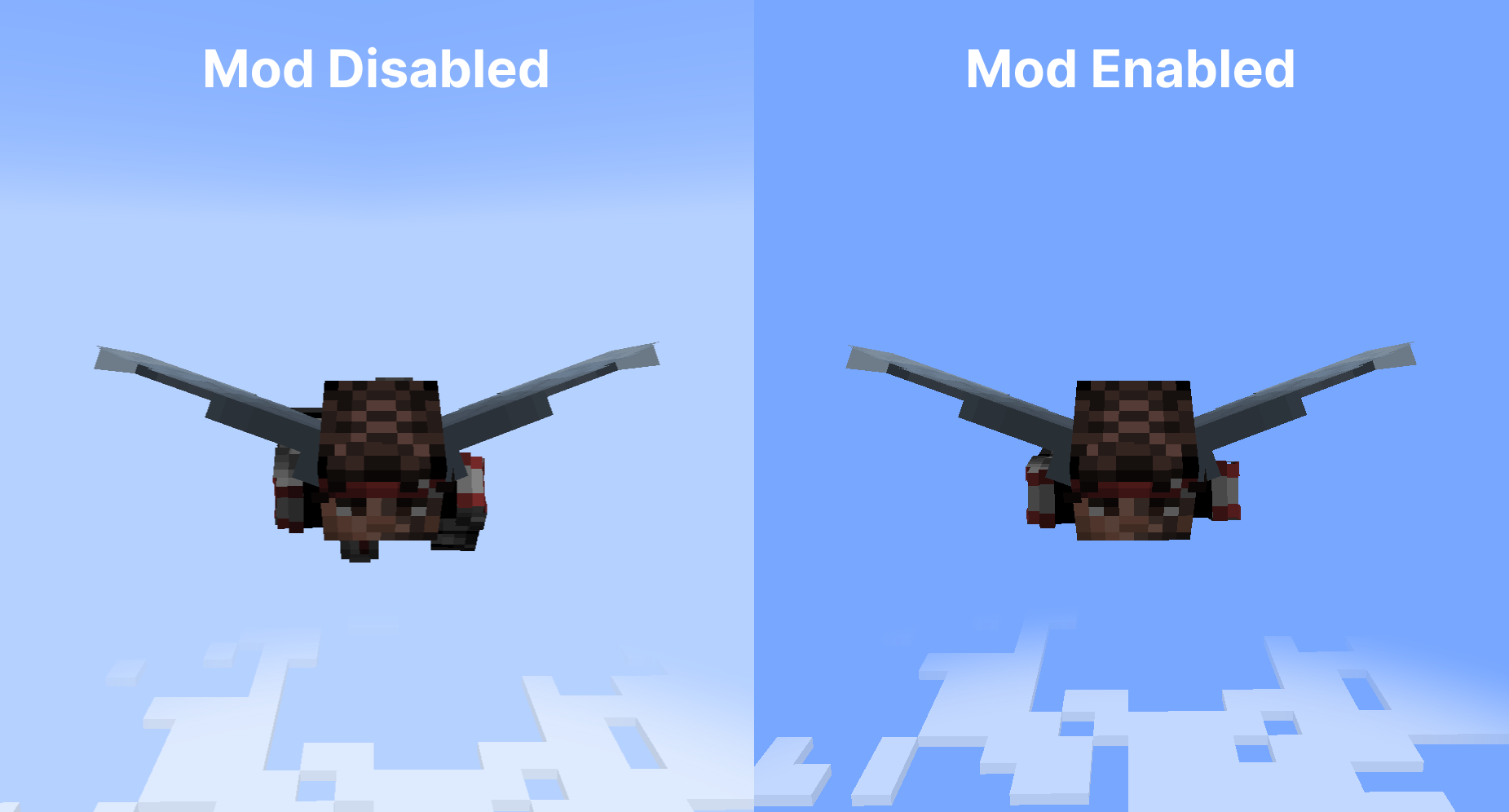
当使用鞘翅在云层上方飞行时,雾气会逐渐消散,提供清晰的天空视野,没有任何奇怪的水平线。
此外,云朵保持其自然外观,不受雾气颜色影响,确保它们始终看起来一致且美观。
配置
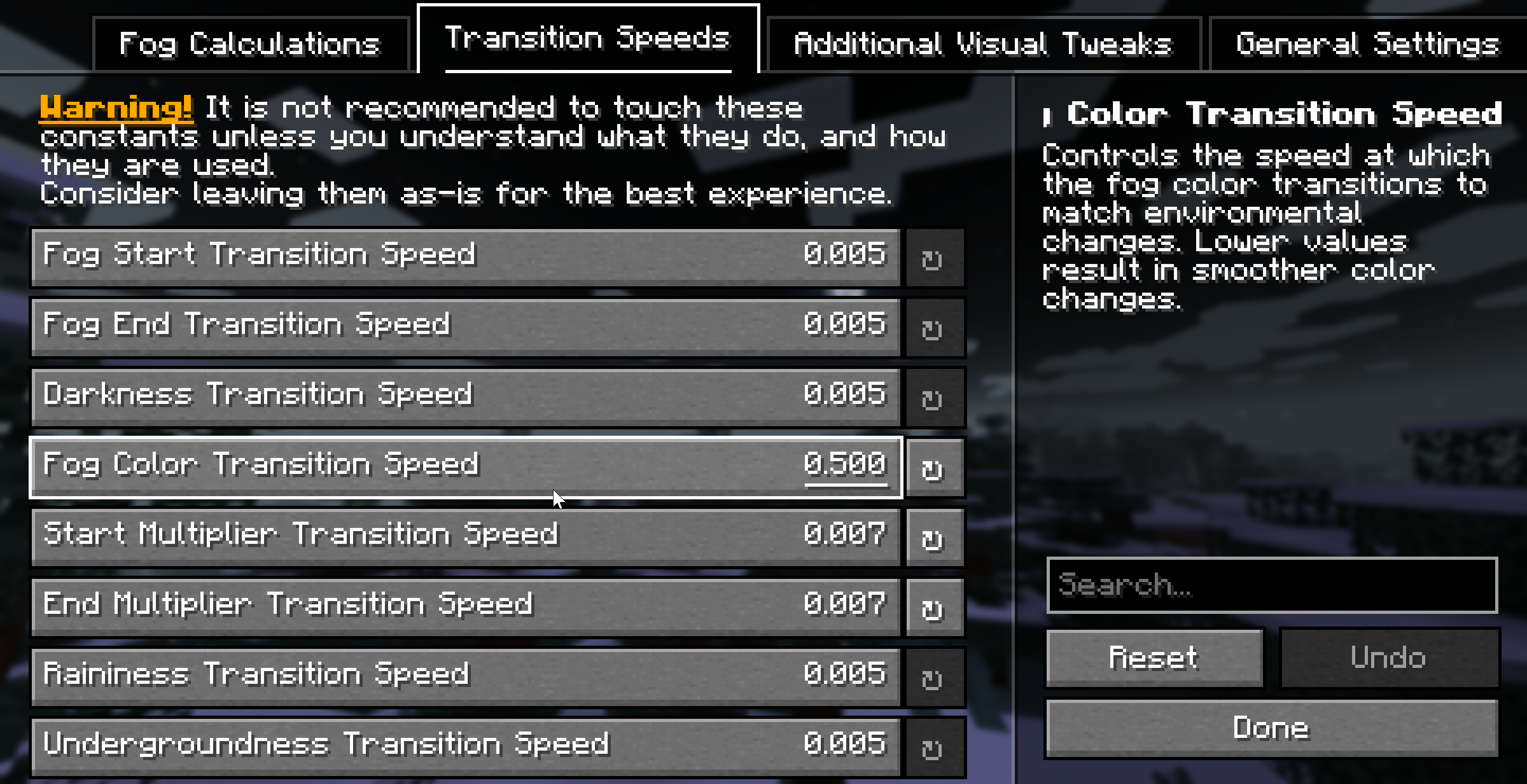
得益于 Yet Another Config Library,Fog 具有极高的可定制性。你应该通过 Fabric 上的 Mod Menu 或 NeoForge 上的模组列表访问配置界面,以查看完整的配置选项列表。
依赖项
必需
兼容性信息
兼容模组
- Mod Menu:允许访问配置界面
- Sodium:完全兼容,确保即使在使用性能增强模组时,你的视觉效果也能保持一致
- True Darkness - 虽然我们尚未添加显式兼容性支持,但该模组与我们的月相修饰器配合良好,后者会根据月相削弱生物群系雾气的强度。
- 使用 Minecraft 默认雾气设置的光影:完全兼容
- Distant Horizons:计划在未来支持
不兼容项
请参阅 问题追踪器 获取不兼容项列表。
下载
Fog 适用于 1.21-1.21.4 版本的 NeoForge 和 Fabric。 你可以从以下位置下载 Fog:
常见问题
-
问:你会将该模组移植到更低版本的 Minecraft 吗?
不会——移植到旧版本需要花费大量时间和精力,而且考虑到很少一部分社区成员仍在使用那些版本,时间投入并不划算。
-
问:你会为 1.21+ 版本支持 Forge 吗?
不会,建议你转向 NeoForge 加载器。
-
问:你支持 Quilt 吗?
很遗憾,我们无法提供支持因尝试在 Quilt 上使用此模组而产生的问题的支持——你可以自行承担风险尝试使用它。
-
问:该模组是否支持多人游戏?
是的!该模组完全兼容多人游戏——只有客户端需要安装该模组,但如果你的朋友也安装了该模组,你将拥有相似的视觉效果。
-
问:只有客户端需要这个模组,还是服务器也需要安装?
这是一个完全基于客户端的模组,因此只需客户端安装即可。服务器不需要安装它。
面向开发者和服务器管理员
如果你希望为你的模组生物群系添加支持,可以使用 Fog 的自定义 JSON 雾效定义格式来创建独特的雾效效果。该模组完全可以通过资源包和专用配置文件进行自定义。
此外,如果你正在开发 Fabric 模组,可以利用 Fog 的自定义数据生成提供程序(datagen providers)来加速在添加与该模组兼容性时的开发流程。
服务器管理员可以调整雾效的起始/结束点以及生物群系颜色,以匹配其服务器的视觉风格。
更多信息,请查看 Fog 的文档。
许可证
本项目采用“保留所有权利”(All Rights Reserved)许可证,详见 LICENSE。
鸣谢
- birsy,Fog Looks Good Now 的原作者 —— 许多系统和创意均源自此模组。
- Steveplays,Biome Fog 模组的作者 —— 他与 IMB11 合作,为 Fog 带来了生物群系雾效颜色功能。
Requires Fabric API (for Fabric) and M.R.U.
Fog
As it says on the tin - Fog is a mod that completely revamps how Minecraft handles fog, including its color, start, and end points. It creates a greater sense of depth and atmosphere in Minecraft by shifting the fog start forward, maintaining the same view distance while greatly improving the visuals of the game.
Features
It should be noted that the majority of these features can be fully customized via the configuration screen or resource packs - if you're using Fabric, you will need Mod Menu to access the configuration screen.
Cave Fog
As you go deeper underground, the fog gets thicker. This adds to the spooky and mysterious feel of caves, making exploration more intense and immersive. It helps create a sense of depth, making the underground environment feel more alive and engaging.
Weather Fog Modifiers
The fog adjusts with the weather, so during rain or snow, the fog will change accordingly. This adds to the overall atmosphere, making each weather condition feel distinct and visually appealing.
Time-based Modifiers
Fog becomes more colorful and vibrant during sunsets, sunrises. During night the fog colour will be dependent on the current moon cycle.
Biome Fog Colors
Fog changes color based on the biome you're in, giving each area a unique look and feel. This helps create a coherent visual experience as you move through different biomes. It supports modded biomes and is easy to customize using resource packs, allowing for a highly personalized game experience.
Sky Fixes
When flying with an elytra above the clouds, the fog gradually fades away, offering a clear view of the sky without any strange horizon lines.
Additionally, clouds maintain their natural look and are not affected by fog color, ensuring they always appear consistent and visually appealing.
Configuration
Fog is extremely customizable thanks to Yet Another Config Library, you should check the configuration screen accessible via Mod Menu on Fabric, or the Mods List on NeoForge for a full list of configuration options.
Dependencies
Required
Compatibility info
Compatible mods
- Mod Menu: allows access to the configuration screen
- Sodium: fully compatible, ensuring that your visuals remain consistent even with performance-enhancing mods
- True Darkness - Whilst we haven't added explicit compatibility, the mod works well with our moon phase modifiers that weaken biome fog strength depending on the moon phase.
- Shaders that use Minecraft’s default fog settings: fully compatible
- Distant Horizons: planned for the future
Incompatibilities
See the issue tracker for a list of incompatibilities.
Download
Fog is available for NeoForge and Fabric for 1.21-1.21.4 versions. You can download Fog from the following locations:
FAQ
-
Q: Will you be backporting this mod to lower Minecraft versions?
No - it takes too much time and effort to backport to older versions, and it's not worth the time investment as very little of the community is on those versions.
-
Q: Will you be supporting Forge for 1.21+?
No, you should consider moving to the NeoForge mod loader.
-
Q: Do you support Quilt?
Unfortunately, we are unable to provide support for issues arising from attempting to use this mod with Quilt - you are welcome to try to use it at your own risk.
-
Q: Does this mod work in multiplayer?
Yes! This mod is fully multiplayer compatible - only clients need to have the mod installed, but if your friends have the mod installed, you should have similar visuals.
-
Q: Does only the client need this mod or does the server need it too?
This is a completely client side mod, so only the client needs to have it installed. The server does not need to have it installed.
For Developers and Server Admins
If you want to add support for your modded biomes, you can utilize Fog's custom JSON fog definition format to create unique fog effects. The mod is fully customizable via resource packs and a dedicated configuration file.
Furthermore, if you're developing a Fabric mod, you can utilize Fog's custom datagen providers to speed your development workflow up when adding compatability with the mod.
Server owners can adjust fog start/end points and biome colors to match their server's aesthetic.
For more information, check out Fog's documentation.
License
This project is licensed under All Rights Reserved, see LICENSE.
Attribution
- birsy, the original author of Fog Looks Good Now - many of the systems and ideas were expanded from this mod.
- Steveplays, the author of the Biome Fog mod - who collaborated with IMB11 to bring biome fog colors to Fog.

下载 Fog
需要联机服务器吗?
稳定流畅、一键部署,几分钟即可和朋友联机开服
最低仅需 8 元/月 即可畅快联机
下载 Fog
需要联机服务器吗?
稳定流畅、一键部署,几分钟即可和朋友联机开服
最低仅需 8 元/月 即可畅快联机
下载 Fog
需要联机服务器吗?
稳定流畅、一键部署,几分钟即可和朋友联机开服
最低仅需 8 元/月 即可畅快联机
下载 Fog
需要联机服务器吗?
稳定流畅、一键部署,几分钟即可和朋友联机开服
最低仅需 8 元/月 即可畅快联机
下载 Fog
需要联机服务器吗?
稳定流畅、一键部署,几分钟即可和朋友联机开服
最低仅需 8 元/月 即可畅快联机
下载 Fog
需要联机服务器吗?
稳定流畅、一键部署,几分钟即可和朋友联机开服
最低仅需 8 元/月 即可畅快联机
下载 Fog
需要联机服务器吗?
稳定流畅、一键部署,几分钟即可和朋友联机开服
最低仅需 8 元/月 即可畅快联机
下载 Fog
需要联机服务器吗?
稳定流畅、一键部署,几分钟即可和朋友联机开服
最低仅需 8 元/月 即可畅快联机
下载 Fog
需要联机服务器吗?
稳定流畅、一键部署,几分钟即可和朋友联机开服
最低仅需 8 元/月 即可畅快联机
下载 Fog
需要联机服务器吗?
稳定流畅、一键部署,几分钟即可和朋友联机开服
最低仅需 8 元/月 即可畅快联机
新增
- 添加了对 26.2 Fabric 和 26.2 NeoForge 的支持。(#336)
关于这个资源的讨论、问题反馈与使用心得
还没有讨论,来发第一帖吧
你是这个资源的作者?登录后可认领此资源。
相似资源
 模组

显示你正在注视的方块的信息。(适用于 Minecraft 1.16+ 的 Hwyla/Waila 分支)
 模组

查看物品与配方
 模组
在游戏画面角落显示附近世界地形、玩家、生物和实体的地图。可创建路径点,帮助你找到标记过的位置。
 模组
使用 JavaScript 编辑配方、添加自定义物品、编写世界事件!
 模组
添加区块认领和玩家组队功能,并与 Xaero's Minimap 和 World Map 集成
 模组
AE2:一款流行的自动化与存储模组
评论 0
登录后参与评分
还没有评论,来抢沙发吧