
Force Port
一个在使用“对局域网开放”功能时强制端口始终相同的模组!
仅客户端端!
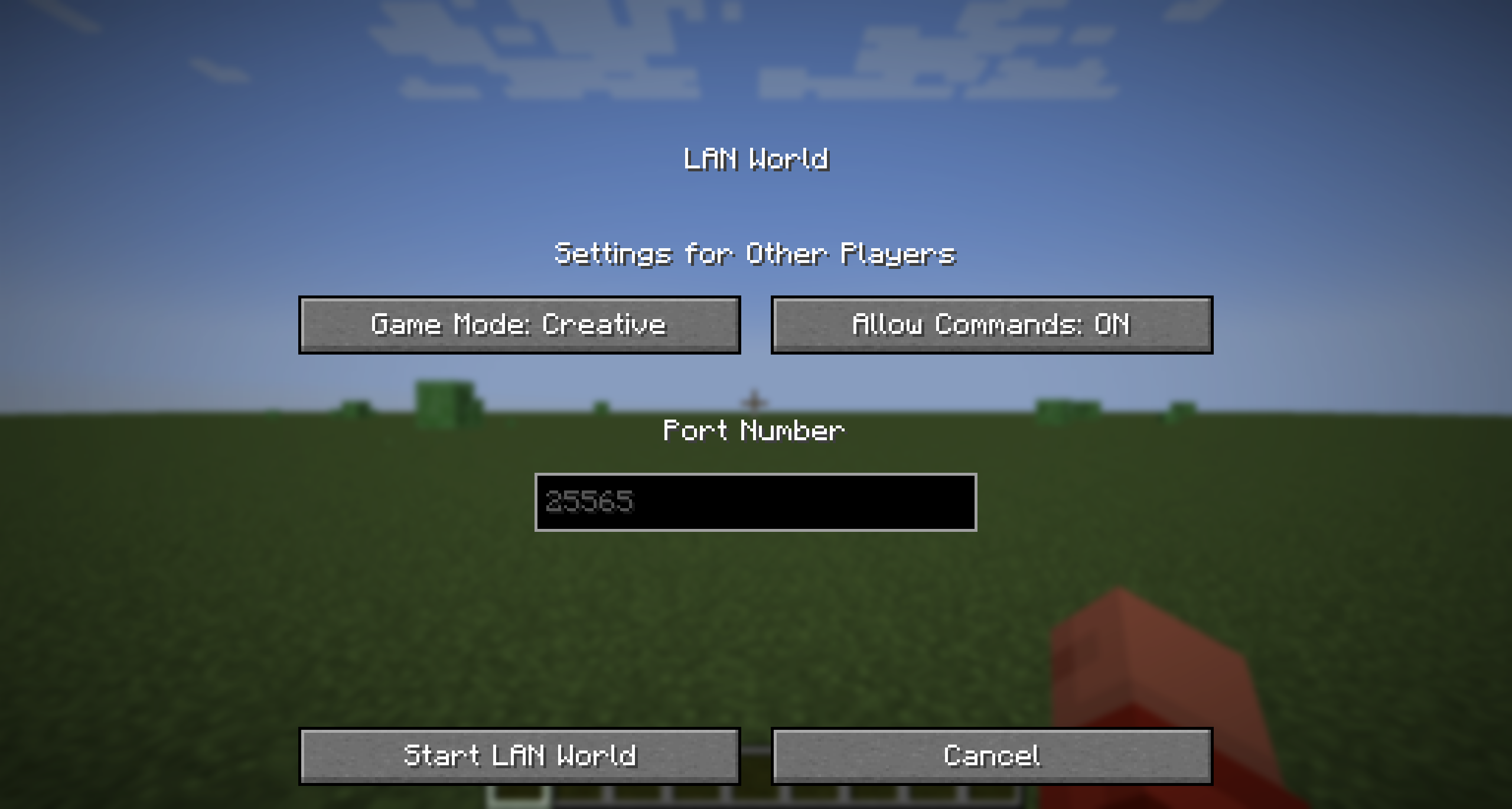
在较新的 Minecraft 版本中的配置菜单
使用方法
Force Port 允许你修改将世界对局域网开放时使用的默认端口。这对于希望为服务器使用特定端口的用户非常有用。
只需进入该 Minecraft 实例的安装位置,并打开 config 文件夹。你应该能看到一个名为 forceport.txt 的文件。用文本编辑器打开它并将端口更改为你想要的端口。
兼容版本
| 模组版本 | 游戏版本 | 模组版本标题 |
|---|---|---|
| 1.0.1 | 1.14+ | force-port-fabric-1.0.1 |
| 1.0.0 | 1.14+ | force-port-fabric-1.0.0 |
重要提示
- 本模组尚未在较旧的 Quilt 版本或较旧的加载器上进行全面测试。但是,对于 1.14 及以上版本,只要使用 Mod Loader 0.16.0 或更高版本,此模组可在 Fabric 上正常运行。
- 如果你使用的是最新的 Minecraft 版本,则可以毫无问题地使用此模组。
- 运行此模组不需要 Fabric API。
- 此模组是使用 Java 21 构建的,因此你需要在实例设置中将 Java 版本更改为 21(或更高),以便在任何早于 1.20.5 的版本中运行此模组。
- 自 1.0.1 版本起,如果配置文件无效,它将默认为
25565(Minecraft 服务器的默认端口)。这是为了防止模组崩溃。如果模组似乎未生效,请验证你的配置文件!
更新日志
1.0.1
- 修复了一个 bug:当在
forceport.txt文件中添加换行符时(某些 Linux 文本编辑器的默认功能),模组会崩溃。 - 添加了检查以确保端口是数字且在 0 到 65535 之间。
Force Port
A mod that forces the port to always be the same when using the "Open To LAN" feature!
Client-side only!
The configuration menu on recent Minecraft versions
Usage
Force Port allows you to modify the default port used when opening your world to LAN. This is useful for those who want to use a specific port for their server.
Just go to the installation location for that Minecraft instance, and open the config folder. You should see a file called forceport.txt. Open it with a text editor and change the port to your desired port.
Compatible Versions
| Mod Version | Game Version(s) | Mod Version Title |
|---|---|---|
| 1.0.1 | 1.14+ | force-port-fabric-1.0.1 |
| 1.0.0 | 1.14+ | force-port-fabric-1.0.0 |
Important Note
- This mod hasn't been tested full on older Quilt versions or older mod loaders. However, this mod does work on Fabric for 1.14 and above using Mod Loader 0.16.0+
- If you're using the latest Minecraft versions, you can use this mod without any issues.
- The Fabric API is NOT required for this mod to work.
- This mod is built with Java 21, so you need to change your Java version to 21 (or above) in the instance settings to run this mod, on any versions prior to 1.20.5.
- As of 1.0.1, if the config file is not valid, it will default to
25565(the default port for Minecraft servers). This is to prevent the mod from crashing. If the mod doesn't seem to work, please verify your config file!
Changelog
1.0.1
- Fixed a bug where the mod would crash if newlines were added into the
forceport.txtfile (a default feature in some Linux text editors). - Added a check to make sure the port is a number and is between 0 and 65535.

下载 Force Port
下载 Force Port
下载 Force Port
下载 Force Port
需要联机服务器吗?
稳定流畅、一键部署,几分钟即可和朋友联机开服
最低仅需 8 元/月 即可畅快联机
下载 Force Port
需要联机服务器吗?
稳定流畅、一键部署,几分钟即可和朋友联机开服
最低仅需 8 元/月 即可畅快联机
下载 Force Port
需要联机服务器吗?
稳定流畅、一键部署,几分钟即可和朋友联机开服
最低仅需 8 元/月 即可畅快联机
下载 Force Port
需要联机服务器吗?
稳定流畅、一键部署,几分钟即可和朋友联机开服
最低仅需 8 元/月 即可畅快联机
暂无更新日志
关于这个资源的讨论、问题反馈与使用心得
还没有讨论,来发第一帖吧
你是这个资源的作者?登录后可认领此资源。
相似资源
 模组

一个用于收集生物掉落物的多区块模组。
 模组

显示你正在注视的方块的信息。(适用于 Minecraft 1.16+ 的 Hwyla/Waila 分支)
 模组

查看物品与配方
 模组
在游戏画面角落显示附近世界地形、玩家、生物和实体的地图。可创建路径点,帮助你找到标记过的位置。
 模组
使用 JavaScript 编辑配方、添加自定义物品、编写世界事件!
 模组
AE2:一款流行的自动化与存储模组
评论 0
登录后参与评分
还没有评论,来抢沙发吧