强制区块加载
制作一个可配置的玩家头颅,使其所在的区块保持加载状态。它可以在服务端运行,并与原版客户端兼容。
功能
- 可配置的头颅皮肤、合成配方、粒子效果和音效。
- 区块加载状态在服务端重启后依然保留。
- 标记头颅默认受到保护,防止非玩家来源的破坏。
- 破坏标记头颅会掉落一个可重复使用的标记物品。
- 无需安装任何客户端模组。
要求
| Minecraft |
Fabric Loader |
Fabric API |
Java |
26.1.2 |
0.19.3+ |
0.155.2+26.1.2 |
25+ |
安装
- 在专用服务器上安装 Fabric Loader 和 Fabric API。
- 将
force_chunk_loading JAR 文件放入服务器的 mods 文件夹中。
- 启动一次服务器以生成配置文件。
- 根据需要编辑配置文件,然后重新启动服务器。
客户端无需安装此模组。
使用方法
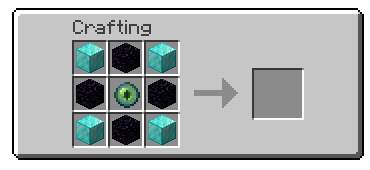
合成并放置上述所示的玩家头颅。成功放置后,该区块会被强制加载,同时会显示激活消息、播放音效以及可选的附魔粒子效果。
破坏标记头颅即可停用其效果。在生存模式下,完整的标记物品会掉落,并可再次放置。默认情况下,爆炸、活塞、命令以及其他非玩家的改动只会恢复标记头颅,而不会将其移除。
配置
显示配置
在服务器停止运行时编辑以下文件:
config/force_chunk_loading.json
| 设置项 |
默认值 |
用途 |
allowPlacement |
true |
允许放置标记头颅。 |
placementPermissionLevel |
0 |
所需的权限等级,范围从 0 到 4。 |
allowPlayerRemoval |
true |
允许玩家破坏标记头颅。 |
allowNonPlayerRemoval |
false |
允许非玩家来源的改动永久移除标记头颅。 |
showEnchantedParticles |
true |
在活跃状态的标记头颅周围显示粒子效果。 |
sounds.enabled |
true |
启用激活/停用音效。 |
sounds.activation |
minecraft:entity.player.levelup |
放置时的音效 ID。 |
sounds.deactivation |
minecraft:entity.enderman.teleport |
移除时的音效 ID。 |
head.texture |
Earth texture |
来自 profile.properties[].value 的 Base64 编码值。 |
recipe.enabled |
true |
启用生成的合成配方。 |
recipe.pattern |
DOD, OEO, DOD |
最多三行,每行三个字符。 |
recipe.ingredients |
D, O, E |
将字符映射到命名空间物品 ID。 |
placementPermissionLevel: 0 表示允许所有人操作。等级 1–4 需要更高的 Minecraft 权限。
请使用已注册的命名空间音效 ID。将 sounds.enabled 设置为 false 可以保留动作栏消息但禁用音效。
仅更改 head.texture 即可选择其他皮肤。命令自定义的名称、描述和头颅 ID 不会被复制。
更改配置后请重新启动服务器。
许可证
MIT。详见 LICENSE。
Force Chunk Loading
Craft a configurable player head that keeps its chunk loaded. It works server-side with vanilla clients.
Features
- Configurable player-head skin, recipe, particles, and sounds.
- Chunk loading survives server restarts.
- Marker heads are protected from non-player destruction by default.
- Breaking a marker drops a reusable marker item.
- No client mod is required.
Requirements
| Minecraft |
Fabric Loader |
Fabric API |
Java |
26.1.2 |
0.19.3+ |
0.155.2+26.1.2 |
25+ |
Installation
- Install Fabric Loader and Fabric API on the dedicated server.
- Put the
force_chunk_loading JAR in the server's mods folder.
- Start the server once to create the config.
- Edit the config if needed, then restart the server.
The client does not need this mod installed.
Use
Craft and place the player head shown above. The chunk is force-loaded after successful placement, with an activation message, sound, and optional enchanted particles.
Break the marker to deactivate it. In survival, the complete marker item drops and can be placed again. By default, explosions, pistons, commands, and other non-player changes restore the marker instead of removing it.
Configuration
Show configuration
Edit this file while the server is stopped:
config/force_chunk_loading.json
| Setting |
Default |
Purpose |
allowPlacement |
true |
Allow marker placement. |
placementPermissionLevel |
0 |
Required permission level, from 0 to 4. |
allowPlayerRemoval |
true |
Allow players to break markers. |
allowNonPlayerRemoval |
false |
Let non-player changes remove markers permanently. |
showEnchantedParticles |
true |
Show particles around active markers. |
sounds.enabled |
true |
Enable activation/deactivation sounds. |
sounds.activation |
minecraft:entity.player.levelup |
Placement sound ID. |
sounds.deactivation |
minecraft:entity.enderman.teleport |
Removal sound ID. |
head.texture |
Earth texture |
Base64 value from profile.properties[].value. |
recipe.enabled |
true |
Enable the generated recipe. |
recipe.pattern |
DOD, OEO, DOD |
Up to three rows of three characters. |
recipe.ingredients |
D, O, E |
Maps characters to namespaced item IDs. |
placementPermissionLevel: 0 allows everyone. Levels 1–4 require higher Minecraft permissions.
Use a registered namespaced sound ID. Set sounds.enabled to false to keep actionbar messages but disable sounds.
Change only head.texture to choose another skin. The command's custom name, lore, and head ID are not copied.
Restart the server after changing configuration.
License
MIT. See LICENSE.
评论 0
登录后参与评分
还没有评论,来抢沙发吧