
FPShud,
一个在可自定义 HUD 上以高精度显示 FPS 的模组
模组功能:
Main FPS(主 FPS)是主要的 FPS 数值,由Main Update Interval(主更新间隔)调节Avererage FPS(平均 FPS)是从所有在Average Update Interval(平均更新间隔)内采集的值中计算出的平均 FPS 值Max FPS(最高 FPS)是从所有在Min Update Interval(最小更新间隔)内采集的值中得出的最大 FPS 值Min FPS(最低 FPS)是从所有在Max Update Interval(最大更新间隔)内采集的值中得出的最小 FPS 值

使用默认设置的 FPShud
HUD 功能:
- 常规设置:
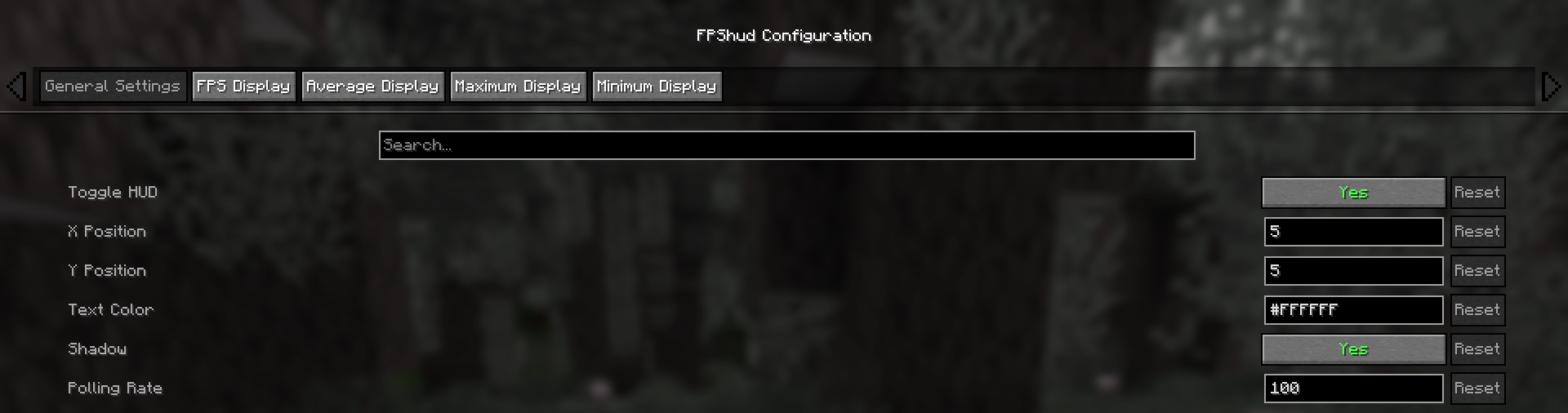
Toggle HUD(切换 HUD)用于开启或关闭整个 HUDX Position(X 轴位置)更改 HUD 在屏幕上的 X 轴位置Y Position(Y 轴位置)更改 HUD 在屏幕上的 Y 轴位置Text Color(文本颜色)更改整个 HUD 的颜色Shadow(阴影)启用或禁用 HUD 上的文本阴影Polling Rate(轮询速率)指示模组应多久轮询一次 FPS
- FPS 显示、平均值显示、最大值显示、最小值显示
这些设置可以针对上述 4 个字段分别进行更改:
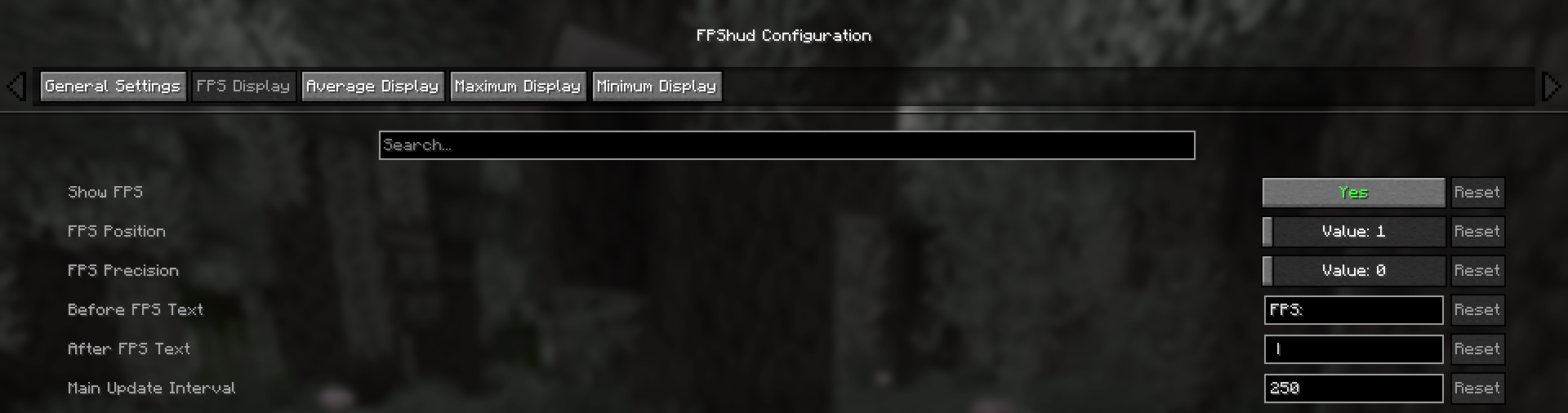
Show FPS(显示 FPS)用于切换该字段的显示状态FPS Position(FPS 位置)指示该字段的位置(第一、第二、第三、第四)FPS Precision(FPS 精度)指示该字段拥有的精度小数位数Before FPS Text(FPS 前缀文本)更改特定字段 FPS 数值之前显示的文本After FPS Text(FPS 后缀文本)更改特定字段 FPS 数值之后显示的文本
ModMenu 配置:
- GUI 配置可通过 ModMenu 模组列表访问
配置界面分为 5 个类别:
- 常规设置:
- FPS 显示、平均值显示、最大值显示、最小值显示:
为什么选择 FPShud?
高精度:
FPShud 使用帧与帧之间的 elapsed time(经过时间)来计算 FPS 值; 这种采样方法提高了精度和可定制性,允许进行毫秒级的精确计算和 FPS 显示
FPShud 采用
Polling Rate(轮询速率)算法工作;每帧都会进行采样,然后在每个 poll-time(轮询时间)内进行平滑处理,最后进行处理以匹配所需的Main Update Interval(主更新间隔)、Average Update Interval(平均更新间隔)、Maximum Update Interval(最大更新间隔)和Minimum Update Interval(最小更新间隔)要求因此,不建议将
Polling Rate(轮询速率)和Update Interval(更新间隔)设置为过低的值,因为结果可能会出现剧烈波动
高度可定制:
您可以自定义 HUD 以匹配各种风格:

仅显示 Avr 和 Max,修改了 'Before Text'(前缀文本),更改了 'Text Color'(文本颜色),移除了 'Shadow'(阴影),更改了 'Precision'(精度)并修改了 'Update Intervals'(更新间隔)
其他说明:
如果您正在使用 ModMenu,请安装 ClothConfigAPI 以访问配置界面
不想使用 ModMenu?配置文件可在您的 config 目录中访问和编辑,更改需在重启游戏后生效
设置将保存在您的 config 文件夹中,并在运行时更新
该模组为客户端端模组(支持多人游戏)
链接:
FPShud,
a mod that displays FPS with high precision on a customizable HUD
Mod features:
Main FPSis the main FPS value, regulated by theMain Update IntervalAvererage FPSis the average FPS value from all the values took inAverage Update IntervalMax FPSis the maximum FPS value from all the values took inMin Update IntervalMin FPSis the minimum FPS value from all the values took inMax Update Interval
FPShud with default settings
HUD Features:
- General Settings:
Toggle HUDtoggles the entire HUDX Positionchanges the X position of the HUD on the screenY Positionchanges the Y position of the HUD on the screenText Colorchanges the color of the entire HUDShadowenables or disables the text shadow on the HUDPolling Rateindicates how frequently the mod should poll FPS
- FPS Display, Average Display, Maximum Display, Minimum display
Those settings can be changed for every one of the 4 fields:
Show FPStoggles the FPS fieldFPS Positionindicates the position of the field (first, second, third, fourth)FPS Precisionindicates how many points of precision the field haveBefore FPS Textchanges the text displayed before the specific field FPS valueAfter FPS Textchanges the text displayed after the specific field FPS value
ModMenu config:
- GUI config is accessible from the ModMenu mods list
The config screen is divided into 5 categories:
- General Settings:
- FPS Display, Average Display, Maximum Display, Minimum display:
Why FPShud?
Highly precise:
FPShud uses time elapsed from frame to frame for the FPS value calculation; This method of sampling elevates precision and customization, permitting millisecond precise calculations and FPS displaying
FPShud works with a
Polling Ratealgorithm; samples are taken every frame, then smoothen every poll-time and finally processed to make them match the requiredMain Update Interval,Average Update Interval,Maximum Update IntervalandMinimum Update IntervalrequirementsFor those reasons, it is not recommended to set
Polling RateandUpdate Intervalto low values because results may appear very fluctuating
Highly customizable:
You can customize the HUD to match every style:
only showing Avr and Max, modified 'Before Text', changed 'Text Color', removed 'Shadow', changed 'Precision' and modified 'Update Intervals'
Other:
If you are using ModMenu install ClothConfigAPI to access the config screen
Don't want ModMenu? The config file is accessible and editable in your config directory, changes apply after a game restart
Settings will be saved in your config folder and updated at runtime
The mod is client side (works on multiplayer)
Links:

下载 FPS hud
需要联机服务器吗?
稳定流畅、一键部署,几分钟即可和朋友联机开服
最低仅需 8 元/月 即可畅快联机
下载 FPS hud
下载 FPS hud
需要联机服务器吗?
稳定流畅、一键部署,几分钟即可和朋友联机开服
最低仅需 8 元/月 即可畅快联机
下载 FPS hud
需要联机服务器吗?
稳定流畅、一键部署,几分钟即可和朋友联机开服
最低仅需 8 元/月 即可畅快联机
下载 FPS hud
需要联机服务器吗?
稳定流畅、一键部署,几分钟即可和朋友联机开服
最低仅需 8 元/月 即可畅快联机
下载 FPS hud
需要联机服务器吗?
稳定流畅、一键部署,几分钟即可和朋友联机开服
最低仅需 8 元/月 即可畅快联机
下载 FPS hud
需要联机服务器吗?
稳定流畅、一键部署,几分钟即可和朋友联机开服
最低仅需 8 元/月 即可畅快联机
下载 FPS hud
需要联机服务器吗?
稳定流畅、一键部署,几分钟即可和朋友联机开服
最低仅需 8 元/月 即可畅快联机
下载 FPS hud
需要联机服务器吗?
稳定流畅、一键部署,几分钟即可和朋友联机开服
最低仅需 8 元/月 即可畅快联机
下载 FPS hud
需要联机服务器吗?
稳定流畅、一键部署,几分钟即可和朋友联机开服
最低仅需 8 元/月 即可畅快联机
关于这个资源的讨论、问题反馈与使用心得
还没有讨论,来发第一帖吧
你是这个资源的作者?登录后可认领此资源。
相似资源
 模组

显示你正在注视的方块的信息。(适用于 Minecraft 1.16+ 的 Hwyla/Waila 分支)
 模组
使用 JavaScript 编辑配方、添加自定义物品、编写世界事件!
 模组

查看物品与配方
 模组
在游戏画面角落显示附近世界地形、玩家、生物和实体的地图。可创建路径点,帮助你找到标记过的位置。
 模组
AE2:一款流行的自动化与存储模组
 模组

一个基于构建器的 Minecraft 配置库!
评论 0
登录后参与评分
还没有评论,来抢沙发吧