Create: Frogport Networks
是否曾希望你的物品能自动知道该去哪里,而不是沿着长长的传送带跑上一公里?这个模组正是为了解决这一痛点而设计的。
Frogport Networks 将基于 IP 的网络概念引入 Create。你可以铺设线缆、分配地址、划分子网,并像真实网络中的数据包一样在基地中传输物品。其底层构建于 Create 原有的物流系统之上——Frogports(青蛙口)、Packagers(打包机)、Funnels(漏斗)和 Chutes(滑槽)均可直接接入——因此它感觉像是机器的一部分,而非外挂插件。
⚠️ 仍在开发中。 目前所有功能均已可用,但可能会遇到一些粗糙之处,且版本间可能存在变动。我们非常欢迎提交错误报告和创意建议。
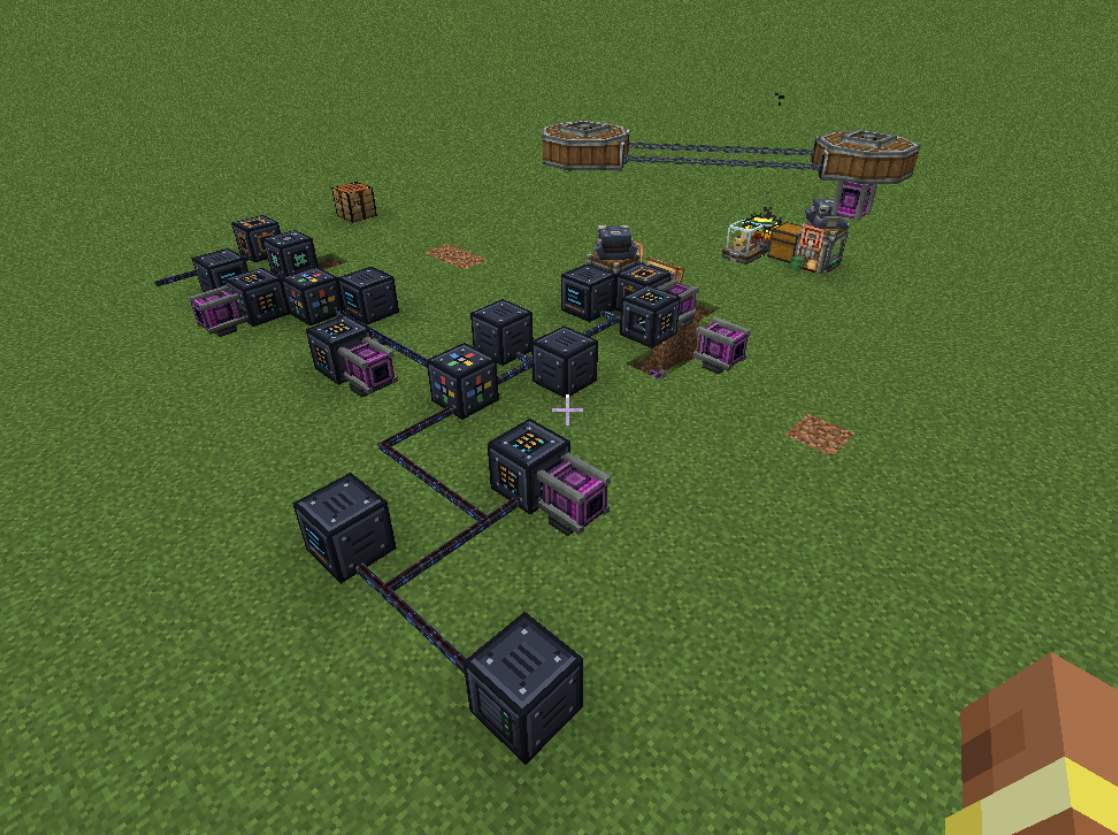
方块介绍
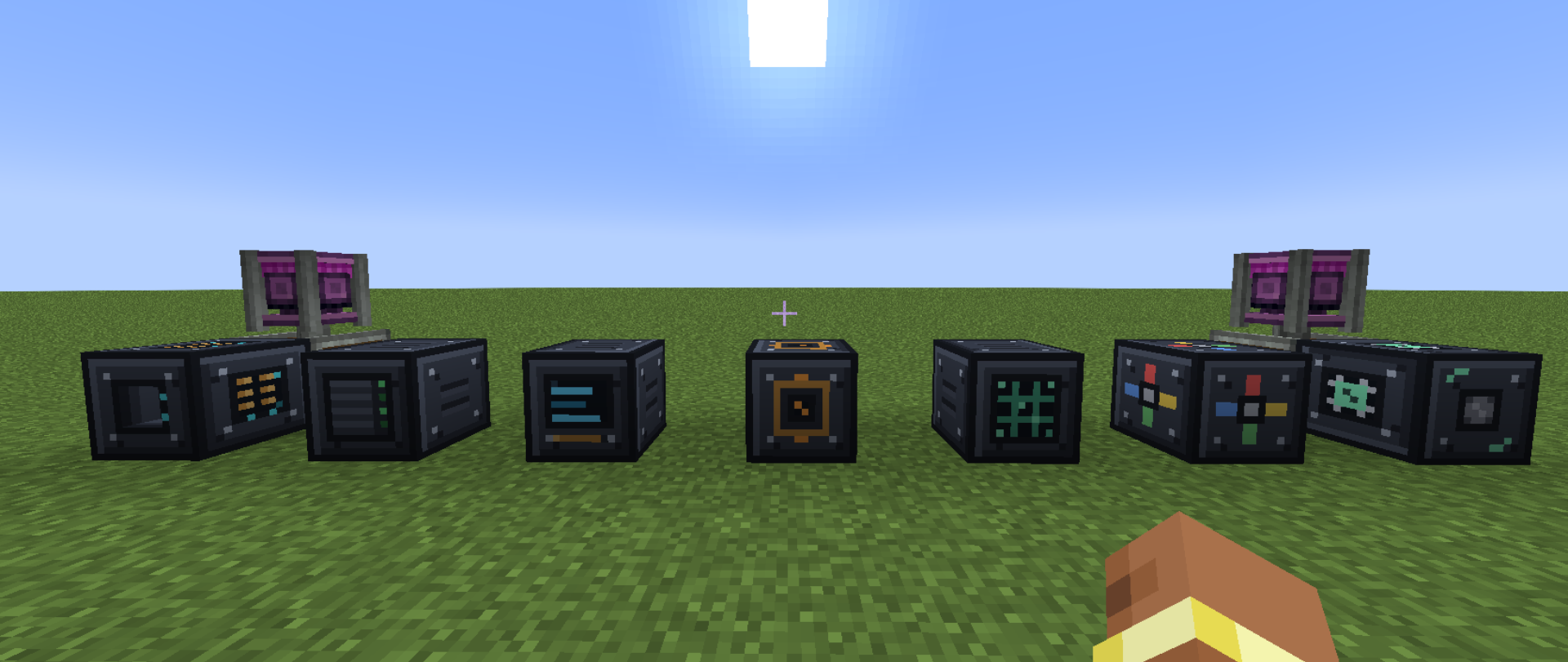
- Router(路由器) – 为连接到它的所有设备定义子网。需要旋转动力才能运行。
- NAS(网络附加存储) – 你的存储空间。插入驱动器后,它们会合并为一个大型容器。
- Terminal(终端) – 你访问网络的窗口:可以查看并一次性提取每个驱动器的内容。
- Network Port(网络端口) – 连接物理世界的输入/输出接口。
- Gateway(网关) – 桥接不同的子网,使它们能够共享存储。
- Computer(计算机) – 自动合成的核心大脑。
- Network Monitor(网络监视器) – 提供对所有网络上所有内容的管理/创造模式概览。
三种线缆类型
覆盖范围和吞吐量取决于线缆类型,因此升级主干线路是有实际意义的:
| Cable (线缆) |
Reach (覆盖范围) |
Throughput (吞吐量) |
| Copper (铜) |
16 个方块 |
64 物品/秒 |
| Gold (金) |
32 个方块 |
128 物品/秒 |
| Fiber (光纤) |
64 个方块 |
256 物品/秒 |
每种线缆方块最多可承载四种颜色的线束,共有 16 种颜色——每种颜色代表一个独立的子网,因此你可以在同一面墙内运行完全独立且互不干扰的网络。
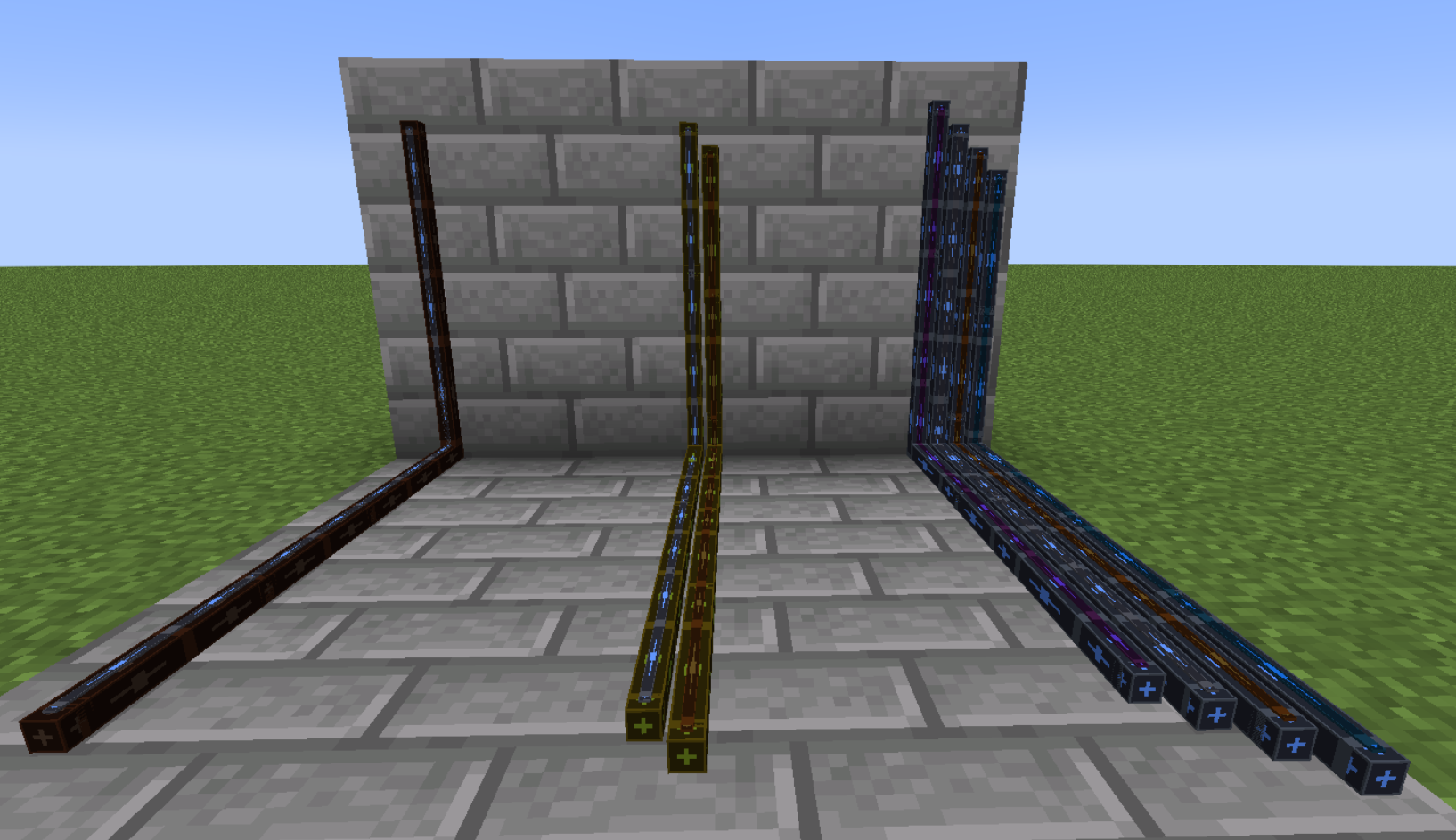
可扩展的存储
驱动器需放入 NAS 中,驱动器的等级决定了其容量:
- 16k 物品 / 64 种类型
- 64k 物品 / 64 种类型
- 256k 物品 / 128 种类型
- 1M 物品 / 256 种类型
每个 NAS 拥有六个驱动器插槽,单个单元最多可容纳 1,536 种不同的物品类型。Terminal(终端) 随后会显示整个池的内容,支持搜索,无论物品实际存储在哪个驱动器中。
物品的进出
Network Port(网络端口) 负责在网络和你的机械装置之间进行繁重的工作。它可以与以下设备通信:
- Create 的 Packagers(打包机)/ Frogports(青蛙口)
- Funnels(漏斗)
- Chutes(滑槽)
- Hoppers(漏斗)
因此,从农场向网络输送物品,或将网络中的物品卸载到机器中,只需将正确的方块对准端口即可。
自动合成
Computer(计算机) 直接从 Terminal(终端)处理合成请求。它使用 Create 的应力值(SU)运行,并通过升级扩展其能力:
- Base(基础版) – 仅支持直接合成。
- AI-Chip(AI 芯片) – 递归合成:请求最终物品,它将自动计算出整个合成树。
- Process upgrades(工艺升级) – 将其连接到 Create 的机械设备,以进行熔炼、部署、混合、研磨、破碎、压制、清洗和闹鬼处理。
连接网络
在两个子网之间放置一个 Gateway(网关),它们就可以相互看到——存储在一个网络中的任何内容都可以从其链接的任何其他网络中访问。构建小型、整洁的子网,并按你喜欢的方式将它们缝合在一起。
监控状态
Network Monitor(网络监视器) 是一个仅限创造模式的方块(类似于管理工具,而非生存装备),它可以一目了然地列出每个网络中的所有物品。这对服务器所有者和调试建筑非常有用。
可选:JEI 集成
如果你安装了 JEI,Terminal(终端)与其配合良好:
- 对任何物品按 R / U 可查看配方和用途查找。
- 搜索栏双向同步。
- 从 JEI 拖拽物品到 Terminal(终端)以将其加入自动合成队列。
没有安装 JEI?没问题——这是完全可选的,即使没有 JEI,模组也能正常运行。
需求
- Minecraft 1.21.1 (NeoForge)
- Create 6.0.10+
- JEI – 可选
An independent Create addon. Not affiliated with the Create team.
Create: Frogport Networks
Ever wished your items could just know where to go, instead of riding a kilometer of belts to get there? That's the itch this addon scratches.
Frogport Networks brings IP-style networking to Create. You lay cables, hand out addresses, split things into subnets, and move items around your base like packets on a real network. Under the hood it's built on Create's own logistics — Frogports, packagers, funnels and chutes all plug straight in — so it feels like part of the machine rather than a bolt-on.
⚠️ Still in development. Everything here works, but expect rough edges and the odd change between versions. Bug reports and ideas are genuinely welcome.
The blocks
- Router – defines the subnet for everything wired to it. Needs rotational power to run.
- NAS – your storage. Slot in drives and it pools them into one big inventory.
- Terminal – your window into the network: see and pull every drive at once.
- Network Port – the in/out plug for the physical world.
- Gateway – bridges separate subnets so they can share storage.
- Computer – the autocrafting brain.
- Network Monitor – an admin/creative overview of everything on every network.
Cables come in three flavours
Reach and throughput are tied to the cable, so there's a real reason to upgrade your backbone:
| Cable |
Reach |
Throughput |
| Copper |
16 blocks |
64 items/s |
| Gold |
32 blocks |
128 items/s |
| Fiber |
64 blocks |
256 items/s |
Each cable block can carry up to four colored strands, and there are 16 colors — every color is its own separate subnet, so you can run completely independent networks through the same wall without them ever touching.
Storage that scales
Drives go into the NAS, and the tier of the drive decides how much it holds:
- 16k items / 64 types
- 64k items / 64 types
- 256k items / 128 types
- 1M items / 256 types
With six drive bays per NAS that's up to 1,536 different item types in a single unit. The Terminal then shows you the whole pool, searchable, no matter which drive things actually live on.
Getting items in and out
The Network Port does the heavy lifting between the network and your contraptions. It talks to:
- Create Packagers / Frogports
- Funnels
- Chutes
- Hoppers
So feeding a network from a farm — or unloading one into a machine — is just a matter of pointing the right block at a port.
Autocrafting
The Computer handles crafting requests straight from a Terminal. It runs on Create's stress (SU), and you grow its abilities with upgrades:
- Base – direct crafting only.
- AI-Chip – recursive crafting: ask for the final item and it figures out the whole tree.
- Process upgrades – hook it up to Create machinery for Smelting, Deploying, Mixing, Milling, Crushing, Pressing, Washing and Haunting.
Connecting networks
Drop a Gateway between two subnets and they can see each other — anything stored in one network becomes reachable from any other network it's linked to. Build small, tidy subnets and stitch them together however you like.
Keeping an eye on things
The Network Monitor is a creative-only block (think admin tool, not survival gear) that lists every item across every network at a glance. Handy for server owners and for debugging a build.
Optional: JEI integration
If you have JEI installed, the Terminal plays nicely with it:
- R / U on any item for recipe and usage lookup.
- The search bars stay in sync both ways.
- Drag an item from JEI onto the Terminal to queue it for autocrafting.
No JEI? No problem — it's entirely optional and the mod runs fine without it.
Requirements
- Minecraft 1.21.1 (NeoForge)
- Create 6.0.10+
- JEI – optional
An independent Create addon. Not affiliated with the Create team.


 模组

 模组

 模组
 模组

 模组
 模组
评论 0
登录后参与评分
还没有评论,来抢沙发吧