
FTB Filter System
概述
FTB Filter System(简称 FFS)是一款功能强大的物品过滤模组,拥有友好的图形界面编辑功能。它本身的功能并不多,但旨在供其他需要过滤物品的模组使用;特别是 FTB Quests,不过它也提供了 API 供任何模组调用。
使用 FFS
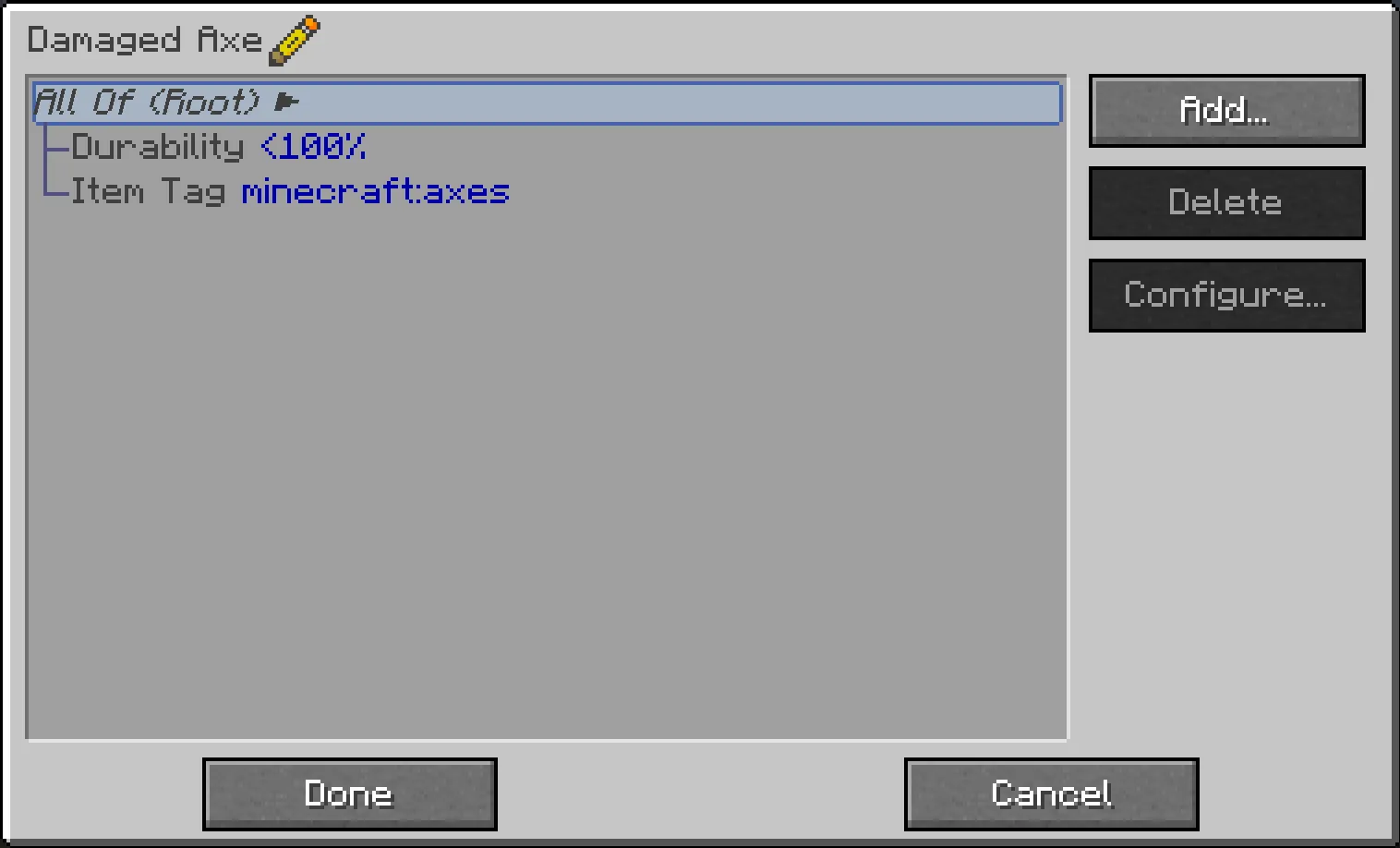
FFS 添加了一个单一物品,即 智能过滤器(Smart Filter)。所有配置均通过该物品完成,只需右键点击即可。这将打开一个图形界面,列表中初始仅包含一个“根”(Root)元素,右侧有“添加”、“删除”和“配置”按钮:
- 点击“添加…”以弹出可用子过滤器的列表,您可以从中添加。
- 列表左侧是 复合(compound)过滤器,可以向其中添加更多过滤器作为子级,从而形成过滤器层级结构。
- 右侧(可能分为多列)是 基础(basic)过滤器,用于对物品进行实际匹配。
- 所有过滤器按钮都有工具提示,简要说明其作用(通常一目了然)
- 点击“删除”以删除当前选中的过滤器。
- 删除复合过滤器也会同时删除其所有子级
- 点击“配置…”以弹出另一个屏幕,允许配置当前选中的过滤器
- 并非所有过滤器都可配置;复合过滤器没有任何配置选项,部分基础过滤器也没有
- 您也可以双击列表中的任意过滤器以打开其配置界面
底部有“完成”和“取消”按钮:
- 点击“完成”以保存您对过滤器所做的任何更改
- 点击“取消”(或按 Escape 键)以丢弃任何更改(系统将提示您确认是否丢弃未保存的更改)
其他技巧:
- 某些过滤器允许从 JEI 拖拽物品进行配置:物品过滤器、NBT 过滤器和模糊 NBT 过滤器,以及模组过滤器
- 可以在列表中拖拽过滤器以在过滤器层级中移动它们,需遵循以下规则:
- 根过滤器永远无法移动
- 过滤器只能拖放到复合过滤器上
- 复合过滤器只能拖放到与其同级或更高层级的过滤器上(将过滤器拖入其自身的子级中并不是一个理智的做法……)
- 您可以快速测试过滤器是否按预期匹配:
- 在主手持有已配置的过滤器,副手持有要测试的物品
- 然后潜行并右键点击过滤器,聊天栏将显示匹配成功或失败的响应
支持
- 关于整合包的问题,请访问此处:
- 关于模组的问题,请访问此处:
- 仅仅有问题想咨询?请查看我们的 Discord:
保持更新


FTB Filter System
Overview
FTB Filter System (aka FFS) is a powerful item filtering mod with friendly GUI editing. It doesn't do much on its own, but is intended to be used by other mods which need to filter items; FTB Quests in particular, but it offers an API which any mod can use.
Using FFS
FFS adds a single item, the Smart Filter. All configuration is done via this item, by simply right-clicking it. This opens a GUI, with a list which initially contains just a "Root" element, and "Add" / "Delete" / "Configure" buttons on the right:
- Click "Add…" to pop up a list of available subfilters which you can add.
- On the left side of the list are compound filters, to which more filters can be added as children, forming a filter hierarchy.
- On the right side (in possibly multiple columns) are basic filters, which do actual matching against items.
- All the filter buttons have a tooltip with a brief explanation of what they do (should be obvious in general)
- Click "Delete" to delete the currently-selected filter.
- Deleting a compound filter also deletes all its children
- Click "Configure…" to pop up another screen allowing the currently-selected filter to be configured
- Not all filters can be configured; compound filters don't have any configuration, and some basic filters don't either
- You can also double-click any filter in the list to open its configuration screen
At the bottom are "Done" and "Cancel" buttons:
- Click "Done" to save any changes you've made to the filter
- Click "Cancel" (or press Escape) to discard any changes (you will be prompted to confirm discarding unsaved changes)
Other tips and tricks:
- Some filters allow dragging of items from JEI to configure them: the Item Filter, the NBT and Fuzzy NBT filters, and the Mod filter
- Filters can be dragged in the list to move them around in the filter hierarchy, subject to the following rules:
- The Root filter can never be moved
- Filters can only be dragged onto compound filters
- Compound filters can only be dragged onto filters at the same level or higher up in the hierarchy (dragging a filter into its own child isn't a very sane thing to do…)
- You can quickly test if a filter matches what it's supposed to:
- Hold the configured filter in your main hand, and the item to be tested in your offhand
- Then sneak-right-click the filter and you'll get a chat response indicating a match success or failure
Support
- For Modpack issues, please go here:
- For Mod issues, please go here:
- Just got a question? Check out our Discord:
Keep up to date

下载 FTB Filter System
需要联机服务器吗?
稳定流畅、一键部署,几分钟即可和朋友联机开服
最低仅需 8 元/月 即可畅快联机
下载 FTB Filter System
需要联机服务器吗?
稳定流畅、一键部署,几分钟即可和朋友联机开服
最低仅需 8 元/月 即可畅快联机
下载 FTB Filter System
需要联机服务器吗?
稳定流畅、一键部署,几分钟即可和朋友联机开服
最低仅需 8 元/月 即可畅快联机
下载 FTB Filter System
需要联机服务器吗?
稳定流畅、一键部署,几分钟即可和朋友联机开服
最低仅需 8 元/月 即可畅快联机
下载 FTB Filter System
需要联机服务器吗?
稳定流畅、一键部署,几分钟即可和朋友联机开服
最低仅需 8 元/月 即可畅快联机
下载 FTB Filter System
需要联机服务器吗?
稳定流畅、一键部署,几分钟即可和朋友联机开服
最低仅需 8 元/月 即可畅快联机
下载 FTB Filter System
需要联机服务器吗?
稳定流畅、一键部署,几分钟即可和朋友联机开服
最低仅需 8 元/月 即可畅快联机
下载 FTB Filter System
需要联机服务器吗?
稳定流畅、一键部署,几分钟即可和朋友联机开服
最低仅需 8 元/月 即可畅快联机
下载 FTB Filter System
需要联机服务器吗?
稳定流畅、一键部署,几分钟即可和朋友联机开服
最低仅需 8 元/月 即可畅快联机
下载 FTB Filter System
需要联机服务器吗?
稳定流畅、一键部署,几分钟即可和朋友联机开服
最低仅需 8 元/月 即可畅快联机
[26.1.2.2]
修复
- 修复了
FTBFilterSystemEvent.CustomFilter#getOutcome()在 NeoForge 上错误地返回null的问题
支持
如果您在使用此模组时遇到任何问题,请在我们的 问题追踪器 上报告。
关于这个资源的讨论、问题反馈与使用心得
还没有讨论,来发第一帖吧
你是这个资源的作者?登录后可认领此资源。
相似资源
 模组

一个用于收集生物掉落物的多区块模组。
 模组

显示你正在注视的方块的信息。(适用于 Minecraft 1.16+ 的 Hwyla/Waila 分支)
 模组
使用 JavaScript 编辑配方、添加自定义物品、编写世界事件!
 模组

查看物品与配方
 模组
在游戏画面角落显示附近世界地形、玩家、生物和实体的地图。可创建路径点,帮助你找到标记过的位置。
 模组
AE2:一款流行的自动化与存储模组
评论 0
登录后参与评分
还没有评论,来抢沙发吧