
Gamma Shifter
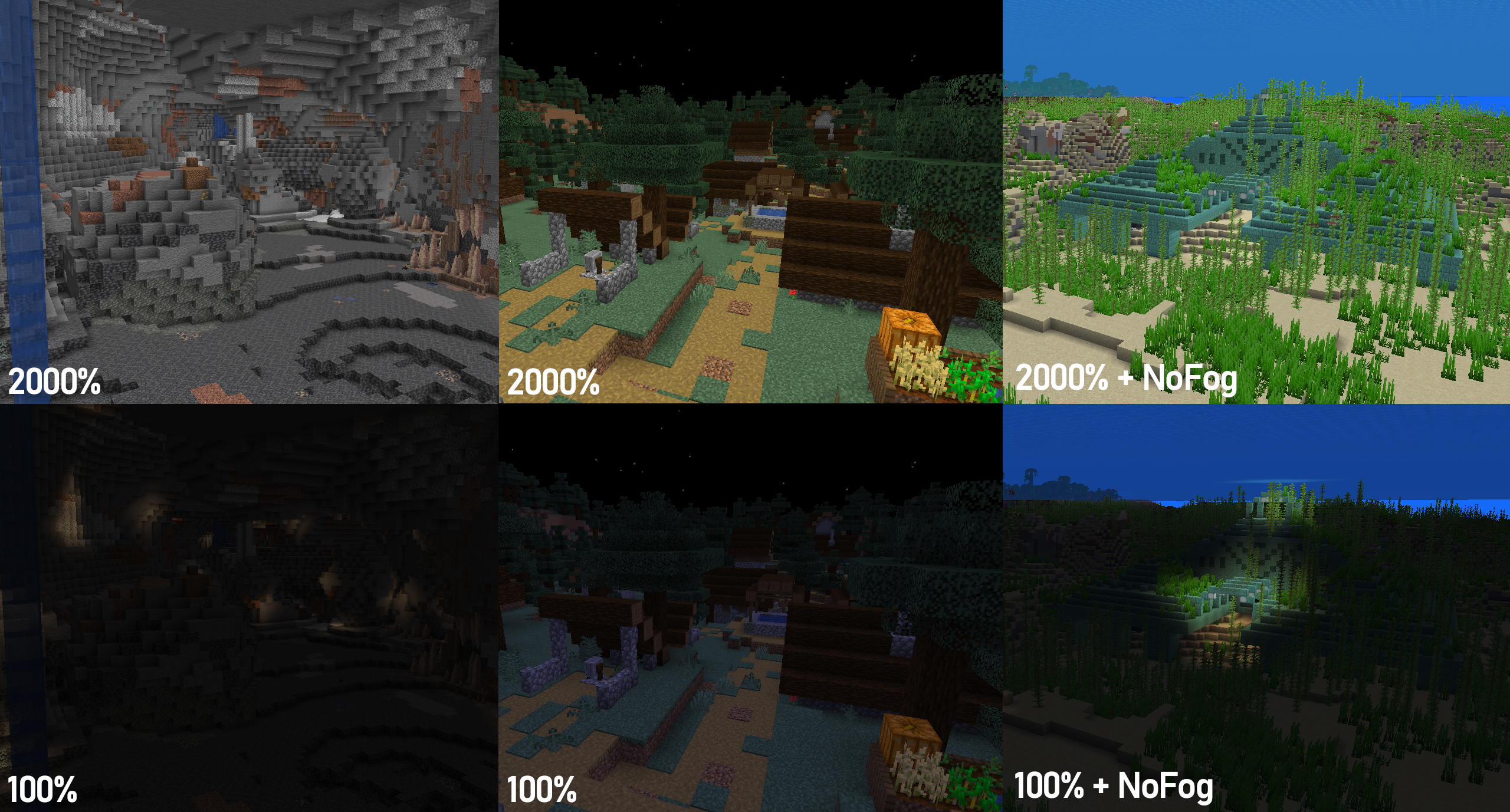
Gamma Shifter 是一款适用于 1.19+ 版本的完全可自定义的全亮工具模组,允许你将亮度提升至远超默认最大值,让你从此不再受看不清的困扰!自动夜间模式会在黎明和黄昏时自动调高或调低伽马值,而快捷键和 HUD(平视显示器)功能则让你无需进入菜单即可更改设置。支持 Mod Menu,几乎所有模组行为都可以按照你的喜好进行自定义!
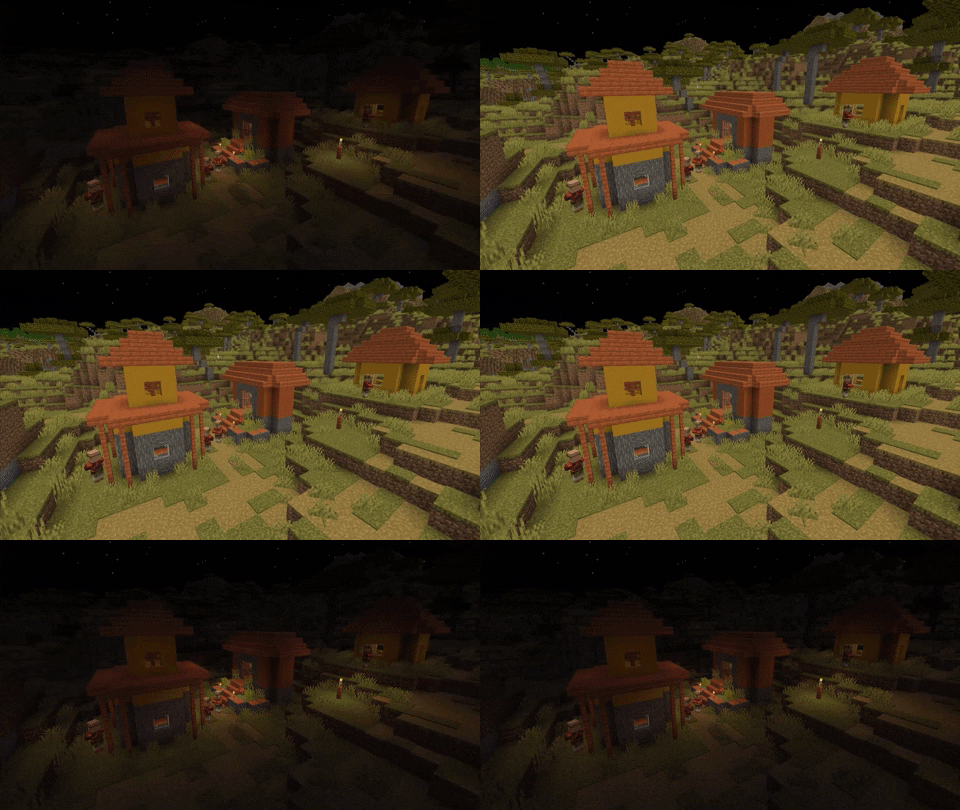
使用方法
以下部分描述的是最新稳定版的功能。旧版本或测试版可能不支持所有功能或按键绑定。点击“查看”按钮以展开相应章节。
默认按键绑定
查看
切换伽马效果
按键绑定:G
设置最大伽马值 (2000%)
按键绑定:]
设置为原版最大伽马值 (100%)
按键绑定:[
降低伽马值(默认为每次 25%)
按键绑定:-
提高伽马值(默认为每次 25%)
按键绑定:=
预设方案 1(默认为 500%)
按键绑定:;
预设方案 2(默认为 1000%)
按键绑定:'
显示当前伽马值
按键绑定:m
菜单/配置设置
菜单设置可通过 ModMenu 获得(见下方依赖项)。
查看
常规
启用模组效果
开启或关闭模组效果。当模组被禁用时,无法更改自定义伽马值。
自定义伽马值 (%)
设置当前的伽马值
每次输入变化的伽马量 (%)
设置按下增加/减少伽马键时伽马值的改变量
始终启用
决定模组是否始终处于启用状态,还是继承游戏上次关闭时的状态
吸附到变化步长
决定是否将伽马值的变化吸附到当前“每次变化量”的最近倍数
始终保存自定义伽马值
决定是否无论模组是否启用,都将自定义伽马值(>=100%)保存到 options.txt 中
强制执行最大/最小伽马值
决定是否将伽马值限制在 Gamma Shifter 的最大/最小值范围内(0% - 2000%)
黑暗效果期间禁用
当应用“黑暗”效果时暂时禁用伽马效果,以减少视觉异常现象
HUD(平视显示器)
启用静默模式
禁用所有 HUD 元素
显示快捷栏消息
在通过按键更改伽马值时启用或禁用快捷栏消息提示。
显示当前伽马值覆盖层
在屏幕角落始终显示伽马值
HUD 文本颜色
为 HUD 元素中的文本设置自定义颜色
HUD 位置
设置持久化覆盖层所在的屏幕角落
自动夜间模式
启用自动夜间模式
在黄昏和黎明时自动增加和减少伽马值
夜间模式伽马值
夜间模式开启时设置的伽马值
预设方案
预设方案 1 (%)
一个用于立即设置特定伽马值的预设方案
预设方案 2 (%)
一个用于立即设置特定伽马值的预设方案
依赖项
必需:
Fabric
Fabric API
或
QuiltMC
Quilted Fabric API + Quilt Standard Library
可选(用于 ModMenu 支持):
ModMenu
Cloth Config API
ModMenu 和 Cloth Config API 是可选的,但没有它们将无法使用任何菜单功能。不过,在这种情况下,仍然可以手动编辑配置文件(.minecraft\config\gamma_shifter.properties)。
其他说明
为了获得上图所示的水下能见度,建议将此模组与 NoFog 配合使用。
Gamma Shifter
Gamma Shifter is a fully customizable fullbright utility mod for 1.19+ that allows you to raise the brightness well above the maximum default level so you'll never struggle to see again! Auto Night Mode automatically raises and lowers the gamma at dawn and dusk, and hotkeys and HUD lets you change your settings without needing to use the menu. With Mod Menu support, almost all mod behaviour can be customized to your liking!
How to Use
The following section describes the latest stable release version. Older versions or betas may not support all features or keybinds. Click the 'View' buttons to view a section.
Default Keybinds
View
Toggle gamma effects
Keybind: G
Set max gamma (2000%)
Keybind: ]
Set vanilla max gamma (100%)
Keybind: [
Decrease gamma (25% by default)
Keybind: -
Increase gamma (25% by default)
Keybind: =
Preset 1 (500% by default)
Keybind: ;
Preset 2 (1000% by default)
Keybind: '
Show current gamma
Keybind: m
Menu/Config settings
Menu settings are available through ModMenu (see Dependencies below).
View
General
Enable mod effects
Toggles mod effects on/off. The custom gamma cannot be changed when the mod is toggled off.
Custom gamma (%)
Sets the current gamma
Gamma change per input (%)
Sets the amount that the gamma value changes by when the increase/decrease gamma key is pressed
Always start enabled
Whether the mod will always start enabled or if it starts in the state the game previously closed in
Snap to change per input
Whether gamma changes will snap to the nearest multiple of the current change-per-input
Always save custom gamma
Whether the custom gamma (>=100%) will always be saved to options.txt, regardless of if the mod is enabled
Enforce maximum/minimum gamma
Whether gamma values are clamped to Gamma Shifter's max/min values (0% - 2000%)
Disable during Darkness effect
Temporarily disables gamma effects when the Darkness effect is applied to reduce visual anomalies
HUD
Enable Silent Mode
Disables all HUD elements
Show hotbar message
Enables/disables hotbar message when the gamma is changed by a keypress.
Display current gamma overlay
Shows the gamma at all times in the corner of the screen
HUD text colour
Sets a custom colour for the text in HUD elements
HUD location
Sets the corner of the screen that the persistent overlay is in
Auto Night Mode
Enable Auto Night Mode
Automatically increases and decreases gamma at dusk and dawn
Night Mode Gamma
The gamma will be set when Night Mode turns on
Presets
Preset 1 (%)
A preset to immediately set a specific gamma value
Preset 2 (%)
A preset to immediately set a specific gamma value
Dependencies
Required:
Fabric
Fabric API
or
QuiltMC
Quilted Fabric API + Quilt Standard Library
Optional (for ModMenu support):
ModMenu
Cloth Config API
ModMenu and Cloth Config API are optional, but all menu features will be unavailable without them. However, in this case the configuration file (.minecraft\config\gamma_shifter.properties) can still be edited manually.
Other notes
To get the underwater visibility shown in the above image, I suggest using this mod alongside NoFog.

下载 Gamma Shifter - FullBright & Auto Night
需要联机服务器吗?
稳定流畅、一键部署,几分钟即可和朋友联机开服
最低仅需 8 元/月 即可畅快联机
下载 Gamma Shifter - FullBright & Auto Night
需要联机服务器吗?
稳定流畅、一键部署,几分钟即可和朋友联机开服
最低仅需 8 元/月 即可畅快联机
下载 Gamma Shifter - FullBright & Auto Night
需要联机服务器吗?
稳定流畅、一键部署,几分钟即可和朋友联机开服
最低仅需 8 元/月 即可畅快联机
下载 Gamma Shifter - FullBright & Auto Night
需要联机服务器吗?
稳定流畅、一键部署,几分钟即可和朋友联机开服
最低仅需 8 元/月 即可畅快联机
下载 Gamma Shifter - FullBright & Auto Night
下载 Gamma Shifter - FullBright & Auto Night
需要联机服务器吗?
稳定流畅、一键部署,几分钟即可和朋友联机开服
最低仅需 8 元/月 即可畅快联机
下载 Gamma Shifter - FullBright & Auto Night
需要联机服务器吗?
稳定流畅、一键部署,几分钟即可和朋友联机开服
最低仅需 8 元/月 即可畅快联机
下载 Gamma Shifter - FullBright & Auto Night
需要联机服务器吗?
稳定流畅、一键部署,几分钟即可和朋友联机开服
最低仅需 8 元/月 即可畅快联机
下载 Gamma Shifter - FullBright & Auto Night
需要联机服务器吗?
稳定流畅、一键部署,几分钟即可和朋友联机开服
最低仅需 8 元/月 即可畅快联机
下载 Gamma Shifter - FullBright & Auto Night
Gamma Shifter 1.0.4
修复/更改
- AutoNight(自动夜间模式)在度过一夜后现在会禁用
- 修复了 ModMenu 中做出的更改有时未保存的 bug
关于这个资源的讨论、问题反馈与使用心得
还没有讨论,来发第一帖吧
你是这个资源的作者?登录后可认领此资源。
相似资源
 模组

显示你正在注视的方块的信息。(适用于 Minecraft 1.16+ 的 Hwyla/Waila 分支)
 模组
在游戏画面角落显示附近世界地形、玩家、生物和实体的地图。可创建路径点,帮助你找到标记过的位置。
 模组

查看物品与配方
 模组
使用 JavaScript 编辑配方、添加自定义物品、编写世界事件!
 模组
AE2:一款流行的自动化与存储模组
 模组
那是什么?一个 Waila/Hwyla 的分支。
评论 0
登录后参与评分
还没有评论,来抢沙发吧