
Gamma Utils
这是一个完全可配置且仅作用于客户端的伽马值调整模组,让你更容易在黑暗中看清事物。
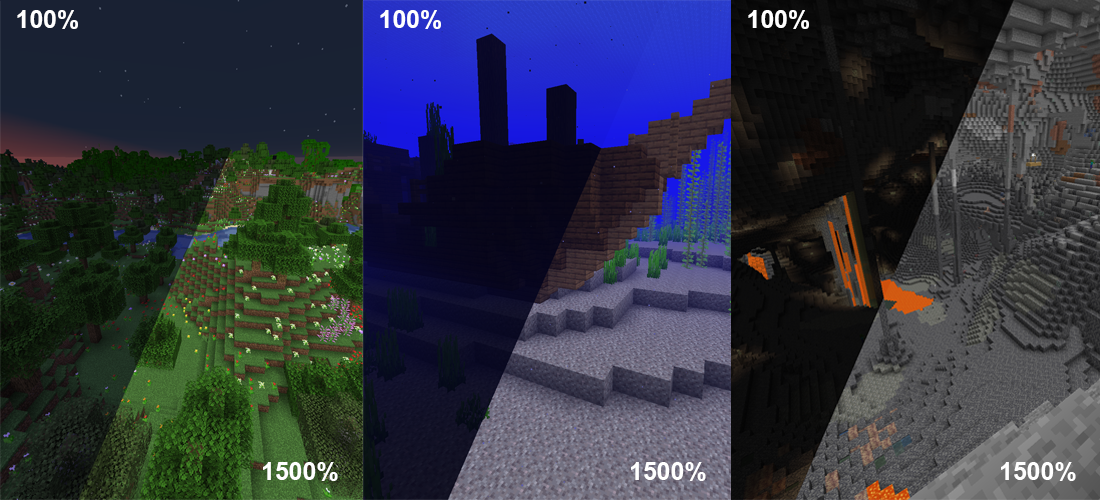
这是一个非常基础的模组,允许你将游戏内的伽马值调整到远超游戏内亮度设置所能达到的程度。夜晚会看起来像白天一样明亮,洞穴也会看起来像是完全被照亮了。
本质上就是适用于 Fabric 和 NeoForge 的「全亮模式」(Fullbright)。
按 G 键在 100% 和 1500% 伽马值之间切换
按 H 键开启或关闭客户端夜视效果
与伽马值相比,此功能配合光影使用效果更好
完全可调,随心定制
要查看所有可执行的操作和调整选项,请展开下方的功能与配置折叠块。
这里有一些可能实现的示例:
BlackNinja745 制作的模组概览视频
切换夜视效果
高伽马值无法与光影配合使用,
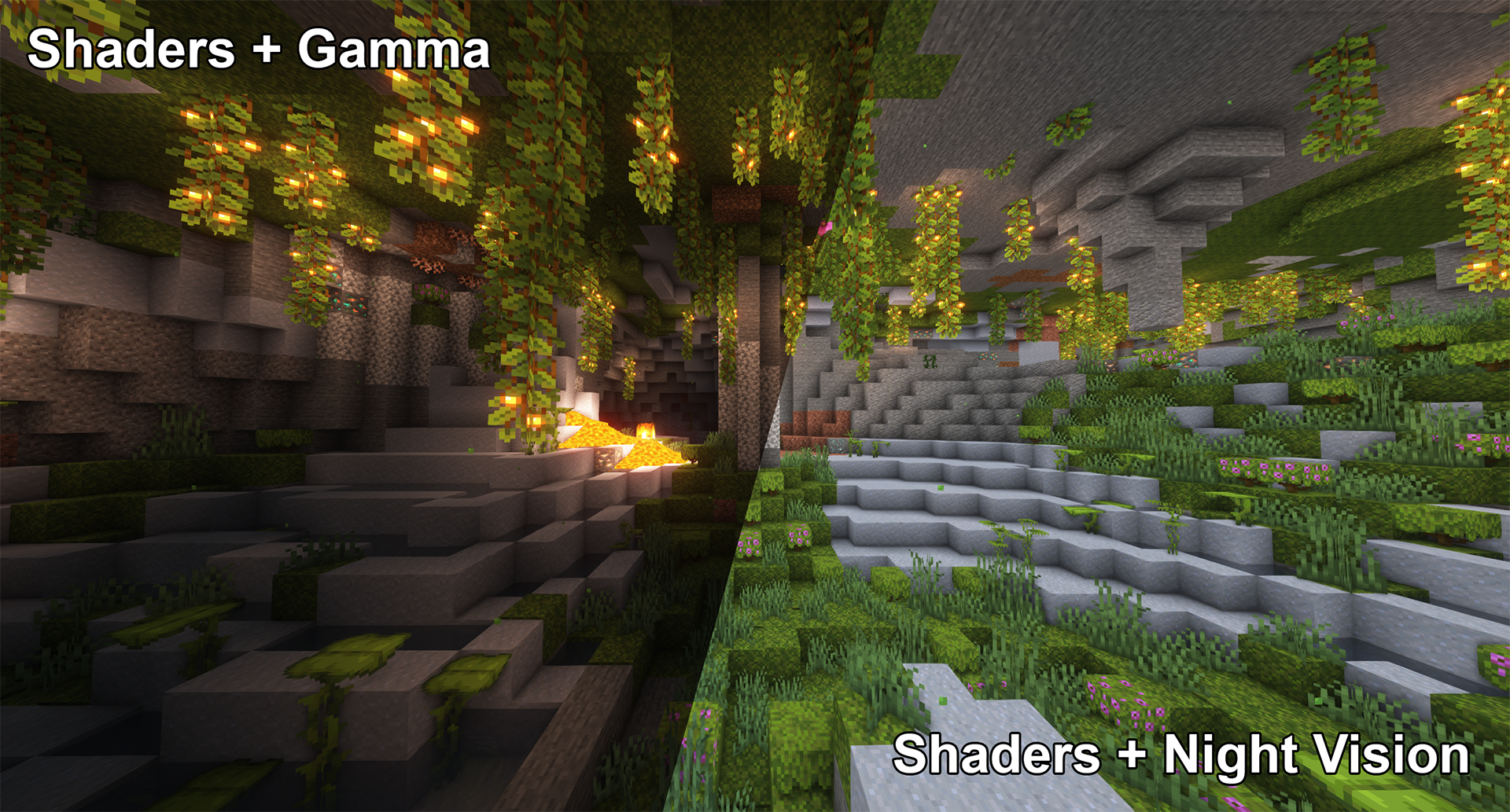
然而,夜视效果至少可以兼容部分光影:
平滑过渡
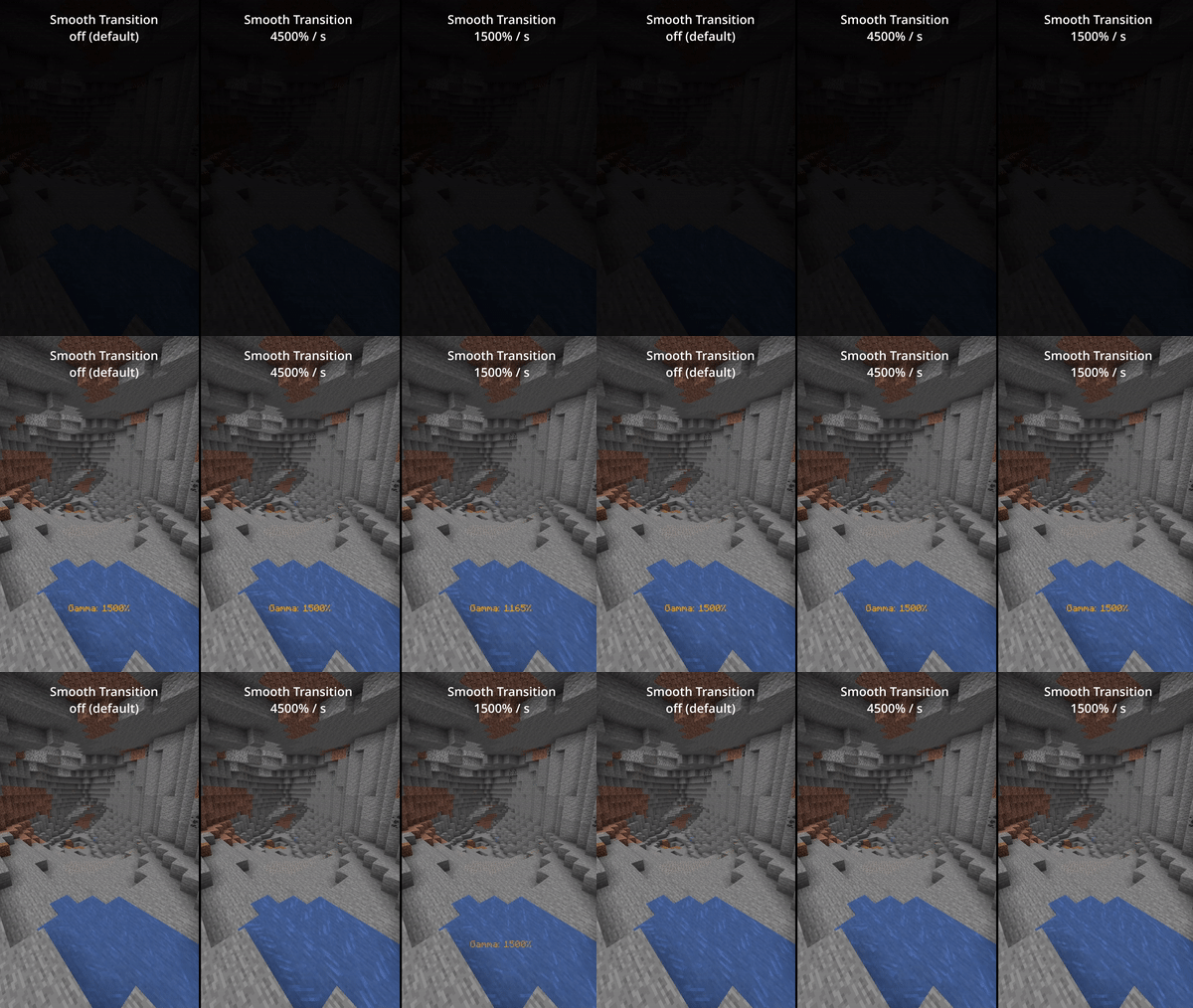
启用平滑过渡(默认关闭),在切换伽马值时减少突兀感:
状态效果提示
启用完全客户端侧的状态效果提示(默认关闭)
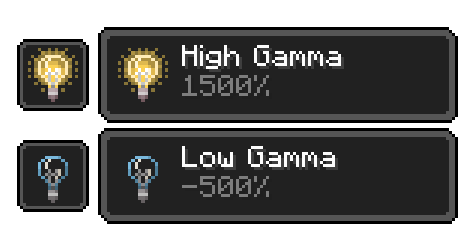
用于提醒你当前已启用了非正常范围的伽马值:
所有功能
所有功能和命令
切换伽马值
用法:按键绑定(默认:G) 或 /gamma toggle
在默认伽马百分比和配置的切换后伽马百分比之间切换。
增加伽马值
用法:按键绑定(默认:上箭头) 或 /gamma increase <value>(数值可选)
按照配置的步长百分比或给定值增加伽马百分比。
减少伽马值
用法:按键绑定(默认:下箭头) 或 /gamma decrease <value>(数值可选)
按照配置的步长百分比或给定值减少伽马百分比。
设置伽马值
用法:/gamma set <value>
将伽马值设置为特定百分比。
最小伽马值
用法:按键绑定 或 /gamma min
将伽马值设置为配置的最小限制。
最大伽马值
用法:按键绑定 或 /gamma max
将伽马值设置为配置的最大限制。
切换夜视效果
用法:按键绑定(默认:H) 或 /gamma nightvision
开启或关闭夜视效果。
配置(文件 / 模组菜单)
所有配置选项
默认伽马百分比
默认:100%
模组关闭时的伽马百分比。
切换后的伽马百分比
默认:1500%
模组开启时的伽马百分比。
记住切换值
默认:false
启用此项将使切换值记住你上次使用的非默认值。
平滑过渡
默认:false
使切换伽马值时的过渡更加平滑。
过渡速度
默认:4500
每秒变化的伽马百分比数值。
显示状态效果
默认:false
当伽马百分比超出正常范围时,显示客户端状态效果提示。
(低于 0% 显示“低伽马”,高于 100% 显示“高伽马”)
限制检查
默认:true
模组是否强制执行最小和最大伽马限制。
最小伽马限制
默认:-750%
如果启用了“限制检查”,模组允许的最小伽马百分比。
最大伽马限制
默认:1500%
如果启用了“限制检查”,模组允许的最大伽马百分比。
伽马变化步长
默认:10%
每次增加或减少时的伽马百分比变化量。
显示伽马消息
默认:true
显示包含新伽马值的消息。
关闭时重置
默认:false
当 Minecraft 关闭时,将伽马值重置为默认值。
版本与依赖项
1.16 - 1.18
必需:
Fabric API (0.31.0 或更高版本)
可选:
Mod Menu(此模组允许你在游戏内编辑配置)
已内置/嵌入:
Cloth Config API(用于使配置功能正常工作)
1.14 - 1.15
必需:
Fabric API (0.14.0 或更高版本)
可选:
Mod Menu(此模组允许你在游戏内编辑配置)
已内置/嵌入:
Auto Config Updated API(用于使配置功能正常工作)
Cloth Config API(Auto Config 所需)
Gamma Utils
This is a fully configurable and client side gamma utility mod, making it much easier to see in the dark.
It's a really basic mod that allows you to change the gamma value in game way higher than the in game brightness setting allows. Nights will look like day and caves will look like they're fully lit up.
Basically Fullbright but for Fabric and NeoForge.
Press G to toggle between 100% and 1500% gamma
Press H to toggle client side Night Vision on or off
This works better in combination with shaders than gamma
Fully adjustable to your liking
To see everything that can be done and adjusted open the function and configuration spoilers below.
Here are some examples of what's possible though:
Mod overview video from BlackNinja745
Toggle Night Vision
High gamma won't work in combination with shaders,
however, night vision will work with at least some shaders:
Smooth Transition
Enable smooth transition (off by default) for a less intense transition when toggling gamma:
Status Effects
Enable fully client side status effects (off by default)
To keep you reminded that you've enabled gamma outside normal values:
All Functions
All functions and commands
Toggle Gamma
Usage: Keybind (default: G) or /gamma toggle
Toggle between the default gamma percentage and the configured toggled percentage.
Increase Gamma
Usage: Keybind (default: arrow up) or /gamma increase <value> (value is optional)
Increase the gamma percentage by the configured step percentage or the given value.
Decrease Gamma
Usage: Keybind (default: arrow down) or /gamma decrease <value> (value is optional)
Decrease the gamma percentage by the configured step percentage or the given value.
Set Gamma
Usage: /gamma set <value>
Set the gamma to a specific percentage.
Min Gamma
Usage: Keybind or /gamma min
Sets the gamma to the configured minimum limit.
Max Gamma
Usage: Keybind or /gamma max
Sets the gamma to the configured maximum limit.
Toggle Night Vision
Usage: Keybind (default: H) or /gamma nightvision
Toggle night vision on or off.
Configuration (File / Mod Menu)
All configuration options
Default Gamma Percentage
Default: 100%
Gamma percentage for when the mod is toggled off.
Toggled Gamma Percentage
Default: 1500%
Gamma percentage for when the mod is toggled on.
Update Toggle Value
Default: false
Enabling this will make the toggle value remember the last non default value you've used.
Smooth Transition
Default: false
Make the transition when toggling gamma smoother.
Transition Speed
Default: 4500
Speed in gamma percentage per second.
Show Status Effect
Default: false
Show a client side status effect when the gamma percentage is outside normal range.
("Low Gamma" below 0% and "High Gamma" above 100%)
Limit Check
Default: true
Should the mod enforce the minimum and maximum gamma limits.
Minimum Gamma Limit
Default: -750%
Minimum gamma percentage the mod will allow if the Limit Check is enabled.
Maximum Gamma Limit
Default: 1500%
Maximum gamma percentage the mod will allow if the Limit Check is enabled.
Gamma Percentage Step
Default: 10%
Gamma percentage change for every increase or decrease.
Show Gamma Message
Default: true
Show a message with the new gamma value.
Reset on Close
Default: false
Reset the gamma value to default when Minecraft closes.
Versions & Dependencies
1.19+
Required:
Fabric API
Cloth Config API (Is needed to make the config work)
Optional:
Mod Menu (This mod allows you to edit the configs in game)
1.16 - 1.18
Required:
Fabric API (0.31.0 or later)
Optional:
Mod Menu (This mod allows you to edit the configs in game)
Already included/embedded:
Cloth Config API (Is needed to make the config work)
1.14 - 1.15
Required:
Fabric API (0.14.0 or later)
Optional:
Mod Menu (This mod allows you to edit the configs in game)
Already included/embedded:
Auto Config Updated API (Is needed to make the config work)
Cloth Config API (Required for Auto Config)

下载 Gamma Utils (Fullbright)
下载 Gamma Utils (Fullbright)
下载 Gamma Utils (Fullbright)
下载 Gamma Utils (Fullbright)
下载 Gamma Utils (Fullbright)
需要联机服务器吗?
稳定流畅、一键部署,几分钟即可和朋友联机开服
最低仅需 8 元/月 即可畅快联机
下载 Gamma Utils (Fullbright)
需要联机服务器吗?
稳定流畅、一键部署,几分钟即可和朋友联机开服
最低仅需 8 元/月 即可畅快联机
下载 Gamma Utils (Fullbright)
下载 Gamma Utils (Fullbright)
下载 Gamma Utils (Fullbright)
下载 Gamma Utils (Fullbright)
- 修复复制夜视状态效果的错误
关于这个资源的讨论、问题反馈与使用心得
还没有讨论,来发第一帖吧
你是这个资源的作者?登录后可认领此资源。
相似资源
 模组

显示你正在注视的方块的信息。(适用于 Minecraft 1.16+ 的 Hwyla/Waila 分支)
 模组
使用 JavaScript 编辑配方、添加自定义物品、编写世界事件!
 模组

查看物品与配方
 模组
在游戏画面角落显示附近世界地形、玩家、生物和实体的地图。可创建路径点,帮助你找到标记过的位置。
 模组
AE2:一款流行的自动化与存储模组
 模组
添加区块认领和玩家组队功能,并与 Xaero's Minimap 和 World Map 集成
评论 0
登录后参与评分
还没有评论,来抢沙发吧