
基本功能
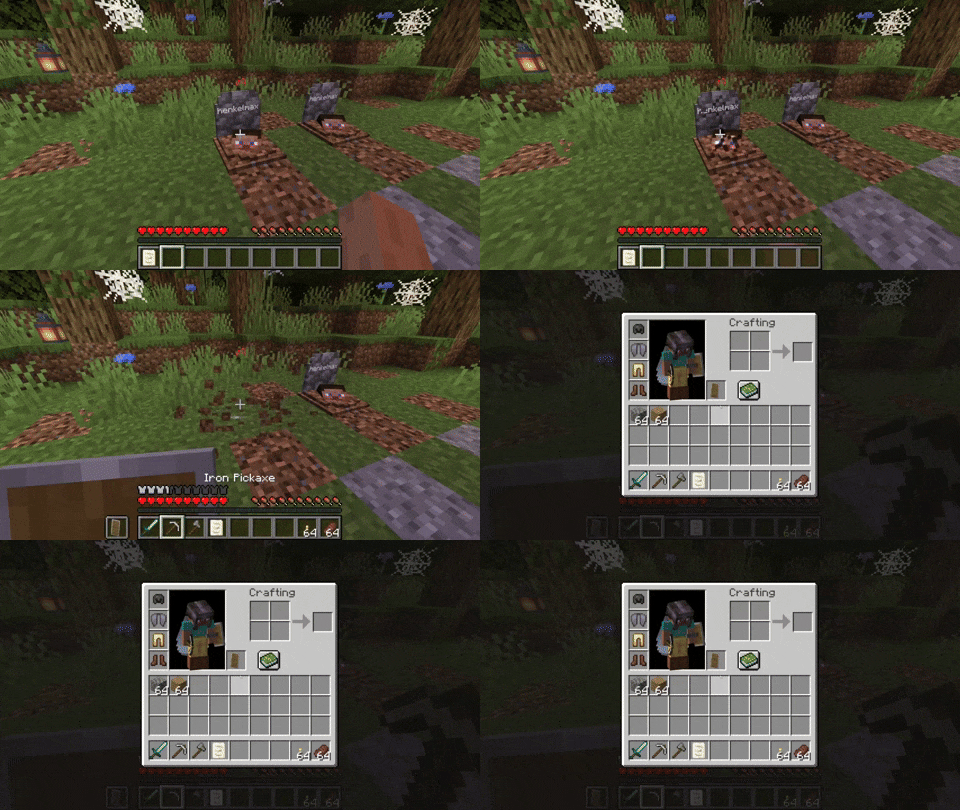
每次你死亡时,会在你的位置放置一个墓碑。 只需破坏墓碑即可取回你的物品。 还有一个配置选项,允许你在 1.16.3+ 版本中通过潜行靠近墓碑来取回物品。
右键点击墓碑会显示有关玩家死亡的信息。
排序(1.16.3+)
自版本 1.16.3-2.0.0 起,墓碑现在能够将你的物品放回其原始槽位中。
讣告
每次你死亡时都会生成一份讣告。如果你不想要这个功能,可以在配置中禁用它。
讣告包含以下内容:
- 玩家的名称
- 玩家死亡的维度
- 玩家死亡的日期
- 玩家死亡的坐标
- 玩家死亡时装备的图片
- 玩家死亡时所拥有的所有物品列表
如果你在取回物品后不想保留讣告,可以在配置中启用自动移除功能。
命名墓碑
如果使用精准采集破坏墓碑,你会获得一个墓碑物品。 你也可以制作墓碑。
在铁砧上为墓碑命名,允许你在墓碑上显示自定义文本。
自定义
你可以在配置中更改多项内容:
- 墓碑上文字的颜色
- 是否渲染墓碑上的头颅
- 是否在死亡时获取讣告
- 可以被墓碑替换的方块
- 破坏墓碑时是否从玩家背包中移除死亡笔记
- 是否只有墓碑的所有者才能破坏它
- 破坏墓碑时是否生成玩家的幽灵
- 幽灵是否友好并保护玩家,或者是否攻击玩家
- 潜行靠近墓碑时是否破坏墓碑
- 破坏墓碑时是否将物品排序回其原始槽位
恢复丢失的物品(1.16.3+)
如果以某种方式丢失了物品,你可以使用 recover 命令进行恢复。
语法为 /restore <player> <death_id> <replace|add>。
参数 player 是应恢复其背包的玩家。
参数 death_id 是死亡的 ID。你可以通过启用高级工具提示(F3 + H)并打开讣告来找到它。如果无法放置墓碑,死亡 ID 也会写入日志中。
最后一个参数定义你是要替换(覆盖)还是添加(仅将物品添加到玩家现有的背包中)玩家的背包。
作为管理员,你还可以通过在讣告上潜行并右键点击来获取预制的恢复命令。
边缘情况
如果你在方块内死亡,墓碑会放置在你位置上方的下一个空位处。如果你的上方没有空闲方块,或者你高于建筑高度限制,你的物品将像往常一样掉落。
如果你掉入虚空,墓碑会放置在世界中可以放置方块的最低点。如果没有空闲空间,它会放置在上方的下一个空闲位置。
Basic Functionality
Every time you die, a grave is placed at your position. To retrieve your items just break the grave. There is also a config option to get your items back by sneaking on the grave (1.16.3+ only).
When you right-click the grave it will show information regarding the death of the player.
Sorting (1.16.3+)
Since version 1.16.3-2.0.0 the grave is now able to store your items back into their original slots.
The Obituary
Everytime you die you get an obituary. If you don't want that you can disable it in the config.
It contains:
- The name of the player
- The dimension the player died in
- The date the player died
- The coordinates where the player died
- An image of the player with its equipment at the time of death
- A list of every item the player had when he died
If you don't want to keep the obituary after you recovered your items, you can enable the automatic removal in the config.
Naming the Grave
If you break the grave with silk touch, you get it dropped as an item. You can also craft graves.
Naming the grave in an anvil, allows you to have custom text displayed on your grave.
Customization
There are several things you can change in the configs:
- The color of the text on the grave
- If the skull on the grave should be rendered
- Whether you want to get the obituary on death
- The blocks that can get replaced by a grave
- If the death note should get removed form the players inventory when breaking a grave
- If only the owners of the grave should be able to break it
- If a ghost of the player should spawn when breaking the grave
- If the ghost should be friendly and defend the player or if it should attack the player
- If the grave should get broken when sneaking on the grave
- If the items should get sorted back into their original slots when breaking the grave
Recovering Lost Items (1.16.3+)
If you somehow lost your items you can recover them with the recover command.
The syntax is /restore <player> <death_id> <replace|add>.
The parameter player is the player whose inventory should get restored.
The parameter death_id is the ID of the death. You can find it out by enabling advanced tooltips (F3 + H) and opening the obituary. The death ID also gets written into the logs if a grave couldn't get placed.
The last parameter defines if you want to get the players inventory replaced (Overwritten) or added (Just adds the items to the players existing inventory).
You can also get a pre made restore command by sneaking and right-clicking the obituary as an admin.
Edge Cases
If you die inside a block, the grave is placed at the next empty space above your location. If there is no free block above your position, or you are above the build limit, your items drop as usual.
If you fall into the void, the grave is placed at the lowest point in the world where blocks can be placed. If there is no free space it will get placed at the next free spot above.

下载 GraveStone Mod
需要联机服务器吗?
稳定流畅、一键部署,几分钟即可和朋友联机开服
最低仅需 8 元/月 即可畅快联机
下载 GraveStone Mod
需要联机服务器吗?
稳定流畅、一键部署,几分钟即可和朋友联机开服
最低仅需 8 元/月 即可畅快联机
下载 GraveStone Mod
需要联机服务器吗?
稳定流畅、一键部署,几分钟即可和朋友联机开服
最低仅需 8 元/月 即可畅快联机
下载 GraveStone Mod
需要联机服务器吗?
稳定流畅、一键部署,几分钟即可和朋友联机开服
最低仅需 8 元/月 即可畅快联机
下载 GraveStone Mod
需要联机服务器吗?
稳定流畅、一键部署,几分钟即可和朋友联机开服
最低仅需 8 元/月 即可畅快联机
下载 GraveStone Mod
需要联机服务器吗?
稳定流畅、一键部署,几分钟即可和朋友联机开服
最低仅需 8 元/月 即可畅快联机
下载 GraveStone Mod
需要联机服务器吗?
稳定流畅、一键部署,几分钟即可和朋友联机开服
最低仅需 8 元/月 即可畅快联机
下载 GraveStone Mod
需要联机服务器吗?
稳定流畅、一键部署,几分钟即可和朋友联机开服
最低仅需 8 元/月 即可畅快联机
下载 GraveStone Mod
需要联机服务器吗?
稳定流畅、一键部署,几分钟即可和朋友联机开服
最低仅需 8 元/月 即可畅快联机
下载 GraveStone Mod
需要联机服务器吗?
稳定流畅、一键部署,几分钟即可和朋友联机开服
最低仅需 8 元/月 即可畅快联机
- 更新至最新 NeoForge 版本
关于这个资源的讨论、问题反馈与使用心得
还没有讨论,来发第一帖吧
你是这个资源的作者?登录后可认领此资源。
相似资源
 模组

一个用于收集生物掉落物的多区块模组。
 模组

显示你正在注视的方块的信息。(适用于 Minecraft 1.16+ 的 Hwyla/Waila 分支)
 模组
使用 JavaScript 编辑配方、添加自定义物品、编写世界事件!
 模组

查看物品与配方
 模组
在游戏画面角落显示附近世界地形、玩家、生物和实体的地图。可创建路径点,帮助你找到标记过的位置。
 模组
AE2:一款流行的自动化与存储模组
评论 0
登录后参与评分
还没有评论,来抢沙发吧