
Gravity Pads
一个简单的重力垫模组。
说明
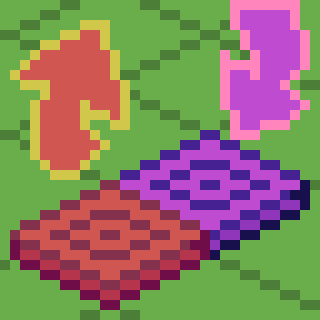
推动型重力垫(橙色)会将你的重力方向设置为该垫子所朝向的方向,而拉动型重力垫(紫色)会将你的重力方向设置为背离其朝向的方向(可以理解为“拉”)。
定向重力垫/方块允许你在放置时通过瞄准方块的边缘来选择重力的方向。瞄准方块中心放置会生成一个“朝向”定向垫/方块(以 + 号标识,重力方向朝向玩家)。潜行放置会反转你放置时的方向。在潜行状态下瞄准方块中心放置则会生成一个“背向”定向垫/方块(以 ◼ 方块标识,重力方向背离玩家)。你也可以使用扳手(可配置)通过右键点击的面作为旋转轴来旋转它。
该模组还包含防死锁机制。当你距离方块高度上限上方 64 格时(可配置),它会触发并将你的重力反转回正常状态(可配置)。
合成配方
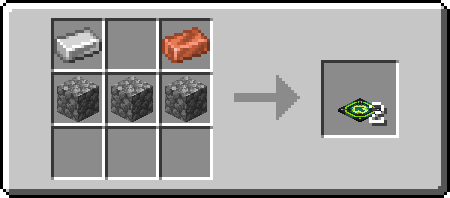
拉动型
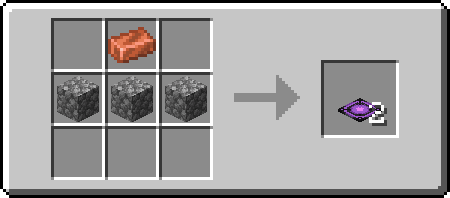
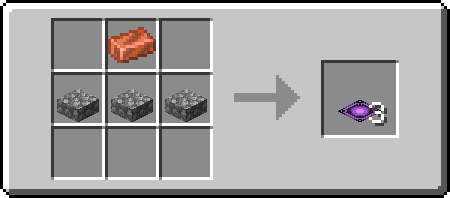
推动型
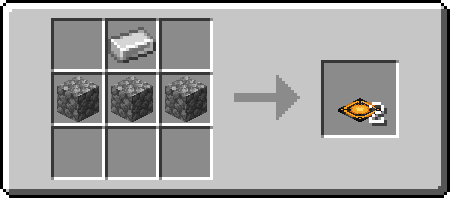
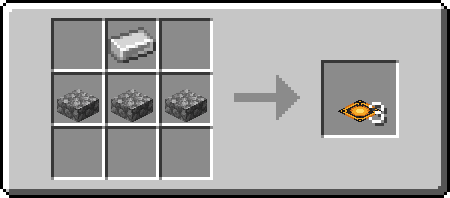
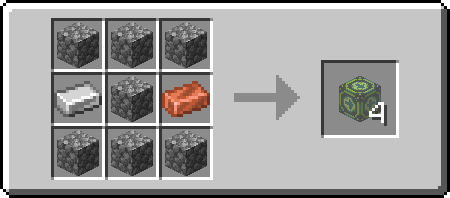
定向型
Gravity Pads
Just a simple Gravity Pad mod.
Explanation
Pushing Gravity Pads (Orange) sets your gravity to the direction it's facing, while Pulling Gravity Pads (Purple) sets your gravity to the direction its facing away from (Think of it as pulling).
Directional Gravity Pad/Block allow you to choose the direction that the gravity will go by targeting the edge of a block when placing. Targeting center of the block will place a "towards" directional pad/block (signified by the + sign, the gravity direction is towards to player). Sneak placing will invert the direction you are placing. Placing targeting the center of the block while sneaking will result in an "away" directional pad/block (signified by a ◼ square, the gravity direction is away from the player). You can also rotate it using a wrench (configurable) using the side you right click as rotation axis.
The mod also comes with anti-softlock. It triggers when you are 64 blocks above the block height limit (configurable) and will reverse your gravity back to normal (configurable).
Recipes
Pulling
Pushing
Directional
下载 Gravity Pads
下载 Gravity Pads
下载 Gravity Pads
下载 Gravity Pads
下载 Gravity Pads
下载 Gravity Pads
- 为 Directional 变体添加放置辅助覆盖层
- 修复方向型垫子与方块之间的纹理差异
- 当将任何重力垫掉落至地面时,不再穿模进入地面以下
关于这个资源的讨论、问题反馈与使用心得
还没有讨论,来发第一帖吧
你是这个资源的作者?登录后可认领此资源。
相似资源
 模组

显示你正在注视的方块的信息。(适用于 Minecraft 1.16+ 的 Hwyla/Waila 分支)
 模组
使用 JavaScript 编辑配方、添加自定义物品、编写世界事件!
 模组

查看物品与配方
 模组
在游戏画面角落显示附近世界地形、玩家、生物和实体的地图。可创建路径点,帮助你找到标记过的位置。
 模组
AE2:一款流行的自动化与存储模组
 模组
那是什么?一个 Waila/Hwyla 的分支。
评论 0
登录后参与评分
还没有评论,来抢沙发吧