
简介:本数据包用于修改游戏中弹射物的渲染逻辑。搭配“蓝晶”(Blue Crystal)数据包使用时效果更佳。
原理非常简单:通过测试实机上弹射物实际达到的最远渲染距离,从而确定最佳的清除距离。在 Minecraft 中,部分弹射物在超出一定距离后会在空中冻结以提升性能。虽然这确实能提升性能,但实际发现弹射物到达最远渲染距离后并不会自行消失。本数据包正是为填补这一空白而生:当弹射物或掉落在地上的物品超出玩家视野范围时,它们将被清除。
自 2.0.0 版本起,新增控制台功能,玩家可自定义清除时间。(Starting from 2.0.0, with the addition of the console, players can choose their own clearing time.)
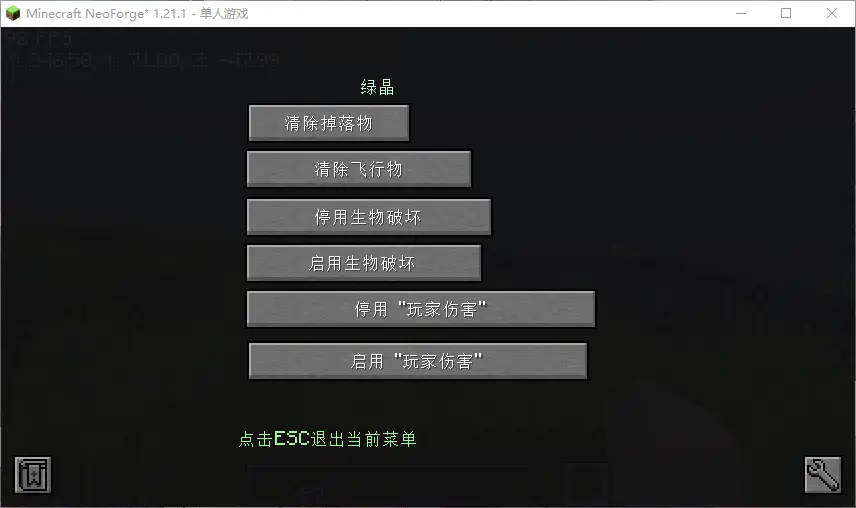
默认按键为 G 键,支持中文和英文版本。(The default key position is the G key, which is available in both Chinese and English versions.)
- 清除物品
- 清除弹射物
- 禁用
MobGriefing - 启用
MobGriefing - 禁用来自玩家的伤害
- 启用来自玩家的伤害
注:值得注意的是,若在多人模式下使用“绿晶”(Green Crystal),对于数据包版本,房主需在其他玩家进入世界后,在指令控制台输入 /reload 以启用;对于模组版本,其他玩家进入世界后,需在控制台中先关闭“来自玩家的伤害”,再重新开启以启用该功能。(ps:It is worth noting that if you want to use "Green Crystal" in multiplayer mode, the datapack version requires the host to enter reload on the command console after other players enter to enable it. The mod version requires other players to enter the world and turn off "damage from players" on the console before turning it back on to enable the modification function.)
Intro:This datapack is designed to modify the rendering logic of projectiles in the game. When paired with the "Blue Crystal" data package, it will be extra effective.
The principle is very simple: the best distance to clear the projectile is obtained by testing the actual maximum rendering distance reached by the projectile on the real machine. In Minecraft, some projectiles freeze in the air after a certain distance to enhance performance. Although this can indeed improve performance, it has been found that projectiles do not disappear on their own after reaching the farthest rendering distance. This datapack is designed to fill this gap, and projectiles and items dropped on the ground will be cleared after exceeding the player's field of view.
简介:本数据包针对游戏中的弹射物渲染逻辑进行修改。在搭配“蓝晶”数据包的时候会额外有效。 原理非常简单:实机测试弹射物的实际到达的最远渲染距离后得出的最佳清除弹射物的距离。我的世界中一些弹射物超出一定距离后会冻结在空中以提升性能。虽然这确实可以提升性能,但是实际发现弹射物到达最远渲染距离后并不会自行消失,而该数据包正是为填补这个空缺而生,弹射物以及掉落在地上的物品在超出玩家的视野距离后会被清除。
Starting from 2.0.0, with the addition of the console, players can choose their own clearing time.(自2.0.0开始,加入控制台,玩家可以自行选择清除的时间。)
The default key position is the G key, which is available in both Chinese and English versions.(默认键位是G键,有中文和英文版本。)
- clear items.
- clear projectiles
- disable MobGriefing
- enable MobGriefing
- disable damage from players
- enable damage from players
ps:It is worth noting that if you want to use "Green Crystal" in multiplayer mode, the datapack version requires the host to enter reload on the command console after other players enter to enable it. The mod version requires other players to enter the world and turn off "damage from players" on the console before turning it back on to enable the modification function.(值得注意的是,如果要在多人模式下使用“绿晶”,数据包版本需要房主在其他玩家进入后在指令台输入reload以启用,mod版本需要其他玩家进入世界后在控制台关闭“玩家伤害”后再次开启以启用改功能。)

下载 Green Crystal(绿晶)
下载 Green Crystal(绿晶)
下载 Green Crystal(绿晶)
下载 Green Crystal(绿晶)
下载 Green Crystal(绿晶)
下载 Green Crystal(绿晶)
下载 Green Crystal(绿晶)
暂无更新日志
关于这个资源的讨论、问题反馈与使用心得
还没有讨论,来发第一帖吧
你是这个资源的作者?登录后可认领此资源。
相似资源
 模组

显示你正在注视的方块的信息。(适用于 Minecraft 1.16+ 的 Hwyla/Waila 分支)
 模组
在游戏画面角落显示附近世界地形、玩家、生物和实体的地图。可创建路径点,帮助你找到标记过的位置。
 模组

查看物品与配方
 模组
使用 JavaScript 编辑配方、添加自定义物品、编写世界事件!
 模组
AE2:一款流行的自动化与存储模组
 模组
那是什么?一个 Waila/Hwyla 的分支。
评论 0
登录后参与评分
还没有评论,来抢沙发吧