
GuideME
本项目为你的模组或整合包指南书提供了基础架构。它基于驱动 Applied Energistics 2 指南书的技术,允许你用简单的 Markdown 编写指南,同时直接嵌入源自结构文件的 3D 场景。
对于玩家而言,基于 GuideME 的指南提供:
- 流畅的滚动体验
- 内容居中显示,配备高级文本布局引擎,支持重排和行内元素
- 带有标注的可交互 3D 场景,直观阐释你的模组概念
- 主题间的交叉链接及链接提示框中的快速信息
- 以“JEI 风格”在指南书中展示行内合成表
- 提供按住 G 键即可在任何物品提示框中快速跳转到相关指南页的功能
对于模组开发者,它提供了丰富的可扩展 API,允许你:
- 通过自定义 Widget 系统,向 Markdown 添加自定义的行内或块级标签
- 扩展渲染器以在指南中显示你的自定义合成表
- 使用自定义 Markdown 前置元数据(front-matter),轻松向指南页面添加任意信息
- 使用自定义索引,根据自定义属性快速查找页面
- 允许资源包或插件向你的指南添加其专属内容
示例
以下是 AE2 指南书中的一页示例(源码)。
---
navigation:
  parent: ae2-mechanics/ae2-mechanics-index.md
  title: Channels
  icon: controller
---

# Channels

Applied Energistics 2 的 [ME 网络](me-network-connections.md) 需要
[通道](../ae2-mechanics/devices.md)来支持使用网络化存储或其他网络
服务的[设备]。可以将通道想象成连接所有设备的 USB 线缆。一台电脑的 USB 端口数量有限,因此能连接的
设备也有限。大多数机器、整块设备(full-block devices)和标准线缆最多只能传输
8 个通道。你可以将整块设备和标准线缆视为由 8 根“通道线”组成的束。然而,[密集线缆](../items-blocks-machines/cables.md#dense-cable)最多可支持
32 个通道。唯一能传输 32 个通道的其他设备是 <ItemLink id="me_p2p_tunnel" />
和 [量子网络桥](../items-blocks-machines/quantum_bridge.md)。每当一个设备消耗一个通道时,想象一下从束中抽出一根 USB “线”,这显然意味着该“线”在线路下游不再可用。

<GameScene zoom="7" interactive={true}>
  <ImportStructure src="../assets/assemblies/channel_demonstration_1.snbt" />
</GameScene>
GuideME
This project offers the foundation for your mods or modpacks guidebook. Based on the technology powering Applied Energistics 2s guidebook, it allows you to write your guide in simple Markdown, while embedding 3d scenes straight from structure files.
For players, guides based on GuideME offer:
- Smooth scrolling goodness
- Content being front and center, with an advanced text layout engine supporting reflow and inline elements
- Interactive 3D scenes with annotations, intuitively illustrating concepts from your mod
- Cross-linking between topics and quick information in link tooltips
- Showing inline-recipes in your guidebook "JEI-Style"
- Offers the ability to "hold G" to quickly jump to the relevant guidebook page in any item tooltip
For modders, it offers a rich extensibility API, allowing you to:
- Add custom inline or block tags to Markdown, backed by a custom Widget system
- Extend the recipe rendering to display your custom recipes in the guide
- Use custom Markdown front-matter to easily add arbitrary information to guidebook pages
- Use custom indices to quickly find pages based on custom attributes
- Allow resource packs or addons to add their own content to your guide
Example
The following is an example page from the AE2 guidebook (source).
---
navigation:
  parent: ae2-mechanics/ae2-mechanics-index.md
  title: Channels
  icon: controller
---

# Channels

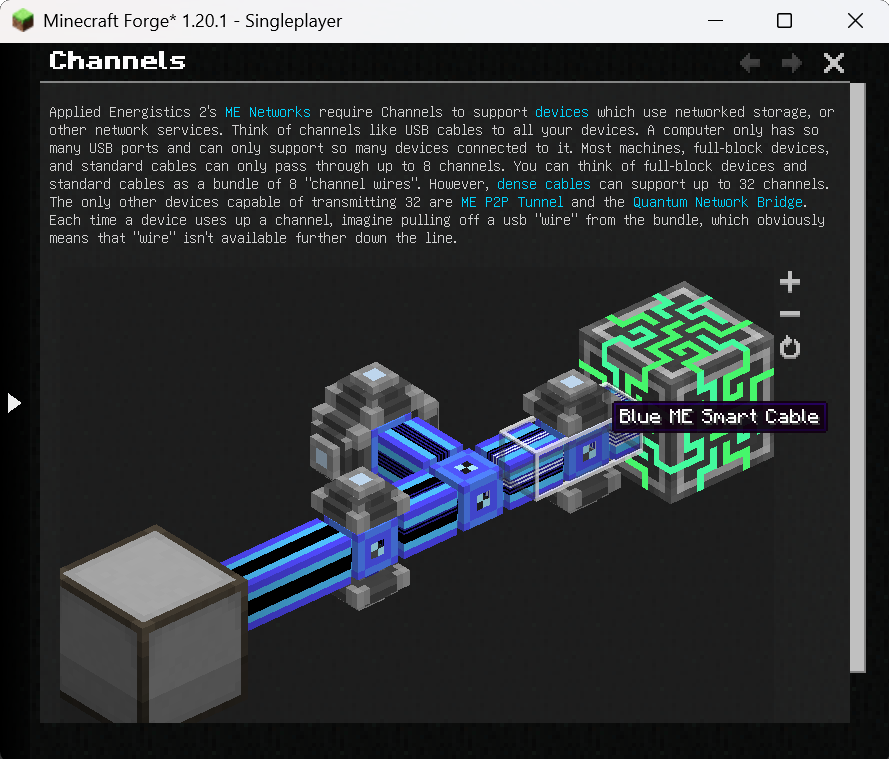
Applied Energistics 2's [ME Networks](me-network-connections.md) require
Channels to support [devices](../ae2-mechanics/devices.md) which use networked storage, or other network
services. Think of channels like USB cables to all your devices. A computer only has so many USB ports and can only support
so many devices connected to it. Most machines, full-block devices, and standard cables can only pass through
up to 8 channels. You can think of full-block devices and standard cables as a bundle of 8 "channel wires". However, [dense cables](../items-blocks-machines/cables.md#dense-cable) can support up
to 32 channels. The only other devices capable of transmitting 32 are <ItemLink id="me_p2p_tunnel" />
and the [Quantum Network Bridge](../items-blocks-machines/quantum_bridge.md). Each time a device uses up a channel, imagine pulling off a usb "wire" from
the bundle, which obviously means that "wire" isn't available further down the line.

<GameScene zoom="7" interactive={true}>
  <ImportStructure src="../assets/assemblies/channel_demonstration_1.snbt" />
</GameScene>

下载 GuideME
需要联机服务器吗?
稳定流畅、一键部署,几分钟即可和朋友联机开服
最低仅需 8 元/月 即可畅快联机
下载 GuideME
下载 GuideME
下载 GuideME
需要联机服务器吗?
稳定流畅、一键部署,几分钟即可和朋友联机开服
最低仅需 8 元/月 即可畅快联机
下载 GuideME
下载 GuideME
下载 GuideME
需要联机服务器吗?
稳定流畅、一键部署,几分钟即可和朋友联机开服
最低仅需 8 元/月 即可畅快联机
下载 GuideME
下载 GuideME
需要联机服务器吗?
稳定流畅、一键部署,几分钟即可和朋友联机开服
最低仅需 8 元/月 即可畅快联机
下载 GuideME
需要联机服务器吗?
稳定流畅、一键部署,几分钟即可和朋友联机开服
最低仅需 8 元/月 即可畅快联机
更新内容
- 兼容 NeoForge 26.3.0.100
完整更新日志:
更新内容
- 添加依赖模组是否存在而显示的可选章节(#109 的移植) by @XFactHD in
完整更新日志:
- 导航侧边栏现在可以显示更深层次的导航树。默认情况下仍然显示两层,页面可以通过其导航 frontmatter 中的
max_depth更改其下层的显示层级(#156 的后移植) - 导航侧边栏会高亮当前页面并在导航时将其展开。点击页面旁边的箭头仅展开或折叠该页面,而点击其标题则打开该页面(#156 的后移植)
- 添加对纹理和精灵导出期间的精灵导出及像素操作的支持(#153 的后移植)
- 将游戏场景的光影管线导出到 Web 导出场景格式
完整更新日志:
更新内容
- 修复 Sodium 0.6+ 的活跃粒子兼容性问题 (#143),由 @andrewsf 在 中完成
- 1.21.1 场景渲染性能优化:通过顶点缓冲区缓存场景方块几何体,由 @andrewsf 在 中完成
完整更新日志:
关于这个资源的讨论、问题反馈与使用心得
还没有讨论,来发第一帖吧
你是这个资源的作者?登录后可认领此资源。
相似资源
 模组

一个用于收集生物掉落物的多区块模组。
 模组

显示你正在注视的方块的信息。(适用于 Minecraft 1.16+ 的 Hwyla/Waila 分支)
 模组
使用 JavaScript 编辑配方、添加自定义物品、编写世界事件!
 模组

查看物品与配方
 模组
在游戏画面角落显示附近世界地形、玩家、生物和实体的地图。可创建路径点,帮助你找到标记过的位置。
 模组

适用于 MC 1.18+ 的 Effekseer 加载器
评论 0
登录后参与评分
还没有评论,来抢沙发吧