

Helix Utility Client
Helix 是一款旨在通过添加各种功能来改善你的体验的 QOL 模组。 Helix 永久免费且开源。


安装
Helix 需要 Kotlin 语言适配器和 Fabric API 才能正常工作
如何安装,分步指南
- 下载最新版本的 Helix、对应的 Fabric API 和 Kotlin 语言适配器
- 将这三个模组放入你的 mods 文件夹中
- 确保已安装正确的 Java 版本(17)
- 确保已安装 Fabric 加载器
- 启动 Fabric 加载器
- 享受游戏吧!
强调色
-
Rgb

-
Orange
-
Red
-
Green

-
Yellow

-
Pink
-
Purple

-
Blue

主题
-
Dark

-
Light
游戏内功能
-
Crystal Optimizer
优化客户端下的末影水晶放置与破坏,提升水晶速度(在客户端移除被破坏的水晶……)
-
Block Outline
更改方块轮廓并添加可选的生物轮廓
-
Armor Hud
无需打开物品栏即可在屏幕上显示你的护甲状态
-
Autosprint
自动为你按下疾跑键
-
Better Arm
更改游戏内手臂的渲染方式
-
Coordinates
显示你在世界中的坐标
-
Cosmetics
免费在客户端渲染装饰性物品
-
Directions
显示你当前面对的方向
-
Fps Display
显示当前的 FPS
-
Fullbright
在黑暗中也能看清
-
Hotbar
将几个状态栏改为纯条形显示
-
Keystrokes
显示当前按下的按键
-
Nametags
查看你自己的名字标签并向其添加信息
-
No Armor
在客户端隐藏你的护甲
-
No Render
禁用某些内容的渲染
-
Ping Display
显示当前的延迟(Ping)
-
Chat Format
无需离开 Minecraft 即可创建渐变色
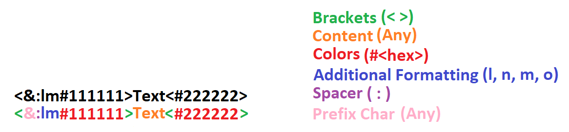
还具备简单的数学计算功能,例如
<solve>1+2*(27-5)/5<solve>
命令
-
/helix
打开主界面 -
/gmc [player]
将你或可选指定的玩家切换到创造模式(仅在你拥有服务器权限时有效,因为我们只是重定向命令) -
/gms [player]
将你或可选指定的玩家切换到生存模式(仅在你拥有服务器权限时有效,因为我们只是重定向命令) -
/gma [player]
将你或可选指定的玩家切换到冒险模式(仅在你拥有服务器权限时有效,因为我们只是重定向命令) -
/gmsp [player]
将你或可选指定的玩家切换到旁观者模式(仅在你拥有服务器权限时有效,因为我们只是重定向命令)
Discord 状态
向你在 Discord 上的好友展示你所在的服务器或世界的部分信息
面向开发者和服务器管理员
以下示例代码可用于阻止在你的服务器上启用某些模块。 未来可能会有更多通过服务器配置模组的选项。
Payload 的 Json 结构
这是发送到玩家的消息 payload 中应使用的结构。无效的 JSON 和不正确的模块 ID 将被忽略。你可以在各个模块中找到模块 ID。
ID 始终位于模块标题中,并遵循以下格式:moduleName。
{
  "disabled": [
    "armorHud",
    "autoSprint"
  ]
}
在插件中发送配置 JSON
此代码可以放在 onJoin 监听器中。一旦禁用,模块将保持禁用状态,直到玩家重新加入服务器。
然后需要再次禁用它们。
<player>.sendPluginMessage(<plugin-instance>, "helix:config",
     <json-payload>.toByteArray()
);
Helix Utility Client
Helix is a QOL Mod that aims to improve your experience by adding various features. Helix is free and open source, forever.
Installation
Helix requires the Kotlin language adapter and the Fabric API to work correctly
How to install, step by step
- Download the latest release of Helix, the matching Fabric API and Kotlin language adapter
- Put all 3 mods in your mods folder
- Make sure you have the correct java version installed (17)
- Make sure you have the fabric loader installed
- Launch the fabric loader
- Have fun!
Accent colors
-
Rgb
-
Orange
-
Red
-
Green
-
Yellow
-
Pink
-
Purple
-
Blue
Themes
-
Dark
-
Light
In-Game features
-
Crystal Optimizer
Optimized the placing and breaking of crystals clientside to improve crystal speed (removing broken crystals on the client...)
-
Block Outline
Changes your block outline and adds optional entity outlines
-
Armor Hud
Shows you your armor on the screen without having to open your inventory
-
Autosprint
Presses the sprint key for you
-
Better Arm
Changes the rendering of your In-Game hand
-
Coordinates
Shows you your coordinates in the world
-
Cosmetics
Render cosmetics clientside, for free
-
Directions
Shows in what direction you are facing
-
Fps Display
Shows your current Fps
-
Fullbright
See in the dark
-
Hotbar
Changes several status bars to literal bars
-
Keystrokes
Shows what keys are being pressed
-
Nametags
See your own nametag and add information to it
-
No Armor
Hides your armor clientside
-
No Render
Disables the rendering of certain things
-
Ping Display
Shows your current ping
-
Chat Format
Create gradients without leaving minecraft
Also has the option so solve simple math, for example
<solve>1+2*(27-5)/5<solve>
Commands
-
/helix
Opens the main UI -
/gmc [player]
Puts you or the optionally specified player in creative mode (only works if you have permission on the server since we are just redirecting commands) -
/gms [player]
Puts you or the optionally specified player in survival mode (only works if you have permission on the server since we are just redirecting commands) -
/gma [player]
Puts you or the optionally specified player in adventure mode (only works if you have permission on the server since we are just redirecting commands) -
/gmsp [player]
Puts you or the optionally specified player in spectator mode (only works if you have permission on the server since we are just redirecting commands)
Discord Presence
Shows some information about the server or world you are on to your friends on discord
For Developers and Server Owners
The following example code can be used to block modules from being used on your server. In the future, there may be more options for configuring the mod via the server.
Json Structure for the payload
This is the structure to use in the payload of the message sent to the player. Invalid json and incorrect module ids will be ignored. You can find the module ids in the respective modules.
The ids can always be found in the header of the module and will always be in the following scheme: moduleName.
{
  "disabled": [
    "armorHud",
    "autoSprint"
  ]
}
Sending the configuration json in your plugin
This code can be put for example in the onJoin listener. Once disabled, modules stay disabled until the player rejoins the server.
Then they need to be disabled again.
<player>.sendPluginMessage(<plugin-instance>, "helix:config",
     <json-payload>.toByteArray()
);

下载 Helix
下载 Helix
下载 Helix
下载 Helix
下载 Helix
下载 Helix
下载 Helix
下载 Helix
下载 Helix
下载 Helix
1.3.0
+ 修复了少量错误
+ 添加了泛光效果
+ 支持缩放
关于这个资源的讨论、问题反馈与使用心得
还没有讨论,来发第一帖吧
你是这个资源的作者?登录后可认领此资源。
相似资源
 模组
缓冲的原始输入和线程化的事件轮询
 模组

显示你正在注视的方块的信息。(适用于 Minecraft 1.16+ 的 Hwyla/Waila 分支)
 模组

原版世界生成优化模组
 模组
使用 JavaScript 编辑配方、添加自定义物品、编写世界事件!
 模组

查看物品与配方
 模组
在游戏画面角落显示附近世界地形、玩家、生物和实体的地图。可创建路径点,帮助你找到标记过的位置。
评论 0
登录后参与评分
还没有评论,来抢沙发吧