Heros Got Motion
功能介绍
将 Minecraft 经验条转换为水平速度表,显示方向基于你当前的朝向。
具体来说,如果你斜向前移动,它显示的速度会比正向前移动时低,因为它是根据你在面朝方向上的移动速度来计算的。
让你的动量和速度更加直观明显。
在获得经验时隐藏该速度表,以便你仍能查看经验条(隐藏时长可配置)。
速度条
- 冲刺速度时填满整条,因此满条代表你正在冲刺
- 超过冲刺速度时(如使用鞘翅、速度药水、冰面、船只等),会在速度条上方叠加第二层,让你能看出比冲刺快多少
- 向后行走时使用不同颜色填充速度条,便于区分方向
- 默认在每个游戏刻之间进行平滑处理,避免抖动;如需原始数值可关闭此功能
- 也会在定位器栏位以及经验条为空时显示,确保不会消失
速度文本
可选地在中屏幕显示精确速度(单位:bl/s),默认关闭。
文字颜色随速度变化:
- 静止时为白色
- 橙色 → 黄色 → 绿色对应蹲下 → 行走 → 冲刺
- 超过冲刺速度时为青色
- 向后移动时依次显示红色 → 紫色 → 粉色 → 蓝色,逻辑同上
可通过 X/Y 偏移量调整位置,并设置不透明度。
速度图表
可选地显示过去 5 秒(100 个游戏刻)内的实时速度曲线图,默认关闭。
- 显示该时间段内的平均速度和最大速度
- 有一条标记线表示冲刺速度,方便你判断当前速度高于或低于冲刺速度多少
- 柱状图颜色与上述速度文本的颜色规则一致
- 可放置在屏幕任意角落或边缘,支持边距设置以避免与其他 HUD 元素重叠
速度锚点
速度条及其颜色基于四个“锚点”速度值:蹲下、行走、冲刺和最大速度。默认值为原版数值(1.30 / 4.32 / 5.61 / 9.60 bl/s),但你可以自行修改这些值,且前后方向可分别设置。适用于服务器自定义移动速度或希望速度条按比例缩放的情况。
速度比例
默认情况下,速度条相对于你的移动速度属性,因此如果你拥有速度 II 或灵魂疾行等效果,冲刺仍会完全填满速度条,且锚点会随你一起缩放。若希望速度条始终基于绝对速度(bl/s),可关闭此功能。
速度模式
- 横向 / 总速度 — “横向”仅考虑水平移动,忽略下落/飞行;“总速度”包含垂直分量(并使用你的视角俯仰角,因此下落时低头也算作前进方向)
- 相对速度 开 / 关 — 开启为默认值,基于你面朝的方向计算;关闭则直接显示原始速度,无论看向何方,横移或后退都会显示为正数
配置方法
Mod Menu: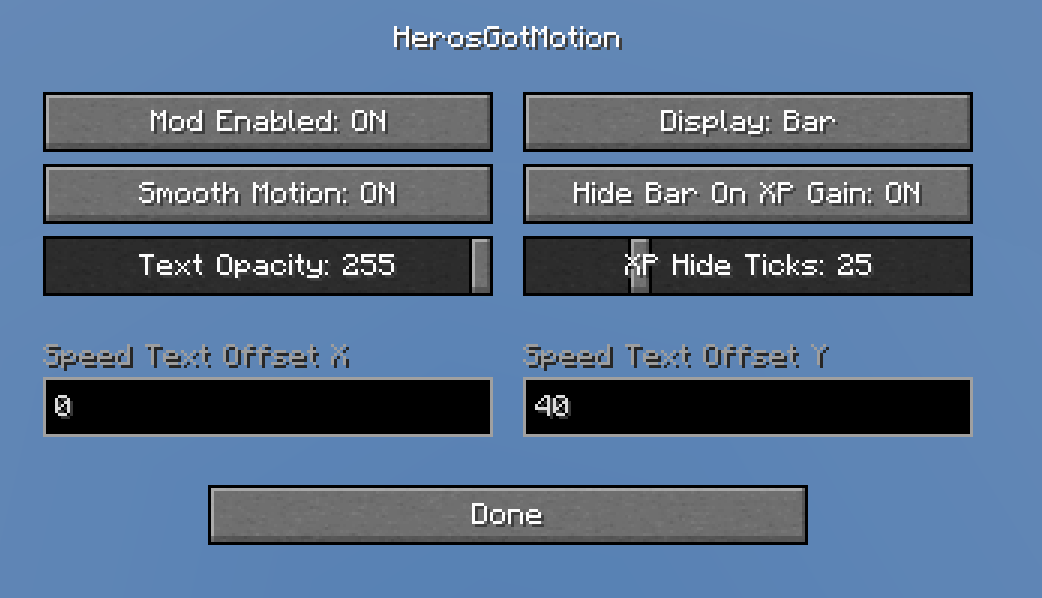
所有选项均可在此菜单中设置,另有一个独立的“速度锚点”界面,提供每个锚点的滑块调节及重置按钮。
配置文件:
.minecraft/config/herosgotmotion.json
首次运行游戏时自动生成,内容与 Mod Menu 中的选项一致。编辑后重启游戏即可生效(也可直接使用 Mod Menu,其保存至同一文件)。
兼容性
实际上没有服务器会禁止此模组,因为它不提供任何优势,仅为便利性改进。
预计不会与其他模组产生冲突。
仅客户端模组,可在原版服务器上正常运行。需要 Fabric API;Mod Menu 为可选安装,但推荐用于配置界面。
联系方式
如有问题、疑问或需要帮助:
欢迎在我的 Discord 中反馈更多兼容性问题!
Heros Got Motion
What does it do?
Turns the Minecraft XP bar into a horizontal speedometer, based on the way you're facing
Specifically, if you're moving diagonally forwards, it will show a lower velocity than if you're moving straight forwards, as it's based on how fast you're going in the direction you're facing.
Makes your momentum and velocity a lot more obvious
Hides when you gain xp so you can still see your xp bar (how long it hides for is configurable)
The bar
- Fills up to full at sprint speed, so a full bar = you're sprinting
- Going faster than sprint (elytra, speed pots, ice, boats, whatever) stacks a second layer on top of the bar so you can still tell how much faster than sprinting you're going
- Walking backwards fills the bar in a different colour so you can tell the difference
- Smoothed between ticks by default so it doesn't jitter, can be turned off if you want the raw numbers
- Also shows up in the locator bar slot and when the xp bar is empty, so it doesn't disappear on you
Velocity text
Optional readout of your exact speed in bl/s in the middle of the screen, off by default
The text changes colour based on how fast you're going:
- White standing still
- Orange -> Yellow -> Green crouch -> walk -> sprint
- Cyan past sprint speed
- Red -> Purple -> Pink -> Blue going backwards, same idea
You can move it wherever you want with an X/Y offset and set the opacity
Velocity chart
Optional live graph of your speed over the last 5 seconds (100 ticks), off by default
- Shows your avg and max speed over that window
- Has a line marking sprint speed so you can see how far above/below it you are
- Bars are coloured the same way as the text
- Can be put in any corner or side of the screen, with padding so it doesn't overlap your other hud stuff
Speed anchors
The bar and colours are based on 4 "anchor" speeds: crouch, walk, sprint and max. Defaults are vanilla values (1.30 / 4.32 / 5.61 / 9.60 bl/s) but you can set them yourself, separately for forwards and backwards, if you're on a server with different movement speeds or just want the bar to scale differently.
Speed scale
By default the bar is relative to your movement speed attribute, so if you've got speed 2 or soul speed or whatever, sprinting still fills the bar exactly the same and the anchors scale with you. Turn it off if you'd rather the bar always be in absolute bl/s.
Velocity modes
- Horizontal / Total — horizontal only ignores falling/flying, total includes vertical (and uses your pitch too, so looking down while falling counts as forwards)
- Relative Velocity on / off — on is the default, based on the direction you're facing. Off just shows your raw speed regardless of which way you're looking, so strafing/backwards show as positive
How to configure
Mod Menu:
Every option is in there, plus a separate Speed Anchors screen with sliders for each anchor and a reset button.
Config file:
.minecraft/config/herosgotmotion.json
Made when the game first runs, same options as Mod Menu. Edit it and restart the game (or just use Mod Menu, it saves to the same file)
Compatibility
Realistically no server will disallow it, doesn't give any advantage, just a qol thing
Shouldn't realistically have any problems with any other mods.
Client side only, works fine on vanilla servers. Needs Fabric API, Mod Menu is optional but recommended for the config screen.
Contact
Any problems, questions, help:
Let me know if there are any more incompatibilities in my discord!


 模组

 模组
 模组

 模组
 模组
 模组
评论 0
登录后参与评分
还没有评论,来抢沙发吧