HoYoI (又名 HoYo UI、HoUI)
简介
本模组仅为 Minecraft 添加了 miHoYo/HoYoVerse 游戏的用户界面(例如《原神》、《崩坏:星穹铁道》),并采用类似原版的风格。
目前 HoYoI 仅实现了《原神》风格,《崩坏:星穹铁道》风格的适配仍在开发中。
《原神》风格的加载画面拥有两种主题:亮色和暗色。在现实时间 19:00 至次日 7:00 期间,界面将自动切换为暗色主题。
截图
《原神》风格
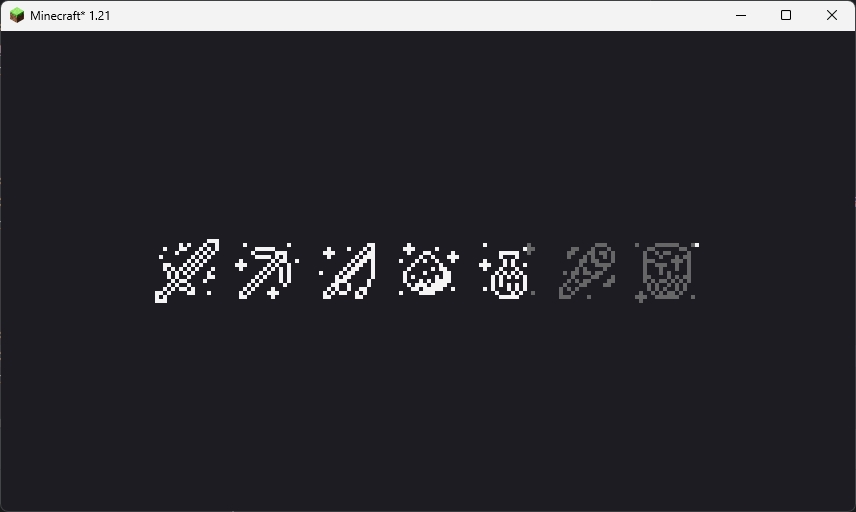
该加载画面仅在启动游戏时显示一次。由于 NeoForge 存在早期渲染机制,此功能在 NeoForge 平台上无法正常工作。
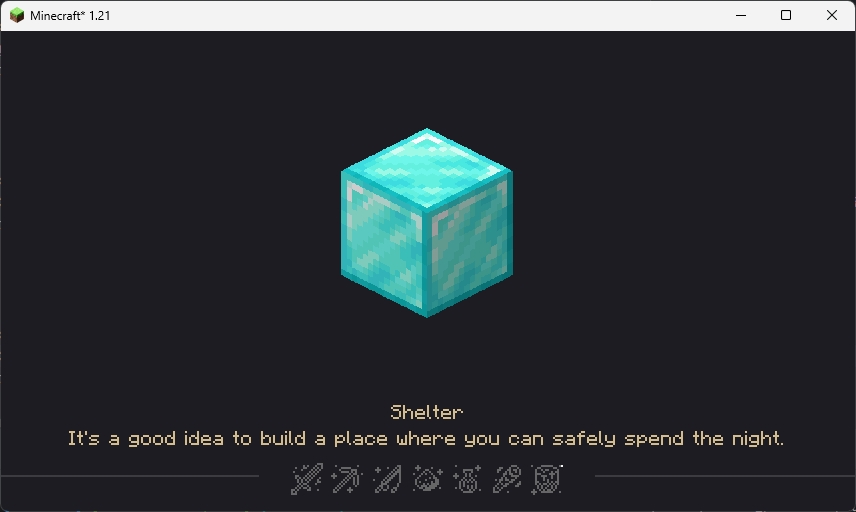
该加载画面会在游戏中正常显示,中间的图片以及底部的提示均为随机生成,支持自定义和本地化(下文将介绍如何自定义)。
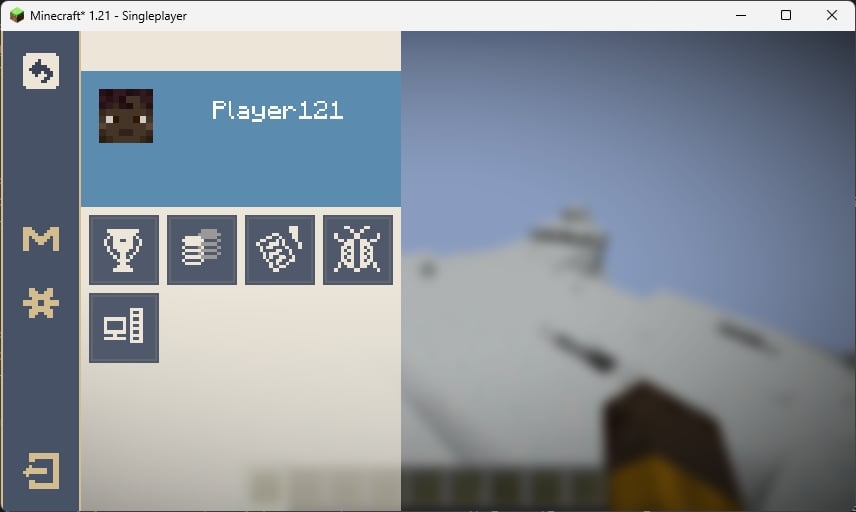
游戏中的 ESC 暂停界面,侧边栏的“M”按钮为模组列表按钮。对于 Fabric,你需要安装 Mod Menu 才能打开模组列表界面。
《崩坏:星穹铁道》风格
WIP
自定义
你可以自定义加载画面中间的图片和底部的提示文字。
第一步:创建一个资源包(参见 Minecraft Wiki)
提示文字
第二步:在 assets/{你的资源包}/tips 文件夹中创建一个名为 {语言代码}.json 的文件,例如 "en_us.json"
第三步:按照下方的示例编辑该文件
[
{
"title": "Example Tip 1",
"desc": [
"Line 1",
"Line 2"
]
},
{
"title": "Example Tip 2",
"desc": [
"Line 1",
"Line 2",
"Line 3",
"Line 4" // 不建议超过 4 行
]
},
...
]
第四步:加载你的资源包
中间图片
第二步:将 png 格式的图片放入 assets/{你的资源包}/textures/ui/regions 文件夹中,文件名可随意指定
第三步:加载你的资源包
致谢
- 7777777_4547,负责加载画面 UI 贴图。
- DeeChael,负责编程及部分暂停界面 UI 贴图和一些提示文字。
HoYoI (Aka. HoYo UI, HoUI)
Introduction
This mod simply adds miHoYo/HoYoVerse games UI for Minecraft (like Genshin Impact, Honkai: Star Rial) with vanilla-like style.
Now HoYoI only implemented Genshin Style, Star Rail Style is still working in progress.
Genshin style loading screen has two theme: light and dark. In reallife time 19:00 ~ 7:00 next day the ui will be dark theme.
Screenshots
Genshin Style
This loading screen will only show once when the game starting. Because NeoForge has an early display, so this feature is broken on NeoForge platform.
This loading screen will be normally seen in the game, the picture in the center and the tips at the bottom are all random, customizable and localized (I'll talk about how to customize below).
The ESC pause screen in the game, the "M" button in the sidebar is Mod List button, for Fabric, you need install Mod Menu to open the Mod List screen.
Star Rail Style
WIP
Customization
You can customize the center picture and bottom tips in loading screen.
FIRST: Create a resource pack (Check Minecraft Wiki)
Tips
SECOND: Create a file in assets/{yourpack}/tips folder with name {languageCode}.json like "en_us.json"
THIRD: Edit the file like the example shown below
[
{
"title": "Example Tip 1",
"desc": [
"Line 1",
"Line 2"
]
},
{
"title": "Example Tip 2",
"desc": [
"Line 1",
"Line 2",
"Line 3",
"Line 4" // I don't suggest over 4 lines
]
},
...
]
FOURTH: Load your resource pack
Center picture
SECOND: Put pictures with png format in assets/{yourpack}/textures/ui/regions folder with any filename you like
THIRD: Load your resource pack
Credits
- 7777777_4547, loading screen ui textures.
- DeeChael, programming and pause screen ui textures. Some tips.
下载 HoYoI
下载 HoYoI
下载 HoYoI
需要联机服务器吗?
稳定流畅、一键部署,几分钟即可和朋友联机开服
最低仅需 8 元/月 即可畅快联机
下载 HoYoI
需要联机服务器吗?
稳定流畅、一键部署,几分钟即可和朋友联机开服
最低仅需 8 元/月 即可畅快联机
下载 HoYoI
需要联机服务器吗?
稳定流畅、一键部署,几分钟即可和朋友联机开服
最低仅需 8 元/月 即可畅快联机
下载 HoYoI
需要联机服务器吗?
稳定流畅、一键部署,几分钟即可和朋友联机开服
最低仅需 8 元/月 即可畅快联机
暂无更新日志
关于这个资源的讨论、问题反馈与使用心得
还没有讨论,来发第一帖吧
你是这个资源的作者?登录后可认领此资源。
相似资源
模组
显示你正在注视的方块的信息。(适用于 Minecraft 1.16+ 的 Hwyla/Waila 分支)
模组
在游戏画面角落显示附近世界地形、玩家、生物和实体的地图。可创建路径点,帮助你找到标记过的位置。

模组
查看物品与配方
模组
使用 JavaScript 编辑配方、添加自定义物品、编写世界事件!
模组
AE2:一款流行的自动化与存储模组
模组
那是什么?一个 Waila/Hwyla 的分支。
评论 0
登录后参与评分
还没有评论,来抢沙发吧